Let's get one thing out of the way: most "free AI tools" articles are lying to you.
They list tools with 7-day trials and $49/month price tags, sprinkle in the word "free," and call it content. This list is different. Every tool here has a permanently free tier that's useful enough for real work. Not a teaser. Not a crippled demo. Actually useful.
We'll also tell you exactly where the paywall hits, because that matters just as much as what's free. A tool that lets you do 90% of what you need before asking for money is fundamentally different from one that gates the good stuff behind a subscription.
If you've been paying for tools that have free alternatives, this list might save you a few hundred dollars a month.
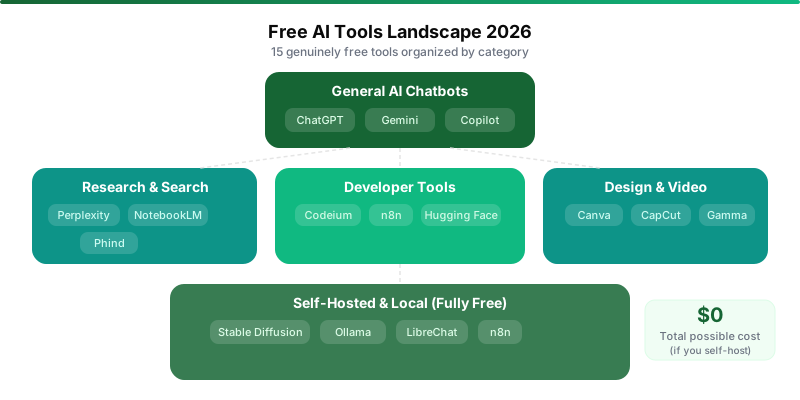
Quick Reference
| # | Tool | Category | What's Free | Where the Paywall Hits |
|---|---|---|---|---|
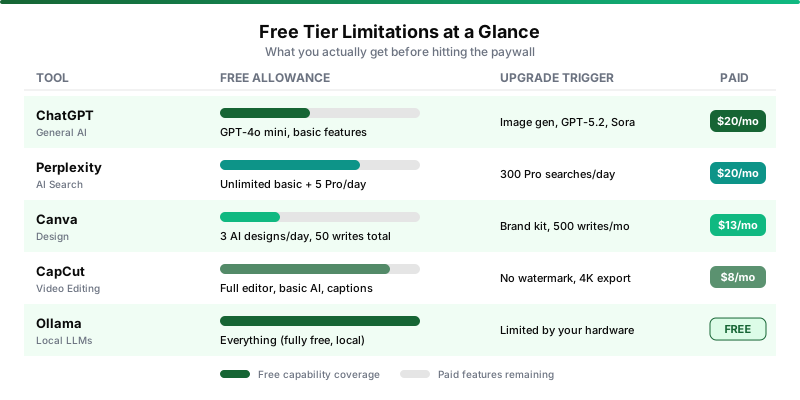
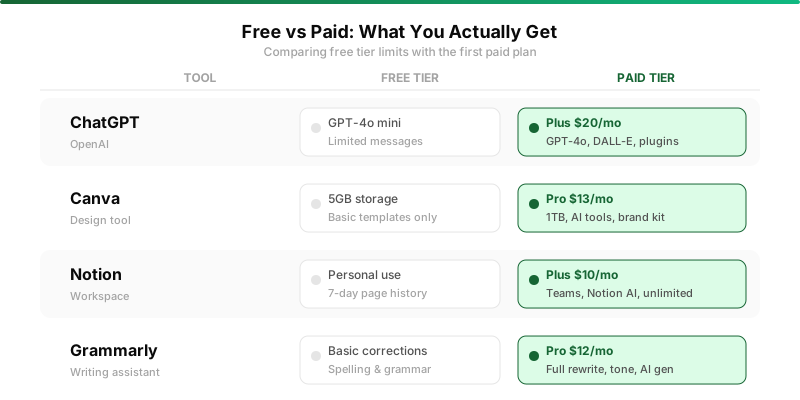
| 1 | ChatGPT | General AI | GPT-4o mini, basic features | GPT-5.2, image gen, Sora: $20/mo |
| 2 | Google Gemini | General AI | Gemini Pro, basic features | 1M context, Deep Search: $19.99/mo |
| 3 | Microsoft Copilot | General AI | GPT-4 access, Bing integration | Higher limits, Office integration: $20/mo |
| 4 | Perplexity | AI Search | Unlimited basic, 5 Pro/day | 300 Pro searches/day: $20/mo |
| 5 | Canva | Design | 3 AI designs/day, templates | Brand kit, more AI: $13/mo |
| 6 | CapCut | Video Editing | Full editor, basic AI effects | Remove watermark, 4K: $8/mo |
| 7 | Google NotebookLM | Research | 100 notebooks, audio overviews | 5x more usage: $19.99/mo (AI Pro) |
| 8 | Codeium | Coding | Unlimited autocomplete | Agent mode, teams: $15/mo |
| 9 | n8n | Automation | Self-hosted: unlimited | Cloud hosting: $20+/mo |
| 10 | Gamma.app | Presentations | 400 credits (one-time) | More credits, remove branding: paid |
| 11 | Hugging Face | ML Models | Thousands of models + Spaces | GPU compute, private repos: $9+/mo |
| 12 | Stable Diffusion | Image Gen | Fully free (local install) | Needs a GPU ($0 if you have one) |
| 13 | LibreChat | AI Interface | Fully free (self-hosted) | You provide API keys |
| 14 | Ollama | Local LLMs | Fully free (local) | Limited by your hardware |
| 15 | Phind | Dev Search | Unlimited basic search | 500+ premium queries: $20/mo |
Tier 1: Free AI Chatbots (Use Daily)
ChatGPT Free
OpenAI's free tier is still the best general-purpose AI chatbot you can use without paying anything. GPT-4o mini for text, basic file uploads, limited access to some premium features.
It handles quick answers, first drafts, brainstorming, and basic data analysis well enough that millions of people use it daily and never feel the need to upgrade. Don't let anyone tell you otherwise.
The paywall kicks in when you want GPT-5.2 Thinking for advanced reasoning, image generation, Sora video clips, higher rate limits, and voice mode. That's Plus at $20 a month. You also get deprioritized during peak usage, which means slower responses when everyone else is on it too.
Google Gemini Free
Google's free tier is generous for a strategic reason: the deeper you go into Gemini, the deeper you go into Google's ecosystem.
That said, the generosity is real. Gemini Pro conversations, basic multimodal inputs for images and PDFs, limited Workspace AI in Gmail and Docs, and Google Search AI Mode.
The AI Search Mode alone justifies keeping Gemini in your rotation. It adds AI-generated summaries to Google search results for free. We found ourselves defaulting to it for quick factual lookups.
The premium stuff, 1 million token context, Deep Search, full Workspace integration, video creation, lives behind AI Pro at $19.99 a month. If you're already in Google's world, Gemini free is the no-brainer daily driver.
Microsoft Copilot Free
Here's the one people forget about.
Microsoft bundles a free AI chat powered by GPT-4 into Windows, Edge, and Bing. Web access built in. Image generation through DALL-E. For Windows users, having GPT-4 with web search available from your browser's sidebar is genuinely convenient.
The paywall is at Office integration. AI in Word, Excel, and PowerPoint costs Copilot Pro at $20 a month. But for chat and search? The free version is competitive with ChatGPT free and arguably better for web-connected queries because it searches Bing automatically.
It's the best free option most people aren't using.
Tier 2: Free Productivity Tools (Weekly Use)
Perplexity Free
Perplexity is the AI search engine that makes traditional search feel ancient.
The free tier gives you unlimited basic searches with sourced answers and, crucially, 5 Pro searches per day. Those Pro searches use more powerful models and multi-step reasoning for research-quality answers.
Five per day sounds limited, but in practice, it covers most people's needs if you're strategic. Use standard search for quick lookups, save Pro searches for questions that actually require depth.
Pro at $20 a month unlocks 300 Pro searches per day, file uploads, and image gen. Most people don't need that.
Canva Free
Canva's free tier includes AI-powered design features that would've cost hundreds in software licenses a few years ago. Magic Write for copy (50 lifetime uses, so be strategic), AI image generation (3 per day), and thousands of templates. Five gigs of storage, collaboration with up to 3 people.
For occasional social media posts and presentations, it's enough. Pro at $13 a month unlocks the Brand Kit, background remover, 500 Magic Write uses monthly, and premium templates. Worth it if you create visuals regularly.
But the free tier isn't a teaser. You can create genuinely professional-looking graphics without ever paying.
CapCut Free
In our opinion, the most generous free tool on this entire list relative to what paid competitors charge. ByteDance just gives it away. The auto-caption feature alone saves hours of manual transcription work.
Pro at eight bucks a month gets you watermark removal on some exports, 4K quality, and premium effects. For most social media content at 1080p, the free tier delivers everything you need.
CapCut is the reason nobody should be paying $20+ a month for basic video editing anymore.
Google NotebookLM Free
The most underrated tool on this list. Possibly the most underrated AI tool, period.
Upload PDFs, websites, or notes and NotebookLM turns them into an interactive AI research assistant. Summaries, sourced Q&A, study guides, and Audio Overviews, which are podcast-style audio summaries of your documents. That Audio Overview feature is uniquely useful and genuinely delightful in a way few AI features are.
The free tier gives you 100 notebooks, 50 sources per notebook, 3 Audio Overviews per day. More than enough for students, researchers, and anyone processing lots of documents. We've never hit the free limits during normal use.
Tier 3: Free Developer Tools
Codeium Free
Codeium, now the engine behind Windsurf, offers free AI autocomplete for individual developers across VS Code, JetBrains, Vim, and other editors. The key word is unlimited.
Unlike GitHub Copilot's free tier with 50 premium requests a month, Codeium gives you unlimited autocomplete with no monthly cap. Quality is close to Copilot's free tier with fewer restrictions. Agent mode and team features live behind the $15/month Windsurf Pro paywall, but for pure autocomplete, this is hard to beat.
n8n (Self-Hosted)
What happens when someone looks at Zapier's pricing and decides to build an alternative that's actually free.
It's a workflow automation platform connecting 400+ apps with native AI capabilities. Self-hosted, it's genuinely unlimited: workflows, executions, users, integrations. All free under the Fair Code license.
The "catch" is hosting it somewhere. A $5-10 VPS handles it easily. That completely replaces Zapier ($20+/mo) and Make ($9+/mo). The learning curve is steeper, but the ceiling is much higher.
Cloud-hosted n8n starts at $20/month if you don't want to manage infrastructure.
Phind Free
An AI search engine built specifically for developers. It searches the web, documentation, and code repositories to answer technical questions with working code examples.
Ten GPT-4 searches per day plus unlimited basic search, with a VS Code extension for searching without leaving your editor. Ten premium searches covers most development work unless you're deep in a debugging marathon. Pro at $20/month bumps to 500+ daily.
Tier 4: Free But Requires Setup
Gamma.app Free
Gamma generates presentations, documents, and web pages from text prompts, and does it surprisingly well. The free tier gives you 400 one-time credits, enough for roughly 40 presentations.
The catch: credits don't renew. Once you burn through 400, you pay or recruit friends for referral credits (200 per referral). Think of it as a generous trial with a hard expiration rather than a sustainable free tool.
Hugging Face
The GitHub of AI models. Over 500,000 open-source models for text, image, audio, and video, many runnable for free through Spaces or downloadable locally.
GPU compute costs $9+ a month and private repos need a subscription. But the free tier, access to half a million models, community, datasets, model cards, makes it essential for anyone experimenting with open-source AI.
Stable Diffusion (Local)
The nuclear option for free image generation.
Fully open-source. Run on your own hardware. No subscription, no usage limits, no content restrictions, no terms of service. You own everything about it.
You need a GPU with at least 6GB VRAM, ideally 8 to 12. If you already have a decent graphics card, the marginal cost is literally zero. Interfaces like Automatic1111, ComfyUI, and Forge have made it surprisingly accessible. Steeper learning curve than Midjourney, but the payoff is unlimited, unrestricted image generation forever.
Ollama
Run large language models, Llama 3, Mistral, Phi, Gemma, locally on your Mac, Linux, or Windows machine. No internet required. Completely private. Entirely free.
A MacBook with 16GB RAM handles 7B to 13B parameter models comfortably. Less capable than GPT-4 or Claude for complex reasoning, but for privacy, offline use, and developers building AI applications, it's indispensable.
LibreChat
A self-hosted, open-source AI chat interface connecting multiple providers through a single clean UI. Think of it as building your own ChatGPT that you control completely.
You provide API keys and pay providers directly. No markup. Hosting costs $5-10 per month on a VPS, or free on your own machine. Combined with Ollama, you get a fully free, fully private AI stack that no cloud service can match on cost.
The Upgrade Question
If AI output directly generates revenue for you, pay for premium tiers. The quality jump and rate limit increases at $20 a month usually pay for themselves many times over.
Teams needing collaboration features should budget for paid plans. Free tiers are almost universally single-user.
Handling sensitive data? Use paid plans with privacy guarantees. Free tiers often use your data for training. Fine for personal use. A liability for business data.
Our Recommendation
The $0/month stack: ChatGPT Free for general AI, Perplexity Free for research, Canva Free for design, CapCut Free for video, NotebookLM for documents.
That covers 80% of what most people need. Add Codeium, Ollama, and n8n if you're a developer. Still zero dollars if you self-host.
Explore all of these and more in our complete AI tools directory.