Most "AI tools for teachers" articles are written by people who've never dealt with a school IT department that blocks everything, a budget that amounts to whatever you squeeze from your own paycheck, or compliance rules that make healthcare look simple.
We talked to 30 teachers across four states. Not administrators. Not EdTech consultants. Teachers who grade papers at midnight, plan lessons on Sunday afternoons, and spend their own money on supplies.
Every tool on this list passed three tests: works within typical school IT restrictions, has a free or budget-friendly tier, and actually saves time on the tasks teachers hate most.
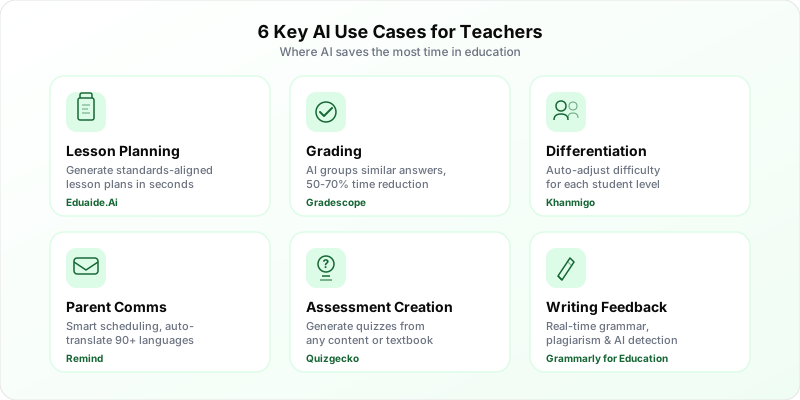
The 10 Tools
| Tool | Primary Use | Price | FERPA/COPPA |
|---|---|---|---|
| Eduaide.Ai | Lesson planning, worksheets | Free (educator plan) | FERPA compliant |
| MagicSchool.ai | All-in-one teacher assistant | Free / $9.99/mo | FERPA + COPPA compliant |
| Khanmigo | Differentiated tutoring | Free for teachers | FERPA + COPPA compliant |
| Grammarly for Education | Writing feedback, plagiarism | ~$12/student/yr | FERPA compliant |
| ChatGPT | General-purpose assistant | Free / $20/mo | NOT compliant for student data |
| Google NotebookLM | Research, study guides | Free | FERPA (via Google Workspace for Edu) |
| Canva for Education | Visual content, worksheets | Free for K-12 | FERPA + COPPA compliant |
| Diffit | Differentiated reading | Free / $6/mo | FERPA + COPPA compliant |
| Remind | Parent communication | Free / $5.99/mo | FERPA + COPPA compliant |
| Turnitin | AI detection, plagiarism | Institutional pricing | FERPA compliant |
1. Eduaide.Ai: Lesson Planning on Autopilot
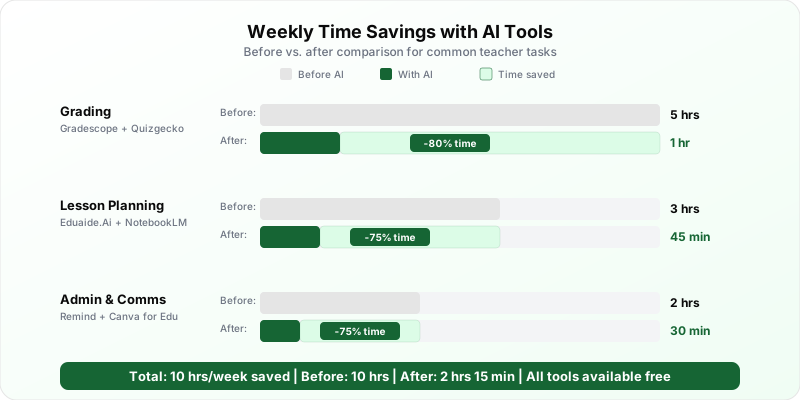
A 22-year veteran teacher in Ohio told us "I got three hours of my Sunday back." Input a topic, grade level, and standards alignment. Get complete lesson plans, worksheets, rubrics, assessments. Under a minute. We timed it.
The free plan is genuinely unlimited for educators with a .edu or school email. The killer feature? One-click differentiation - on-level, below-level, and advanced versions generated simultaneously. For a teacher with 30 students across three reading levels, that alone is worth the five minutes to sign up.
Output quality varies by subject. Math and science worksheets are excellent. Creative writing prompts tend toward the generic. History lessons sometimes need fact-checking on dates. The more structured the subject, the better Eduaide performs.
2. MagicSchool.ai: The Swiss Army Knife
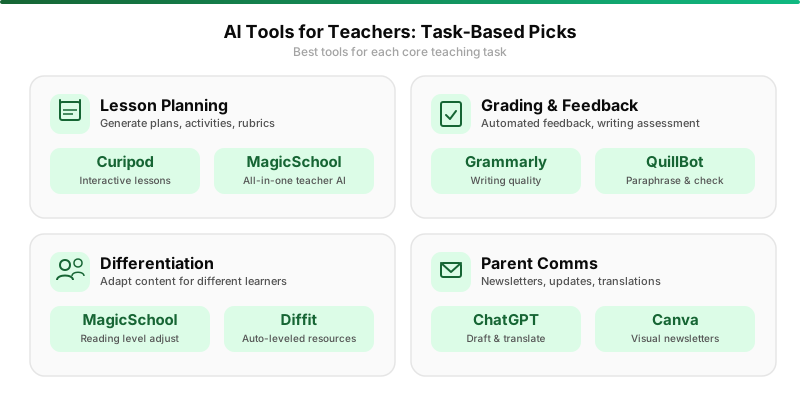
If Eduaide is a specialist, MagicSchool is the generalist. Over 60 AI tools in one platform: lesson planning, rubric generation, IEP goal writing, email drafting, quiz creation, text leveling. The free tier gives access to everything with a monthly limit. Ten bucks a month removes the cap.
We were skeptical of the "everything tool" approach. Figured each function would be mediocre.
We were mostly wrong.
The IEP goal writer is genuinely useful - multiple special ed teachers told us it saves hours per student. The email drafter handles parent communication with appropriate tone. The rubric generator goes beyond generic "exceeds/meets/below" categories.
Why it works where similar tools fail: it was built by former teachers. The prompts are designed by people who understand what a 5th grade reading passage looks like versus a 10th grade one.
3. Khanmigo: The AI Tutor That Refuses to Give Answers
Built by Khan Academy. The anti-ChatGPT.
When a student asks it to solve a math problem, it doesn't solve it. It asks a guiding question. "What do you think the first step should be?" This Socratic approach is what makes it a teaching tool rather than a cheating tool.
The real value for teachers is automated differentiation. Advanced students get harder follow-ups. Struggling students get more scaffolding. It happens automatically. A 4th grade math teacher in Texas told us Khanmigo handles differentiation better than she could manually, because it adjusts in real-time based on each student's responses.
The catch: only covers Khan Academy subjects. Math, science, computing, economics, history are solid. English lit and foreign languages aren't there yet.
4. Grammarly for Education: Writing Feedback That Scales
The Education version provides real-time writing feedback, citation assistance, plagiarism detection, and AI-writing detection. That last one is the feature every English teacher asks about.
So let's be direct: it's approximately 85% accurate according to Grammarly's own data. One in six flagged passages might be a false positive. Use it as a signal, not a verdict. Never use it as the sole basis for an academic integrity case.
It's institutional only, roughly $12/student/year with volume discounts. Individual teachers can't purchase it, so you need buy-in from your school. The teacher dashboard showing class-wide writing patterns is worth pushing for. Seeing that 60% of your students struggle with thesis statements tells you exactly what to teach next week.
5. ChatGPT: The Tool Teachers Already Use (With Caveats)
Let's be honest. Most teachers are already using ChatGPT for lesson planning, whether their district approves or not.
The free tier generates discussion questions, rubrics, project ideas, parent emails. Twenty bucks a month for Plus adds GPT-4o, which is noticeably better at complex tasks like multi-week unit plans.
ChatGPT is NOT FERPA or COPPA compliant for student-facing use.
Don't have students log in. Don't paste student names or identifying information. Use it exclusively as a teacher-facing tool for content generation. Under those conditions, it's perfectly fine.
6. Google NotebookLM: Research Without Hallucinations
NotebookLM solves AI's biggest problem in education: hallucination. It only answers based on sources you upload. Feed it a textbook chapter, primary source, or set of articles. Get study guides, discussion questions, vocabulary lists, even audio summaries - all grounded exclusively in your material.
Completely free. If your school uses Google Workspace for Education, it's already covered under your FERPA agreement.
A high school AP History teacher uploads each unit's readings at the start of the week. Generates a study guide, key vocabulary list, and 20 practice questions in 15 minutes. Same process used to take three hours.
7. Canva for Education: The One Everyone Should Use
Easiest recommendation on this list.
Canva gives verified K-12 educators free access to the entire premium library - that's a $120/year value. AI features like Magic Write, text-to-image, background remover, plus thousands of education templates for worksheets, posters, infographics, presentations.
Students can use it through your classroom with age-appropriate filters. FERPA and COPPA compliant through the Education portal (not personal accounts).
If you use only one tool from this entire list, make it this one. Zero barrier to entry. Immediate time savings. Students actually enjoy using it.
8. Diffit: Differentiated Reading Made Simple
Paste in a New York Times article about climate change. Diffit produces versions readable by a 3rd grader, a 7th grader, and a 10th grader. Same core content. Each with vocabulary, comprehension questions, and writing prompts.
The free tier is generous. Pro is $6/month for more customization. For ELL teachers and mixed-level classrooms, it's transformative. One teacher in California described it as "the tool that finally makes inclusion actually work in practice, not just on paper."
9. Remind: Parent Communication Without Your Personal Number
Remind's been around for years. The recent AI features make it worth reconsidering.
Smart scheduling suggests optimal send times based on when parents actually open messages. Quick replies generate appropriate responses. Automatic translation handles 90+ languages - a game-changer for diverse parent populations.
Free tier includes unlimited messages. Remind Chat at $5.99/month adds two-way messaging, translation, and read receipts. For pure parent engagement ROI, nothing else comes close.
10. Turnitin: AI Detection for the Age of ChatGPT
The 800-pound gorilla of academic integrity. Reports around 98% accuracy for fully AI-generated text. Lower but still useful for mixed human-AI content.
Institutional pricing, and most secondary schools and universities already have licenses. Integrates with Google Classroom and major LMS platforms.
Same caveat as Grammarly: AI detection is a tool, not a tribunal. A student who writes unusually well is not necessarily cheating. Use the data to start conversations, not issue verdicts.
The Elephant in the Room: FERPA and COPPA
This is the section that actually matters. The one most articles skip.
If you work with students under 13 (COPPA) or at any institution receiving federal funding (FERPA - basically all of them), compliance isn't optional. It's the law.
Here's what keeps it simple:
Teacher-only use is almost always fine. Use ChatGPT to generate a worksheet, then print it? No student data involved. No issue. Full stop.
Student-facing tools need district approval. If students log in, their data becomes an issue. Your district needs a Data Privacy Agreement with the vendor.
Check your district's approved list first. Tools in the Google Workspace ecosystem (NotebookLM, Docs, Slides) are usually pre-approved because most districts already have a Google DPA.
When in doubt, use AI in teacher-only mode. Generate content yourself, distribute through normal channels. Stays compliant with everything while getting 90% of the time savings.
Budget Reality Check
The $0 tier is genuinely excellent. Eduaide, Khanmigo, NotebookLM, Canva for Education, Remind, and ChatGPT (teacher-only) cover lesson planning, tutoring, research, visual design, parent communication, and general AI assistance. All free. All real tools with generous tiers designed for educators.
Got $10-15/month? Adding MagicSchool Plus and Diffit Pro fills the remaining gaps. District-funded? Grammarly for Education and Turnitin complete the picture.
The Recommendation
Start with three tools this week.
Eduaide for lesson planning. Sunday prep just got three hours shorter.
NotebookLM for research. Upload your unit materials, get resources instantly.
Canva for Education for everything visual. Worksheets, presentations, posters - all from professional templates.
All three are free. All three are FERPA-compliant. All three produce results you can use tomorrow morning.
The goal isn't to turn your classroom into a tech lab. It's to reclaim those 10-15 hours a week on tasks a machine can handle, so you can spend that time on the parts of teaching that actually require a human being in the room.
Find more tools in our AI tools directory or browse all tools.