Google has owned search for 25 years. Not "dominated." Owned.
And for the first time, there are tools that make us genuinely question whether typing a query into Google is still the best way to find information.
AI search engines don't give you 10 blue links and hope you click the right one. They read those links for you, synthesize the information, cite sources, and give you an actual answer. The promise has been around for a couple of years. In 2026, the execution finally caught up.
We tested six of them across 50 queries. Factual lookups, current events, technical questions, product comparisons, deliberately ambiguous research topics. Checked every citation. Timed every response. Pushed each engine to the point of failure.
Quick Comparison
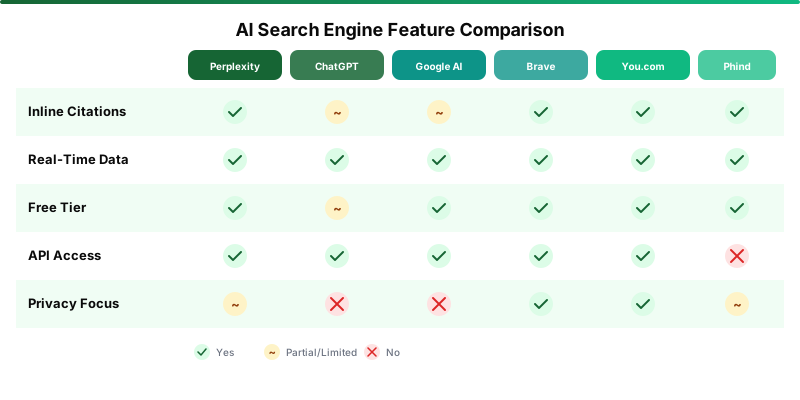
| Engine | Price | Best For | Sources Cited | Privacy |
|---|---|---|---|---|
| Perplexity | Free / $20/mo Pro | Research, sourced answers | Yes, inline | Medium |
| ChatGPT Search | Free (with Plus) | Conversational research | Yes, at bottom | Low |
| Google AI Mode | Free | General web search | Yes, linked cards | Low |
| Brave Search AI | Free | Privacy-first search | Yes, inline | High |
| You.com | Free / $20/mo Pro | Multi-model research | Yes, inline | High |
| Phind | Free / $20/mo Pro | Developer questions | Yes, inline | Medium |
How We Tested
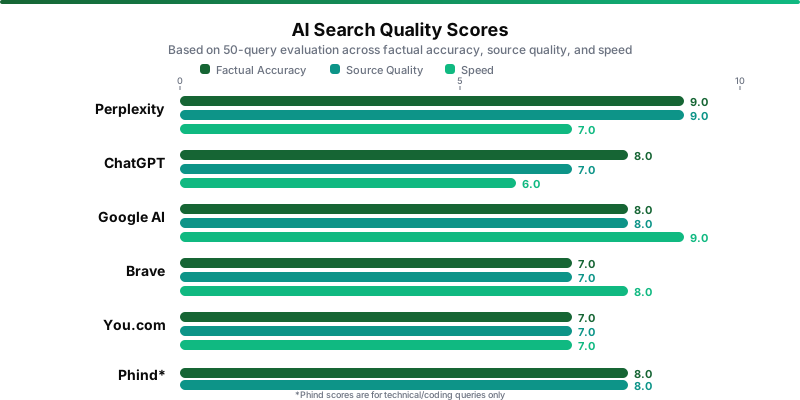
Same 50 queries across all six engines. Scored on four criteria: factual accuracy (verified against primary sources), source quality (authoritative and relevant?), speed (query to complete answer), and completeness (full question addressed or just part?).
The results weren't close in every category. That's what makes this interesting.
Perplexity: The Research Champion
Perplexity won our testing. It wasn't particularly close.
This is the AI search engine built from the ground up to be an AI search engine. That singular focus shows in everything about the product.
Every claim comes with numbered inline citations you can verify with a click. We spot-checked dozens during testing. Perplexity's citations were the most consistently accurate and relevant of any engine.
The follow-up conversation flow is natural. Ask a question, get an answer, drill deeper. Context carries forward without repeating yourself.
Pro Search is the real power. It runs multiple searches and synthesizes results, catching nuances single-pass search can't. When we asked about trade-offs between two JavaScript frameworks, it pulled from recent benchmarks, GitHub discussions, and official migration guides, then gave a nuanced answer that addressed the actual question. Google AI Mode gave us a Wikipedia-level summary.
The free tier is the most generous: unlimited standard searches plus 5 Pro searches per day. That's enough for most people's daily research if you save Pro for complex questions. Twenty bucks a month for Pro bumps you to 300 Pro searches daily.
Where Perplexity stumbles is speed. Pro Search takes 10 to 20 seconds because it's running multiple searches behind the scenes. Standard is fast at 2-3 seconds, but deep mode requires patience.
ChatGPT Search: Powerful, But Not Really a Search Engine
ChatGPT Search takes a fundamentally different approach. Instead of being a search engine with AI, it's an AI with search capabilities. That distinction matters more than you'd think.
The strength is conversation depth. Because search is integrated into ChatGPT's broader toolset, you can search for information, analyze it, generate code based on the findings, create an image, and export the results. All in a single thread. No other search engine can do that.
We asked it to research WebAssembly browser support, then immediately generate a compatibility detection script based on what it found. Seamless.
But as a pure search engine? Problems.
Citations appear at the bottom rather than inline, making fact-checking tedious. We caught several instances where the cited source didn't actually support the specific claim. Right neighborhood, wrong address.
Bigger issue: ChatGPT decides when to search, and sometimes confidently answers from training data when it should've searched the web. You often need to explicitly say "search the web for..." to force it. And full search functionality requires Plus at $20 a month, making it the only engine here where basic AI search isn't free.
Google AI Mode: Fast, Free, and Shallow
Google AI Mode answers the question "what if Google just told you the answer instead of making you click through 10 links?"
The key advantage is obvious: Google crawls more of the web than anyone. For obscure topics, it finds information others miss entirely.
It's completely free. No subscription for any AI features. Source cards appear alongside answers as interactive elements for digging deeper.
The quality, though? Inconsistent in ways the others aren't. AI summaries sometimes pull from low-quality sources or misinterpret content. The "put glue on pizza" era has improved, but we still hit answers during testing that were technically sourced but practically misleading.
Ads remain a problem, blurring the line between information and advertising. Privacy is minimal. And the reasoning depth is noticeably shallow. Google optimizes for quick answers, not deep research. Complex multi-step questions get surface-level treatment.
Brave Search AI: The Privacy Play
Brave is for people who care about privacy and are tired of pretending Google's "incognito mode" means anything.
No tracking. No profiling. No ads based on your searches. Brave doesn't store your search history. Period. And unlike DuckDuckGo, which essentially proxies Bing results, Brave crawls the web independently with its own index.
That independence is both the strength and the limitation. Its own index means results are genuinely different from Google's, sometimes surfacing information the bigger engines bury. Ask Brave provides cited AI responses for free to all users.
The trade-off is coverage. Brave's index is smaller than Google's, and for niche or very recent topics, it occasionally misses relevant results. If privacy is your primary concern, Brave is the clear choice. If answer quality matters more, Perplexity is better.
You.com: Ambitious, Cluttered
You.com is trying something interesting: rather than committing to one AI model, it lets you choose from 20+ models for searches and research tasks. GPT-4o for coding, Claude for writing research, Gemini for broad web search. Pick your weapon per question.
In practice? Power users who know the differences between models will appreciate the choice. Everyone else will stare at a dropdown of 20 models and have no idea which one to pick.
The interface tries to do too many things. Compared to Perplexity's clean design, You.com feels cluttered. Pro is $20 a month, same as Perplexity Pro, and at that price it doesn't offer enough to justify choosing it over Perplexity.
We wouldn't recommend paying for You.com Pro over Perplexity Pro in any scenario. Same price, less value.
Phind: For Developers Only
Phind exists in its own lane. While everything else on this list tries to answer every possible question, Phind focuses exclusively on technical and developer queries.
And it's excellent at that specific job.
It searches the web, official docs, and code repositories with an understanding of programming languages and frameworks that general search engines don't have. We asked about a specific edge case in SvelteKit's load function. Phind pulled the answer from official docs and a relevant GitHub discussion, with working code examples. Google AI Mode returned a vague summary.
The VS Code extension is a nice touch, keeping you in your editor. Ten GPT-4 searches per day covers most development work. Pro at $20 a month gets 500+ premium queries daily and Claude access.
Useless for non-technical queries though. We tried a few out of curiosity. Results ranged from irrelevant to comically off-base.
Test Results Summary
| Criteria | Perplexity | ChatGPT | Brave | You.com | Phind | |
|---|---|---|---|---|---|---|
| Factual accuracy | 9/10 | 8/10 | 8/10 | 7/10 | 7/10 | 8/10* |
| Source quality | 9/10 | 7/10 | 8/10 | 7/10 | 7/10 | 8/10* |
| Speed | 7/10 | 6/10 | 9/10 | 8/10 | 7/10 | 7/10 |
| Completeness | 9/10 | 8/10 | 7/10 | 6/10 | 7/10 | 9/10* |
| Privacy | 6/10 | 4/10 | 3/10 | 10/10 | 8/10 | 6/10 |
*Phind scores are for technical/coding queries only.
Who Wins What
| If you need... | Use this | Why |
|---|---|---|
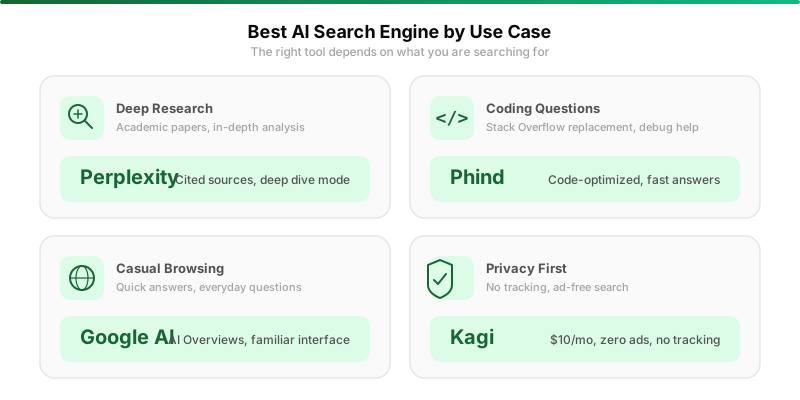
| Best overall AI search | Perplexity | Best citations, deepest research, generous free tier |
| Search + AI tools in one place | ChatGPT Search | Combine search with code, images, and analysis |
| Quick factual lookups | Google AI Mode | Fastest, largest index, free |
| Privacy above all | Brave Search AI | No tracking, independent index, fully free |
| Multi-model research | You.com | Choose the best model per task |
| Developer/coding questions | Phind | Code-first answers, VS Code integration |
Who Should NOT Use AI Search
AI search engines still hallucinate. Less than they used to, but they do.
Journalists, researchers, anyone whose work depends on verified facts: treat AI search as a starting point, never a conclusion. Always click through to primary sources.
Legal and medical professionals should stick to Westlaw and PubMed for authoritative information. And if you're the kind of person who copies the AI answer without clicking a single citation, you're going to spread misinformation eventually. The tools are only as reliable as the effort you put into verifying them.
Our Recommendation
Use Perplexity as your default AI search engine. The free tier gives you the best combination of accuracy, source quality, and usability we found. It's the only one where we consistently trusted citations enough to use them in professional work without extensive re-checking.
Keep Google for quick lookups where speed matters more than depth. The kind of search where you want a phone number or a conversion rate, not an essay.
Use Phind if you're a developer. It genuinely understands code in a way general engines don't.
The one we wouldn't pay for: You.com Pro. At $20 a month, it doesn't differentiate enough from Perplexity Pro at the same price. If you're spending $20 on AI search, Perplexity wins by every metric we measured.
Find more AI search tools and alternatives in our AI tools directory or browse the AI Search category.