The first time my team picked the wrong tool, we spent four months pretending it was working. We were a small SaaS shop trying to ship our v1, and a friend who ran an agency told me ClickUp had changed his life. So I rolled it out on a Monday. By Tuesday afternoon, my designer told me she "couldn't think in it." By the end of the week, our engineer had quietly started writing his task list in Apple Notes.
That's the whole point of this article. ClickUp and Notion are not the same shape of tool. They're not even close. The reason every "ClickUp vs Notion" piece on the internet sounds the same is that most of them are written by affiliate sites that grade both on feature checklists, and on a feature checklist they look identical.
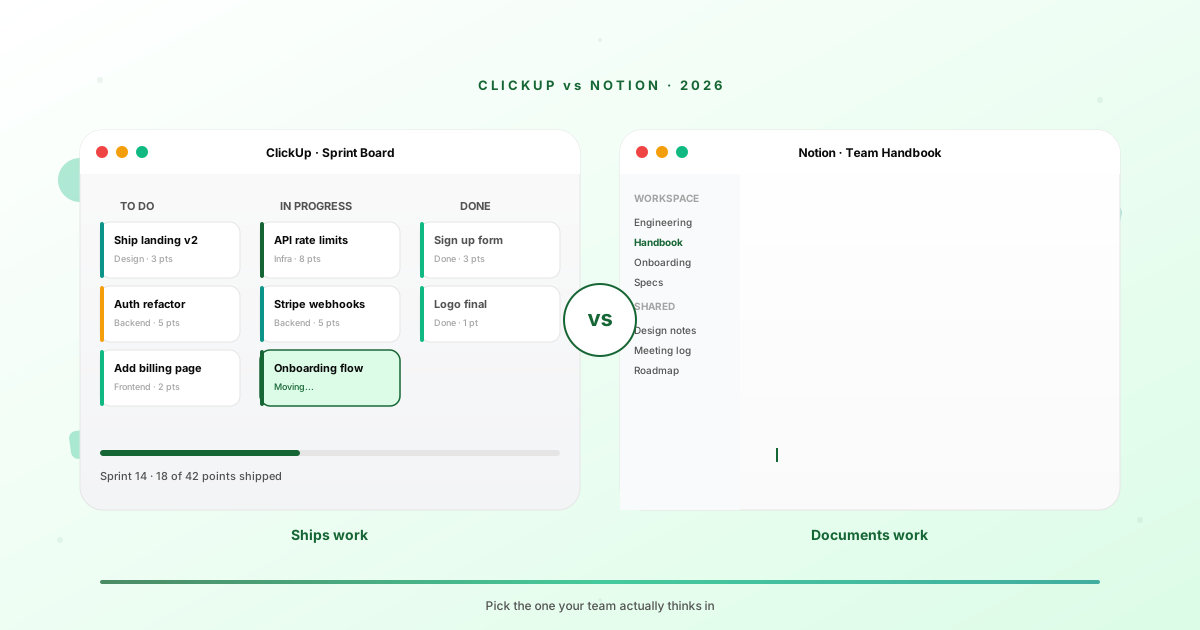
They aren't. One was built to ship work. The other was built to document work. If you pick the wrong one for how your team actually thinks, you'll feel it within two weeks. If you pick the right one, you'll wonder why you waited so long.
The Hidden Question Behind "Which Should I Use"
Everyone asks the wrong question. "ClickUp or Notion?" is feature-shaped, but the actual decision is psychological.
Here's the question I'd ask a friend instead. When your team gets stuck on a project, do they ask "what's the status of the task" or "where's the doc that explains how we do this"? That's it. That's the fork in the road.
Teams that think in tickets, sprints, dependencies, and Gantt charts are project-management teams. They want ClickUp. Teams that think in pages, decisions, written specs, and "let me link you to the doc" are knowledge-management teams. They want Notion.
The interface you put in front of your team becomes the lens they think through. If the home screen of your work OS is a board, you'll think in cards. If it's a page, you'll think in paragraphs. Pick the lens that matches how you already work, not the one you wish you worked.
Both tools have grown sideways into the other's territory. ClickUp shipped a wiki product. Notion shipped project management. Neither of those expansions changes the gravity of the parent product. ClickUp's docs feel like an afterthought even in 2026. Notion's task views feel like they were ported from a third-party plugin.
ClickUp in Plain English
ClickUp is a project management platform. The home screen is a workspace full of spaces, folders, lists, and tasks. The hierarchy is deep on purpose. If you've used Asana, Trello, Monday, or Jira, you'll recognize the shape immediately. There are tasks. Tasks have statuses. Statuses move across boards. Boards roll up into reports.
What ClickUp nails is breadth of work surfaces. The same task can be viewed as a card on a kanban board, a row in a list, a bar in a Gantt chart, a calendar event, a point in a workload graph, or a node in a mind map. For operations teams, agencies running 30 client projects, or anyone managing dependencies between contractors, this matters a lot.
The thing ClickUp does better than almost anyone is the automations layer. You can build "when this status changes to In Review, assign Sarah and set the due date to three days out" rules without writing code or paying for a third party. For a small business running on a single tool, that's load-bearing.
Where ClickUp grates is the UI density. The product has so many features that the screen feels noisy out of the box. Every list view has twelve possible columns. Every task has 40 possible fields. New users open it and feel like they walked into a cockpit. The learning curve isn't steep so much as it's wide.
The docs feature exists. It's competent. Nobody picks ClickUp for the docs.
Notion in Plain English
Notion is a workspace built on a single primitive, the block. A page is a stack of blocks. A database is a collection of pages. Everything composes. The home screen is a sidebar of pages, not a board of tasks, and that one design decision shapes the whole experience.
What Notion nails is information architecture. Their database views, the relations between databases, the rollups, the formulas, the ability to embed a database inside a page that's inside another database, all of it composes in ways that feel surgical when you get it right. Knowledge workers, content shops, startups documenting their playbook, schools, communities, all live in Notion for a reason. The thing bends to how you think.
The killer Notion feature is the public site. You can publish any page on the public web with a single toggle. Your team handbook becomes your public-facing onboarding doc. Your product spec becomes your changelog. Your CRM becomes your customer-facing portal. Nobody else makes this feel native.
Where Notion grates is the moment you try to use it as a real task tracker. The "task" is just a page in a database with a status field. There's no native sprint view that doesn't require a templated database. The mobile app is essentially read-only for serious work. If you have engineers who need to update tickets on their phone between meetings, this hurts.
Notion's project management exists. It's competent. Nobody picks Notion to run an engineering sprint.
Side-by-Side Comparison Table
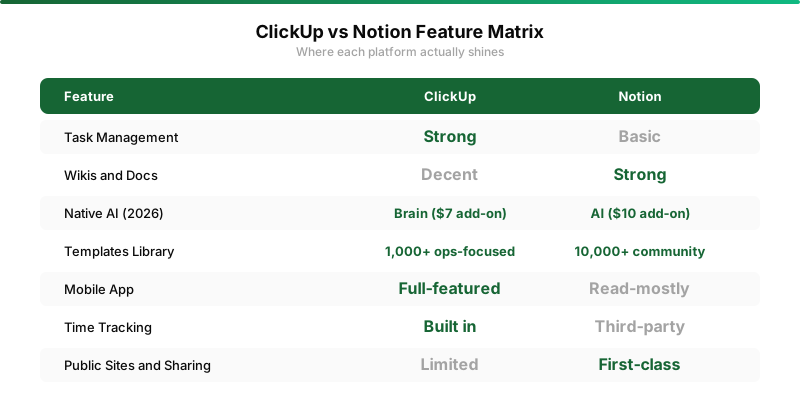
| Dimension | ClickUp | Notion |
|---|---|---|
| Core metaphor | Boards and tasks | Pages and blocks |
| Best for | Ops, agencies, project-heavy teams | Knowledge work, content, startups |
| Pricing (paid tier) | $7 per user per month | $10 per user per month |
| Native AI | ClickUp Brain, $7 add-on | Notion AI, $10 add-on |
| Mobile experience | Full-featured, ticket-friendly | Read-mostly, painful to edit |
| Public sharing | View-only, limited theming | First-class, custom domains |
| Learning curve | Wide (lots to learn) | Tall (databases take time) |
Where ClickUp Wins
Project-heavy teams. That's the headline. If your day is structured around shipping work, hitting deadlines, and tracking who owes what to whom, ClickUp earns its keep.
Agencies are the cleanest fit. You're running ten clients simultaneously, each with their own scope, deadline, and approval chain. ClickUp's space-and-folder hierarchy maps to client-and-project naturally. The time tracking is built in, the billable hours roll up automatically, the reports are exportable for invoicing. I've watched agency owners cut their admin time in half by moving off a stack of three tools onto one ClickUp instance.
Operations teams come second. If you run process-heavy work, the automations engine is the unlock. You can wire up "new request comes in, assign it, set SLA, escalate if overdue, notify the customer when resolved" in an afternoon, no Zapier required. For a small ops team running on a budget, that's huge.
Engineering teams that want a Jira alternative without the Jira tax often land on ClickUp too. The sprint view, the story points, the burndown chart, the GitHub integration, all present, all working, none of it requiring a $15-per-seat per month corporate license.
If your team's most-asked question is "what's the status?" you want ClickUp. Pair it with our team tools index for adjacent picks like communication and time tracking.
Where Notion Wins
Knowledge-heavy teams. Content shops. Startups before they hit Series A. Communities. Education. Anywhere the work product is more "decision" or "document" than "delivered ticket," Notion fits like a glove.
Startups in particular have a love affair with Notion that's earned. The first 18 months of a startup look like writing things down. Specs. Hiring rubrics. Board updates. Investor memos. Founder journals. Customer research. Pricing experiments. None of this fits well in a task tracker. All of it fits beautifully in Notion. The day your second hire starts and reads your "How we work" page and is productive that afternoon, you'll get why founders are so attached to it.
Content shops are the other big one. Writers, editors, social teams, and creator-led businesses run their entire editorial calendar in Notion. The fact that the same database can be a kanban for editorial workflow, a calendar for publish dates, and a public-facing page for the audience to see what's coming is uniquely Notion. I've seen newsletter operations of 50,000 subscribers managed end-to-end in one Notion workspace. See our open-source Notion alternatives roundup if you want to evaluate the broader space.
Solo founders and indie hackers land here too, for what it's worth. When you're building alone, you don't have status meetings, you have a brain. Notion is the externalized brain. Tasks slip naturally into the page where you were writing the spec.
Notion is what the work looks like before the work happens. ClickUp is what the work looks like while the work is happening. If you're earlier-stage, you want the former. If you're operationally mature, you want the latter.
The Pricing Reality
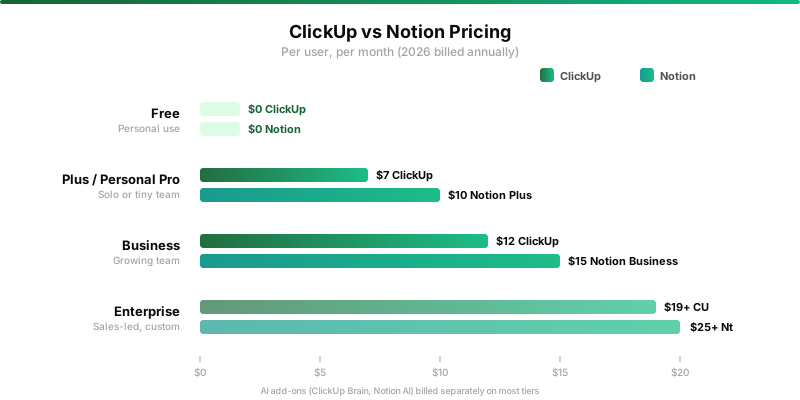
The sticker prices are misleading on both sides. ClickUp's Unlimited tier is seven bucks a user per month, billed annually. Notion's Plus tier is ten. On a five-person team, that's a $180 annual delta. Trivial.
The real cost is the AI add-on. ClickUp Brain costs another seven dollars per user per month on top of whatever tier you're on. Notion AI is ten per user per month. For a team that wants AI baked in, you're looking at $14 per user on ClickUp and $20 on Notion before you blink.
For most teams under 20 people, the all-in cost lands somewhere between $50 and $400 a month. Compared to running a stack of Trello plus Confluence plus Toggl plus Zapier, you're saving money on either side. The pricing isn't the deciding factor. The fit is.
AI Features in 2026
Both products bolted AI on in 2024 and 2025. By 2026, the AI features are actually useful, not just demoware.
ClickUp Brain shines on operational tasks. "Summarize what's overdue this week." "Draft a project recap from these completed tasks." "Suggest the right assignee for this ticket based on past patterns." It's the kind of AI that earns its $7 add-on if you're running enough volume of work for the summaries to matter.
Notion AI shines on writing and synthesis. "Turn these bullets into a launch announcement." "Pull the action items out of this meeting note." "Find me every doc where we mentioned pricing." The Q-and-A feature over your own workspace is the killer use case, and it's noticeably better than ClickUp's equivalent because Notion's information graph is richer to start with.
If AI is the deciding factor, Notion has the edge in late 2026. The product was built on text, and AI is built on text. They compose better. For more in this category, check our indie hacker AI tools roundup.
Switching Cost: What Nobody Tells You
The piece every comparison post skips is the migration tax. It's brutal in both directions.
Moving from Notion to ClickUp means you're flattening pages into tasks, and most pages don't flatten well. A spec doc with an embedded checklist, a decision log, and three comment threads doesn't become a clean kanban card. You lose context. Teams that try the migration usually end up keeping both tools for a quarter and then drifting back.
Moving from ClickUp to Notion is the opposite problem. You're unflatening tasks into pages, and most tasks don't have enough body to fill a page. You end up with thousands of one-paragraph database entries that feel anemic. The mobile workflow falls apart. Engineers grumble.
The lesson is to pick once, with care, before you have a year of accumulated work to migrate. The cost of being wrong in month two is a Saturday. The cost of being wrong in month fourteen is a month.
If you're not sure yet, run both for two weeks on a single real project. Not a demo. A real one. Whichever one your team actually opens on day eight is the answer.
Decision Tree
Here's the short version, in the order I'd actually ask the questions.
Does your team ship deliverables on a deadline more than four times a week? If yes, ClickUp. If no, keep reading.
Does your team produce more written work (specs, docs, research, content) than they do tickets and deliverables? If yes, Notion. If no, keep reading.
Does anyone on your team need to update statuses from their phone regularly? If yes, ClickUp. If no, keep reading.
Do you want to publish parts of your workspace to the public web (handbook, docs, customer-facing pages)? If yes, Notion. If no, you've answered the question already by elimination. See our broader productivity tools roundup if you want to compare against the field.
The Verdict by Team Size
For solo founders and one-person businesses, Notion is the right answer almost every time. You don't need a ticket tracker. You need a brain. Notion is the externalized brain.
For teams of two to five, it depends on what you ship. If you're a design studio or content shop, Notion. If you're a small services business or agency, ClickUp.
For teams of five to fifteen, the divide gets sharper. Engineering and ops teams want ClickUp. Marketing, content, and research teams want Notion. Most companies this size end up running both because the underlying work is genuinely different.
For teams above fifteen, you'll probably end up with both anyway, regardless of which one you officially adopt. Accept that early and pick the one that fits your dominant workflow. The other will sneak in for the use cases it serves better.
Honest Closing
I've ended up running both for what it's worth. Notion is where I think, where I write, where I plan. ClickUp is where my team ships, where deadlines live, where the operations of the business breathe. Neither replaces the other.
If you forced me to pick one for a hypothetical five-person SaaS team starting from scratch in 2026, I'd pick Notion. Most early-stage work is thinking, writing, and documenting. ClickUp's project management strengths matter less when you don't have five projects to manage yet. You add the project tracker when the volume forces it, not before.
If you forced me to pick one for a ten-person agency in 2026, I'd pick ClickUp without hesitation. The operations engine, the billable hours, the client compartmentalization, all of it is built for that shape of work and saves you tools.
The biggest mistake I see teams making is picking based on what their friends use. Your friends' business doesn't run on the same shape of work yours does. The right answer is the one that fits how your team already thinks. Pick that one. Then go build something.