The first time I shipped a side project to a real server in 2019, I spent a weekend setting up Kubernetes on a single DigitalOcean droplet. The app got fourteen users in its first month. The cluster cost more than the revenue, the kubelet ate 40% of the RAM I'd budgeted for the actual app, and I felt very smart and very stupid at the same time.
What I needed was a Dockerfile and a docker run command. What I built was a Helm chart, three YAML manifests, an ingress controller, and a cert-manager install that I didn't understand. I'd Googled "Kubernetes vs Docker," picked the answer that sounded modern, and torched a weekend on it.
The reason this happens to so many people is that the comparison itself is wrong. Docker and Kubernetes aren't rival products. They're not even in the same category. But "kubernetes vs docker" is still one of the most-searched queries in cloud computing, and most of the content answering it is sloppy. Let me try to do better.
The Actual Distinction In 60 Seconds
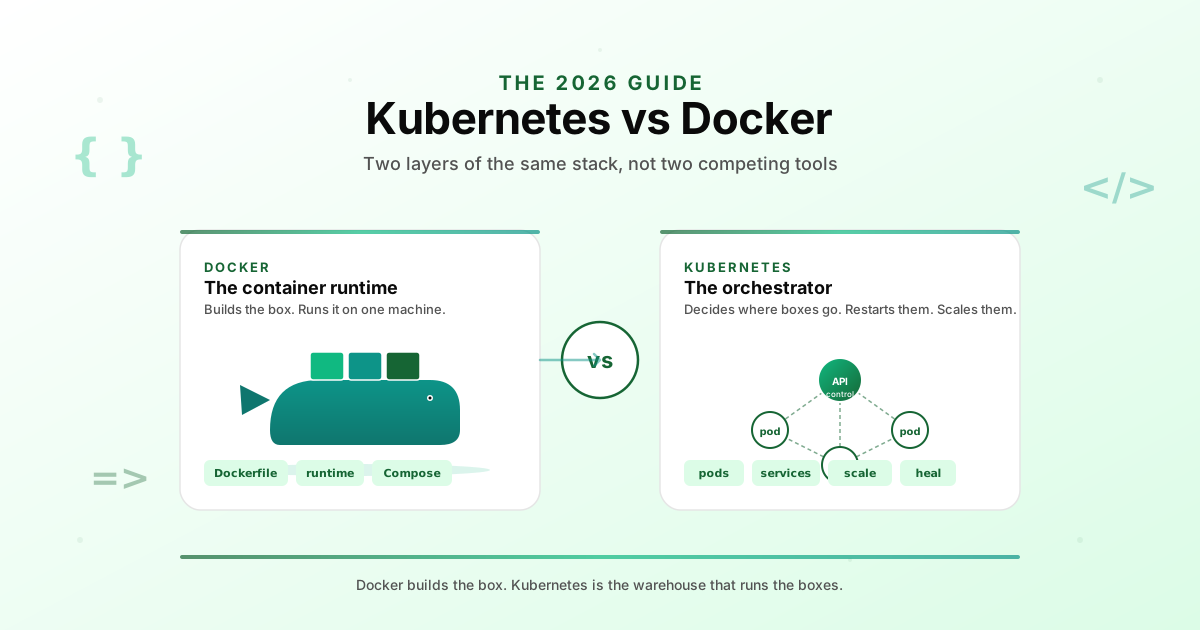
Docker is a way to package your application into a container, and a runtime that can start that container on one machine. That's the whole job.
Kubernetes is a system that runs many containers across many machines, decides where each one should live, restarts the ones that crash, balances traffic between them, and gives you a single API to manage the whole fleet. It needs a container runtime underneath it. Docker used to be that runtime, and conceptually still is on your laptop. In production K8s clusters it's usually containerd or CRI-O now, but the container format is still the Docker-compatible OCI image.
So when someone asks "Kubernetes vs Docker," they're usually asking one of three different things. They might mean "should I use Docker on my laptop or Kubernetes." That question is malformed. They might mean "do I need an orchestrator at all for this project." That's a real question. Or they might mean "should I use Docker Compose or Kubernetes to run multiple containers in production." That's the actually interesting one, and almost no comparison post answers it honestly.
If you take one thing from this post, take this. Docker builds the box. Kubernetes is the warehouse that decides which shelf the box goes on, replaces it when it falls off the shelf, and routes customers to the right aisle. You need the box either way. You only need the warehouse if you have a lot of boxes.
What Docker Really Does
Docker is four things bundled into one CLI, and the bundling is part of why the confusion exists.
The first is the image format. A Docker image is a tarball of filesystem layers plus a manifest that says "run this binary with these env vars." The format is now an open standard called OCI, which is why containerd and Podman can run Docker images without any Docker code involved.
The second is the build tool. The Dockerfile is the script that produces an image. You write FROM, COPY, RUN, CMD, you run docker build, you get an image. This is the part most developers interact with daily, and it's genuinely Docker's enduring contribution. Even teams running pure Kubernetes still write Dockerfiles.
The third is the runtime. The Docker daemon takes an image and starts a container on the local machine. It handles networking, volumes, port mapping, the works. On your laptop this is what you use every day. On a Kubernetes cluster, you usually don't have Docker installed at all, and the daemon is replaced by containerd.
The fourth is Docker Compose, which is a small orchestration layer for running multiple containers on one machine. It reads a compose.yml file that lists your services (app, postgres, redis, nginx), and brings them all up with one command. Compose is the unsung hero of small-team production. We'll come back to it.
Docker Hub also exists as the default public registry, the thing you docker pull from. Not a feature of Docker the runtime, but it's part of why the ecosystem won.
What Kubernetes Really Does
Kubernetes does one thing, and a hundred things that follow from that one thing. The one thing is scheduling. Given a set of machines (called nodes) and a set of workloads (containers grouped into pods), K8s decides which container runs where, when to start them, when to stop them, and when to replace them.
From that one thing, everything else follows. Because containers can move between nodes, you need service discovery, so Kubernetes invented Services, a stable virtual IP that load-balances traffic to a set of pods. Because services need to be reachable from the outside, you need Ingresses, which are basically opinionated reverse proxies. Because pods can fail, you need replicas and a controller that keeps the desired count alive, which is what Deployments do. Because workloads need configuration and credentials, you get ConfigMaps and Secrets.
And because all of this is too much to manage by hand, you get the kubectl CLI, the YAML manifests, and the eventual realization that Helm or Kustomize is the only way to ship sane changes.
Kubernetes also gives you autoscaling (the Horizontal Pod Autoscaler watches CPU or custom metrics and adds replicas), rolling updates (a Deployment can swap old pods for new ones without downtime), self-healing (crashed pods get rescheduled), and a real RBAC system. None of those are things you get from Docker by itself.
The cost is operational weight. A real Kubernetes cluster runs an API server, etcd, a controller manager, a scheduler, a kubelet on every node, kube-proxy on every node, a CNI plugin for networking, a CSI plugin for storage, an ingress controller, cert-manager for TLS, and usually a half-dozen helper services. That's before you've deployed your app.
The honest cost of Kubernetes isn't the cluster fee. It's the cognitive overhead of understanding twenty primitives well enough to debug them at 2am. If you don't have a person on the team who can do that, you're renting complexity you can't service.
The Comparison Table
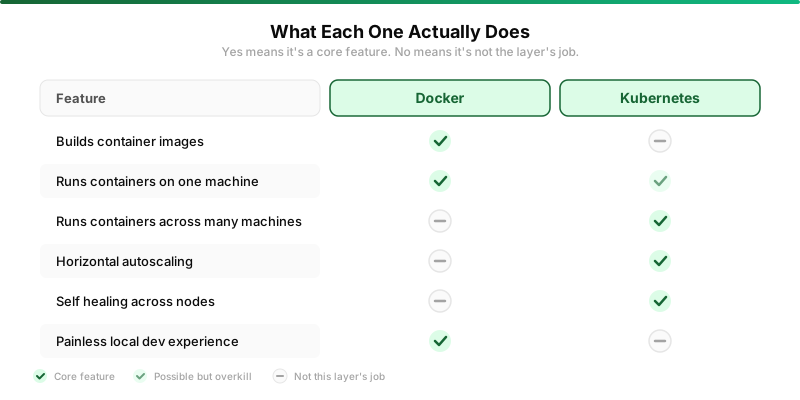
Since this is the section everyone wants, here it is. Read it as "which layer does this feature live at," not as "which tool wins each row."
| Capability | Docker | Kubernetes |
|---|---|---|
| Build a container image | Yes, this is its job | No, it consumes prebuilt images |
| Run a container on one machine | Yes | Yes, but it's overkill |
| Run containers across many machines | No, not without Swarm or Compose extensions | Yes, this is its core job |
| Auto-restart crashed containers | Single-node only via restart policy | Yes, across the whole cluster |
| Horizontal autoscaling | No | Yes, HPA and VPA |
| Zero-downtime rolling updates | Manual, you write the script | Built in |
| Secrets management | Env vars or bind-mounted files | Secret objects with RBAC |
| Local dev experience | Excellent | Painful unless you use k3d or minikube |
| Time to first running container | Minutes | Hours to days for a real setup |
When You Need Docker But Not Kubernetes
This is the situation a huge percentage of teams are in, and the situation where most over-engineering happens. If your project meets any of these descriptions, you almost certainly don't need Kubernetes yet.
You're running a side project, an MVP, or anything that fits on a single $5 to $40 VPS. The traffic is modest, the uptime requirements are "best effort," and the team is one to three people. Docker plus a process supervisor plus a cron job is enough.
You're shipping a single application with a database and maybe a worker queue. Three to six containers total. You don't expect to scale horizontally for the next six months. Docker Compose on one box will outperform a Kubernetes setup at the same cost, because all the cluster overhead is gone.
You're a solo developer or a tiny team. You don't have a platform person, you don't want one, and any time you spend on infrastructure is time not spent on the product. Kubernetes will quietly steal that time forever. Don't sign up for it until the pain of not having it is real.
You're building developer tools, doing local-first work, or shipping desktop apps with bundled containers. Kubernetes is a server-side abstraction. It has no role here.
A useful heuristic. If you can name every container running in production from memory, you don't need Kubernetes. If you can't, you probably do. Browse our developer tool roundup for the lighter end of the stack.
When You Need Both
The flip side is when Kubernetes earns its keep. The threshold isn't a magic number of users or a specific revenue line. It's a shape of workload.
You're running across multiple machines because one isn't enough, or because you need redundancy. The moment you have two web servers behind a load balancer, you're already doing manual orchestration. Kubernetes does it correctly, with health checks and rolling updates, and it does it on three machines as well as on three hundred.
You have many small services that need to talk to each other. Ten Go microservices, each needing its own deployment, scaling, and discovery, is the canonical K8s use case. Compose can technically do this on one box. It can't span boxes without bolting on Swarm or moving to K8s.
You need real high availability. If one machine goes down, requests still get served. If one container crashes, a new one comes up within seconds. Kubernetes gives you both of these as defaults, not as features you build yourself.
You have a platform team or a competent infra-curious developer. The cost of Kubernetes is mostly human capital. If you have someone who can read a kube-apiserver log without crying, the operational cost flattens out quickly. If you don't, it doesn't.
You're at a stage where you might get acquired, audited, or scaled by customer demand. Kubernetes is the default substrate for enterprise infrastructure. Having your stuff on K8s makes a thousand later conversations easier. Not a reason to start there, but a reason to plan for it.
Docker Compose vs Kubernetes
This is the comparison most people actually want when they search "Kubernetes vs Docker," and almost nobody writes it cleanly. So let me try.
Docker Compose is a YAML file that describes multiple containers on one machine. Kubernetes is a YAML file (well, a stack of them) that describes multiple containers across many machines. They look superficially similar. They are not similar.
Compose is a developer-experience tool first. Its job is to make local dev environments and small single-host deployments easy. Bring up the whole stack with one command, tear it down with another, edit code on your laptop and hot-reload into the running container. The mental model is "my application is a few containers that need to start together." That's it.
Kubernetes is an operations tool first. Its job is to keep your application running at the scale and reliability you need, even when machines, networks, or your own deploys fail. The mental model is "my application is a declarative spec, and the cluster's job is to make reality match the spec." Very different shape.
The honest production reality. Compose runs production for thousands of small businesses, side projects, and indie SaaS apps in 2026, including some that make real money. It's perfectly fine if you have one box, one team, and modest traffic. The downsides are no autoscaling, no automatic failover, manual zero-downtime deploys, and no native multi-host story. If those tradeoffs are acceptable, Compose is the right answer.
Kubernetes runs everything else. The day you outgrow a single box, the day you need real HA, the day a single deploy outage is worth more than a month of K8s setup, the cost-benefit flips. The migration from Compose to Kubernetes is not trivial, but it's well-trodden ground. Compare options at our docker vs kubernetes breakdown if you want a feature-by-feature side-by-side.
The reason Docker Compose still exists in 2026 isn't nostalgia. It's that Kubernetes is the wrong tool for 90% of the deployments that exist in the world. Most of them just don't make tech blog headlines.
The Cost And Complexity Tradeoff
Numbers help. Here's roughly what each path costs in 2026, both in dollars and in person-time, for a hypothetical small SaaS.
A single $20 to $50 per month VPS running Docker Compose can serve a few thousand active users if your app isn't pathological. Setup takes a competent developer about half a day. Ongoing ops is maybe two hours a month, mostly OS patches.
A small managed Kubernetes cluster (DigitalOcean, Linode, or a tiny GKE/EKS) starts around $70 to $150 a month for the control plane plus nodes, before you add anything useful like a managed database. Setup takes a competent platform engineer about a week to do well, including ingress, cert-manager, monitoring, logging, and a real deployment pipeline. Ongoing ops is maybe a day a month, more during upgrades.
A self-managed cluster on bare metal can be cheaper in raw infra terms, especially with k3s. But the labor multiplier is brutal. Plan for a half-time platform person if you go this route, or accept that you'll lose a weekend every few months to "why is etcd unhappy today."
The cost most people miss is the cognitive tax. Every time you debug a production issue on Kubernetes, you have to reason about pods, services, ingresses, network policies, the DNS layer, the storage layer, and the application all at once. With Compose, you have docker logs and a single host's syslog. The first time you hit a real outage, this difference is enormous.
A Decision Tree
If you've made it this far, here's the flowchart I'd give a friend who's trying to figure out what to actually install.

Start with the question "are you building something or running something." If you're building, you want Docker for the Dockerfile and local dev. Done, install Docker Desktop or Colima and move on.
If you're running something, ask whether it fits on one machine and whether that's likely to stay true for the next year. If yes to both, you want Docker plus Docker Compose. Add a process supervisor or a managed VPS and you're shipping.
If no to either question (you need more than one machine, or you might soon), the answer is Kubernetes. Managed flavors like GKE, EKS, or DigitalOcean Kubernetes are the right starting point. Don't self-host until you have a reason to.
If you're somewhere in between (one machine today, three machines next quarter, no in-house platform person yet), k3s on a couple of VPSes is a real middle ground. It's a stripped-down Kubernetes that runs on hardware you'd usually consider too small. We use it for several side projects in our developer tools stack, and it punches above its weight.
Common Misconceptions
A few things people regularly get wrong about this comparison. Worth clearing up.
"Kubernetes replaced Docker." It didn't. Kubernetes deprecated the Docker runtime as the default in 2022, switching to containerd. But the containers Kubernetes runs are still Docker-compatible OCI images, built with docker build or buildah or kaniko. Docker the tool is alive and well. Docker the runtime in K8s isn't, but that's a different sentence than most people read.
"Kubernetes is faster than Docker." This makes no sense. They run at different levels of the stack. Kubernetes adds latency on every layer (scheduler, scheduler queue, kubelet, network proxy) compared to a bare Docker run. The reason to use K8s isn't speed, it's the operational properties.
"You need Kubernetes for production." This is the most common lie indie developers tell themselves. Production for a small app is "an app that handles real traffic without falling over." A $20 VPS with Compose can hit that bar for a long time. Choose the smallest tool that fits.
"Docker Swarm is dead." Mostly true, sadly. Swarm was Docker's answer to Kubernetes and lost the orchestration wars by 2020. It still works, Docker still maintains it, but the community moved on. If you're starting fresh in 2026, you're picking Compose or Kubernetes, not Swarm.
"Serverless makes both irrelevant." Not yet. Lambda, Cloud Run, Fly Machines, and friends are real and great for some workloads. But they don't fit every architecture, the cold-start and cost models are different, and most apps with any persistent state still need a container running somewhere. The container ecosystem isn't going anywhere.
Verdict By Use Case
Closing thoughts, sliced by who you are.
If you're a solo developer or a tiny team shipping a SaaS, you want Docker and Docker Compose. Skip Kubernetes until you have a real reason. Run on a VPS or a managed App Platform. Read about the lightweight side of the stack in our free dev tools roundup.
If you're a growth-stage startup with two to twenty engineers and real traffic, you probably want Kubernetes. Managed, not self-hosted. The cost is real but the operational properties earn it back. Hire or train a platform person early.
If you're at an enterprise, you're already on Kubernetes whether you wanted to be or not. The interesting question for you is not K8s vs Docker, it's the service mesh, the policy engine, and the cost of operating multiple clusters.
If you're learning, install Docker first. Get comfortable with images, containers, networking, and volumes. Then learn Compose. Then, only when you have a real reason, learn Kubernetes. Each layer makes the next one easier to understand. Doing it in reverse is how my 2019 weekend died.
If you're shipping AI agents or background workers (a category that's exploded in the AI coding tool era), Compose plus a Celery-style queue gets you a long way. The fancy K8s machinery isn't required until you're running real concurrent volume.
Honest Closing
The reason "kubernetes vs docker" is such a popular search isn't that the comparison is interesting. It's that the answer is genuinely confusing if you don't already know the stack. People who already know it shrug and say "they're different layers." People who don't know it search for a verdict.
Here's the verdict, simple. You will use Docker, or something that builds Docker-compatible images. That's the floor. Above the floor, you'll pick an orchestrator. For most teams in 2026, the right orchestrator is still Docker Compose on a single host, until traffic, reliability needs, or team shape push you to Kubernetes.
The mistake I made in 2019 is the mistake the industry keeps making. Picking the impressive-looking tool because everyone on Twitter said it was the future, when the boring tool would have shipped the same product in a third of the time. The interesting question isn't which one wins. It's which one you actually need this year.
If you want to keep digging, our developer tools roundup covers the lighter end of the stack (Dokku, Coolify, Caprover, Fly) that bridges Compose and Kubernetes for small teams. And the broader tools-for-developers index is the place to start if you want to see what the rest of the cloud-native ecosystem looks like.
Whatever you pick, ship something. The orchestrator that nobody runs in production is the worst one of all.