I ran a team on GitLab self-hosted for three years. Then I migrated us to GitHub. Then, two years later, I migrated half of the org back to GitLab. Each time the reason was different, and each time I learned something I wish someone had told me before I started.
The "GitHub vs GitLab" debate gets framed wrong almost everywhere. People argue about UI polish, or which CI pipeline is faster, or whose AI assistant writes better Python. Those are real but they're downstream. The real question is one level up, and once you answer it, the rest pretty much falls into place.
This is what I wish I'd known. Honest comparison, no fanboy energy, real numbers from running both in production in 2026.
The One Question That Decides It
Before you read another comparison post or watch another YouTube benchmark, answer this. Does your team need to host the source code on infrastructure you control? Yes or no.
If the answer is yes, you're picking GitLab. Full stop. GitHub Enterprise Server exists, and it's a real product, but it's a second-class citizen inside GitHub. The release cadence trails the cloud product by months. The CI runners are a separate Action Runner Controller you have to manage. The package registry, the security scanning, the project management features all show up later, sometimes much later. Meanwhile GitLab's self-hosted Community Edition and Enterprise Edition are the same codebase as the cloud product. Feature parity is the default, not the goal.
If the answer is no, you're staying in the cloud, and now the picture genuinely opens up. Both platforms are competent. The choice tilts on AI features, pricing, talent pool, and ecosystem. That's the rest of this post.
The mistake teams make is treating GitHub Enterprise Server like it's a peer to GitLab self-hosted. It isn't. If you need on-prem with serious data sovereignty requirements, GitLab still owns that battleground in 2026, and it's not particularly close.
GitHub in 2026
GitHub is where the open source world lives. That hasn't changed and probably won't. If you want the network effect, the contributor pool, the issue link economy, the dependency graph, you're on GitHub.
What did change is the AI integration. Copilot is no longer a sidebar autocomplete. It's now an agent that can review your PRs, summarize issues, suggest test cases, and in 2026 it ships with a workspace mode that genuinely competes with Cursor and Windsurf. If you've never tried Copilot since the agentic update, the experience is different from what you remember. It's the deepest integration on the market because GitHub controls the surface area.
Pricing is the friction. GitHub Team is $4 per user per month, which is reasonable. GitHub Enterprise is $21 per user per month, which adds SSO, audit logs, advanced security, and the Copilot Enterprise tier. If you want Copilot Enterprise on top of GitHub Enterprise, that's another $39 per user per month. Real number for a 50-person engineering team is around $36,000 per year all in, before any GitHub Advanced Security add-ons.
The Actions billing is the second sticker shock. CI minutes are free up to a generous cap on the Linux runners, but if your team is running macOS builds or Windows builds at scale, that bill is going to wake you up. macOS runners are 10x the cost per minute of Linux, and "we forgot to cap our test matrix" has been the single most common engineering accident I've seen in 2026.
For developer tooling beyond version control, see our developer tool roundup. The picks there assume you've already settled the GitHub vs GitLab question.
GitLab in 2026
GitLab calls itself a DevOps platform, and that framing matters. GitHub thinks of itself as code hosting with everything else bolted on. GitLab thinks of itself as the full lifecycle, with code hosting as one part of it. In practice this shows up as a much more opinionated product. Issues, epics, milestones, CI, container registry, package registry, vulnerability dashboard, value stream analytics, all live in the same interface and they all assume you're using the rest of GitLab.
That's either heaven or claustrophobic depending on your taste. If you want a platform that hands you the full pipeline in one login, GitLab is the answer. If you want to compose your own stack from best-of-breed pieces, GitLab feels heavier than you need.
The AI play is GitLab Duo. Duo is the AI assistant that ships inside GitLab, with code suggestions, vulnerability explanations, merge request summaries, and a chat interface. It's competent. It's also not Copilot. Copilot has had a multi-year head start, a tighter editor integration story, and the Anthropic and OpenAI partnerships keep deepening. Duo is closing the gap but you're not switching to GitLab for the AI in 2026. You're switching for self-hosting, for the integrated DevOps story, or for the pricing.
Pricing is where GitLab gets interesting. The Premium tier is $29 per user per month and the Ultimate tier is $99 per user per month. That looks steep next to GitHub Team, but the comparison everyone forgets is that GitLab Premium includes things GitHub charges extra for, like security scanning and value stream analytics. The fair compare is GitLab Premium vs GitHub Enterprise plus Advanced Security, and once you do that math, GitLab looks competitive or cheaper depending on your feature mix.
I've seen teams switch from GitHub Enterprise plus Advanced Security to GitLab Ultimate and cut their bill by 30% with feature parity. I've seen other teams switch the other way and cut their bill by 40%. The right answer is genuinely contingent on what you actually use.
Side By Side: How They Stack Up
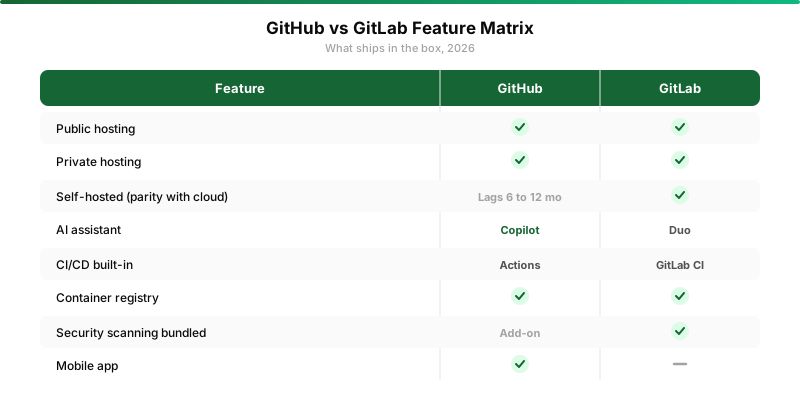
| Dimension | GitHub | GitLab |
|---|---|---|
| Cloud hosting | Yes, market leader | Yes, smaller share |
| Self-hosted | Enterprise Server, lags cloud | CE/EE, parity with cloud |
| AI assistant | Copilot, deepest integration | Duo, competent but younger |
| CI/CD | Actions, marketplace huge | GitLab CI, native, opinionated |
| Entry pricing | $4/user (Team) | $29/user (Premium) |
| Open source mindshare | Dominant | Strong in EU and gov |
| Talent acquihire signal | Bigger pool, default expectation | Smaller pool, DevOps depth signal |
Self-Hosted, The Battleground Where GitLab Still Owns
This is the section most posts gloss over and it shouldn't be. If your team handles regulated data, contracts with a government, runs in air-gapped environments, or just doesn't want a third-party SaaS holding the entire engineering history, you need self-hosting. And the gap between GitHub Enterprise Server and GitLab self-hosted is wider than the marketing materials suggest.
GitLab ships the same product on-prem as in the cloud. You pin a version, you update on your schedule, you get the same features. The community edition is genuinely free and genuinely usable for small teams. The enterprise edition turns on the paid features behind a license file. The architecture is well-documented. You can run it on a single VM or you can scale it to dozens of nodes with Gitaly cluster, Sidekiq workers, and Praefect for redundancy.
GitHub Enterprise Server is also a real product, but the way GitHub treats it is telling. Major features show up in the cloud product first, sometimes six to twelve months earlier. The Action Runner Controller for self-hosted CI is a separate Kubernetes project you deploy and maintain. GitHub's own packaging story for Enterprise Server is an OVA appliance image, which feels dated next to GitLab's Helm chart and operator-based deployments.
The pricing in the on-prem world also shifts. GitHub Enterprise Server is $21 per user per month. GitLab Premium self-hosted is $29 per user per month. Looks like GitHub wins. Then you add GitHub Advanced Security, which on-prem is licensed separately, and the gap closes to within a few dollars. Then you factor in the engineering hours to maintain the GitHub Action Runner Controller versus GitLab's built-in runners, and GitLab usually pulls ahead on total cost of ownership.
The one place GitHub Enterprise Server still wins on-prem is when your team is already deeply on GitHub cloud and migrating would cost a year of pain. Don't underrate that. Migrations are real money.
AI Features Compared, Copilot vs Duo
The AI race between GitHub and GitLab is interesting because it's not symmetric.
Copilot is GitHub's flagship and Microsoft's flagship. It ships in VS Code, in JetBrains, in Neovim. The chat interface gets the latest OpenAI and Anthropic models. The PR review agent went from gimmick to genuinely useful in 2026. The Copilot Workspace feature competes head-to-head with Cursor and Claude Code for agentic coding. If you want the deepest AI integration with your code host in 2026, it's Copilot, and nothing else is close.
Duo is GitLab's answer and it's a respectable second place. Code suggestions inside the GitLab Web IDE are competent. The vulnerability explanations are genuinely useful for the security team. The merge request summary is a nice productivity bump. But the editor story is weaker because GitLab doesn't have a Microsoft-tier editor ecosystem to plug into. You're either using GitLab's own Web IDE, which is fine but limited, or you're using Duo through a separate plugin in your existing editor, which works but feels like a layer of indirection.
If AI integration is the deciding factor for your team, you're picking GitHub. Period. If AI is important but not deciding, the gap is shrinking and Duo is improving fast enough that this won't be the right answer forever.
Pricing Reality
Headline pricing favors GitHub by a wide margin. The fair comparison favors neither by much. Here's how it actually shakes out for a 50-person engineering team.
GitHub Team is $4 per user, so $200 per month base. Add Copilot Business at $19 per user, that's $950. Add GitHub Actions overages depending on your matrix, conservatively $300. Total around $1,450 per month, or about $17,400 per year.
GitLab Premium is $29 per user, so $1,450 per month base. CI minutes are included generously at this tier. Duo Pro is bundled at the Ultimate tier ($99 per user) or available as an add-on at Premium. Premium without Duo lands around $17,400 per year too.
For Enterprise tier comparisons, GitHub Enterprise plus Copilot Enterprise lands around $36,000 per year for the same team, give or take Advanced Security. GitLab Ultimate lands around $59,400 per year, but you're getting security scanning, value stream analytics, compliance dashboards, and Duo bundled in. Apples to apples, the bill is similar. The mix is different.
If you want a budget version of either, GitHub Free or GitLab Free for personal projects and small teams is genuinely capable. See our free developer tools list for adjacent freebies.
DevOps and CI/CD, Actions vs GitLab CI
Both Actions and GitLab CI are mature in 2026. The choice between them isn't really about which is "better." It's about which workflow shape fits your team.
GitHub Actions has the marketplace advantage. Almost every tool you might want to plug in has a published Action, often maintained by the vendor. Want to deploy to AWS, post to Slack, run a security scanner, push a Docker image? There's an Action for that, and it works on day one. The composition story (reusable workflows, composite actions, environments with manual gates) is genuinely good.
GitLab CI has the integration advantage. The pipeline lives next to the merge request. The variables, the secrets, the environments, the deployment dashboards, all in the same product. The DAG (directed acyclic graph) pipeline visualization is the cleanest in the industry. Parent-child pipelines and dynamic pipelines are powerful patterns that Actions matched only recently.
The thing that tilts most teams. GitLab CI feels more like infrastructure-as-code from the start. The .gitlab-ci.yml is just YAML, with includes, with templates, with extends. GitHub Actions feels more like an ecosystem you wire together. Neither is wrong. Both can do everything. The aesthetic preference is real and it sticks.
Which One Acquihires Better Talent
This is the section everyone leaves out and it shouldn't be left out.
If your team is hiring engineers, the GitHub experience is the default. Every junior developer has a GitHub profile. Most open source contributions live there. The "send me your GitHub" question in an interview happens every day. Putting your codebase on GitHub means you're hiring against the broadest possible pool, with the lowest possible context-switch cost for new hires.
GitLab is the opposite signal. Teams on GitLab are usually there for a reason. Self-hosting requirements, deep DevOps culture, regulated industry. When an engineer applies to a job at a GitLab shop and they already know GitLab, you've filtered for a specific kind of profile. That's good if you want it. That's a smaller hiring pool if you don't.
Neither is universally right. If you're hiring fast and you want the broadest possible candidate pipeline, GitHub. If you're hiring slow and you want DevOps depth, GitLab is a useful filter.
Decision Tree

Roughly, the path looks like this. Do you need self-hosting? Yes goes to GitLab self-hosted, every time. No, you're staying cloud, then ask if you're optimizing for the broadest hiring pool and deepest AI integration. If yes, GitHub. If you're optimizing for an opinionated all-in-one DevOps platform with strong on-prem optionality later, GitLab cloud.
That's the 80/20. The remaining 20% is taste, ecosystem lock-in, and which platform your team has actual muscle memory in.
The Verdict By Use Case
Here's the cleanest way to think about it for each kind of team.
Open source maintainer or solo developer building public projects, GitHub. The network effect is non-negotiable. People find your project, star it, contribute to it, and the discovery infrastructure is all over there. Other dev tools in our index assume you're on GitHub for distribution.
Startup with five to twenty engineers, all cloud, fast hiring, GitHub. The pricing is unbeatable at this size, the AI integration is the best in market, and you're not going to outgrow the platform until you're at least 100 engineers.
Mid-stage company, 50 to 500 engineers, mixed cloud and some on-prem requirements, GitLab. The all-in-one story actually saves you from buying five tools. The on-prem path is real if you ever need it. The pricing crosses over and starts to favor GitLab once you turn on the full security and compliance stack.
Government, defense, regulated finance, healthcare with PHI, GitLab self-hosted, by default. GitHub Enterprise Server is a fine fallback if you're already there, but starting fresh in a regulated industry in 2026, you're starting on GitLab.
Enterprise migrating off legacy SVN, Perforce, or Bitbucket Server, this is the one that genuinely depends. If your team is heavy on .NET and Microsoft shops, GitHub Enterprise plus Azure DevOps integration is the natural landing. If your team is heavy on Kubernetes, Helm, and infrastructure as code, GitLab is the natural landing. Look at where your tooling stack already pulls you.
My personal setup right now. Public projects and my open source work, GitHub. The internal monorepo for my consulting work, GitLab self-hosted on a single VM. Both platforms do what they do well. Forcing all of it onto one is the wrong shape.
Honest Closing
The lazy take on GitHub vs GitLab is that GitHub won and GitLab is a niche play. That's wrong, and it's been wrong for three years. The honest take is that they're both healthy, both growing, and they're each winning the customer segment they were built for.
GitHub is the cloud-native default and the open source default. It's where the world's code lives and where the talent expects to be. The AI story is the strongest in the industry and Microsoft is going to keep pouring money in.
GitLab is the integrated DevOps platform and the self-hosted default. It's where regulated industries, governments, and engineering-led DevOps shops settle. The product is denser, more opinionated, and the on-prem path is the cleanest in the market.
Pick the one that matches the question you're answering. Don't pick on tribe. Don't pick because you saw a thread on Hacker News. Don't pick because your last team used the other one. Ask the self-hosting question, ask the hiring question, ask the AI question, in that order, and the answer mostly writes itself.
Whatever you pick, get on with it and ship something. The tool isn't the bottleneck. It never was.