Here's the dirty secret about AI coding assistants in 2026: they've all gotten good enough that the wrong choice won't ruin your workflow.
But the right choice? That can genuinely change how fast you ship.
We spent a month living inside five of them. Built a SvelteKit app, wired up a Django REST API, debugged a React Native project that felt cursed from birth. What we found surprised us.
The market has split into two philosophies. On one side, polished IDE experiences like Cursor and Windsurf that want to own your entire editor. On the other, scrappy open-source tools like Cline and Aider that say "bring your own everything" and mean it. GitHub Copilot sits in the middle, trying to be everyone's safe pick.
The right tool depends less on which AI model is "smartest" and more on how you actually write code day to day.
Quick Comparison Table
| Tool | Price | Type | Best For | AI Models | Open Source |
|---|---|---|---|---|---|
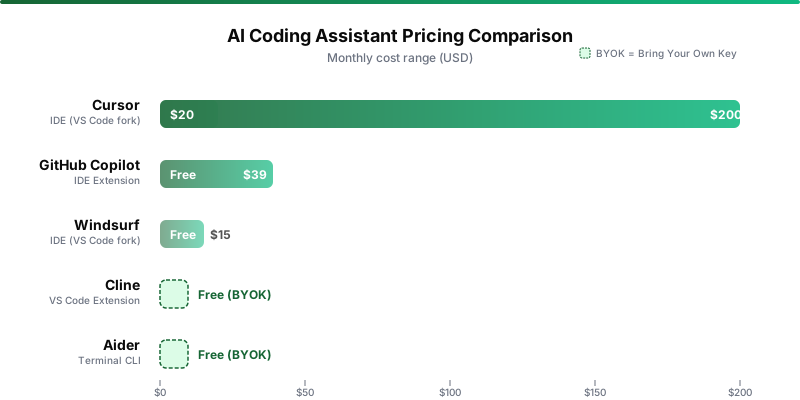
| Cursor | $20/mo (Pro), $60/mo (Pro+), $200/mo (Ultra) | IDE (VS Code fork) | Full-stack agents, large refactors | Claude, GPT-4o, Gemini | No |
| GitHub Copilot | Free, $10/mo (Pro), $39/mo (Pro+) | IDE extension | Inline completions, GitHub integration | GPT-4o, Claude, Gemini | No |
| Windsurf | Free, $15/mo (Pro) | IDE (VS Code fork) | Budget-friendly agentic coding | Claude, GPT-4o, Gemini | No |
| Cline | Free (bring your own API key) | VS Code extension | Full control, open-source enthusiasts | Any (via API keys) | Yes (Apache 2.0) |
| Aider | Free (bring your own API key) | Terminal CLI | Git-native workflows, terminal users | Any (via API keys) | Yes (Apache 2.0) |
Cursor: The Power User's Choice
Cursor changed how we build features. Not in a small way. In a "why were we doing it the other way" kind of way.
It's a VS Code fork with AI threaded through everything. After twenty minutes, you stop noticing where the editor ends and the AI starts.
Agent mode is the real draw. Describe what you want in English. Cursor writes files, edits code, runs terminal commands, and fixes its own mistakes along the way.
During our SvelteKit project, we told it to add authentication middleware to all API routes. It found every route file, updated the imports, and caught a route we'd forgotten about. That's not autocomplete. That's a junior dev who reads fast.
The codebase awareness is what separates it from everything else. Cursor indexes your entire project, so when it suggests code, it already knows your data models, your utility functions, your naming conventions. Tab completions predict multi-line changes, not just variable names.
You can swap between Claude Sonnet, GPT-4o, and Gemini depending on the task. Different models genuinely perform differently on different types of code. That flexibility matters.
But here's the thing: Cursor has a cost problem.
In mid-2025, they switched to credit-based billing where different models burn credits at different rates. Some users got surprised by how fast premium credits evaporated during heavy Agent sessions. Us included.
That's a real cost, and Cursor doesn't make it obvious upfront. The other big limitation? Editor lock-in. If you use JetBrains, Vim, or anything that isn't VS Code, you simply can't use Cursor.
GitHub Copilot: The Safe Corporate Pick
There's a reason Copilot is the most widely adopted AI coding tool in the world. It's not because it's exciting. It's because it works everywhere, doesn't break things, and your IT department will approve it.
Copilot lives inside VS Code, JetBrains, Neovim, and Xcode as an extension. For a lot of developers, that alone ends the conversation.
What surprised us was how much the agentic capabilities have improved. The new Copilot Agent handles multi-step coding tasks that would've been impossible a year ago.
But the real killer feature is ecosystem integration. Copilot understands GitHub Issues, pull requests, and Actions. During our Django project, we pointed it at an open issue and it pulled context from the description, the related code, and the conversation thread before generating a fix. Nothing else does this as seamlessly.
The free tier is genuinely useful too. Fifty premium requests a month plus basic completions give you enough to evaluate it properly. Not just a taste before the paywall slams shut.
Where Copilot falls short is ambition. Its agentic mode launched later than Cursor's and still feels a step behind for complex multi-file refactors. The premium request limits on Pro (300/month) and Pro+ (1,500/month) sound generous until you start leaning on the agent for real work. Extra requests cost $0.04 each, which adds up in annoying ways.
At ten bucks a month, Copilot Pro is the best value in this entire roundup for individual developers who mostly want solid completions. If you need heavier agent work, Pro+ at $39 makes sense. For teams, Business at $19/user/month is the default corporate choice, and for good reason.
Windsurf: The Budget Contender
Windsurf, formerly Codeium, answers a question a lot of developers are asking: "Can I get 80% of what Cursor does for less money?"
Mostly yes. With caveats that matter.
At fifteen bucks a month for Pro, it undercuts Cursor by $5 while offering a surprisingly similar feature set. It's another VS Code fork, but two features give it a distinct identity.
First, Memories. Windsurf remembers your codebase patterns, conventions, and past decisions across sessions. After a few days, we noticed it applying our naming conventions without being told. That cut down on the repetitive prompting that plagues other tools.
Second, automatic lint fixing. After generating code, Windsurf detects and fixes lint errors on its own. Sounds minor until you realize how much debugging time comes from AI-generated code that technically works but violates your project's style rules.
The free tier is practically a demo. Twenty-five credits won't survive a single afternoon. Go straight to Pro and skip it entirely.
One thing to watch: Claude 3.5 Sonnet eats credits significantly faster than the default model because Windsurf adds a 20% margin on third-party costs. The community is smaller too, which means fewer extensions and less troubleshooting help when things go sideways.

Cline: The Open-Source Powerhouse
Cline made us feel most like we were working with a real collaborator. And it's completely free.
That combination doesn't happen often.
It's an open-source VS Code extension (Apache 2.0) that turns your editor into an autonomous coding agent. The catch? You bring your own API keys from OpenAI, Anthropic, Google, or even local models through Ollama. No subscription, no credits, no usage limits from Cline itself. You pay only for API calls.
During our React Native debugging sessions, Cline's ability to create files, edit code, run terminal commands, and even use a browser felt more capable than Cursor's agent for certain tasks. The permission-at-each-step approach is slower but safer, especially on production code.
The model flexibility is unmatched. We swapped between Claude for architecture decisions, GPT-4o for quick utility functions, and a local Llama model for boilerplate. All in the same session. The new CLI 2.0 even lets you run parallel agents for CI/CD pipelines.
And Cline doesn't do tab completions. It's purely an agent, so you'll need Copilot or Codeium alongside it for inline autocomplete. The setup friction is real too. Getting API keys, configuring providers, understanding token pricing, none of that is plug-and-play.
Aider: The Terminal Purist's Tool
If the other tools on this list are sports cars, Aider is a well-tuned motorcycle. Fewer things. Done with elegance.
It lives entirely in your terminal. Point it at files, describe changes in natural language, it edits your code directly. The key differentiator? Every single change gets automatically committed to git with a descriptive message.
That sounds like a small detail. It's not.
During our Django project, this git-native approach was a revelation. We experimented aggressively, knowing every AI edit was its own atomic commit we could undo in seconds. Aider also builds a repository map to understand architecture before making changes, runs your linter and test suite after each edit, and even supports voice input.
The trade-off is obvious: no GUI, no visual diffs, no hand-holding. You need to be comfortable living in the terminal, and the command syntax takes real time to learn. Like Cline, you bring your own API keys with the same cost unpredictability.
Aider isn't for everyone. But for developers who think in git commits and prefer terminal workflows, nothing else comes close.
Decision Matrix: Who Should Use What

| If you are... | Use this | Why |
|---|---|---|
| A solo developer who wants the best agent | Cursor Pro+ ($60/mo) | Best agentic capabilities, deep codebase awareness |
| Budget-conscious and want good completions | GitHub Copilot Pro ($10/mo) | Best value for inline autocomplete across editors |
| On a team at a company | GitHub Copilot Business ($19/user/mo) | Admin controls, IP indemnity, multi-editor support |
| Open-source advocate, want full control | Cline (free + API keys) | No vendor lock-in, any model, full transparency |
| A terminal purist who loves git | Aider (free + API keys) | Git-native, auto-commits, voice input |
| Budget-constrained, want agentic features | Windsurf Pro ($15/mo) | Cheapest subscription with agent mode and memories |
Who Should NOT Use AI Coding Assistants
Not everyone should reach for these tools.
If you're a beginner learning to code, resist the temptation. You need to understand what the AI is generating before you can evaluate whether it's any good. Learn fundamentals first, then accelerate with AI.
If you work on security-critical codebases with strict compliance requirements, only self-hosted options like Cline with local Ollama models are viable. Verify that setup with your security team.
And if your team doesn't have a code review process? An AI coding assistant will help you ship bugs faster. Not better code.
Our Recommendation
For most developers in 2026, start with GitHub Copilot Pro at ten bucks a month. It works in every major editor, the completions are reliable, and the agent handles straightforward tasks well. Lowest-risk entry point.
If you find yourself wanting more powerful agentic workflows, the kind where you describe a feature and the AI builds it across multiple files, upgrade to Cursor Pro at $20.
Want maximum flexibility and don't mind managing API keys? Cline is genuinely impressive and completely free aside from API costs.
The worst choice is paying for the most expensive tier you don't need. Start small, measure actual time savings over two weeks, and scale up only when the numbers justify it.
Looking for more developer tools? Browse our full AI Coding Tools directory or explore all tools on Tool Index.