ffsubsync
Language agnostic automatic subtitle synchronization that runs in your browser
Gallery
About ffsubsync
FFsubsync solves the frustrating problem of misaligned subtitles that plague anyone managing video content with external subtitle files. When a subtitle track doesn't match the actual dialogue timing in a video, viewers end up reading lines before or after they're spoken, which destroys the viewing experience and makes following dialogue nearly impossible. This happens constantly because subtitle files get created for specific video releases, and when the video comes from a different source with alternate cuts, different intro sequences, or framerate variations, the timing drifts. FFsubsync automatically synchronizes those subtitles with video content, handling offsets ranging from a few seconds to several minutes without requiring manual timestamp adjustment.
The synchronization algorithm works through a three step process that's both clever and computationally efficient. First, both the audio track and subtitle timing data get divided into ten millisecond windows, creating a fine grained representation of when speech occurs. Then the system uses WebRTC's voice activity detector to identify which windows contain speech in the audio while simultaneously mapping when subtitles appear based on their timing data. This produces two binary strings representing speech patterns, one from the actual audio and one from the subtitle timestamps. Finally, FFsubsync aligns these binary strings using Fast Fourier Transform, which converts what would normally be an extremely slow quadratic time computation into something that finishes in seconds even for feature length content.
The best scoring alignment determines exactly how to offset the subtitles so dialogue appears when actors speak. For most content, processing finishes in twenty to thirty seconds when syncing against video. When you have a correctly timed reference subtitle available, syncing against that instead of video typically completes in under one second since no audio processing is needed. The tool handles various complications like mid file inconsistencies where different sections of a video have different timing offsets, using a split penalty mode that attempts piecewise alignment rather than assuming one global offset works throughout.
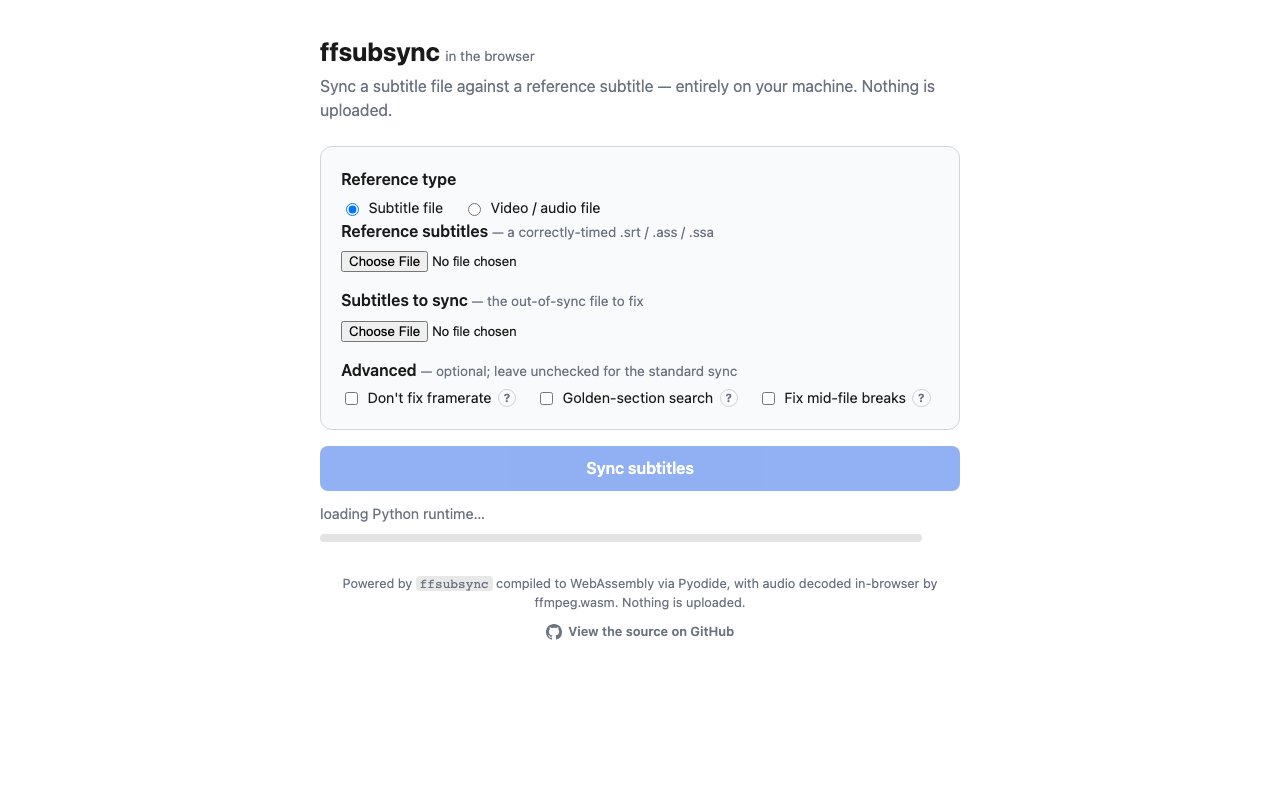
FFsubsync runs entirely on your machine with no data uploads to external servers, which matters for both privacy and practical workflow reasons. The web version at the project homepage compiles to WebAssembly via Pyodide with audio decoded by ffmpeg.wasm right in your browser. You drag in your files, processing happens locally, and the corrected subtitle downloads without anything touching a server. For power users there's also a command line tool installable through pip or Homebrew that offers additional options and integrates into scripting workflows. Docker images are available for containerized deployments.
The tool handles multiple subtitle formats including SRT, ASS, and SSA files. It can auto detect subtitle character encoding, which eliminates the encoding issues that plague subtitle files originating from different regions or creation tools. Remote file support lets you work with content accessible via HTTP, RTMP, RTSP, and FTP protocols without downloading locally first. For long videos, multi segment sampling analyzes multiple points across the content for more accurate alignment rather than relying solely on the beginning of the file.
Content creators who distribute videos across multiple platforms will find this particularly valuable since the same video often ships with different intros, outros, or cuts depending on where it's published. Translators working with subtitle files sourced from different versions of the same film or show can quickly resync rather than manually adjusting timestamps. Media library managers dealing with subtitle files accumulated over years can batch process corrections. The language agnostic approach means it works regardless of what language the subtitles are in since it's matching speech patterns rather than understanding words.
FFsubsync is open source and completely free to use with active development on GitHub. The repository provides documentation for programmatic integration if you need to build it into larger workflows, including progress callback handlers for UI feedback. Advanced users can experiment with alternative voice detection algorithms like auditok or fused mode for challenging audio conditions where WebRTC's detector struggles. Maximum offset tolerance, framerate correction, and other parameters offer fine tuning for edge cases. The entire tool prioritizes doing one thing exceptionally well, aligning subtitles accurately without requiring manual adjustment or cloud processing dependencies.
Key Features
- Language agnostic subtitle alignment
- Browser based processing via WebAssembly
- Support for SRT, ASS, and SSA formats
- Framerate correction and golden section search
- No file uploads required
- Command line and remote file support
Pros & Cons
What we like
- Runs entirely in browser with no server uploads
- Works regardless of subtitle or audio language
- Open source under MIT license
- Handles legacy character encodings automatically
Room for improvement
- Browser version slower than native Python on large files
- Requires basic understanding of subtitle formats
- No graphical preview of sync quality
- Complex drift issues may need multiple attempts
Frequently Asked Questions
What is ffsubsync?
Does ffsubsync upload my files?
Is ffsubsync free?
What subtitle formats does ffsubsync support?
Best For
Featured in
Alternatives to ffsubsync
View all
Apatero AI
The creator studio for AI image, video, audio, 3D, and avatars, now at apatero.ai.
Apatero Studio
Creator studio for AI image, video, audio, 3D, and avatars. Every model worth using, in one workspace.

Melodex
Turn your idea into an AI-generated music video

Speel
AI UGC video generator that makes realistic AI avatars hold and talk about your product for ads
Reviews (9)
Two months in, no regrets
Found ffsubsync on a Show HN thread and I am glad I clicked. Their take on handles legacy character encodings automatically is genuinely good. It slotted into my routine without much fuss. Worth it for what I get out of it.
Does the job, a few gripes
Three months of ffsubsync later, here is what holds up. The open source under mit license is more useful than I expected. It just works, day after day, without surprises. Mostly using it for syncing subtitles across different cuts of a film. It would be a five if not for complex drift issues may need multiple attempts. Glad I made the switch.
Worth a look
Started using ffsubsync casually, now it is pinned in my dock. Their take on no file uploads required is genuinely good. The defaults are sensible, so I was not fighting settings on day one. No regrets so far.
Solid daily driver
Tried ffsubsync on a side project first, then rolled it out everywhere. It just works, day after day, without surprises. Glad I made the switch.
Quietly excellent
Tried ffsubsync on a side project first, then rolled it out everywhere. What stands out is how it handles browser based processing via webassembly. It fits well for syncing subtitles across different cuts of a film. Glad I made the switch.
Powerful once it clicks
Found ffsubsync on a Show HN thread and I am glad I clicked. The works regardless of subtitle or audio language is more useful than I expected. It fits well for aligning fan subs to official video releases. My only gripe is requires basic understanding of subtitle formats. Easy yes for anyone weighing the same trade offs.
Pulled its weight from week one
ffsubsync has quietly become part of my daily flow. What stands out is how it handles runs entirely in browser with no server uploads. It has shaved real time off my week. It earns its place in my stack.
Recommended without reservation
Three months of ffsubsync later, here is what holds up. The core workflow is smooth once you are set up. It fits well for aligning fan subs to official video releases. No regrets so far.
Solid daily driver
ffsubsync solves a real problem for me without making a fuss about it. The support for srt, ass, and ssa formats is more useful than I expected. The output quality holds up better than I expected. No regrets so far.
Badge builder
Add ffsubsync to your website
Choose a badge style and size, preview it here, then copy the generated HTML. Badge images are self-contained SVGs and do not require an external script.

<a href="https://toolindex.net/tools/ffsubsync?ref=badge" target="_blank" rel="noopener">
  <img src="https://toolindex.net/badge/ffsubsync/medium.svg" alt="ffsubsync - Listed on Tool Index" width="180" height="50" />
</a>How to use the badge
- 1. Pick the style, size, and theme that fit your layout.
- 2. Copy the generated HTML from the code block.
- 3. Paste it into your footer, homepage, or press page.
Standard badge available
The standard listing badge is available now. Score and circle badges are limited to tools currently ranked in the top 10 of a category.
Badge clicks return visitors to this profile with a referral tag so the source remains identifiable.
Related Tools
Apatero AI
The creator studio for AI image, video, audio, 3D, and avatars, now at apatero.ai.

LocalClip
Local-first AI video clipper for Mac that turns long videos into vertical clips
Melodex
Turn your idea into an AI-generated music video
Apatero Studio
Creator studio for AI image, video, audio, 3D, and avatars. Every model worth using, in one workspace.
Work on ffsubsync? Request listing access or correction