
LocalClip
Local-first AI video clipper for Mac that turns long videos into vertical clips
Gallery
About LocalClip
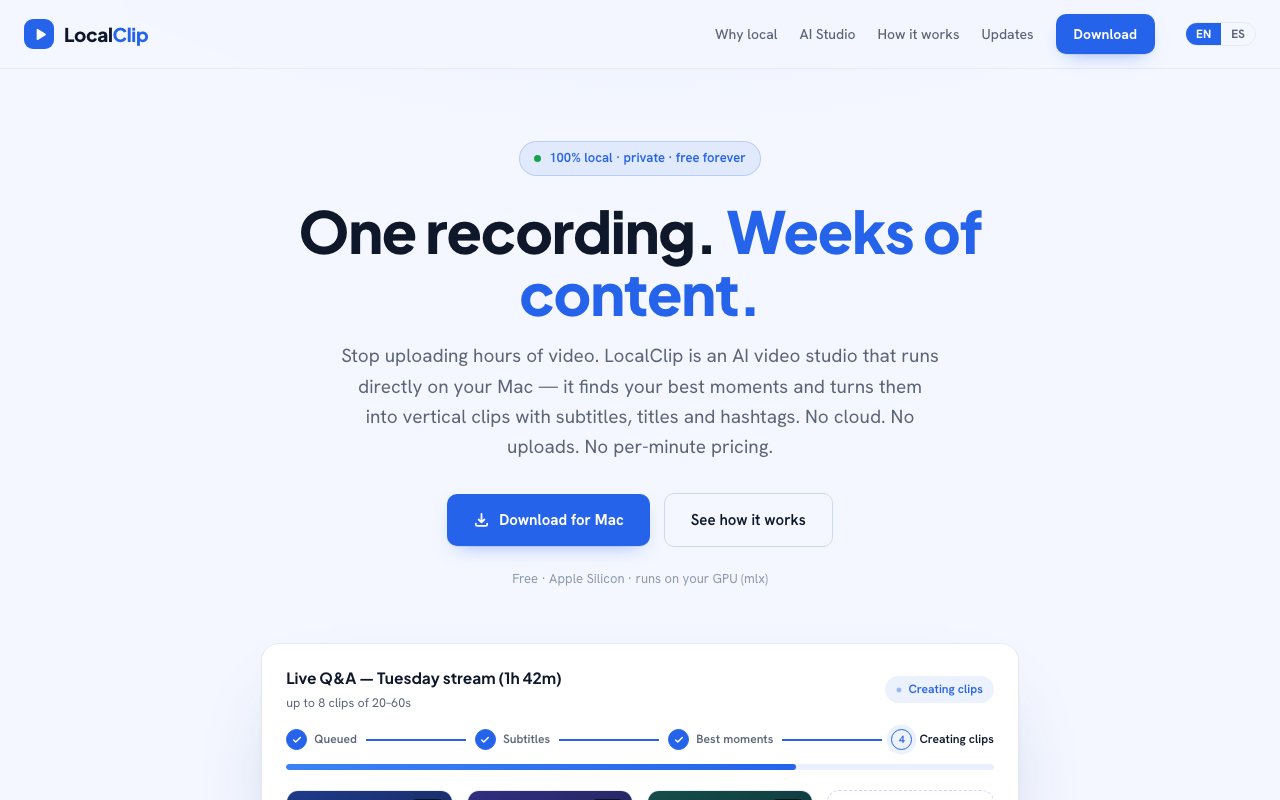
LocalClip is an AI video clipper for the Mac that runs entirely on your own machine. You drop in a long recording and it finds the strongest moments, then cuts them into short vertical clips complete with word-by-word subtitles, a title, and hashtags, ready to post. The whole pipeline happens on-device, so your footage never leaves your computer and nothing gets uploaded to a server. The site sums the promise up as one recording turning into weeks of content, which is aimed squarely at people who record long and publish short.
The problem it targets is the cost and friction of cloud clippers. Those tools make you upload multi-gigabyte video files, wait in a processing queue, and pay for every minute you push through them, because they're renting the GPUs doing the work and passing that bill along. LocalClip flips the model by running on the Apple Silicon hardware you already own and that mostly sits idle anyway. There's no upload step, no queue, and no per-minute or per-clip billing. Transcription and rendering start the moment you drop a file in, rather than after a round trip to someone else's data center. For a creator who records for hours at a time, avoiding a multi-gigabyte upload on every session is a real saving in both time and bandwidth.
The workflow is about as short as it gets. You pick a video file or a saved livestream, the app transcribes it on your Mac's GPU using Apple's MLX framework, detects the best moments, and renders up to eight vertical 9:16 clips of roughly 20 to 60 seconds each. Every clip comes with word-by-word captions burned in, along with a generated title and hashtags, so a single clip is ready to go across TikTok, Reels, Shorts, and Facebook without any extra editing. The three-step framing on the site is drop your video, let the AI do the work, then post everywhere from one export. Because the clips are already vertical and captioned, the step after rendering is just uploading, and the same file drops cleanly into every major short-form feed without reformatting.
It handles the kinds of long recordings creators actually accumulate. Livestreams, podcasts, Zoom and Meet calls, webinars, and general video files all work as input. The underlying idea is a local video-understanding engine that watches your recording once and then produces the pieces you need to publish from it. Clips, word-by-word subtitles, and titles with hashtags are available today, and the roadmap lists chapters, a summary and blog post, and ready-made LinkedIn and X posts as things the same engine is meant to produce later from that same single pass over the footage. The point of watching the recording once is that the heavy work of understanding what's in it happens a single time, and the outputs are then cheap to generate from that shared understanding.
Who it's for is fairly specific. This is a tool for streamers, podcasters, and creators who record long sessions and want short-form output, and who care about keeping their raw footage private. Because processing is local, there's nothing stored in someone else's cloud and no account balance ticking down while you experiment with different cuts. You can render as many clips from as many videos as you want, with your own hardware as the only real limit, which changes how freely you iterate compared with a metered service where each attempt costs money. That freedom to re-render matters while you're still figuring out which moments land, because you can try a whole batch, throw out the weak ones, and run it again at no cost.
Where it differs from the crowded field of clip tools is the local-first stance taken as the whole point rather than a footnote. Most competitors are cloud services with subscriptions and mandatory upload steps baked in. LocalClip's pitch is the same output without the uploading, the waiting, or the paying per minute, and it leans on Apple Silicon and MLX to make on-device transcription and rendering fast enough to be practical instead of a compromise. Privacy by design and a fixed cost of zero are the two things the product keeps coming back to. It frames the comparison directly, lining up its own local processing against cloud tools on upload, privacy, waiting, and per-minute billing, and the whole appeal rests on that contrast holding up in practice.
Access is free. The product ships as a macOS beta you download as a DMG of around 600 megabytes, and it needs a Mac with Apple Silicon, an M1 chip or newer, since it depends on the GPU and the MLX framework and won't run on Intel machines. It's an unsigned beta for now, so the first launch takes an extra step through the system security settings to open it, either through the Privacy and Security panel or a single Terminal command that clears the quarantine flag. It's made by Lou Alcala, and the site collects emails to send the download and updates rather than charging for the app.
Key Features
- On-device AI moment detection
- Vertical 9:16 clip rendering
- Word-by-word subtitle generation
- Auto-generated titles and hashtags
- Runs on Apple Silicon GPU via MLX
- Batch clips from one long video
Pros & Cons
What we like
- Runs fully local with no uploads
- Free with no per-minute billing
- Unlimited clips bounded only by hardware
- Handles livestreams, podcasts, and calls
Room for improvement
- macOS on Apple Silicon only
- Unsigned beta needs a manual first launch
- Output quality bounded by your hardware
- Some features still on the roadmap
Frequently Asked Questions
What is LocalClip?
Is LocalClip free?
What does LocalClip run on?
How is it different from cloud clippers?
Best For
Featured in
Alternatives to LocalClip

Apatero AI
The creator studio for AI image, video, audio, 3D, and avatars, now at apatero.ai.
Apatero Studio
Creator studio for AI image, video, audio, 3D, and avatars. Every model worth using, in one workspace.

Melodex
Turn your idea into an AI-generated music video

Speel
AI UGC video generator that makes realistic AI avatars hold and talk about your product for ads
Reviews (7)
Recommended without reservation
Came to LocalClip after getting frustrated with what I had before. Got real value out of auto-generated titles and hashtags. It handles the boring parts so I can focus on the work that matters. Found it works best for repurposing a podcast into vertical shorts. No regrets so far.
Good, with a few caveats
Picked LocalClip for the price, stayed for the quality. The auto-generated titles and hashtags is more useful than I expected. It would be a five if not for macos on apple silicon only. Glad I made the switch.
Does the job, a few gripes
LocalClip solves a real problem for me without making a fuss about it. Got real value out of word-by-word subtitle generation. The interface stays out of my way, which I appreciate. It would be a five if not for some features still on the roadmap. Recommending it to people in a similar spot.
Decent with some rough edges
Started using LocalClip casually, now it is pinned in my dock. What stands out is how it handles on-device ai moment detection. It just works, day after day, without surprises. Mostly using it for turning a livestream into short-form clips. The catch is some features still on the roadmap.
Quietly excellent
LocalClip has quietly become part of my daily flow. It just works, day after day, without surprises. Recommending it to people in a similar spot.
Recommended without reservation
Found LocalClip on a Show HN thread and I am glad I clicked. The word-by-word subtitle generation is more useful than I expected. Mostly using it for keeping raw footage private while editing.
Two months in, no regrets
LocalClip has quietly become part of my daily flow. Got real value out of word-by-word subtitle generation. Mostly using it for clipping a webinar for social posts. Hard to imagine going back to my old setup.
Badge builder
Add LocalClip to your website
Choose a badge style and size, preview it here, then copy the generated HTML. Badge images are self-contained SVGs and do not require an external script.

<a href="https://toolindex.net/tools/localclip?ref=badge" target="_blank" rel="noopener">
  <img src="https://toolindex.net/badge/localclip/medium.svg" alt="LocalClip - Listed on Tool Index" width="180" height="50" />
</a>How to use the badge
- 1. Pick the style, size, and theme that fit your layout.
- 2. Copy the generated HTML from the code block.
- 3. Paste it into your footer, homepage, or press page.
Standard badge available
The standard listing badge is available now. Score and circle badges are limited to tools currently ranked in the top 10 of a category.
Badge clicks return visitors to this profile with a referral tag so the source remains identifiable.
Related Tools
Apatero AI
The creator studio for AI image, video, audio, 3D, and avatars, now at apatero.ai.
Melodex
Turn your idea into an AI-generated music video
Apatero Studio
Creator studio for AI image, video, audio, 3D, and avatars. Every model worth using, in one workspace.
Pika
Playful AI video generator known for fun effects and short clips
Work on LocalClip? Request listing access or correction