
MP3 to MIDI Lab
Turn short piano recordings and song clips into editable MIDI
Gallery
About MP3 to MIDI Lab
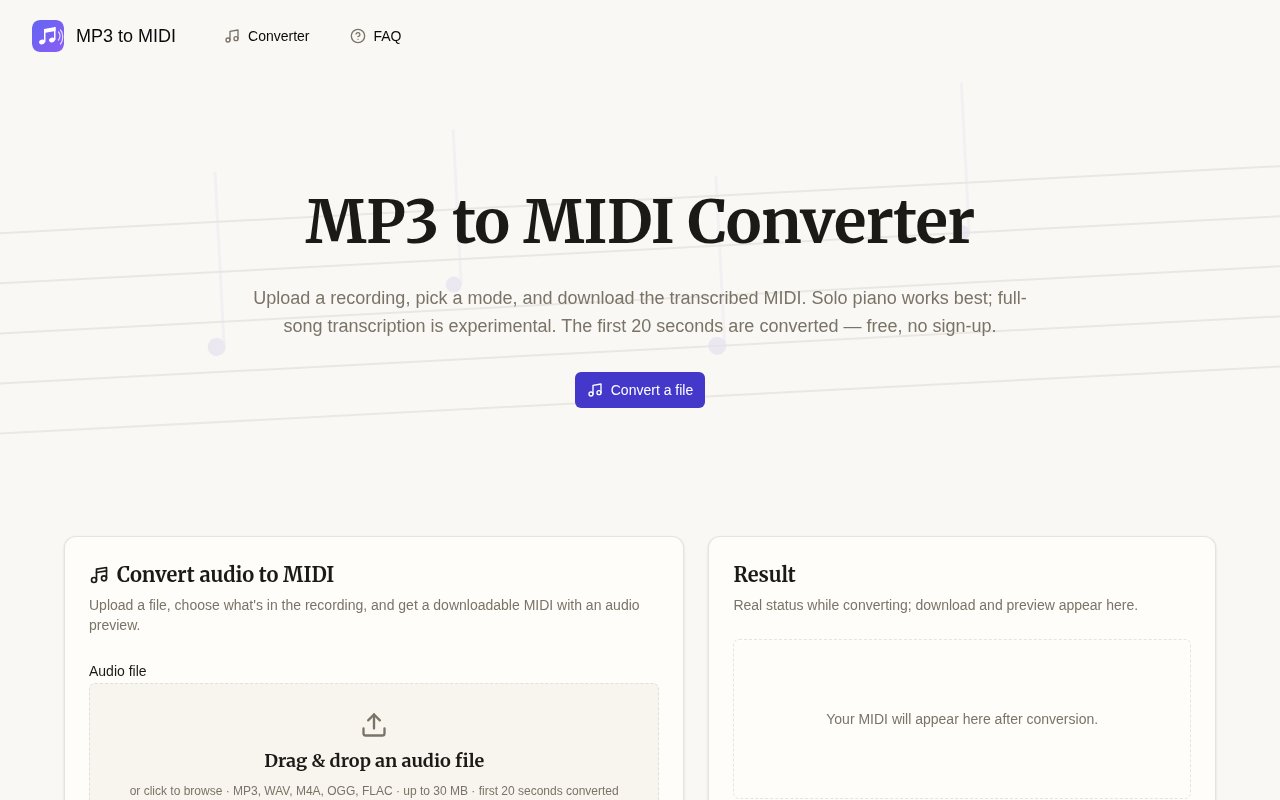
MP3 to MIDI Lab is a web tool that transcribes a short MP3 or WAV recording into a downloadable MIDI file. It is built for musicians who have audio but need note data they can edit, play in learning software, or use as the start of an arrangement. The workflow is deliberately small. A user uploads a file, chooses a transcription mode, waits for processing, listens to a rendered preview of the result, and downloads the MIDI if it is useful. There is no software to install and the current early trial doesn't require an account.
The tool offers two modes with different expectations. Piano mode uses a piano-focused model and is the dependable choice for a clean solo piano recording. Full song mode is an experimental option for mixed music and can put detected parts into separate MIDI tracks. Dense arrangements, drums, overlapping instruments, room noise, and heavy effects make audio transcription much harder, so the full-song result is best treated as rough material rather than finished notation. The site is unusually direct about that boundary and recommends solo piano when accuracy matters.
Every conversion is limited to the first 20 seconds of the uploaded file. If someone selects a longer recording, MP3 to MIDI Lab trims it and tells them on the result page instead of silently suggesting that the whole song was processed. A conversion generally takes around 30 to 60 seconds during the current trial. This makes the service better for testing a phrase, an intro, a short practice recording, or one musical idea than for converting an album track in a single pass. People working with a longer performance would need to prepare short excerpts before uploading and then manage the resulting clips themselves.
The output is a standard MIDI file rather than another audio format. MIDI represents detected notes, timing, and track information that compatible software can reinterpret with different instruments. That means the result can be opened in a digital audio workstation for rearranging, used in piano practice software such as Synthesia, or imported into notation software as a starting point for sheet music. The built-in audio preview renders the generated MIDI back into sound before download. The preview comes from the same generated note data that the user receives, so it is a meaningful listening check rather than a replay of the original upload. It doesn't prove that every note is correct, but it gives the user a quick way to hear whether the transcription captured the phrase well enough to continue. Editing happens after download in a compatible MIDI or notation application, since the current product doesn't advertise an on-page note editor.
Audio to MIDI conversion is inherently less certain than changing one audio container into another. An MP3 doesn't contain a clean list of notes, and several instruments can occupy the same frequency range at the same moment. MP3 to MIDI Lab therefore works best when the input gives its model one clear musical source. Even good piano results may need adjustments to note length, timing, velocity, or extra detected notes once they reach a MIDI editor. Experimental full-song output may also assign instruments incorrectly. The tool saves time by producing an editable first pass, not by promising a publication-ready score.
Uploads are processed by the service rather than remaining entirely on the user's device. The site says files and results are kept for about an hour and then deleted automatically. That short retention window is useful for ordinary musical sketches, but users should still upload only material they are allowed to process and should download a wanted result promptly. There is no persistent project library or account history in the current version. Someone who needs long-term storage, team review, precise manual editing, or confidentiality controls beyond the published deletion period will need to handle those needs in another application.
MP3 to MIDI Lab is free during its early test, with no sign-up. The published trial limit is 15 conversions per IP address each day, in addition to the 20-second cap on each conversion. No paid tier or permanent pricing has been announced, so free access should be viewed as the current beta posture rather than a promise about the final product. Within those limits, it is a practical way to test whether a short solo piano passage can become usable MIDI before committing to manual transcription. Its value is strongest as a quick bridge from an audio idea to an editable file, with clear warnings about where the automated result may need cleanup.
Key Features
- MP3 and WAV uploads
- Piano transcription mode
- Experimental full-song mode
- Rendered MIDI audio preview
- Standard MIDI downloads
- Automatic hourly file deletion
Pros & Cons
What we like
- Works without installing software or creating an account
- Piano mode is focused on clean solo recordings
- Audio preview helps assess the result before download
- Trimming and model limitations are stated clearly
Room for improvement
- Only the first 20 seconds are converted
- Full-song transcription remains experimental
- Conversions can take 30 to 60 seconds
- Uploaded files are processed on the service
Frequently Asked Questions
What is MP3 to MIDI Lab?
Is MP3 to MIDI Lab free?
What kind of audio works best?
How long are uploaded files kept?
Best For
Featured in
Alternatives to MP3 to MIDI Lab
View all
Suno
Generate full songs from a prompt, including vocals, lyrics, and all.

Stable Audio
Stability AI's text-to-audio model for generating original music and sound effects from a written prompt

Loudly
Berlin-based AI music platform for generating, customizing, and distributing 100% royalty-free tracks

Soundraw
AI music generator that builds royalty-free, fully customizable songs from a mood and genre in seconds
Our take
Tool Index Editorial · Sep 2026· 3.5/5
MP3 to MIDI Lab converts a short audio clip into editable MIDI through a simple browser workflow. It offers a piano-focused mode, an experimental full-song mode, and an audio preview rendered from the exact MIDI file before download. We found the limits commendably clear. The early service is free without an account, accepts common formats up to 30 MB, and deletes uploads and results after about an hour.
This is most useful for a piano phrase or musical sketch that needs a rough start in a DAW, notation editor, or practice app. Only the first 20 seconds are processed, conversions can take 30 to 60 seconds, and dense mixes often need extensive cleanup. Full-song track separation remains experimental, while even clean piano output may contain timing, duration, velocity, or extra-note errors.
Editorial opinion from the Tool Index team, written from the public product pages. Not a user review.
Reviews (0)
Badge builder
Add MP3 to MIDI Lab to your website
Choose a badge style and size, preview it here, then copy the generated HTML. Badge images are self-contained SVGs and do not require an external script.

<a href="https://toolindex.net/tools/mp3-to-midi-lab?ref=badge" target="_blank" rel="noopener">
  <img src="https://toolindex.net/badge/mp3-to-midi-lab/medium.svg" alt="MP3 to MIDI Lab - Listed on Tool Index" width="180" height="50" />
</a>How to use the badge
- 1. Pick the style, size, and theme that fit your layout.
- 2. Copy the generated HTML from the code block.
- 3. Paste it into your footer, homepage, or press page.
Standard badge available
The standard listing badge is available now. Score and circle badges are limited to tools currently ranked in the top 10 of a category.
Badge clicks return visitors to this profile with a referral tag so the source remains identifiable.
Related Tools
Soundraw
AI music generator that builds royalty-free, fully customizable songs from a mood and genre in seconds
Stable Audio
Stability AI's text-to-audio model for generating original music and sound effects from a written prompt
Suno
Generate full songs from a prompt, including vocals, lyrics, and all.

Boomy
Make original AI songs in seconds and distribute them to Spotify, Apple Music, and 40+ streaming platforms
Work on MP3 to MIDI Lab? Request listing access or correction