
Timeline Studio
Free browser video editor with local AI voiceover, captions and talking avatars
Gallery
About Timeline Studio
Timeline Studio is a video editor that runs entirely in a browser tab, with the AI parts running on your own machine rather than on somebody's GPU cluster. It handles multi-track timeline editing, generates voiceovers from text, transcribes audio into captions, animates a still portrait into a talking avatar, and exports finished video as MP4 or WebM. There's no account, no upload step, and no payment screen anywhere in it.
The interesting engineering choice is that inference happens locally through ONNX models the browser downloads and caches. Text to speech runs on Kokoro-82M, transcription runs on Whisper, and the talking avatar work runs on Live-Portrait, with the models pulled from HuggingFace on first use and stored in browser storage afterward. Execution goes through WebGPU where the hardware supports it and falls back to WebAssembly where it doesn't. There's a settings panel for checking browser support and clearing the model cache when it fills up, which you'll want, because these models aren't small and the first run of any given feature involves a real download. After that they're cached, so the cost is paid once per feature rather than once per generation.
The practical payoff is privacy and cost at the same time. Your footage never leaves the machine, because there's no server to send it to, and that's also why the tool can be free without a credit card or a usage meter. Anyone who has hit a monthly cap on a hosted AI video tool, or hesitated before uploading client footage to a service whose data policy they hadn't read, will recognize what that buys. The same architecture means it works offline once the models are cached. It's a genuinely different bargain from the hosted tools. Rather than paying a subscription so that somebody else's GPU does the work, you spend one download and then your own hardware does it indefinitely, for nothing.
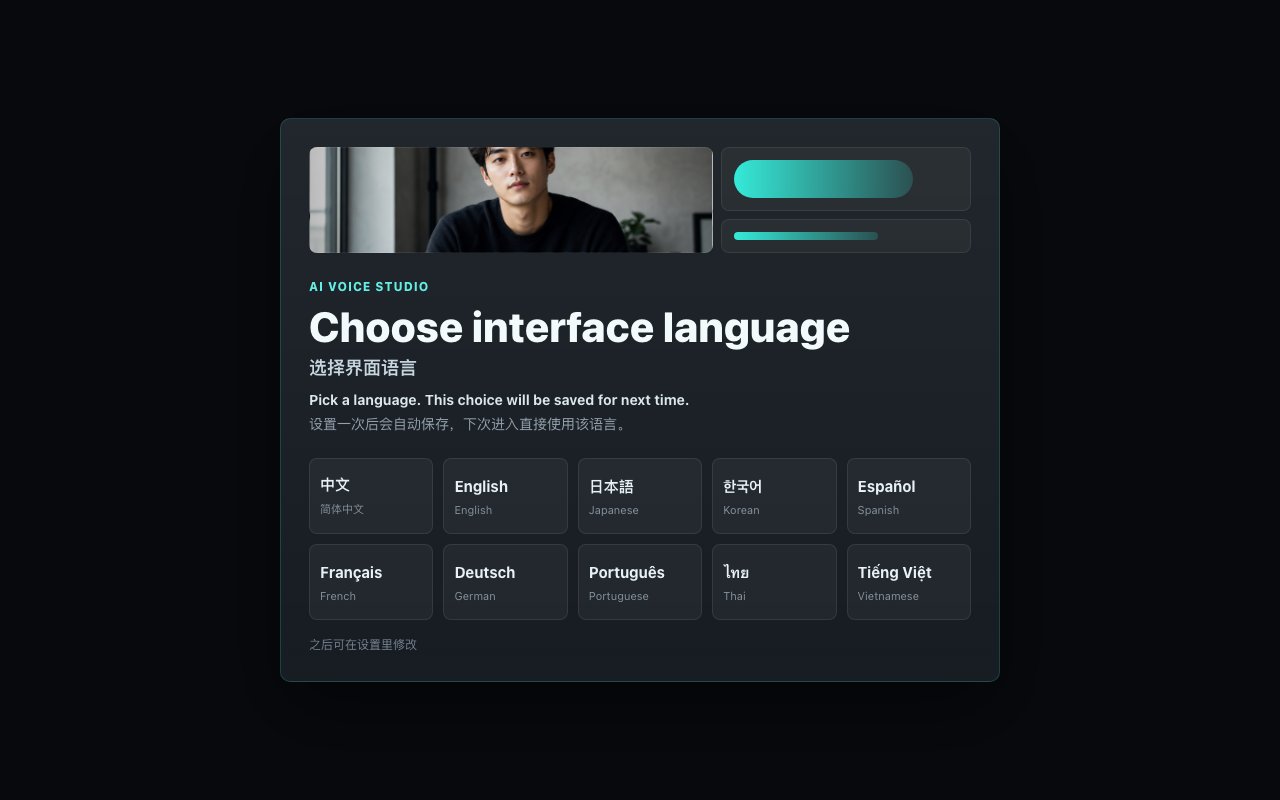
Feature coverage is broader than the browser-based framing suggests. Beyond the timeline, there's AI vocal separation for pulling voice off a backing track, waveform analysis, audio reverse, background music, recording straight to a voiceover track, caption styling with lip-sync alignment, effects, stickers, transitions, and vision analysis for a clip or a still. The interface ships in ten languages including English, Chinese, Japanese, Korean, Spanish, French, German, Portuguese, Thai, and Vietnamese. It's installable as a progressive web app with a standalone window and a shortcut that opens straight into voiceover editing. That breadth is itself a fair signal of intent, since a thrown-together shell would have stopped at one headline feature rather than shipping vocal separation and lip-sync alignment.
Two clarifications matter before anyone tries it, and both come from checking rather than from the marketing. The first is the name. There's an unrelated project also called Timeline Studio from chatman-media, which is a Tauri desktop application distributed through GitHub under MIT with a Commons Clause. This is not that. This one is a browser app with no public repository and no license statement, so despite what some listings say, it shouldn't be treated as open source. It's free, which is a different thing. The second is the address, since it lives on a subdomain of ai-creator.top, a hub of free browser-based AI image and audio tools. The throwaway-looking domain undersells what's actually there, because the app itself is substantial and genuinely works. The bundle is over a megabyte of real application code wired to real models, which isn't what a scraped landing page looks like underneath.
The honest limits follow from the design. Local inference means your laptop is doing the work, so quality and speed depend on your hardware, and a machine without WebGPU will fall back to WASM and feel it. Browser-side export won't match a native editor on long or complex timelines, and model downloads make the first run of each feature slow. There's no cloud project storage, so work lives in the browser session, and generated voiceovers are saved there rather than in an account you can log into from another device. This isn't a replacement for a professional NLE on a feature film.
For its actual audience, though, the trade lands well. Someone making short social video, a voiceover for a demo, captions for a clip, or a talking-head explainer can do the whole job in a tab without signing up or paying, and without any of it touching a server. Given that the comparable hosted tools charge monthly and meter generations, a free local-first editor that covers voiceover, captions, avatars, and export is worth an hour of anyone's evaluation, provided they go in knowing it's free rather than open source and that the first run of each model takes a moment.
Key Features
- Multi-track browser timeline editing
- Local AI voiceover with Kokoro TTS
- Automatic captions via local Whisper
- Talking avatar from a still portrait
- Browser-side MP4 and WebM export
- AI vocal separation and audio tools
Pros & Cons
What we like
- Completely free with no account or payment screen
- Footage never leaves your machine because there's no server
- Works offline once the models are cached
- Installable as a PWA in ten interface languages
Room for improvement
- Speed and quality depend on your own hardware
- First run of each feature downloads a sizable model
- No cloud project storage, so work lives in the browser
- No public repository or license despite open-source claims elsewhere
Frequently Asked Questions
What is Timeline Studio?
Is Timeline Studio free?
Is Timeline Studio open source?
Does my video get uploaded anywhere?
Best For
Featured in
Alternatives to Timeline Studio

Apatero AI
The creator studio for AI image, video, audio, 3D, and avatars, now at apatero.ai.
Apatero Studio
Creator studio for AI image, video, audio, 3D, and avatars. Every model worth using, in one workspace.

Melodex
Turn your idea into an AI-generated music video

Speel
AI UGC video generator that makes realistic AI avatars hold and talk about your product for ads
Reviews (11)
Exactly what I needed
Started using Timeline Studio casually, now it is pinned in my dock. Setup was painless and I was productive the same day. Performance has been steady even when I lean on it hard.
Good, with a few caveats
Hadn't planned on switching, but Timeline Studio was hard to ignore. Setup was painless and I was productive the same day. The interface stays out of my way, which I appreciate. Mostly using it for making a talking avatar from one portrait. It would be a five if not for speed and quality depend on your own hardware.
Genuinely impressed
Came to Timeline Studio after getting frustrated with what I had before. It slotted into my routine without much fuss. The defaults are sensible, so I was not fighting settings on day one. Would sign up again without thinking twice.
Recommended without reservation
Started using Timeline Studio casually, now it is pinned in my dock. The completely free with no account or payment screen is more useful than I expected. The core workflow is smooth once you are set up. It fits well for editing client footage without uploading it anywhere. Recommending it to people in a similar spot.
It just works
Picked Timeline Studio for the price, stayed for the quality. Got real value out of completely free with no account or payment screen. Mostly using it for editing client footage without uploading it anywhere. No regrets so far.
Solid daily driver
Found Timeline Studio on a Show HN thread and I am glad I clicked. Got real value out of local ai voiceover with kokoro tts. Mostly using it for adding captions to a short social clip. Easy yes for anyone weighing the same trade offs.
It just works
Found Timeline Studio on a Show HN thread and I am glad I clicked. Where it really wins is multi-track browser timeline editing. Found it works best for editing client footage without uploading it anywhere. Would sign up again without thinking twice.
Finally something that fits
Timeline Studio solves a real problem for me without making a fuss about it. Performance has been steady even when I lean on it hard. Found it works best for generating a voiceover without a subscription.
Good, with a few caveats
Timeline Studio solves a real problem for me without making a fuss about it. Where it really wins is completely free with no account or payment screen. My only gripe is no cloud project storage, so work lives in the browser. Would sign up again without thinking twice.
Genuinely impressed
Have been running Timeline Studio for a while, here is where I land. The thing I keep coming back to is how reliable it is. The defaults are sensible, so I was not fighting settings on day one. It fits well for making a talking avatar from one portrait. Glad I made the switch.
It just works
Started using Timeline Studio casually, now it is pinned in my dock. Where it really wins is installable as a pwa in ten interface languages.
Badge builder
Add Timeline Studio to your website
Choose a badge style and size, preview it here, then copy the generated HTML. Badge images are self-contained SVGs and do not require an external script.

<a href="https://toolindex.net/tools/timeline-studio?ref=badge" target="_blank" rel="noopener">
  <img src="https://toolindex.net/badge/timeline-studio/medium.svg" alt="Timeline Studio - Listed on Tool Index" width="180" height="50" />
</a>How to use the badge
- 1. Pick the style, size, and theme that fit your layout.
- 2. Copy the generated HTML from the code block.
- 3. Paste it into your footer, homepage, or press page.
Standard badge available
The standard listing badge is available now. Score and circle badges are limited to tools currently ranked in the top 10 of a category.
Badge clicks return visitors to this profile with a referral tag so the source remains identifiable.
Related Tools
Apatero AI
The creator studio for AI image, video, audio, 3D, and avatars, now at apatero.ai.

LocalClip
Local-first AI video clipper for Mac that turns long videos into vertical clips
Melodex
Turn your idea into an AI-generated music video
Apatero Studio
Creator studio for AI image, video, audio, 3D, and avatars. Every model worth using, in one workspace.
Work on Timeline Studio? Request listing access or correction