Last month, we built an AI agent that checks competitor pricing pages every morning at 8am, summarizes what changed, and drops a Slack message before anyone's had coffee. Costs $24/month to run. A junior analyst doing the same work? $4,000/month. And they'd probably miss things.
That's the promise of AI agents in 2026. Autonomous software that plans, reasons, uses tools, and finishes multi-step tasks without babysitting.
This isn't another "what are AI agents?" explainer. We're building that competitor price monitor from scratch. Something you can deploy today.
The Seven Layers of an AI Agent Stack
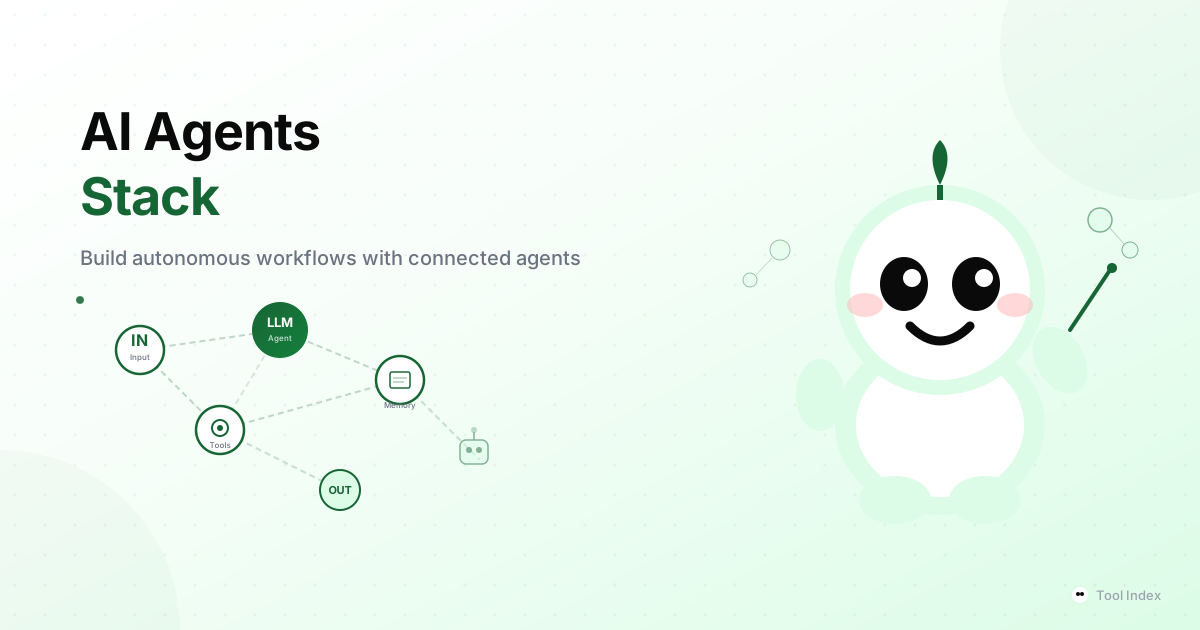
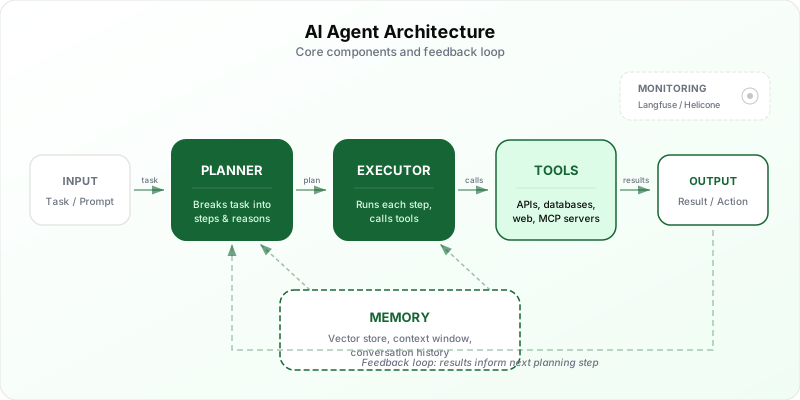
Think of an AI agent like a new hire. It needs a brain, instructions, tool access, memory, someone watching it, a place to work, and a manager to approve the important stuff. Seven layers. Miss one and the whole thing falls apart.
| Layer | Purpose | Our Pick | Alternatives |
|---|---|---|---|
| 1. Orchestration | Defines workflow logic, chains steps | n8n | Langflow, CrewAI |
| 2. LLM Backbone | The "brain" that reasons | GPT-4o + GPT-4o-mini | Claude Sonnet, Ollama |
| 3. Tool Connections | Lets the LLM call external services | MCP Servers | Custom function calling |
| 4. Memory | Stores context across runs | ChromaDB | Pinecone, Weaviate |
| 5. Monitoring | Tracks costs, failures, quality | Langfuse | Helicone |
| 6. Deployment | Runs the agent reliably | n8n Cloud / Docker | Railway, Fly.io |
| 7. Human-in-the-Loop | Approval gates for actions | Slack approvals | Email confirmations |
Layer 1: Orchestration
The conductor directing the orchestra. This layer defines what your agent actually does - step by step, including branching logic, error handling, and retry policies.
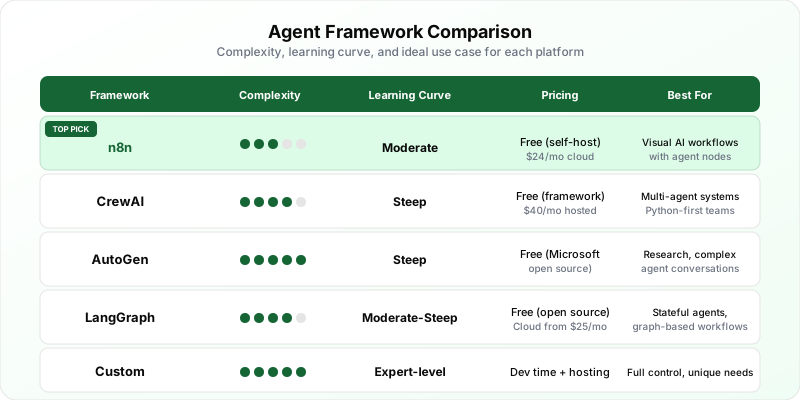
n8n (our pick for most people)
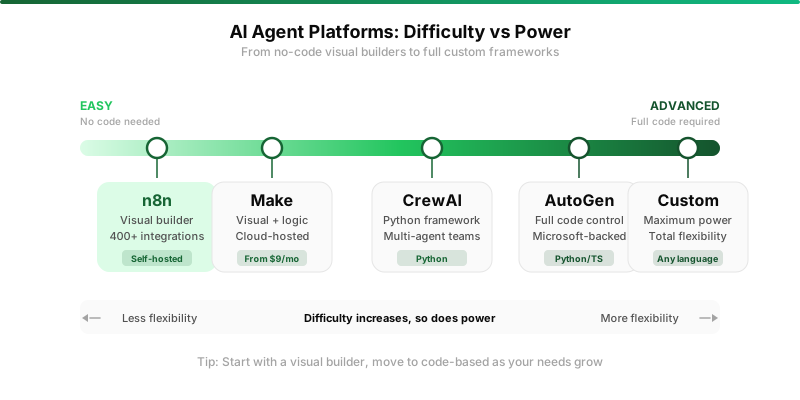
We've tested every major orchestration platform. n8n wins for one simple reason: it's the only tool that lets non-engineers build real AI agents visually while giving engineers full code access when needed.
The AI agent nodes, added in late 2025, support tool-calling natively. Your agent decides which tools to use, loops through data, handles conditions, even calls other agents as sub-workflows.
For our competitor price monitor, the self-hosted version on a $5/month VPS handles everything with room to spare. The 400+ integrations cover Slack, email, databases, HTTP requests, and most SaaS tools you'd want.
LangGraph and CrewAI
LangGraph gives you a Python-native graph-based framework for agent workflows. More powerful than n8n for complex multi-agent systems, but requires real programming skills.
CrewAI takes a different approach: you define "agents" with distinct roles (researcher, writer, critic) that collaborate. Elegant for certain problems. Overkill for most single-agent workflows.
Unless you're building something with three or more agents that need to coordinate, n8n gives you 90% of the capability with 20% of the complexity. Start there.
Layer 2: LLM Backbone
Your agent needs a brain. And here's the dirty secret: 80% of your LLM calls don't need the best model. They need a fast, cheap one. The trick is knowing which 20% needs the expensive model.
| Model | Cost (per 1M tokens, in/out) | Best Agent Use Case |
|---|---|---|
| GPT-4o | $2.50 / $10.00 | Final reasoning, complex decisions, output generation |
| GPT-4o-mini | $0.15 / $0.60 | Routing, classification, data extraction, parsing |
| Claude 3.5 Sonnet | $3.00 / $15.00 | Long context analysis, coding tasks, nuanced reasoning |
| Claude 3.5 Haiku | $0.80 / $4.00 | Fast classification, simple tool calls |
| Llama 3.3 70B (Ollama) | Free (hardware costs) | Privacy-sensitive workflows, no API dependency |
In our price monitor, we use GPT-4o-mini for extraction (pulling prices from HTML - simple pattern matching) and GPT-4o for the summary (writing the Slack message with analysis). This two-model approach cuts API costs by about 65%.
For local inference with Ollama, you'll need 16GB+ RAM for 7B models or 32GB+ for 70B. Zero API costs, total privacy. But slower, less capable, and you maintain everything yourself.
Layer 3: Tool Connections (MCP)
The Model Context Protocol, introduced by Anthropic in late 2024, has become the USB-C of AI. A universal protocol that lets any LLM talk to any tool.
Before MCP, connecting an LLM to your database or Slack meant writing custom code for each one. Now you spin up an MCP server that exposes tools like create_event or query_database, and any MCP-compatible LLM can use them.
The official repository already has servers for GitHub, Slack, PostgreSQL, Google Drive, and dozens more. n8n supports MCP natively in its AI agent nodes as of early 2026.
This layer is what turns a chatbot into an agent. Without tools, your LLM can only think and talk. With tools, it can act.
Layer 4: Memory and Vector Stores
Without memory, your agent has amnesia. Every run starts from zero.
ChromaDB is where you should start. Full stop. It runs in-process with Python, requires literally zero setup (pip install, done), and handles up to about a million vectors on a single machine.
For our price monitor, ChromaDB stores historical pricing so the agent can include context like "This is the third time Competitor X has dropped this price in 30 days." That's what makes summaries useful instead of just data dumps.
When you outgrow it - and you probably won't for a while - Pinecone offers managed cloud storage from $70/month. Weaviate is the pick for hybrid search (vector + keyword). Both are unnecessary until you're dealing with multi-user access or datasets north of a million vectors.
Layer 5: Monitoring
Here's what nobody tells you about AI agents: they fail silently. An agent that hallucinated a competitor's price last Tuesday will happily send you a confident Slack message with wrong data.
Langfuse (our pick)
Open-source LLM observability. Traces every step: which tools were called, LLM inputs/outputs, latency, token usage, cost. When something breaks, you replay the entire execution chain and see exactly where.
Free to self-host. Cloud has a free tier at 50K observations/month. Pro from $59/month. It integrates with everything - LangChain, OpenAI SDK, Anthropic SDK, n8n.
Helicone is the simpler alternative: a proxy you route API calls through. Less granular but trivially easy to set up. Free for 100K requests/month, $20/month for unlimited.
Layer 6: Deployment
Your agent needs to run somewhere. For scheduled agents like our price monitor (runs at 8am daily), a Docker container on a $5/month VPS is plenty. For event-triggered agents, you need something always-on.
n8n Cloud handles deployment for you at $24/month. Self-hosted Docker on a $5 Hetzner VPS runs n8n, ChromaDB, and Langfuse simultaneously. Railway and Fly.io offer push-to-deploy at $5-10/month.
Layer 7: Human-in-the-Loop
Non-negotiable for any agent that takes real-world actions. Sending emails, posting to social media, modifying databases, spending money. An agent without approval gates is a liability waiting to happen.
n8n has a built-in "Wait for approval" node. Pauses the workflow, sends a Slack notification. Resumes only when a human clicks approve. We use it for aggressive agents (auto-responding to support tickets) but skip it for read-only ones like the price monitor.
Rule of thumb: if the agent can break something or annoy a customer, add an approval gate.
Real Example: Competitor Price Monitor Agent
Let's build the agent from the intro. This is a real workflow we run in production, slightly simplified.
The architecture is straightforward: n8n Cron triggers at 8am. HTTP Request fetches competitor pages (or ScrapingBee at $49/month for JavaScript-rendered pages). GPT-4o-mini extracts prices from raw HTML. A Code node compares against yesterday's data in Postgres. Another saves today's prices. GPT-4o writes the summary. Slack node sends it.
The summary looks something like: "Competitor X dropped Widget Pro from $49 to $39 (20% decrease). Second price cut in 14 days. Competitor Y is now out of stock on Gadget Plus, their best seller for three months."
The historical context from ChromaDB is what makes these actually useful.
| Component | Monthly Cost |
|---|---|
| n8n Cloud (Starter) | $24 |
| OpenAI API (~30 daily runs) | ~$0.50 |
| ScrapingBee (if needed) | $49 |
| Slack | Free |
| Total | $24-$74/month |
When You Should NOT Build an AI Agent
If you haven't automated the basics yet - still manually copying data between spreadsheets - start with simple Make or Zapier automations first. Agents add complexity. Make sure the simple solutions aren't enough.
If you need 100% accuracy, proceed with extreme caution. Agents hallucinate. Confidently. If a wrong output causes legal or financial damage, add heavy guardrails or stick with deterministic code.
If your data is highly sensitive, sending customer PII through third-party APIs requires careful compliance review. That's where Ollama and local models earn their keep.
The Recommendation
For your first agent: n8n for orchestration, GPT-4o-mini as primary LLM with GPT-4o for final output, ChromaDB for memory, Langfuse for monitoring. Under $50/month on cloud. Free if self-hosted.
Build one agent. Get it running reliably. Watch it for two weeks. Then build the next one.
The teams that fail at agents are the ones who try to build five at once before any of them work properly. Complexity is the enemy of shipping.
Browse AI automation tools and our full directory to find the right building blocks for your stack.