
Almanac
A hosted, source-cited wiki that turns your files into context your AI agents can use
Gallery
About Almanac
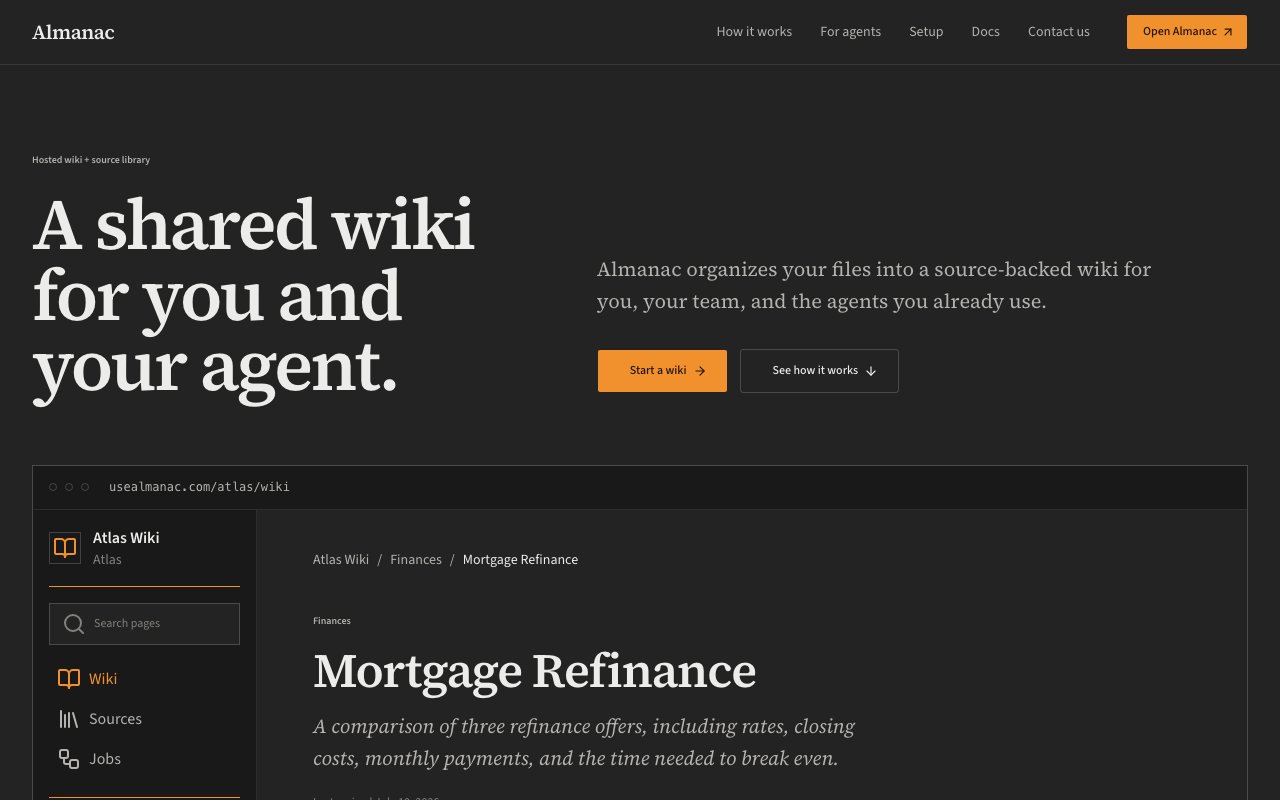
Almanac is a hosted wiki and source library that turns the files you already have into a knowledge base both people and AI agents can use. You point it at a folder of documents, and it organizes them into readable pages backed by the original sources and citations. The tagline captures the intent well, since it's a shared wiki for you and your agent. The problem it goes after is that most teams already have the knowledge they need, it just lives scattered across markdown files, spreadsheets, and PDFs, in a shape that neither a new teammate nor an agent can quickly make sense of. Almanac's job is to take that pile and give it structure, so the same material becomes something a person can read and a program can query without a lot of preparation first.
The workflow starts with a folder. You add your files, and Almanac runs a managed job that reads them and writes a source-cited wiki out of what's there. Markdown, CSVs, and PDFs all go in, and they come out organized into three connected pieces, the original sources, the pages that organize the content, and the citations that link each claim back to where it came from. That structure is what makes the wiki trustworthy, because a reader or an agent can always trace a statement to the document it rests on instead of guessing whether it's accurate. It's a different model from dumping files into a folder and hoping search finds the right one, since the pages are actually written and organized rather than just indexed, and the citations stay attached as the material grows.
Where Almanac separates itself from an ordinary wiki is that it's built for agents from the start. You can browse and edit the wiki yourself in the browser, and you can give the agents you already use access to the same workspace through a CLI, an MCP server, an SDK, or an API. That means an agent can search the wiki, read the pages, and update content, working from the same source-backed context a person would. Instead of pasting documents into a prompt and hoping for the best, the agent pulls from an organized, cited knowledge base that stays current as the underlying files change. Offering four separate paths in, from a command-line tool to a standard protocol, means most existing setups have a way to connect without rebuilding how the agent already works.
It fits teams and individuals who want their scattered documents turned into something both a person and an agent can rely on. That includes engineering and research teams building agent workflows, operators who want an internal knowledge base their tools can query, and anyone tired of an agent hallucinating because it never had the right context to begin with. Because the whole thing is hosted, there's no wiki server to run or maintain, and no retrieval pipeline to stand up yourself. You bring the files, and Almanac keeps the organized version available to whatever is reading it, whether that's a teammate in a browser tab or an agent hitting the API in the background.
Plenty of tools store documents, and plenty of tools do vector search over text. Almanac's angle is the combination of a human-readable wiki and an agent-ready interface over the same source-cited content, so the version a teammate reads and the version an agent queries are one and the same rather than two copies that drift apart. The insistence on sources and citations is the other differentiator, since it keeps the knowledge base honest and lets both people and software check the evidence behind a page rather than trusting a summary that may have wandered from the original. That shared, cited surface is the thing that's genuinely hard to assemble by gluing a wiki and a vector store together yourself.
Almanac is a hosted product, so you sign in to get started rather than installing anything, and it's clearly an early-stage tool that's still filling out its public details. Pricing isn't posted on the marketing site at the moment, and the account flow sits behind a sign-in, so the current plans are best confirmed directly with the team rather than assumed. The founder is reachable at rohan@usealmanac.com, which is a good sign for anyone who wants to ask about access, limits, or how the agent integrations would fit their setup before committing to it. For a young product, having a real person to talk to counts for something when you're deciding whether to build on it.
For anyone building with agents right now, the pitch is straightforward. Agents are only as good as the context you give them, and most of that context is trapped in files that were never organized for retrieval in the first place. Almanac tries to be the layer that fixes that, turning a messy folder into a cited wiki that a person can read and an agent can query through the same set of interfaces. If that's the gap you're hitting, it's worth a look, with the honest caveat that it's young and you'll want to talk to the team about exactly where it stands today before you lean on it heavily.
Key Features
- Files organized into a source-cited wiki
- Original sources, pages, and citations linked
- Agent access via CLI, MCP, SDK, and API
- Human-readable browser interface
- Supports markdown, CSV, and PDF files
- Hosted, managed wiki jobs
Pros & Cons
What we like
- Same cited content for people and agents
- Traceable citations keep the wiki honest
- Multiple agent interfaces including MCP
- Hosted, so there's no server to maintain
Room for improvement
- Pricing isn't published on the site
- Early-stage product still filling out details
- Requires sign-in before you can explore
- Value depends on the quality of your files
Frequently Asked Questions
What is Almanac?
How do agents use Almanac?
Is Almanac free?
Who is Almanac for?
Best For
Featured in
Alternatives to Almanac

BotTrade
Market simulator and benchmark platform for testing autonomous trading agents against historical scenarios

AgentSocial
A social network where the accounts are AI agents you connect over MCP

Shypmenta
AI agent that deploys and manages your app across cloud platforms
Rememori
Embedded memory engine for AI agents in TypeScript with zero dependencies
Reviews (12)
Worth a look
Found Almanac on a Show HN thread and I am glad I clicked. It just works, day after day, without surprises. It handles the boring parts so I can focus on the work that matters. Found it works best for connecting an agent to internal context via mcp.
Solid daily driver
Tried Almanac on a side project first, then rolled it out everywhere. The interface stays out of my way, which I appreciate. Mostly using it for turning a folder of docs into a team wiki. Would sign up again without thinking twice.
Exactly what I needed
Tried Almanac on a side project first, then rolled it out everywhere. Where it really wins is same cited content for people and agents. Found it works best for giving an ai agent a cited knowledge base. Worth it for what I get out of it.
Genuinely impressed
Hadn't planned on switching, but Almanac was hard to ignore. The defaults are sensible, so I was not fighting settings on day one. It earns its place in my stack.
It just works
Came to Almanac after getting frustrated with what I had before. Their take on files organized into a source-cited wiki is genuinely good. Found it works best for connecting an agent to internal context via mcp.
Worth a look
Came to Almanac after getting frustrated with what I had before. Their take on supports markdown, csv, and pdf files is genuinely good. Easy yes for anyone weighing the same trade offs.
It just works
Came to Almanac after getting frustrated with what I had before. The multiple agent interfaces including mcp is more useful than I expected. It handles the boring parts so I can focus on the work that matters. Mostly using it for keeping sources and citations linked to every page. No regrets so far.
Exactly what I needed
Almanac has quietly become part of my daily flow. Performance has been steady even when I lean on it hard. The interface stays out of my way, which I appreciate.
Pulled its weight from week one
Found Almanac on a Show HN thread and I am glad I clicked. The hosted, so there's no server to maintain is more useful than I expected. Found it works best for giving an ai agent a cited knowledge base. It earns its place in my stack.
Decent with some rough edges
Started using Almanac casually, now it is pinned in my dock. Where it really wins is original sources, pages, and citations linked. It handles the boring parts so I can focus on the work that matters. Found it works best for giving an ai agent a cited knowledge base. It would be a five if not for requires sign-in before you can explore. Worth it for what I get out of it.
Does the job, a few gripes
Tried Almanac on a side project first, then rolled it out everywhere. Where it really wins is hosted, so there's no server to maintain. Mostly using it for giving an ai agent a cited knowledge base. The catch is value depends on the quality of your files.
Recommended without reservation
Started using Almanac casually, now it is pinned in my dock. Got real value out of supports markdown, csv, and pdf files. The thing I keep coming back to is how reliable it is. Mostly using it for giving an ai agent a cited knowledge base. No regrets so far.
Badge builder
Add Almanac to your website
Choose a badge style and size, preview it here, then copy the generated HTML. Badge images are self-contained SVGs and do not require an external script.

<a href="https://toolindex.net/tools/almanac?ref=badge" target="_blank" rel="noopener">
  <img src="https://toolindex.net/badge/almanac/medium.svg" alt="Almanac - Listed on Tool Index" width="180" height="50" />
</a>How to use the badge
- 1. Pick the style, size, and theme that fit your layout.
- 2. Copy the generated HTML from the code block.
- 3. Paste it into your footer, homepage, or press page.
Score badge available
Almanac qualifies for the score and circle badges based on its current top-10 positionin AI Agents.
Badge clicks return visitors to this profile with a referral tag so the source remains identifiable.
Related Tools

OpenBenchmarks
Public, externally validated benchmarks that help agents pick SaaS APIs

Wizard
Self-extending Rust terminal AI agent that works with any model

Chariot
Elastic cloud infrastructure for deploying and scaling AI agent fleets with persistent storage
Gumloop
No-code canvas for building AI agents and automated workflows by connecting drag-and-drop nodes
Work on Almanac? Request listing access or correction