
Capsule
Send files with a short link, no accounts, optional end-to-end encryption, gone in an hour
Gallery
About Capsule
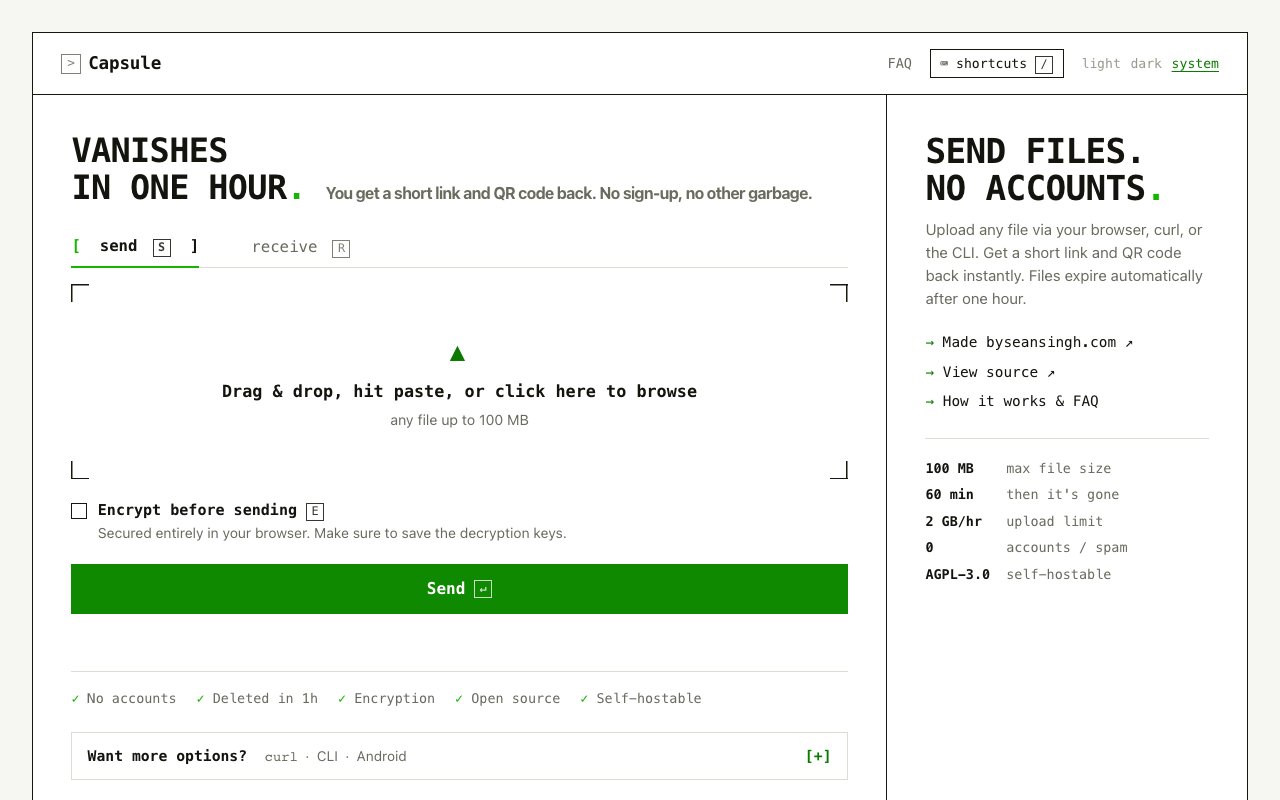
Capsule is a file-sharing tool built around one simple promise. You drop in a file, you get back a short link and a QR code, and the file is gone in an hour. There are no accounts, no sign-up, and no inbox full of share notifications, just a link you hand to someone before it quietly expires. It sits somewhere between a pastebin and a full file host, close to the ease of a temporary link but with real encryption underneath the moment you ask for it. For anyone who has emailed a file to themselves just to move it between machines, or spun up a whole cloud bucket for a single one-time transfer, it's the lighter option that does one job and then forgets about it.
The workflow is deliberately bare. The web app has a send mode and a receive mode, and to send you drag and drop a file, paste it, or click to browse, after which Capsule uploads it and hands back a link plus a scannable code. File IDs read as three little words, something like duck-view-time, so they're easy to say out loud or type on another device, and to receive you just enter that phrase on the receive screen. Keyboard shortcuts cover the common actions so you can move without reaching for the mouse, and the interface follows a light, dark, or system theme so it fits wherever you open it.
The limits are the point rather than an afterthought. Uploads cap at 100 MB per file with a 2 GB per hour ceiling, and everything is deleted automatically after sixty minutes with no backups, so recovery is impossible once the window closes. That makes Capsule a bad choice for anything you need to keep and a good one for a quick handoff you'd rather not leave sitting on someone's server forever. The short lifetime is a feature, not a compromise, because nothing lingers to be indexed, leaked, or dug up later. If a transfer matters for the next few minutes and not the next few years, that expiry is doing exactly what you want.
What sets it apart is optional end-to-end encryption that runs entirely in your browser. Flip the encrypt toggle before sending and the file is scrambled on your device before anything leaves it, so the server only ever stores the ciphertext and a boolean flag noting the file is encrypted. It never sees your key or your plaintext, which is what makes this a genuinely zero-knowledge design rather than a promise about how the operator behaves. In exchange you're handed a recovery phrase you have to save, because without it the file genuinely cannot be recovered, and that's the honest cost of holding the only key yourself.
The encryption is standard rather than homegrown, which is the reassuring part. Capsule uses the age v1 format with a scrypt passphrase recipient and ChaCha20-Poly1305 authenticated encryption, and the key material is a 12-word BIP39 mnemonic generated locally from 128 bits of entropy. Because it's plain age ciphertext with no proprietary wrapper, a file encrypted in the browser can be decrypted by the command-line tool and the other way around, so you're not locked into one client or one vendor's format. Beyond the encrypted bytes the server keeps only the filename and size, nothing more, so there's little there to expose even before you factor in the encryption. Even if someone got hold of the storage, there's no key sitting next to the data to find, and encryption stays opt-in so the plain flow keeps moving fast for files you don't care about.
Capsule isn't only a web page. You can upload straight from the terminal with a one-line curl command against its upload endpoint, install a proper CLI on macOS, Linux, or Windows through a short install script, or use the Android app, and package managers are supported too. That suits developers who want to move a file off a server or out of a script without opening a browser at all, and the same short links and browser-grade encryption work across every client, so a file dropped from curl can be pulled back down in a browser and a phrase read off one screen types cleanly into another. It's the same small tool wearing whatever interface the moment calls for.
Being open source under AGPL-3.0 is more than a license badge here. The source for the server and the Android client is public on GitHub under the withcapsule organization, so you can read exactly what happens to a file, confirm that encryption really runs before upload, and check the retention behavior for yourself rather than taking it on faith. The hosted service, made by Sean Singh, is free with no account, and if you'd rather not trust a shared instance you can self-host your own on infrastructure you control, keeping even the ciphertext off a stranger's server. If you need long-lived links, huge files, or team management, that narrow focus is the tradeoff, but for quick, disappearing, optionally encrypted transfers it does exactly what it says.
Key Features
- No accounts, no sign-up
- Short link plus QR code
- Browser-based end-to-end encryption
- Automatic deletion after one hour
- curl, CLI, and Android upload
- AGPL-3.0 and self-hostable
Pros & Cons
What we like
- Send a file in seconds, no login
- Client-side encryption the server can't read
- Open source and self-hostable
- Standard age encryption, cross-client compatible
Room for improvement
- 100 MB cap per file
- Links vanish after sixty minutes
- Lose the phrase and the file is gone
- Not built for team management
Frequently Asked Questions
What is Capsule?
Is Capsule encrypted?
Is Capsule free?
What are the limits?
Best For
Featured in
Alternatives to Capsule

1Password
Password and secrets manager for individuals, families, and developer teams with strong CLI and SSH agent support.
Clerk
Drop-in authentication and user management for modern apps

Tailscale
WireGuard-based mesh VPN that connects your devices, servers, and cloud resources into one private network in minutes.

BackPedal
UK bike theft protection that sends recovery agents after your stolen bike
Reviews (7)
Powerful once it clicks
Have been running Capsule for a while, here is where I land. The automatic deletion after one hour is more useful than I expected. Support actually answered when I had a question, which surprised me. Found it works best for moving a file off a server with curl. My only gripe is 100 mb cap per file.
Powerful once it clicks
Picked Capsule for the price, stayed for the quality. What stands out is how it handles send a file in seconds, no login. Setup was painless and I was productive the same day. It would be a five if not for lose the phrase and the file is gone. Worth it for what I get out of it.
Pulled its weight from week one
Three months of Capsule later, here is what holds up. The output quality holds up better than I expected. It has shaved real time off my week. Glad I made the switch.
Finally something that fits
Tried Capsule on a side project first, then rolled it out everywhere. The thing I keep coming back to is how reliable it is. Worth it for what I get out of it.
Pulled its weight from week one
Three months of Capsule later, here is what holds up. What stands out is how it handles client-side encryption the server can't read. Easy yes for anyone weighing the same trade offs.
Powerful once it clicks
Capsule has quietly become part of my daily flow. Got real value out of automatic deletion after one hour. Mostly using it for self-hosting a private, ephemeral drop box. My only gripe is lose the phrase and the file is gone. Recommending it to people in a similar spot.
Genuinely impressed
Hadn't planned on switching, but Capsule was hard to ignore. The thing I keep coming back to is how reliable it is. It does what it says, which is rarer than it should be. It fits well for self-hosting a private, ephemeral drop box. It earns its place in my stack.
Badge builder
Add Capsule to your website
Choose a badge style and size, preview it here, then copy the generated HTML. Badge images are self-contained SVGs and do not require an external script.

<a href="https://toolindex.net/tools/capsule?ref=badge" target="_blank" rel="noopener">
  <img src="https://toolindex.net/badge/capsule/medium.svg" alt="Capsule - Listed on Tool Index" width="180" height="50" />
</a>How to use the badge
- 1. Pick the style, size, and theme that fit your layout.
- 2. Copy the generated HTML from the code block.
- 3. Paste it into your footer, homepage, or press page.
Standard badge available
The standard listing badge is available now. Score and circle badges are limited to tools currently ranked in the top 10 of a category.
Badge clicks return visitors to this profile with a referral tag so the source remains identifiable.
Related Tools
Clerk
Drop-in authentication and user management for modern apps

DomeSOC
Autonomous SOC that grades every AI claim against evidence before it reaches an analyst
Reel
Forensic evidence capture for regulated Kubernetes, plus a free open-source VEX hub

HeimWall
Menu bar app that catches secrets and PII before you paste them into AI coding tools
Work on Capsule? Request listing access or correction