Caption and Cut
Cuts pauses and filler words out of short videos and burns in word-highlighted captions
Gallery
About Caption and Cut
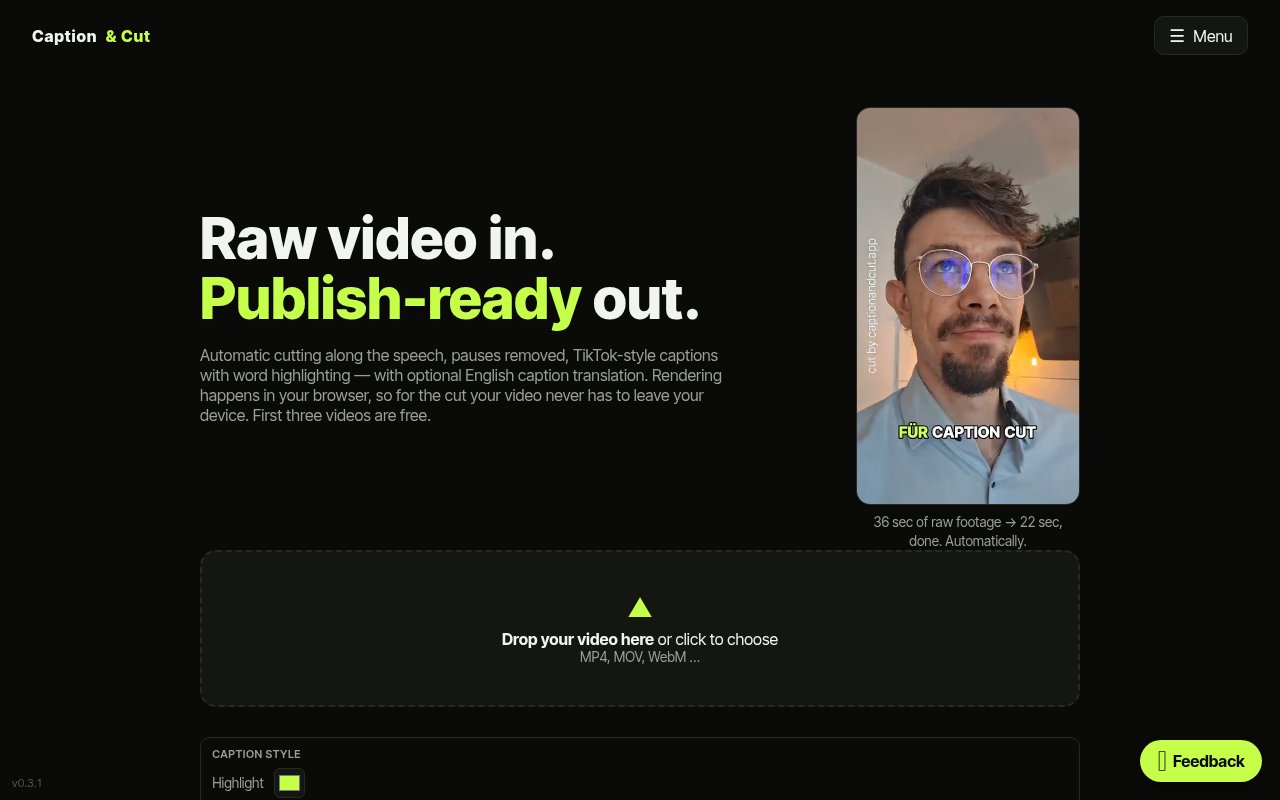
Caption and Cut is a browser-based editor for short spoken videos that handles the tedious part of getting a clip ready to post. You upload a raw recording, and it transcribes the speech, cuts out the pauses and filler words, and burns in word-highlighted captions in the style you'd expect on TikTok or Reels. What comes back is a tighter video and an SRT subtitle file, both ready to publish, without a timeline ever being opened.
The problem it goes after is the hour that disappears between recording a clip and publishing it. Trimming dead air by hand, typing captions, syncing them to the audio and exporting a clean version is slow, repetitive work, and it's the reason a lot of recorded footage never goes out at all. Caption and Cut folds those steps into a single pass, and the example on the site shows 36 seconds of raw footage coming out as a 22 second clip with nobody scrubbing through it.
The workflow runs in a fixed order. You upload an MP4, MOV or WebM file and sign up with an email address, with no card required. Speech recognition runs on the audio and understands German, English and many other languages automatically. The tool then strikes the pauses and filler from the transcript, renders captions either in the original language or as an English translation, and produces the finished video. The highlighting moves word by word with the speech, so the caption on screen tracks what's being said rather than dropping a block of text on the viewer. If something isn't right, the transcript editor lets you strike extra words with a click or correct a caption text, and re-rendering takes seconds because nothing has to be transcribed a second time. That transcript-as-timeline approach is the whole editing model, and it's why the tool needs no training to use.
There are two processing modes. In local mode the video stays on your device and only the audio goes to the server, with rendering done in your browser on your own CPU or GPU. That means less to upload and a smoother run on a slow connection. Full server-side processing is the more reliable option when the machine you're on isn't up to the job. Either way the finished video and its SRT file are available to download for 24 hours and are then deleted automatically. An integrations section lets you store a personal Buffer API key so finished videos can go straight to Buffer for scheduling.
It's built for content creators, social media managers and anyone who records short spoken clips and wants them trimmed and captioned without learning an editor. The bilingual German and English interface and the automatic English translation make it a natural fit for people who record in one language and post for a wider audience, which is a common situation for creators in Europe. It also suits the person who records a quick product update or a customer answer and just wants it clean enough to post in the next ten minutes. Teams that publish on a schedule can pair it with Buffer, since the integration sends the finished clip straight into a queue rather than back to a downloads folder.
What sets it apart from a full editing suite is how little it asks of you. There's no timeline, no plugin and no export preset, just the transcript as the editing surface. The local processing mode is also unusual for a web tool, since most caption services want the whole video uploaded before they do anything, and keeping the video on your device is a real privacy and bandwidth win. The trade-off is scope. It does one job, it's a young product built by an independent developer, and features such as multi-track editing, brand templates or team accounts aren't part of it. Compared with the usual alternatives, a desktop editor with an auto-caption plugin or a cloud captioning service, the pitch is speed with a light footprint. A desktop editor gives you full control but every clip still means a project, a render and an export. A cloud service is quick but takes the whole file and usually charges per minute. Caption and Cut sits between them, doing the cut and the captions in one go and letting the browser do the rendering when you want it to. Where it stops is anything beyond a single spoken clip, so a montage with music, B-roll or several speakers on separate tracks still needs a proper editor afterwards.
Access is freemium and generous while the beta lasts. The first three videos are free, and during the beta the Premium tier of 100 videos a month with no watermark is granted on request with no automatic charges. Pricing after the beta hasn't been published, so anyone planning to build a routine around it should expect the terms to change. There's no public contact email, but there's a feedback form inside the app, and the imprint, privacy and terms pages are linked from the site.
Key Features
- Automatic transcription and filler word removal
- Burned-in word-highlighted captions
- English translation of captions
- Click-to-strike transcript editor
- Local browser rendering mode
- SRT export and Buffer integration
Pros & Cons
What we like
- Cuts and captions a clip in one pass
- Local mode keeps the video on your device
- Re-renders in seconds after transcript edits
- Free during beta with no card required
Room for improvement
- Single-clip focus, no multi-track editing
- Post-beta pricing isn't published yet
- Downloads expire after 24 hours
- Young product from an independent developer
Frequently Asked Questions
What is Caption and Cut?
Is Caption and Cut free?
Does my video get uploaded?
Who is Caption and Cut for?
Best For
Featured in
Alternatives to Caption and Cut
View all
Apatero AI
The creator studio for AI image, video, audio, 3D, and avatars, now at apatero.ai.
Apatero Studio
Creator studio for AI image, video, audio, 3D, and avatars. Every model worth using, in one workspace.

Melodex
Turn your idea into an AI-generated music video

Speel
AI UGC video generator that makes realistic AI avatars hold and talk about your product for ads
Our take
Tool Index Editorial · Sep 2026· 3.5/5
Caption and Cut is a focused web editor that removes pauses and filler words from spoken clips, then burns in word-highlighted captions. Its transcript doubles as the editing surface, so creators can strike unwanted words, correct captions and render without learning a timeline. The site supports MP4, MOV and WebM, automatic language detection and optional English translation.
The first three videos are free. We like the local render mode, but its privacy claim needs reading precisely. The video stays on the device while audio still goes to the server for transcription. Downloads disappear after 24 hours, and the tool is meant for one talking-head clip rather than music, multiple tracks or detailed visual edits. For quick social posts it removes real drudgery; anything more elaborate still belongs in a full editor.
Editorial opinion from the Tool Index team, written from the public product pages. Not a user review.
Reviews (0)
Badge builder
Add Caption and Cut to your website
Choose a badge style and size, preview it here, then copy the generated HTML. Badge images are self-contained SVGs and do not require an external script.

<a href="https://toolindex.net/tools/caption-and-cut?ref=badge" target="_blank" rel="noopener">
  <img src="https://toolindex.net/badge/caption-and-cut/medium.svg" alt="Caption and Cut - Listed on Tool Index" width="180" height="50" />
</a>How to use the badge
- 1. Pick the style, size, and theme that fit your layout.
- 2. Copy the generated HTML from the code block.
- 3. Paste it into your footer, homepage, or press page.
Standard badge available
The standard listing badge is available now. Score and circle badges are limited to tools currently ranked in the top 10 of a category.
Badge clicks return visitors to this profile with a referral tag so the source remains identifiable.
Related Tools
Apatero AI
The creator studio for AI image, video, audio, 3D, and avatars, now at apatero.ai.

LocalClip
Local-first AI video clipper for Mac that turns long videos into vertical clips
Melodex
Turn your idea into an AI-generated music video
Apatero Studio
Creator studio for AI image, video, audio, 3D, and avatars. Every model worth using, in one workspace.
Work on Caption and Cut? Request listing access or correction