
clipyouredit
Batch trim, crop, correct, and export video locally in your browser
Gallery
About clipyouredit
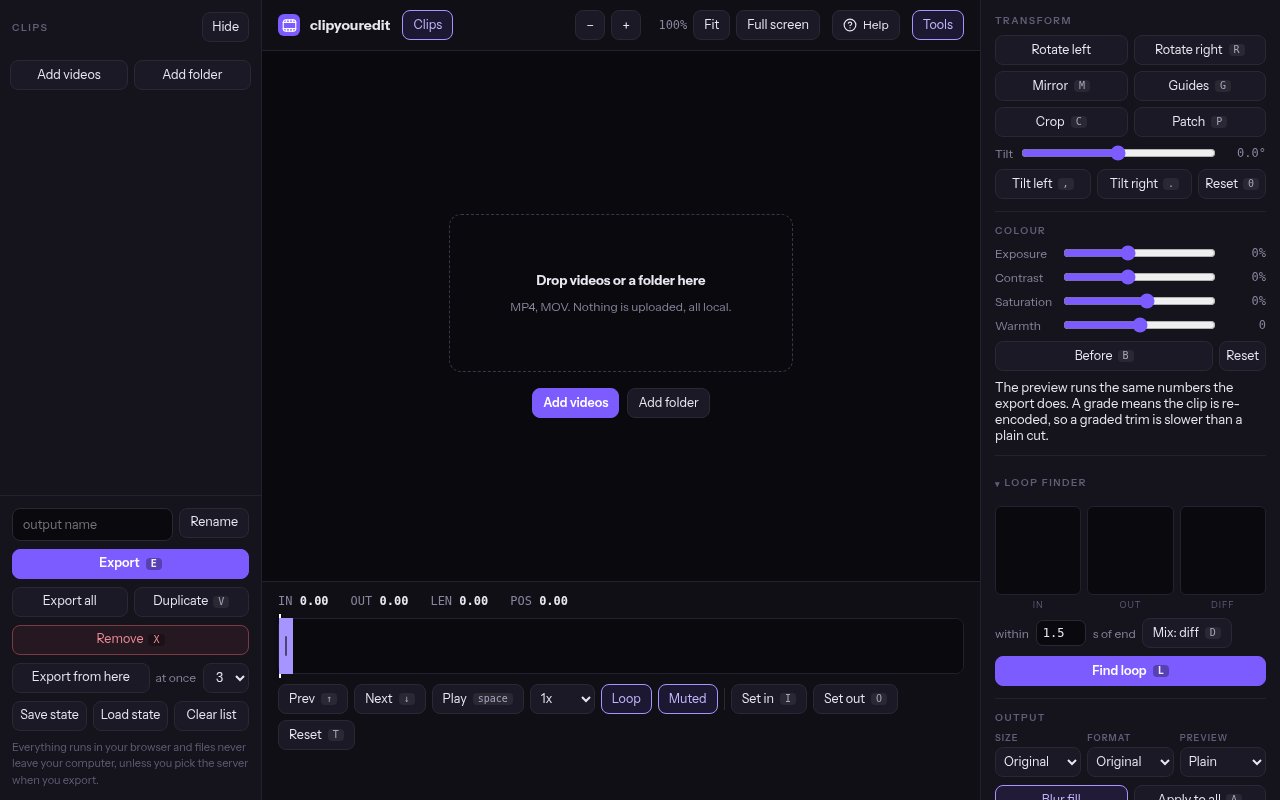
clipyouredit is a free browser video editor built for processing a folder of separate clips rather than assembling one long timeline. It is aimed at shoots where dozens or hundreds of files need the same practical cleanup, such as trimming dead air, fixing the crop, correcting color, and choosing useful file names. There is no sign-up, installation, watermark, or export limit. Most work happens locally on the user's machine, so large source files don't need to be uploaded before editing can begin. The maker originally built it for its own exercise video library, where each studio day produced hundreds of takes that needed the same set of small fixes. That origin explains why the interface favors repetition and throughput over a layered creative timeline.
A user can open an entire folder of MP4, MOV, or other common video containers and move through its clips in a list. Each file keeps its own in point, out point, crop, and output name. Keyboard controls speed up repetitive trimming, and the editor remembers the folder and settings when the tab is closed and reopened. When the batch is ready, Export all can encode up to four clips at once. Files that were already exported receive a badge and are skipped on the next run, so a changed or newly added clip doesn't force the whole folder through export again. The editor can regularly handle a few hundred clips from a shoot day, according to the maker. Export concurrency can be set from one to four jobs, letting the user decide how much of the machine to give the batch.
Trimming can prioritize speed or precision. The editor reads the source keyframes and marks them under the timeline. When a cut falls on a keyframe, it can copy the video stream without recompressing it, preserving the source quality and completing even a large clip quickly. Frame-accurate mode is available when the cut must land at an exact point, though that choice requires re-encoding part of the clip. Other transformations include cropping, 90 degree rotation, mirroring, and tilt correction. It can fit vertical, square, or widescreen outputs and fill unused space with a blurred copy of the frame. Guides for thirds and center lines can sit over the picture while a crop is adjusted. That gives a creator visual reference for reframing many related shots without requiring a separate composition tool.
The tool goes beyond basic trimming without trying to become a full production suite. Exposure, contrast, saturation, and warmth controls can be applied to one clip or across the batch. A loop finder compares potential end frames with the selected start frame, then shows the best candidates side by side so the editor can judge the transition. A patch tool can cover a cable, backdrop seam, light stand, or another fixed distraction by cloning nearby pixels, blurring the selected area, or applying a flat color. Patches can be copied across many clips when the unwanted object stays in the same place. The preview and exported color adjustments use the same calculations, and the maker reports checking them against a real frame to within half a value out of 255. A Before control makes it possible to compare the correction with the untouched clip before committing the batch.
Preview modes place the video inside frames that resemble Reels, Stories, Shorts, or YouTube, including the interface areas that can cover important content. This lets a creator spot a subject hidden behind a caption bar before exporting a large batch. The app accepts common containers including MP4, MOV, M4V, MKV, WebM, and AVI, then exports MP4 with H.264 video for broad playback support. It works best on a computer with a keyboard and a larger display. The editor can load on a phone and works on tablets, but the maker recommends a desktop-style setup for serious batch work. That advice reflects the job the app is built to handle. Setting precise in and out points across a large folder benefits from keyboard controls, a large preview, and enough processor capacity to run several exports.
The local processing model is the main point of difference. Its video engine runs in the browser through WebAssembly and reads files from disk, which avoids a long upload queue and keeps routine work on the device. An optional Trim on server command exists for a machine that is too slow or a file too large for browser memory. That mode uploads the selected clip for native ffmpeg processing, then deletes the job after download or within two hours at the latest. The tool remains entirely free, funded indirectly by the maker's separate fitness data business. It is a strong fit for repetitive shoot cleanup, while editors building layered narratives, audio mixes, or complex effects will still need a traditional timeline application.
Key Features
- Whole-folder batch editing
- Keyframe-aware lossless trimming
- Crop rotate mirror and tilt
- Batch color correction controls
- Loop finder and patch tools
- Social platform preview frames
Pros & Cons
What we like
- Processes most files locally without uploading
- Handles hundreds of separate clips in one batch
- Keyframe cuts avoid unnecessary quality loss
- Free with no account watermark or export cap
Room for improvement
- Complex layered editing still needs another app
- Frame-accurate cuts and transforms require re-encoding
- Browser processing depends on available device memory
- Phone use is less practical than desktop editing
Frequently Asked Questions
What is clipyouredit?
Is clipyouredit really free?
Do videos get uploaded?
Does trimming reduce video quality?
Best For
Featured in
Alternatives to clipyouredit

Apatero AI
The creator studio for AI image, video, audio, 3D, and avatars, now at apatero.ai.
Apatero Studio
Creator studio for AI image, video, audio, 3D, and avatars. Every model worth using, in one workspace.

Melodex
Turn your idea into an AI-generated music video

Speel
AI UGC video generator that makes realistic AI avatars hold and talk about your product for ads
Our take
Tool Index Editorial · Oct 2026· 4.0/5
clipyouredit is a free browser editor built for trimming, cropping, correcting, and exporting a folder of separate clips. It suits creators processing a shoot full of similar takes, especially when keyboard controls, per clip settings, and parallel exports matter more than a layered timeline. Most files stay on the computer, and the interface clearly marks the optional server export path.
We like the practical details, including keyframe aware lossless cuts, frame accurate mode, color controls, social preview frames, a loop finder, and patches that can be copied across clips. Few free browser tools are this focused on batch throughput. The limit is equally clear. It is not for narrative editing, audio mixing, or complex effects, and reencoding speed depends on local memory and processor capacity. Desktop is the sensible place to use it.
Editorial opinion from the Tool Index team, written from the public product pages. Not a user review.
Reviews (0)
Badge builder
Add clipyouredit to your website
Choose a badge style and size, preview it here, then copy the generated HTML. Badge images are self-contained SVGs and do not require an external script.

<a href="https://toolindex.net/tools/clipyouredit?ref=badge" target="_blank" rel="noopener">
  <img src="https://toolindex.net/badge/clipyouredit/medium.svg" alt="clipyouredit - Listed on Tool Index" width="180" height="50" />
</a>How to use the badge
- 1. Pick the style, size, and theme that fit your layout.
- 2. Copy the generated HTML from the code block.
- 3. Paste it into your footer, homepage, or press page.
Standard badge available
The standard listing badge is available now. Score and circle badges are limited to tools currently ranked in the top 10 of a category.
Badge clicks return visitors to this profile with a referral tag so the source remains identifiable.
Related Tools
Apatero AI
The creator studio for AI image, video, audio, 3D, and avatars, now at apatero.ai.

LocalClip
Local-first AI video clipper for Mac that turns long videos into vertical clips
Melodex
Turn your idea into an AI-generated music video
Apatero Studio
Creator studio for AI image, video, audio, 3D, and avatars. Every model worth using, in one workspace.
Work on clipyouredit? Request listing access or correction