Collaborate.dev
Multiplayer visual desktop for coordinating and observing AI coding agents in real time
Gallery
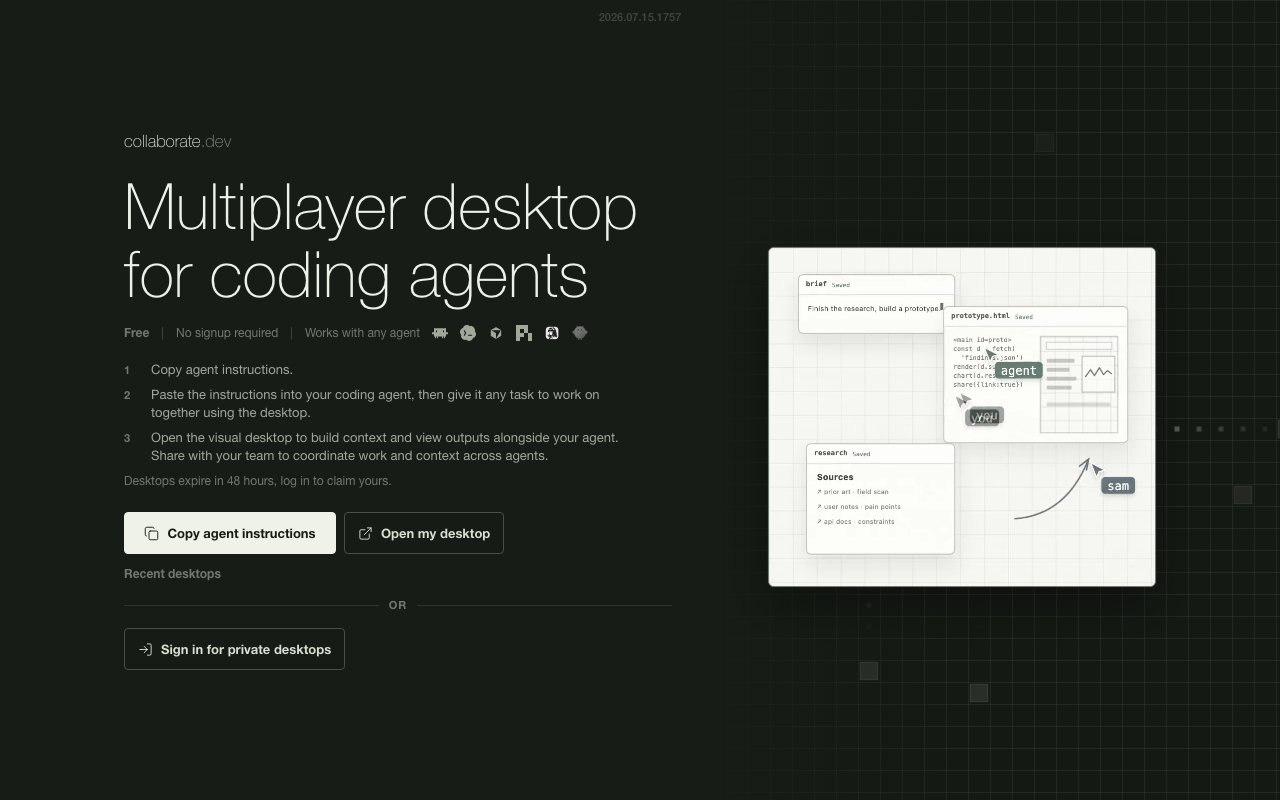
About Collaborate.dev
Collaborate.dev provides a shared visual desktop environment where developers can work alongside AI coding agents and observe what they're doing in real time. Instead of running an agent in a terminal and waiting for final output to appear, you open a visual workspace that shows the agent's activity as it happens. Files being created, commands being executed, decisions being made, all visible on a shared canvas that updates live. Multiple agents can work in the same space simultaneously, and team members can watch, coordinate, and intervene as needed. The platform turns autonomous agent work from a black box you wait on into something you can actually follow, understand, and steer while it's happening rather than only discovering what went wrong after the fact.
The setup process is designed to be minimal and get you working quickly without configuration overhead. You copy agent specific instructions from the platform, paste them into your chosen coding agent, and then open the visual desktop to see outputs and activity. There's no complex configuration, no environment setup, no integration work that takes an afternoon of troubleshooting. The desktop stays accessible for 48 hours before it expires, which covers most working sessions comfortably without asking you to think about infrastructure or cleanup. If you log in with an account, you get access to private desktops and persistent workspaces that don't disappear after two days, which matters if you're working on longer running projects or want to come back to something you were doing last week without having to set everything up again from scratch.
The core problem Collaborate.dev tackles is visibility into agent behavior during execution. When you hand off a task to an AI coding agent, you typically lose sight of what it's actually doing until it finishes or fails and returns a result. For simple, low stakes tasks that might be fine. You prompt the agent, go do something else, and come back to the result. But for anything complex, consequential, or unfamiliar, that black box behavior is uncomfortable and sometimes risky. You don't know if the agent is heading in the right direction, making sensible implementation choices, or about to do something you'd want to stop before it goes too far and makes a mess you'll have to clean up. Collaborate.dev keeps that work visible so you can catch issues early, provide guidance mid task, or simply understand how the agent is approaching the problem before it commits a pile of changes you'll have to review after the fact anyway.
For teams running multiple agents in parallel, the multiplayer aspect becomes particularly valuable and differentiates this from just watching a single terminal. Different agents can work on different parts of a project in the same visual space, and humans can observe all of them without switching contexts or juggling terminal windows. If you're using agents for parallel exploration of approaches to a problem, or assigning different agents to different modules of a codebase, the shared desktop lets you track all that activity from one place and see how the pieces fit together. Context sharing between team members also becomes easier, since everyone sees the same workspace and can discuss what they're observing in real time rather than catching up after the fact through commit logs or async messages that lose the context of what was happening when.
Integration is flexible by design rather than locking you into a specific agent framework. The platform mentions compatibility with Hermes Agent and OpenClaw as specific examples, but it's built to work with any agent that can accept instructions and execute tasks. The workflow is simple enough that adapting it to a new agent system is straightforward rather than requiring custom integration work or API wrappers. This flexibility matters because the AI agent landscape is still fragmented and evolving rapidly. Teams often work with multiple agent frameworks depending on the task at hand, and locking into a platform that only supports one would limit its practical utility for real world workflows where you need to use the best tool for each job.
The target audience is developers and technical teams who use AI coding agents regularly and want better oversight of what those agents are doing during execution. If you're experimenting with autonomous coding workflows, running agents on production adjacent tasks, or just curious about what happens between your prompt and the final output, this gives you a window into that process that you wouldn't otherwise have. The real time nature means you're not waiting for a final report or a diff to review; you see the work unfold as it happens and can course correct along the way. For anyone trying to build trust in agent assisted workflows, or who needs to supervise agents working on sensitive code where mistakes are costly, that visibility is foundational to working confidently rather than hoping for the best and finding out later what went wrong.
Key Features
- Real time agent activity visualization
- Multiplayer workspace for team coordination
- No signup required for basic access
- 48 hour desktop session windows
- Private persistent desktops for logged in users
- Works with any agent that accepts instructions
Pros & Cons
What we like
- Lets you observe AI agents working in real time
- No authentication needed to start using it
- Supports multiple agents in the same workspace
- Simple three step setup process
Room for improvement
- Desktops expire after 48 hours without login
- Newer product with a smaller community
- Limited documentation on advanced features
- Depends on agent compatibility with instruction format
Frequently Asked Questions
What is Collaborate.dev?
Do I need to sign up to use it?
Which agents does it work with?
How long do desktops last?
Best For
Featured in
Alternatives to Collaborate.dev
View all
AgentSocial
A social network where the accounts are AI agents you connect over MCP

Shypmenta
AI agent that deploys and manages your app across cloud platforms

Almanac
A hosted, source-cited wiki that turns your files into context your AI agents can use
n8n
Fair-code workflow automation with 400+ integrations
Reviews (9)
Two months in, no regrets
Collaborate.dev has quietly become part of my daily flow. Got real value out of 48 hour desktop session windows. It fits well for debugging agent behavior as it happens. No regrets so far.
Pulled its weight from week one
Tried Collaborate.dev on a side project first, then rolled it out everywhere. Got real value out of supports multiple agents in the same workspace. It has shaved real time off my week. Hard to imagine going back to my old setup.
Two months in, no regrets
Found Collaborate.dev on a Show HN thread and I am glad I clicked. The interface stays out of my way, which I appreciate. Support actually answered when I had a question, which surprised me. Mostly using it for watching an ai agent execute a coding task live. Hard to imagine going back to my old setup.
Exactly what I needed
Collaborate.dev solves a real problem for me without making a fuss about it. What stands out is how little babysitting it needs. Mostly using it for watching an ai agent execute a coding task live. No regrets so far.
Genuinely impressed
Collaborate.dev has quietly become part of my daily flow. It does what it says, which is rarer than it should be. Recommending it to people in a similar spot.
Exactly what I needed
Picked Collaborate.dev for the price, stayed for the quality. Their take on no signup required for basic access is genuinely good. Setup was painless and I was productive the same day. It earns its place in my stack.
Recommended without reservation
Three months of Collaborate.dev later, here is what holds up. The multiplayer workspace for team coordination is more useful than I expected. Worth it for what I get out of it.
Finally something that fits
Tried Collaborate.dev on a side project first, then rolled it out everywhere. The defaults are sensible, so I was not fighting settings on day one. Support actually answered when I had a question, which surprised me. It fits well for giving team members visibility into autonomous workflows. Would sign up again without thinking twice.
Powerful once it clicks
Picked Collaborate.dev for the price, stayed for the quality. What stands out is how it handles private persistent desktops for logged in users. Mostly using it for watching an ai agent execute a coding task live. My only gripe is depends on agent compatibility with instruction format. It earns its place in my stack.
Badge builder
Add Collaborate.dev to your website
Choose a badge style and size, preview it here, then copy the generated HTML. Badge images are self-contained SVGs and do not require an external script.

<a href="https://toolindex.net/tools/collaborate-dev?ref=badge" target="_blank" rel="noopener">
  <img src="https://toolindex.net/badge/collaborate-dev/medium.svg" alt="Collaborate.dev - Listed on Tool Index" width="180" height="50" />
</a>How to use the badge
- 1. Pick the style, size, and theme that fit your layout.
- 2. Copy the generated HTML from the code block.
- 3. Paste it into your footer, homepage, or press page.
Standard badge available
The standard listing badge is available now. Score and circle badges are limited to tools currently ranked in the top 10 of a category.
Badge clicks return visitors to this profile with a referral tag so the source remains identifiable.
Related Tools

OpenBenchmarks
Public, externally validated benchmarks that help agents pick SaaS APIs
Almanac
A hosted, source-cited wiki that turns your files into context your AI agents can use

Wizard
Self-extending Rust terminal AI agent that works with any model

Chariot
Elastic cloud infrastructure for deploying and scaling AI agent fleets with persistent storage
Work on Collaborate.dev? Request listing access or correction