
Crest
Answer Claude Code, Codex, and Copilot CLI approvals from the MacBook notch
Gallery
About Crest
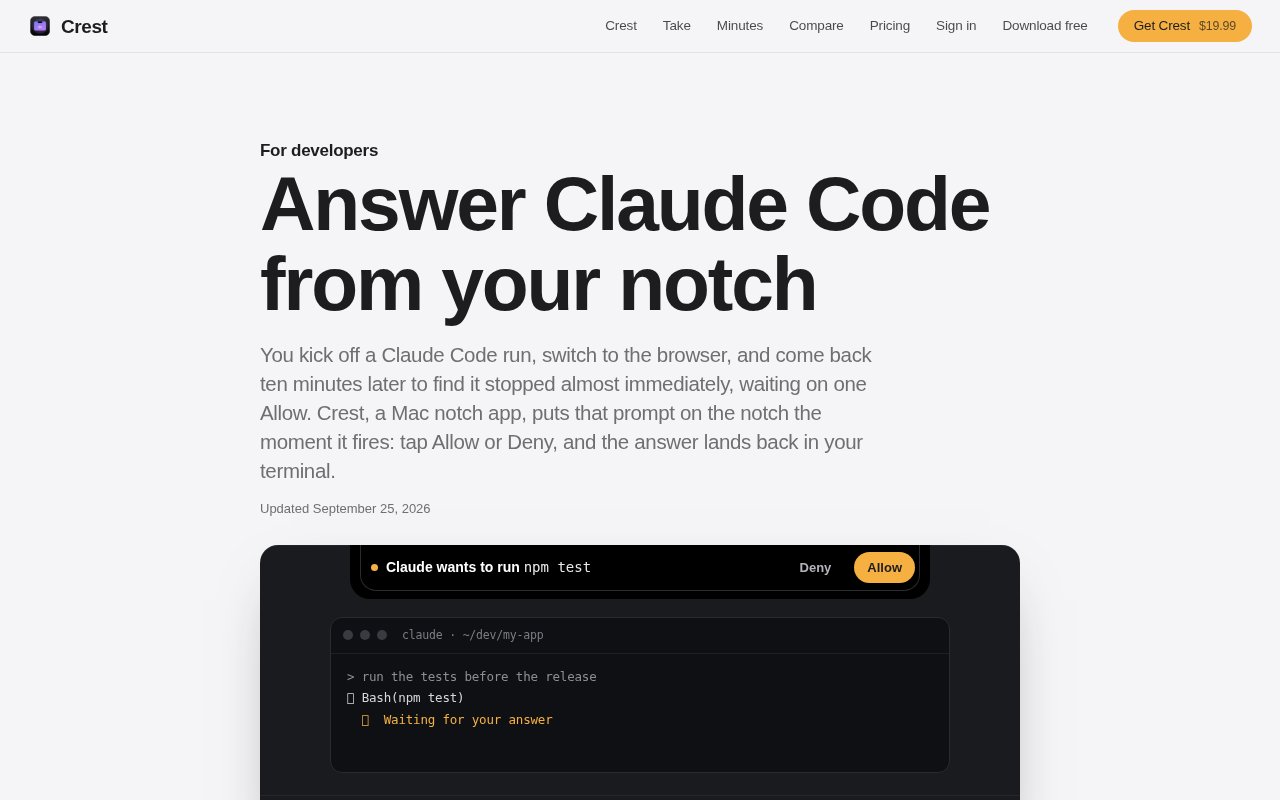
Crest is a native Mac notch app that brings coding agent approvals and questions into a persistent strip at the top of the screen. Its AI Coding module watches Claude Code, Codex, and GitHub Copilot CLI sessions, then shows an Allow or Deny control when an agent needs permission. This addresses a small but expensive interruption in agent-assisted development. A long task can stop almost immediately while the developer is in a browser, editor, or meeting, and the terminal gives no useful signal until they return to it.
When a supported agent pauses, Crest places a pill at the notch and keeps it visible until the user responds. The prompt can appear on every display, including over fullscreen apps. A chime, a macOS notification, and an amber menu bar indicator provide additional signals. Allow and Deny are available directly on the card, while hovering reveals the complete request. Depending on the action, that expanded view can show a command, a file and the lines being changed, or a URL and the reason the agent wants it. Nothing is sent back until the user chooses.
Crest also handles questions that are not simple permissions. Claude Code's AskUserQuestion prompts can appear in the notch with their choices. A single option can be answered with one tap, multiple selections and several questions can be sent together, and a user can type a custom response when the listed choices don't fit. Crest enters that answer into the terminal session, so macOS asks for Accessibility permission before this behavior works. An In terminal control remains available whenever a developer would rather handle the prompt in its original interface.
The integration uses each coding tool's supported hook system. For Claude Code, Crest installs a PreToolUse hook and keeps a backup of the existing settings file. Read-only actions are not intercepted, and turning the integration off removes the hooks. If Crest is closed, the hook steps aside and the normal terminal prompt takes over, so quitting the app doesn't leave a session waiting for a response that can never arrive. Codex support uses its hooks file and requires the user to review and trust the hook definition once. Copilot CLI has its own hook file and does not require that trust step. Setup stays inside the application. After downloading the signed and notarized Mac app, the user opens AI Coding and enables the hooks toggle. Crest adds the relevant hook for tools it finds and preserves a backup where it changes Claude Code settings. The next request that needs human approval appears in the notch. No API key is required because the underlying agent continues to use the developer's existing account. The app's role is to relay a decision to the running command-line session, while the agent, subscription, and terminal workflow remain otherwise unchanged.
A session can be marked trusted from Crest when the developer wants permission prompts approved for the remainder of that run. New sessions start untrusted, and agent questions still come to the user because they represent choices rather than simple action approvals. Beyond individual prompts, Code mode shows live sessions for Claude Code, Codex, and Copilot CLI. Clicking a session can return the developer to the terminal tab or tmux pane where it started. The same area includes GitHub pull requests and CI status, saved SSH hosts, system information, and a file shelf with clipboard history.
This is most useful for Mac developers who let coding agents work while they move between applications. It can shorten idle time without forcing the terminal to remain frontmost, and it still preserves a review step for commands, edits, and questions. Crest is signed and notarized, runs on macOS 14 or later, and uses a small pill on Macs or displays without a physical notch. It works with the user's existing Claude or ChatGPT account, so the approval feature does not require an additional API key. The product is an interaction layer around those tools, not a coding agent or model subscription of its own.
Crest has a permanent free tier for features such as Now Playing, the shelf, clipboard history, and window snapping. AI Coding is one of its Pro modules. Signing in starts a seven-day Pro trial without a card, after which Crest Pro costs $19.99 as a one-time purchase with free updates. A licence covers two Macs, and team seats are available separately. That pricing is attractive for developers who want a focused Mac utility rather than another recurring subscription, though the agent approval workflow does require Pro and remains limited to macOS.
Key Features
- Notch-based agent approvals
- Full command and edit previews
- Interactive agent question answers
- Claude, Codex, Copilot hooks
- Per-session trust controls
- Terminal and tmux return
Pros & Cons
What we like
- Keeps blocked agent prompts visible across apps
- Uses supported hooks with terminal fallback
- Shows the full request before approval
- One-time Pro purchase includes updates
Room for improvement
- AI Coding requires the paid Pro module
- Available only on macOS 14 or later
- Typed answers require Accessibility permission
- Codex hooks need a one-time trust step
Frequently Asked Questions
What is Crest?
What happens if Crest is not running?
Can Crest answer agent questions as well as approvals?
Is Crest free?
Best For
Featured in
Alternatives to Crest
Cursor
VS Code fork built around an AI pair-programmer

Replit
Browser IDE plus Replit Agent that builds and deploys apps from a prompt
Windsurf
Codeium's AI editor with Cascade agent and deep IDE integration

Vibe Built
Building real apps with agentic AI. What worked, what broke, what shipped.
Our take
Tool Index Editorial · Oct 2026· 4.0/5
Crest puts Claude Code, Codex, and Copilot CLI approval prompts in the Mac notch, where a developer can inspect and answer them without returning to a buried terminal. We like that it shows the full command or edit and falls back to the terminal if Crest is closed. The AI Coding widget is in Pro, with a seven-day trial and a $19.99 one-time price covering two Macs.
This is a polished answer to a narrow interruption, not a coding agent. It requires macOS 14 or later, hook setup, and Accessibility permission for typed responses. Trusting a whole session can also trade scrutiny for speed, so teams still need sensible agent permissions. Mac developers who run several long agent sessions are the clear audience.
Editorial opinion from the Tool Index team, written from the public product pages. Not a user review.
Reviews (0)
Badge builder
Add Crest to your website
Choose a badge style and size, preview it here, then copy the generated HTML. Badge images are self-contained SVGs and do not require an external script.

<a href="https://toolindex.net/tools/crest?ref=badge" target="_blank" rel="noopener">
  <img src="https://toolindex.net/badge/crest/medium.svg" alt="Crest - Listed on Tool Index" width="180" height="50" />
</a>How to use the badge
- 1. Pick the style, size, and theme that fit your layout.
- 2. Copy the generated HTML from the code block.
- 3. Paste it into your footer, homepage, or press page.
Standard badge available
The standard listing badge is available now. Score and circle badges are limited to tools currently ranked in the top 10 of a category.
Badge clicks return visitors to this profile with a referral tag so the source remains identifiable.
Related Tools

Bolt.new
Prompt-to-deployed full-stack app inside the browser

Tabnine
Privacy-first enterprise AI code assistant you control, with SaaS, VPC, on-prem, or fully air-gapped deployment
Cursor
VS Code fork built around an AI pair-programmer

Skeezo
Agent-native macOS IDE for coordinating Claude Code and AI agents
Work on Crest? Request listing access or correction