Cursor
VS Code fork built around an AI pair-programmer
Gallery
About Cursor
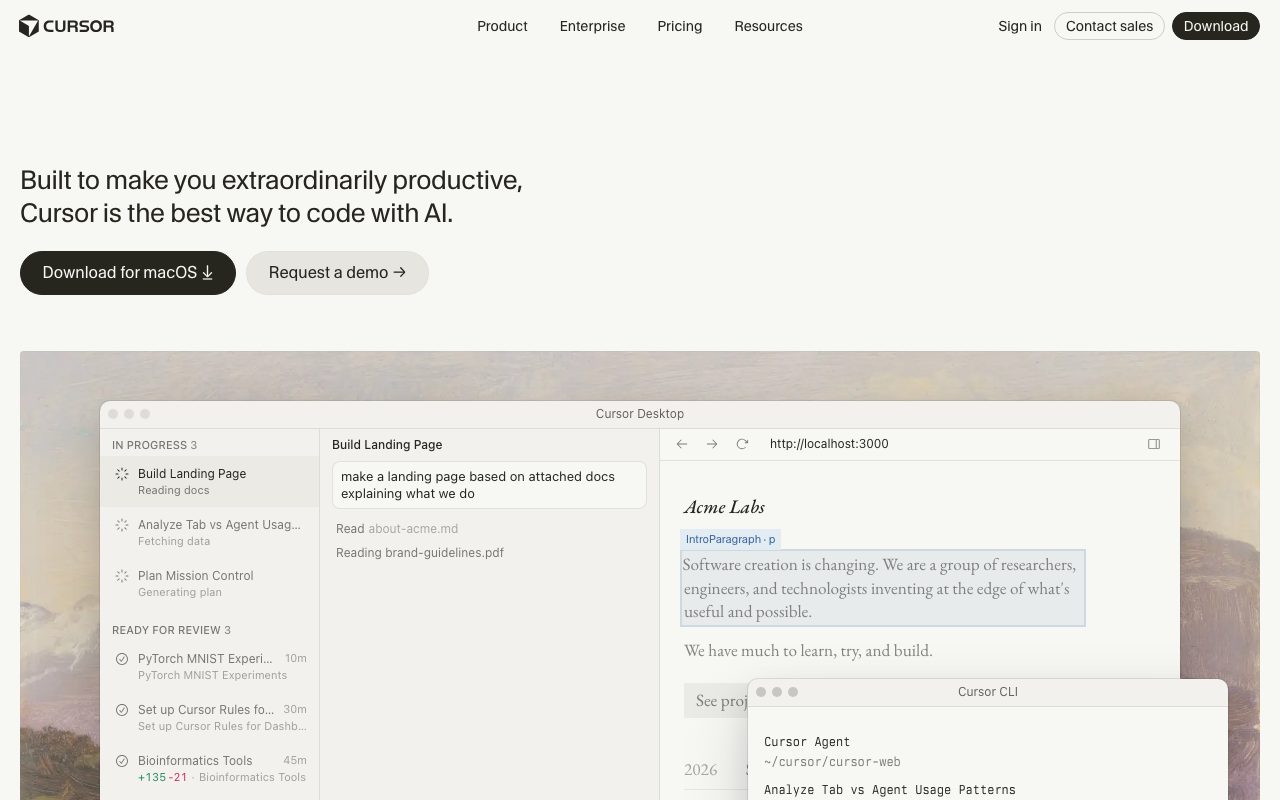
Cursor is the AI-first code editor that replaced VS Code in my daily setup. It is a fork of VS Code with deep AI integration in the editor, terminal, and codebase indexer. Cursor lets you talk to your repo in natural language, refactor across files, and generate whole features without leaving the IDE.
The category is crowded now: Copilot, Windsurf, Zed, Cline, Aider, plus the original VS Code with extensions. Cursor remains the one most senior engineers I trust use as their daily driver. There is a reason for that, and a few reasons to push back.
I have been on Cursor for over a year. The honest take follows.
What Cursor does
Cursor takes the VS Code core and threads AI through every interaction. Tab autocomplete predicts multi-line edits across the file, not just the next token. The chat panel has access to your repo, can run terminal commands, and can apply diffs across many files in one go.
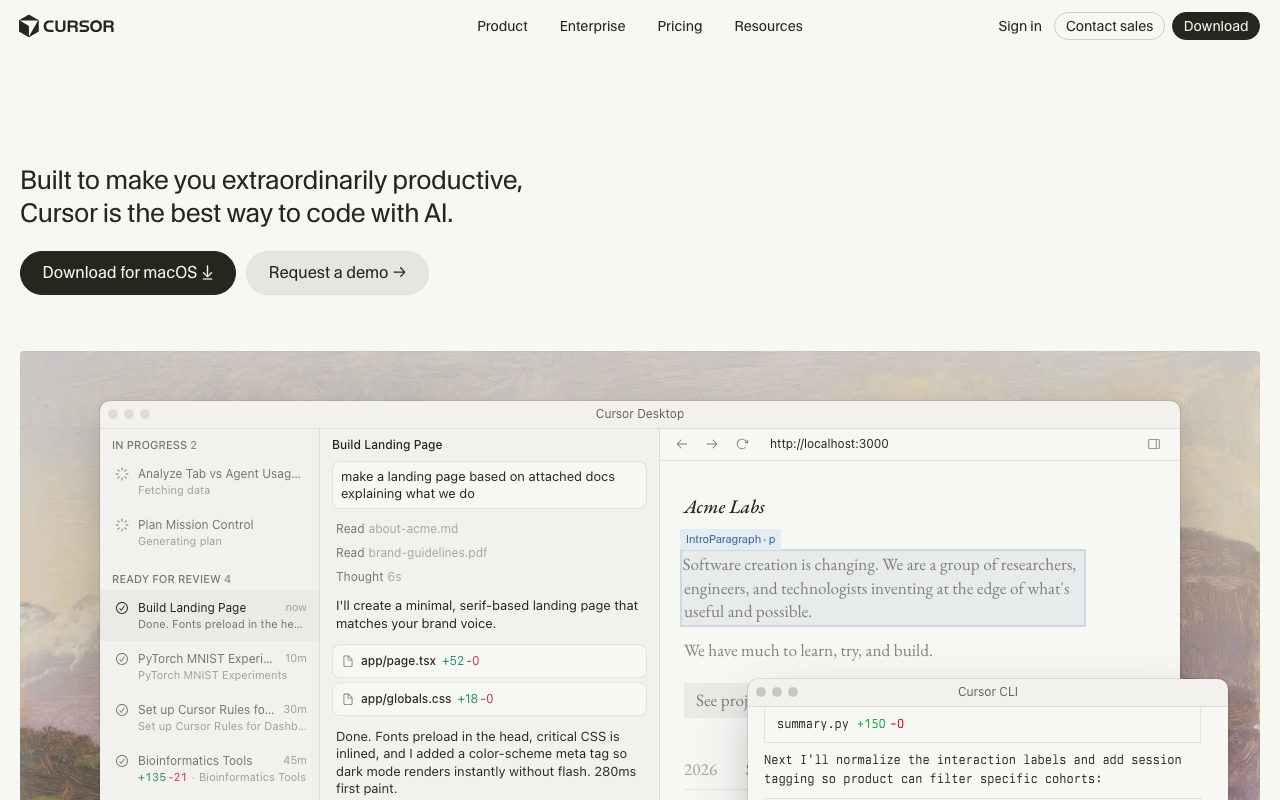
Composer, called Agent in newer builds, is the standout. You describe a feature in plain English, and Cursor reads relevant files, plans a change set, applies edits, runs tests, and iterates if it breaks something. On well-structured codebases, the success rate on real tasks is high enough to be load-bearing.
Codebase indexing is the secret sauce. Cursor builds an embedding-aware map of your project so that when you ask about "the auth middleware," it finds the right file without you pointing at it. Custom rules per project shape the model's behavior over time.
Who Cursor is for
Cursor fits any developer comfortable in VS Code who wants AI to do more than autocomplete. Solo founders ship product features faster. Senior engineers offload boilerplate and refactors. Junior developers get a pair programmer that explains decisions.
It is less of a fit for teams locked into JetBrains, Vim, or Emacs. There are AI plugins for those, but Cursor's deep integration is the reason to switch IDE in the first place.
Pricing
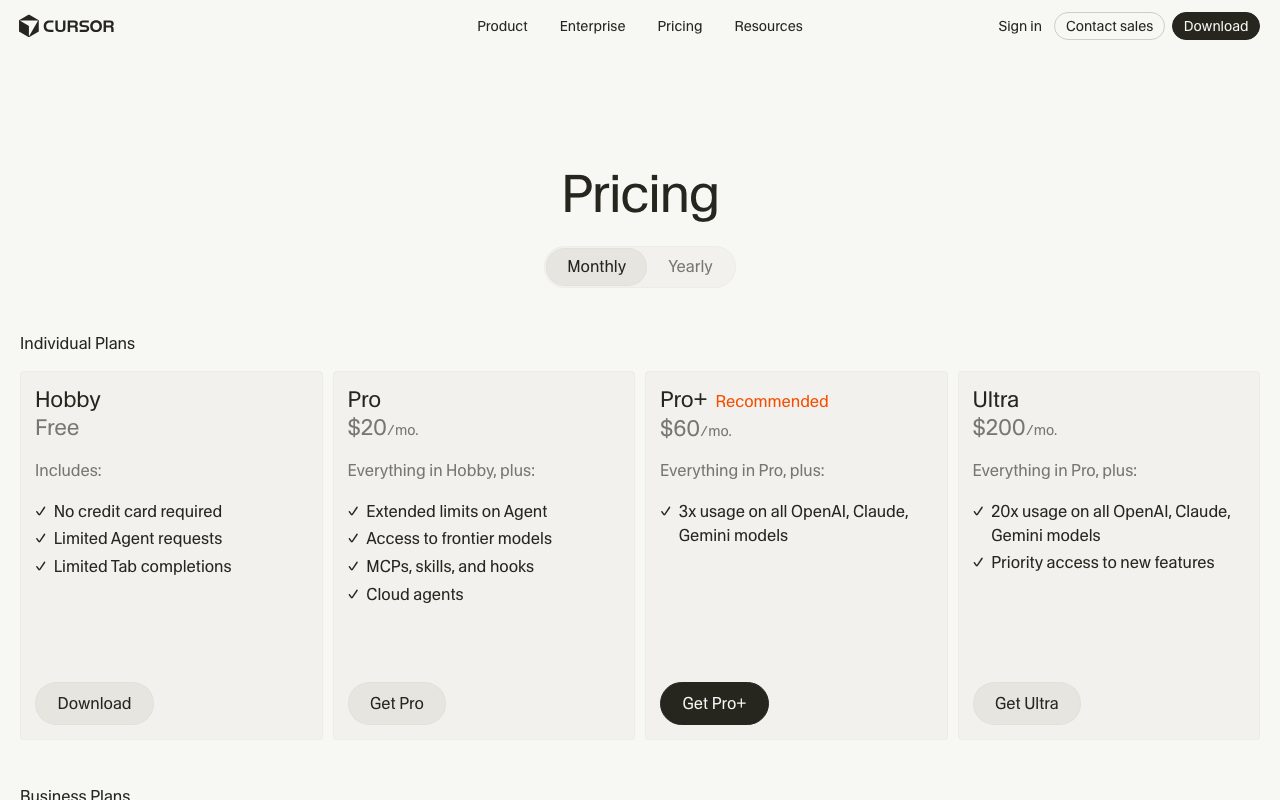
Cursor offers a free tier with limited fast requests and unlimited slow requests. Pro at twenty dollars a month unlocks more fast requests across premium models. Pro+ and Ultra tiers cover heavy users running Agent all day.
Pricing has shifted over the past year toward a credit-style model where premium models burn credits at different rates. Heavy Composer users have hit the cap and complained loudly. Light users barely notice.
Features that matter
Tab completion in Cursor is, in my use, the best in the business. It predicts the multi-line shape of your next change, not just the next word. After a while you stop noticing where your typing ends and Cursor's prediction begins.
Composer Agent runs multi-step work without supervision when you want, with checkpoint review when you do not. You can let it write, test, and iterate, or pause after each step.
The chat sidebar pulls context from open files, the codebase index, web search, and your terminal output. You can pin specific files into context for a long task. Custom rules per repo nudge style and conventions.
Model choice matters. Cursor lets you swap between Claude, GPT, and Gemini variants for different tasks. Claude is, in my use, the best at long refactors; GPT is faster at small edits; Gemini handles certain large-context tasks well.
Tradeoffs
The credit model surprises people. Heavy Agent use during a long session can chew through fast requests faster than you expect. Read the docs before committing to a tier.
VS Code parity is mostly there but occasionally lags. A new VS Code feature can take weeks or longer to land in Cursor. If you depend on a bleeding-edge VS Code extension, check compatibility.
Privacy matters. Cursor sends code context to model providers by default, with a privacy mode that does not retain. Enterprise tier adds the obvious controls. If your code cannot leave your network, this is a real conversation, not a checkbox.
Cursor is the rare AI tool that makes me faster on the unglamorous parts of the job, not just the demo-friendly parts. That is the bar.
Cursor vs alternatives
Versus GitHub Copilot, Cursor wins on agent capability and codebase awareness. Copilot wins on enterprise procurement and the GitHub ecosystem integration. If you are a Microsoft shop, Copilot has gravity.
Versus Windsurf, Cursor is more mature and has more lift behind agent workflows. Windsurf's Cascade agent is competitive and the pricing is gentler at the entry tier. Some engineers prefer the Windsurf interaction model.
Versus Cline and Aider (open source, BYO key), Cursor is more polished and integrated. The tradeoff is cost and dependency on a single vendor.
See best AI coding assistants, GitHub Copilot alternatives, and Cursor vs Windsurf.
Common questions
Is Cursor better than VS Code with Copilot? For most agentic workflows, yes. For pure inline completions, it is closer than the marketing suggests. Does Cursor support Vim mode? Yes, the same Vim extensions that work in VS Code. Can Cursor see my whole codebase? Yes, with the codebase index opted in. Is there a free tier? Yes, with limits.
Bottom line
Cursor is the strongest daily-driver AI editor for most working developers right now. It is not the cheapest, the most open, or the most private, but the productivity delta is large enough to be worth real money. Watch the credit model and pick a tier honestly.
If you are still on VS Code and curious, the free tier is enough to feel the difference in an afternoon. Browse tools for developers and the Cursor profile for current pricing and tiers.
How to actually use Cursor
The fastest path to value is letting Tab autocomplete do its job. Most developers underuse it because they instinctively complete code themselves. A week of consciously waiting for Cursor's prediction before typing trains the tool and your habits together.
The chat sidebar is for explanation and small surgical edits. Ask why a function is doing something, get an explanation in your own codebase context. Ask for a refactor across two files, accept the diff, move on.
Composer (Agent) is for medium-sized features. "Add JWT auth to all routes that match this pattern" is the shape of task it handles well. Pure greenfield generation is also strong; existing-codebase changes get better the more structured the codebase is.
Cursor rules and workflows
The .cursorrules file at the repo root is underused and powerful. Document your codebase conventions, preferred libraries, and patterns to avoid; the model picks up the context for every prompt. Five minutes writing rules saves hours of correcting bad suggestions later.
Pinning files into context for a long task keeps the model aligned. If you are refactoring auth, pin the auth module, the tests, and the routes. The model stops drifting into unrelated code.
Web search inside chat is real and useful for new APIs or library upgrades. The model consults docs and combines them with your codebase context.
When Cursor is the wrong tool
Heavy refactors across an unfamiliar codebase still benefit from a careful human pass. Cursor accelerates the mechanical work; the architectural decisions still belong to you.
Security-sensitive code review is not a Cursor strength. Use it to write code, then review the diff with the same skepticism you would for a junior engineer's PR.
Pure pair programming with another human is still better than pair programming with an AI for some kinds of work. The AI is faster for fast feedback loops; another human is better for product judgment.
Cursor team and enterprise notes
Team plans add seat management, billing consolidation, and shared rules. Useful when more than a handful of engineers use Cursor daily.
Enterprise plans add SSO, SCIM, audit logs, and custom retention. Required for some industries; optional for most teams.
Privacy mode runs without sending code to model providers for training. The runtime requests still go to providers; nothing is retained. Read the privacy policy carefully if your code is sensitive.
Self-hosted models are not supported in Cursor's cloud product. If your code cannot leave your network, the conversation is different and Cursor may not be the answer.
Cursor and the future of AI coding
The category is moving fast. Cursor is the current leader for many engineers; Windsurf, Cline, Aider, and others are real competitors. The platform shape will keep shifting.
Model improvements show up in Cursor quickly. When Anthropic releases a stronger Claude or OpenAI ships a smarter GPT, Cursor users see it within days. The platform's value is partly aggregating frontier model access.
Worth re-evaluating quarterly. The right pick today might not be the right pick next year. Stay curious.
Cursor models and modes
Auto mode picks the model based on the task, which is a sane default for most users. Manual selection lets power users override per session.
Claude Sonnet variants handle complex reasoning and long context well; the right pick for big refactors.
GPT models are fast and cheap for many smaller edits. Their performance on certain coding tasks is competitive with Claude.
Gemini and other models are available in some plans; useful for specific use cases like multimodal context.
Cursor for specific languages
TypeScript and JavaScript are the strongest. The training data overlaps heavily with this ecosystem.
Python is also strong. The model handles framework-specific patterns well.
Go, Rust, and Java are competent. Some niche frameworks expose gaps; the model often guesses reasonably and you correct.
Less common languages (Elixir, Clojure, Haskell) get adequate support. The autocomplete is still helpful; agentic tasks are harder.
Tutorial / Demo
Key Features
- Multi-line, project-aware tab completion
- Composer/Agent for multi-file edits
- Chat with codebase context
- Bring your own model API key option
- Inline edit (Cmd-K)
- Background agent and bug-bot features
- VS Code extension compatibility
Pros & Cons
What we like
- Single biggest productivity jump in coding tools in years
- Codebase indexing actually understands your repo
- Choice of model (Claude, GPT, Gemini) on Pro
- Drop-in replacement for VS Code
Room for improvement
- Pro plan is needed for serious daily use
- Privacy-conscious teams may not love sending code to the cloud
- Occasional latency on bigger codebases
- Cursor-specific config drifts from upstream VS Code
Frequently Asked Questions
Does Cursor have a free tier?
Cursor vs GitHub Copilot, which is better?
Is Cursor just VS Code with AI?
Can Cursor use my own API key?
Does Cursor work with my codebase context?
Best For
Featured in
Tags
Alternatives to Cursor
View all
GitHub Copilot
AI pair programmer from GitHub with inline completions, chat, agent mode, and model choice across IDEs

VS Code
The code editor that adapts to any workflow

Replit
Browser IDE plus Replit Agent that builds and deploys apps from a prompt
Windsurf
Codeium's AI editor with Cascade agent and deep IDE integration
Our take
Tool Index Editorial · May 2026· 4.6/5
If you're evaluating Cursor, the headline is simple: vs code fork built around an ai pair-programmer, and most teams will get value out of the box.
Where it wins: Single biggest productivity jump in coding tools in years, Codebase indexing actually understands your repo, and Choice of model (Claude, GPT, Gemini) on Pro. Honest gripes: Pro plan is needed for serious daily use and Privacy-conscious teams may not love sending code to the cloud.
Bottom line: pick Cursor when you need daily software development with AI assist; look elsewhere if pro plan is needed for serious daily use would be a dealbreaker.
Editorial opinion from the Tool Index team, written from the public product pages. Not a user review.
Reviews (8)
Underrated honestly
Cursor isn't perfect but it's the best I've used in this category. Honestly impressed by how choice of model (Claude, GPT, Gemini) on Pro. Got real value out of background agent and bug-bot features. Mostly using it for refactoring across many files at once. Sticking with Cursor.
Pros
- Drop-in replacement for VS Code
Worth the price of admission
Started using Cursor casually, now it's pinned in my dock. Where it really wins is single biggest productivity jump in coding tools in years. The VS Code extension compatibility is more useful than I expected. Mostly using it for pair-programming on hard bugs. Would buy again without thinking twice.
Pros
- Codebase indexing actually understands your repo
- Single biggest productivity jump in coding tools in years
- Choice of model (Claude, GPT, Gemini) on Pro
Cursor has been a quiet upgrade
The pitch for Cursor sounded too good to be true. Mostly true. Where it really wins is drop-in replacement for VS Code. Easy yes for anyone weighing the same trade-offs.
The kind of tool you forget you're paying for
Tried half a dozen options before landing on Cursor. Real selling point: choice of model (Claude, GPT, Gemini) on Pro. Their take on chat with codebase context is solid. Found it works best for onboarding into an unfamiliar codebase.
Pros
- Drop-in replacement for VS Code
- Single biggest productivity jump in coding tools in years
- Choice of model (Claude, GPT, Gemini) on Pro
Hit the Cursor sweet spot
Cursor isn't perfect but it's the best I've used in this category. Honestly impressed by how single biggest productivity jump in coding tools in years. Got real value out of chat with codebase context. Main use case: pair-programming on hard bugs. It would be a 5 if not for pro plan is needed for serious daily use.
Cons
- Cursor-specific config drifts from upstream VS Code
- Pro plan is needed for serious daily use
Best decision this quarter
Adopted Cursor for one project, ended up using it for more. The biggest win has been drop-in replacement for VS Code. Main use case: onboarding into an unfamiliar codebase. Worth the price for what I get out of it.
Pros
- Codebase indexing actually understands your repo
- Single biggest productivity jump in coding tools in years
- Drop-in replacement for VS Code
Hit the Cursor sweet spot
Cursor solves a real problem for me, but it's not magic. Genuine strength: drop-in replacement for VS Code. Their take on inline edit (Cmd-K) is solid. It fits well for refactoring across many files at once. Worth the price for what I get out of it.
Easy 5 from me
Cursor is one of those tools you stop noticing because it just works. The thing I keep coming back to: choice of model (Claude, GPT, Gemini) on Pro. The inline edit (Cmd-K) is more useful than I expected. Found it works best for daily software development with AI assist. Would buy again without thinking twice.
Pros
- Single biggest productivity jump in coding tools in years
- Codebase indexing actually understands your repo
Badge builder
Add Cursor to your website
Choose a badge style and size, preview it here, then copy the generated HTML. Badge images are self-contained SVGs and do not require an external script.

<a href="https://toolindex.net/tools/cursor?ref=badge" target="_blank" rel="noopener">
  <img src="https://toolindex.net/badge/cursor/medium.svg" alt="Cursor - Listed on Tool Index" width="180" height="50" />
</a>How to use the badge
- 1. Pick the style, size, and theme that fit your layout.
- 2. Copy the generated HTML from the code block.
- 3. Paste it into your footer, homepage, or press page.
Score badge available
Cursor qualifies for the score and circle badges based on its current top-10 positionin AI Coding Assistants.
Badge clicks return visitors to this profile with a referral tag so the source remains identifiable.
Related Tools

Kevin Gabeci
Solo developer building web apps, cozy browser games, and AI creator toolkits.

Coolify
Self-hostable, open source alternative to Heroku and Netlify

Apatero AI
The creator studio for AI image, video, audio, 3D, and avatars, now at apatero.ai.
Kevin Gabeci Toolkits
Seven AI toolkits for writing books, making music, cutting video, and building agents.
Work on Cursor? Request listing access or correction