
VS Code
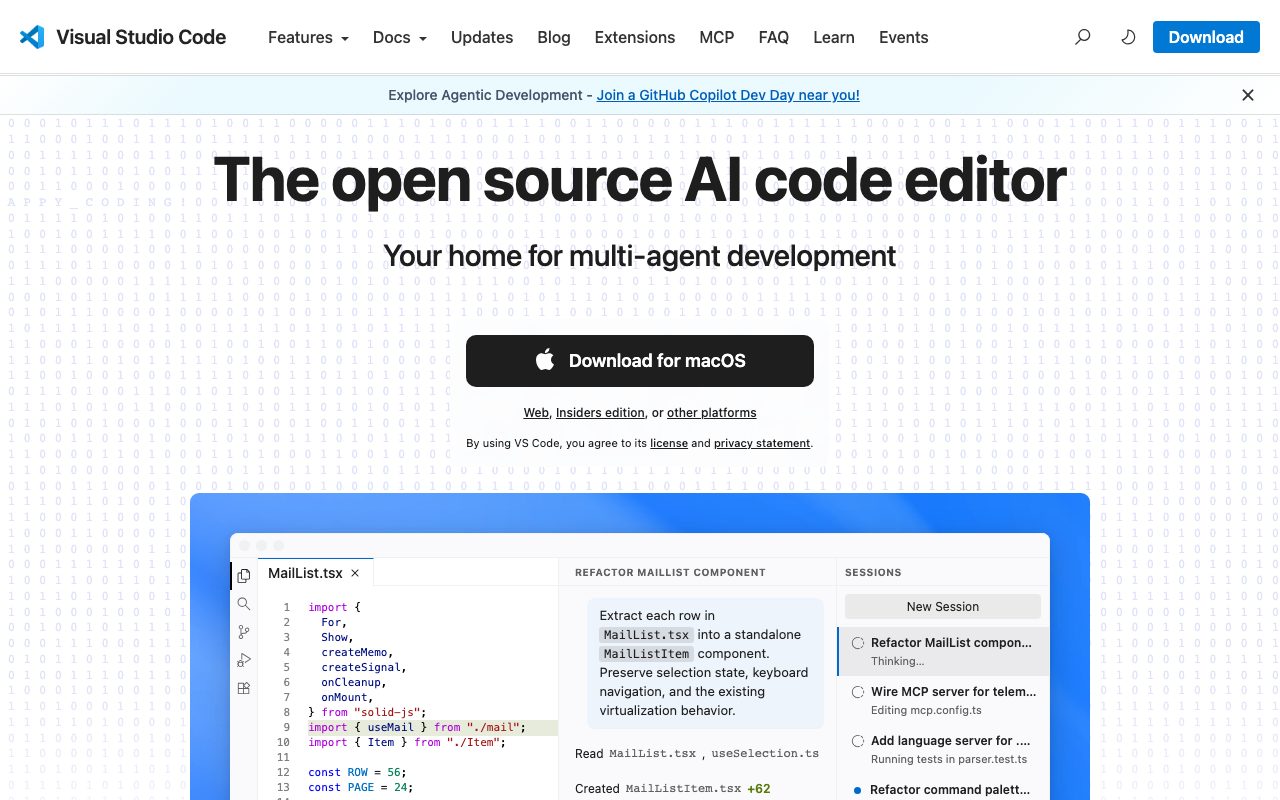
The code editor that adapts to any workflow
Gallery
About VS Code
VS Code is the code editor that ate the rest of the editor market. It's free, fast enough, runs everywhere, and has an extension for almost every language and tool you'll meet. Microsoft built it on Electron, and somehow that became the dominant developer experience for a generation.
For most developers in 2026, the default answer to "what editor should I use?" is VS Code. The competition has narrowed to JetBrains for heavier IDE workflows, Neovim for terminal lifers, Cursor and other AI-native forks for AI-first work, and Zed for users who want raw speed.
What VS Code is
VS Code is a free, cross-platform code editor from Microsoft, released in 2015 and now used by an estimated 70-plus percent of professional developers. The base editor is fast, supports syntax highlighting, debugging, Git integration, and a polished UI. The extensions are where the real power lives.
The Marketplace has hundreds of thousands of extensions. Languages, debuggers, linters, formatters, theme packs, productivity tools, AI assistants, and integrations with everything from Docker to Kubernetes to Notion. Most popular extensions are free and maintained by either the community or first-party teams.
The Language Server Protocol
VS Code popularized the Language Server Protocol (LSP), which lets one server provide intelligence (autocomplete, go-to-definition, diagnostics) for a language across many editors. LSP is now an industry standard. VS Code consumes language servers as extensions, and most major languages have first-class servers.
Who VS Code is for
VS Code fits everyone from beginners to senior engineers across nearly every language and stack. Web, backend, scripting, DevOps, ML, mobile through extensions, embedded, you name it. The barrier to entry is zero. The ceiling is high enough that most people never hit it.
VS Code is less ideal for very heavy IDE features like enterprise Java with deep refactor support. JetBrains tools usually win there. It's also weaker than Neovim for power users who live in the terminal and want extreme keyboard speed and remote-first workflows.
VS Code pricing
VS Code is free for everyone, including commercial use. There's no Pro tier, no per-seat fee, no hidden enterprise license requirement. Microsoft funds it through ecosystem benefits like GitHub Copilot subscriptions and Azure cloud integrations.
VS Code is technically open source under MIT, though the binaries Microsoft ships include some proprietary telemetry. The community ships VSCodium, a fully open binary build. Most professionals use the standard Microsoft build because the convenience tradeoff is small.
VS Code features that matter
The integrated terminal, source control panel, and debugging tools cover daily workflows without leaving the editor. The split editor and zen mode features handle multi-file work cleanly. Workspace settings let you commit editor config to your repo so the team shares the same setup.
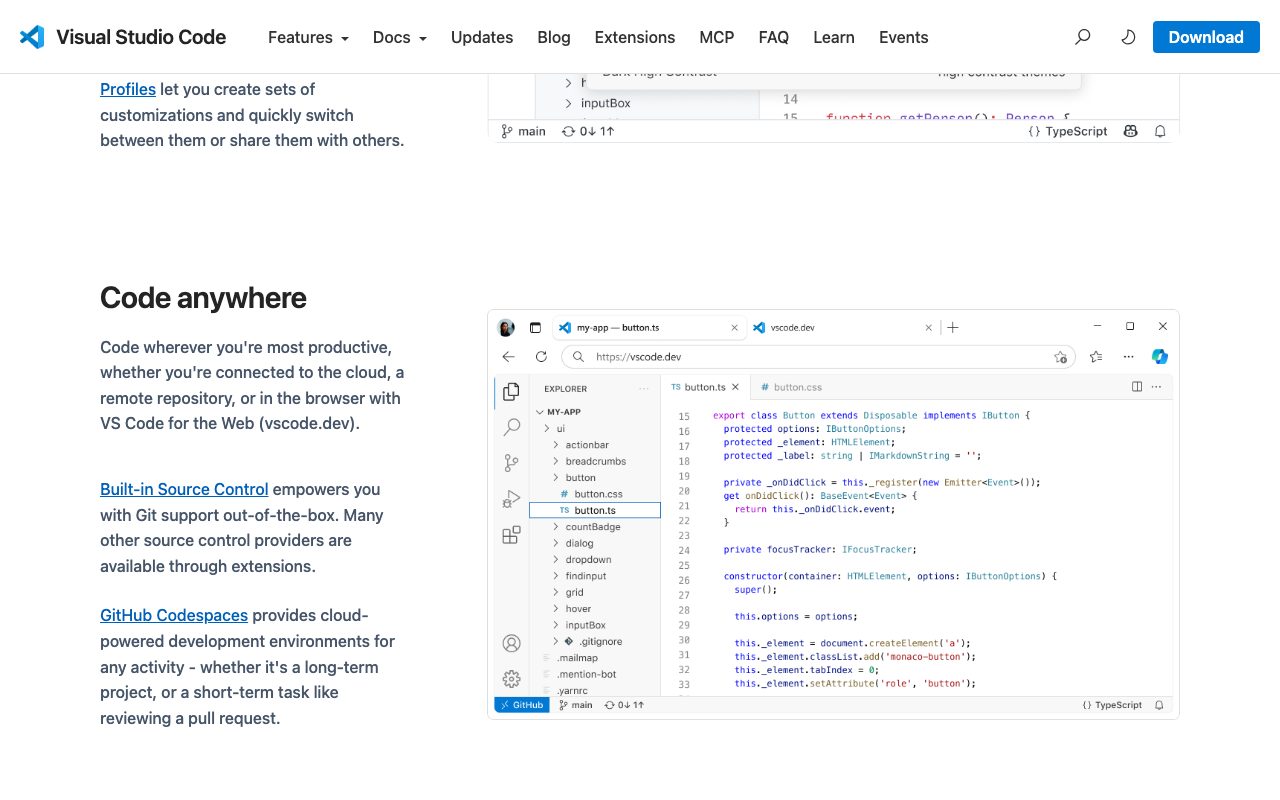
Remote development extensions are unique. SSH Remote, Dev Containers, and WSL extensions let you edit code that lives on a remote server, in a Docker container, or in WSL, while the UI runs locally. This single capability transforms how a lot of engineers work.
Copilot and AI
GitHub Copilot is a paid extension at $10 per month for individuals and $19 per user per month for business. It generates code suggestions inline as you type. Most VS Code-using developers either use Copilot or one of the alternatives like Codeium, Tabnine, or Cursor's fork. AI integration is now table stakes.
Tradeoffs
VS Code is built on Electron, which means RAM usage is real. Large workspaces with many extensions can chew through a few gigabytes. On a recent laptop, this is invisible. On older hardware, it can become annoying.
The extension ecosystem is enormous, which means quality varies. Some extensions slow startup, conflict with each other, or stop being maintained. Curating your extension list is a real activity. The defaults are good, and most developers add only a handful of essentials.
VS Code is the default for a reason: it's good enough at almost everything. The places where it's not good enough have specialist alternatives.
VS Code vs alternatives
Compared to JetBrains IDEs, VS Code is faster to start and lighter, but JetBrains wins on heavy refactor and database tooling. Compared to Cursor, Cursor is a fork of VS Code with deeper AI integration; you can also approximate Cursor by adding Copilot to VS Code.
Compared to Zed, Zed is dramatically faster and Rust-native, but with a smaller ecosystem and fewer extensions. Compared to Neovim, Neovim is the choice for keyboard-driven and terminal-native developers. See our best code editors roundup, VS Code alternatives guide, and VS Code vs Cursor breakdown.
Bottom line on VS Code
VS Code is the safe and capable default editor for almost every developer. It's free, fast, extensible, and well-maintained. Microsoft funds it indefinitely, and the open ecosystem keeps it healthy regardless. Picking VS Code in 2026 is the obvious move unless you have a specific reason to want something else.
If you're starting out, install VS Code and a handful of extensions for your stack and skip the editor wars. If you're optimizing for AI-first workflows, try Cursor. If you want raw speed, try Zed. If you live in a terminal, learn Neovim. Otherwise, VS Code is the answer.
VS Code extension strategy
The realistic VS Code setup uses 5 to 15 extensions for most developers. More than that and you're paying performance and conflict costs without proportional value. The essentials usually include: a language server for your primary language, GitLens or a similar Git enhancer, an AI assistant like Copilot or Codeium, a theme, a syntax pack for secondary languages, and a few productivity tools like better commenting or path intellisense.
The mistake most developers make is installing every extension that gets recommended. The extension marketplace has a "trending" effect that surfaces popular but not always useful extensions. Curating to what you actually use saves startup time, RAM, and conflict debugging.
Settings sync and workspace config
VS Code's Settings Sync uses your GitHub or Microsoft account to keep settings, extensions, keybindings, and themes consistent across machines. Setting up Sync once means new machines feel like home in 30 seconds. The feature is free and reliable.
Workspace settings committed to your repo handle team consistency. The .vscode folder can include settings for formatting, linting, debugging, and recommended extensions. New team members get the right setup automatically when they open the project. This pattern is underused; teams that adopt it consistently report fewer "works on my machine" issues.
VS Code for remote development
The Remote Development extensions transformed how many engineers work. SSH Remote lets you edit code that lives on a server while the UI runs locally. The latency is low, the experience feels native, and you avoid the "sync code between laptop and server" dance entirely. For cloud-native engineering teams, this single capability changed daily workflow.
Dev Containers extends the same pattern to Docker. Define your dev environment in a Dockerfile or devcontainer.json. Anyone opening the project gets the exact same environment with the same tools, languages, and dependencies. Onboarding new engineers compresses from days to minutes. The pattern works particularly well for projects with complex local setup.
Common VS Code questions
Should I switch to Cursor? Depends on your AI usage. Cursor is a fork of VS Code with deeper AI integration: in-editor chat, codebase-aware completion, agent-style multi-file editing. For developers who do significant AI-assisted coding, Cursor's UX is meaningfully better. For developers who use AI occasionally, VS Code with Copilot is fine.
Is VS Code memory usage really a problem? Mostly no on modern machines. A typical VS Code window uses 200 to 500 MB. Multiple windows or large extension lists can push it higher. On a recent laptop with 16 GB or more RAM, this is invisible. On older or constrained machines, it can become noticeable.
What about Vim or Emacs? Both remain excellent for users who fully commit to them. The learning curve is real but the long-term productivity ceiling is high. VS Code's Vim emulation extensions cover the basics for users who want some of the keyboard efficiency without leaving the GUI editor.
VS Code and AI integration
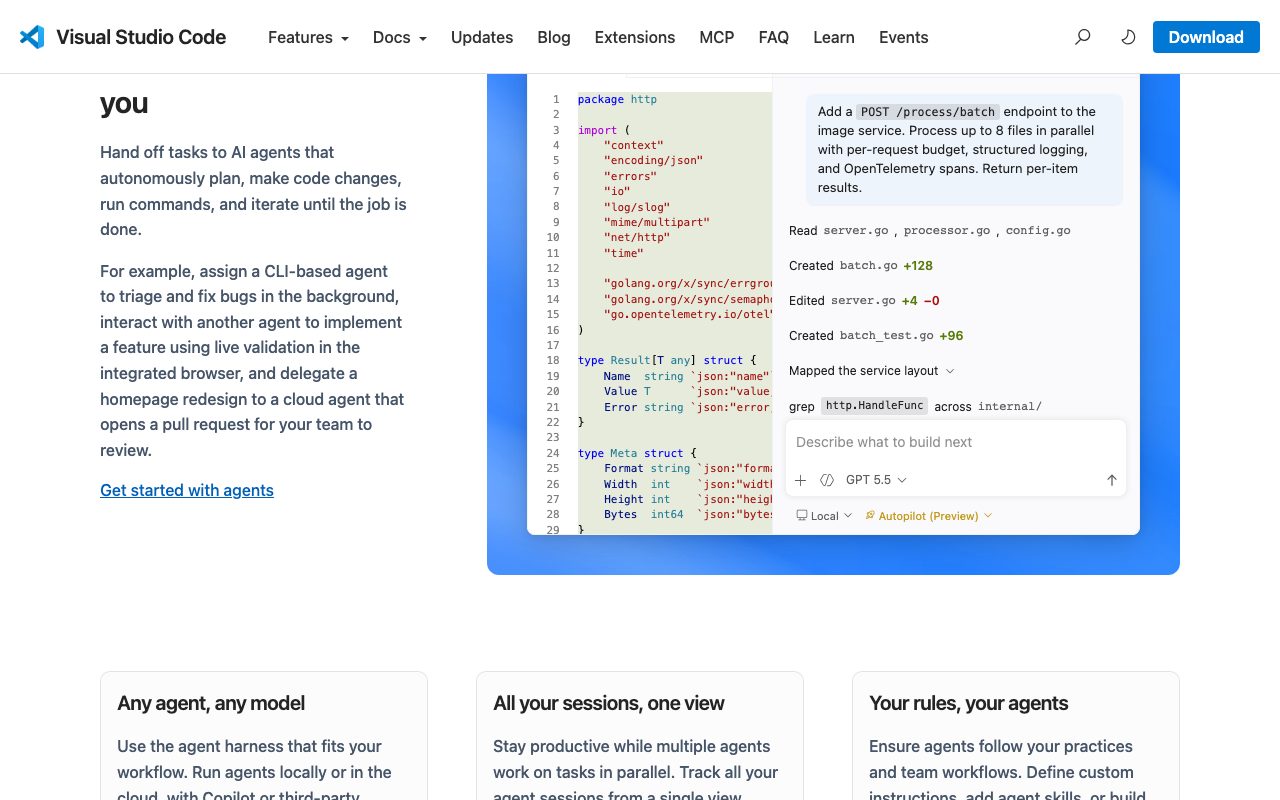
The AI integration story in 2026 is varied. GitHub Copilot remains the most popular paid option with Microsoft's deep integration. Codeium offers a free alternative with similar capabilities. Tabnine focuses on code completion with privacy options. Cursor (a fork) and Continue (an open extension) push further into agentic workflows.
The choice usually comes down to budget, privacy preferences, and how heavily you lean on AI. For most developers, GitHub Copilot at $10 a month delivers meaningful productivity gains. For developers running large AI-assisted refactors regularly, Cursor or Continue with custom configurations can do more. The market is still evolving fast and the right choice in 2027 may be different.
Final take on VS Code
VS Code's market position is so dominant that it's reshaped how new editors get evaluated. Cursor, Zed, and Continue all position themselves relative to VS Code. The extension API has become a de facto standard. The Language Server Protocol and Debug Adapter Protocol are now industry-wide. Microsoft's investment in the open ecosystem has paid off enormously, both for them and for the broader developer community.
The competitive landscape in 2026 is interesting. Cursor pulls AI-forward developers. Zed pulls performance-obsessed developers. JetBrains continues to win heavy IDE workflows. Neovim retains the terminal-native crowd. None of these alternatives have meaningfully reduced VS Code's market share. They've carved out specific segments while VS Code remains the general default.
For most developers in 2026, VS Code is the right choice. It's free, fast enough, well-maintained, and has the largest extension ecosystem. The remote development capabilities are unique and transformative. The AI integrations through Copilot or alternatives keep the editor competitive on the AI-assisted coding dimension. Pick something else only when you have specific reasons (AI workflows, raw performance, terminal preference, JetBrains feature depth) that override these defaults. For everyone else, install VS Code and skip the editor wars.
Tutorial / Demo
Key Features
- IntelliSense code completion with AI-powered suggestions via Copilot
- Integrated terminal, debugger, and source control in one window
- Extension marketplace with 50,000+ community and official extensions
- Remote development via SSH, containers, and WSL
- Multi-cursor editing and powerful find-and-replace with regex support
- Built-in Git integration with diff viewer, staging, and branch management
- Customizable themes, keybindings, and settings sync across devices
Pros & Cons
What we like
- Completely free and open-source with no paid tier limitations
- Starts fast and stays responsive even with large projects
- Unmatched extension ecosystem that supports every language and framework
- Excellent remote development capabilities for SSH, Docker, and WSL workflows
- Frequent monthly updates with meaningful new features and improvements
Room for improvement
- Can become resource-heavy with too many extensions installed
- Not a full IDE out of the box for languages like Java or C++ without significant extension setup
- Telemetry is enabled by default, though it can be disabled
- Extension quality varies widely and some popular ones can conflict with each other
Frequently Asked Questions
What is VS Code used for?
Is VS Code free to use?
What are the pros and cons of VS Code?
Who should use VS Code?
Best For
Featured in
Tags
Alternatives to VS Code

Our take
Tool Index Editorial · May 2026· 4.7/5
VS Code sits in a crowded category, differentiating itself as the code editor that adapts to any workflow.
Where it wins: Completely free and open-source with no paid tier limitations, Starts fast and stays responsive even with large projects, and Unmatched extension ecosystem that supports every language and framework. Honest gripes: Can become resource-heavy with too many extensions installed and Not a full IDE out of the box for languages like Java or C++ without significant extension setup.
Bottom line: pick VS Code when you need full-stack web development with JavaScript, TypeScript, Python, and more; look elsewhere if can become resource-heavy with too many extensions installed would be a dealbreaker.
Editorial opinion from the Tool Index team, written from the public product pages. Not a user review.
Reviews (6)
VS Code has been a quiet upgrade
Started using VS Code casually, now it's pinned in my dock. Honestly impressed by how completely free and open-source with no paid tier limitations.
Solid daily driver
Been using VS Code for six months now. The thing I keep coming back to: frequent monthly updates with meaningful new features and improvements. Got real value out of integrated terminal, debugger, and source control in one window. Main use case: data science and notebook workflows with the Jupyter extension. Glad I made the switch.
Pros
- Frequent monthly updates with meaningful new features and improvements
- Excellent remote development capabilities for SSH, Docker, and WSL workflows
- Unmatched extension ecosystem that supports every language and framework
Cons
- Telemetry is enabled by default, though it can be disabled
- Can become resource-heavy with too many extensions installed
The kind of tool you forget you're paying for
VS Code is one of those tools you stop noticing because it just works. Real selling point: starts fast and stays responsive even with large projects. Sticking with VS Code.
Pros
- Starts fast and stays responsive even with large projects
Good for most of what we need
Adopted VS Code for one project, ended up using it for more. Where it really wins is frequent monthly updates with meaningful new features and improvements. Found it works best for learning to code with beginner-friendly extensions and live share for pair programming. Decent value once you accept the rough edges.
Three months in, here's the verdict
Picked VS Code for the lower price, stayed for the actual quality. The thing I keep coming back to: frequent monthly updates with meaningful new features and improvements. It fits well for data science and notebook workflows with the Jupyter extension. That said, can become resource-heavy with too many extensions installed is a real gripe. Decent value once you accept the rough edges.
Pros
- Excellent remote development capabilities for SSH, Docker, and WSL workflows
- Unmatched extension ecosystem that supports every language and framework
- Starts fast and stays responsive even with large projects
Cons
- Can become resource-heavy with too many extensions installed
- Not a full IDE out of the box for languages like Java or C++ without significant extension setup
Finally something that fits
Came to VS Code after frustration with what I had before. Where it really wins is unmatched extension ecosystem that supports every language and framework. Mostly using it for remote server development via SSH without a local environment. Easy yes for anyone weighing the same trade-offs.
Pros
- Completely free and open-source with no paid tier limitations
Badge builder
Add VS Code to your website
Choose a badge style and size, preview it here, then copy the generated HTML. Badge images are self-contained SVGs and do not require an external script.

<a href="https://toolindex.net/tools/vscode?ref=badge" target="_blank" rel="noopener">
  <img src="https://toolindex.net/badge/vscode/medium.svg" alt="VS Code - Listed on Tool Index" width="180" height="50" />
</a>How to use the badge
- 1. Pick the style, size, and theme that fit your layout.
- 2. Copy the generated HTML from the code block.
- 3. Paste it into your footer, homepage, or press page.
Standard badge available
The standard listing badge is available now. Score and circle badges are limited to tools currently ranked in the top 10 of a category.
Badge clicks return visitors to this profile with a referral tag so the source remains identifiable.
Related Tools

Kevin Gabeci
Solo developer building web apps, cozy browser games, and AI creator toolkits.

Coolify
Self-hostable, open source alternative to Heroku and Netlify

Warp
The modern terminal reimagined with AI and collaboration

Bolt.new
Prompt-to-deployed full-stack app inside the browser
Work on VS Code? Request listing access or correction