
Warp
The modern terminal reimagined with AI and collaboration
Gallery
About Warp
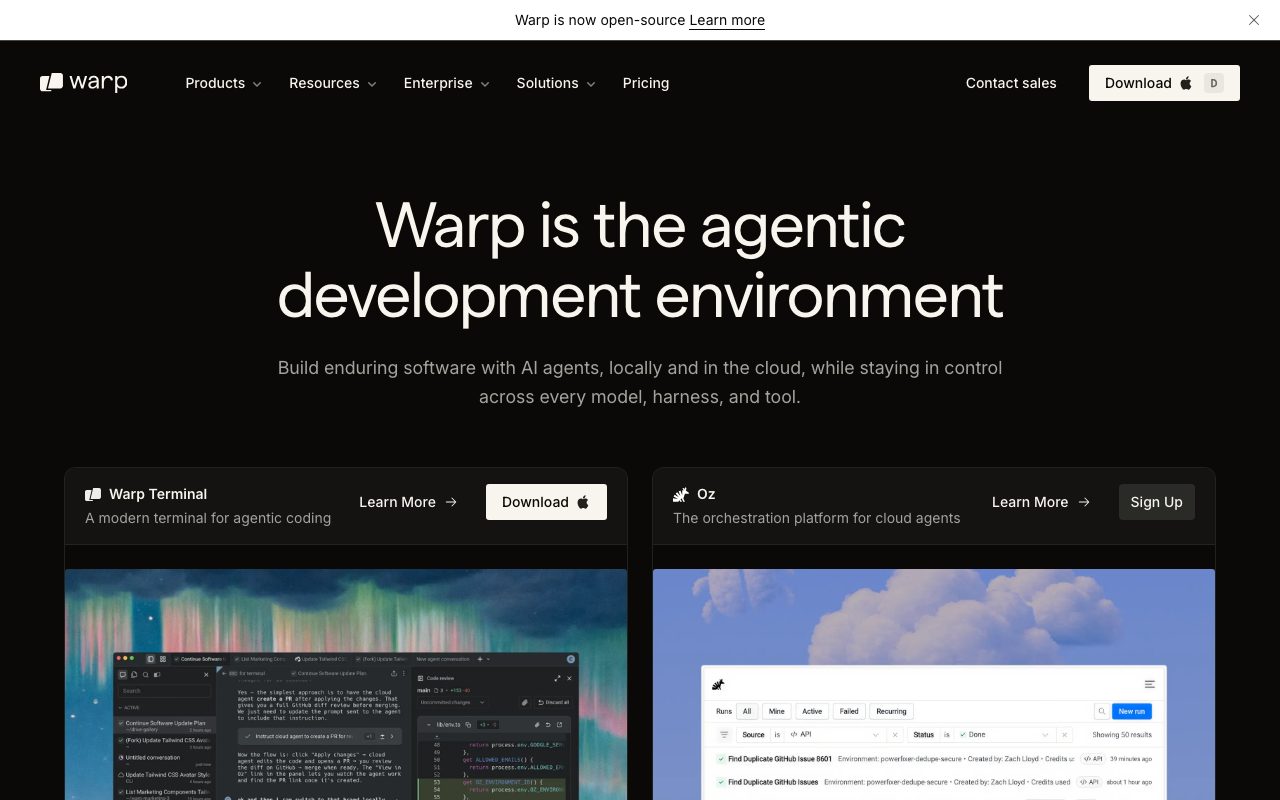
Warp is the modern terminal that took developer UX seriously. Block-based output, AI command help, IDE-style editing, and collaboration features. It's a love-it-or-hate-it tool, and that's by design.
Terminal purists hate it. Newer developers who never grew up on tmux love it. Both reactions are valid.
What Warp actually does
Warp is a terminal emulator. It runs your shell of choice (zsh, bash, fish) like any other terminal. The differences are everything around the shell.
Each command and its output form a "block" you can scroll, search, and reference. The input area edits like a real text editor with cursor movement and selection. AI command search lets you describe what you want and get a suggestion in plain English.
Warp Drive (the collaboration layer) lets you save and share workflows, runbooks, and notebooks with your team. Onboarding a new engineer to your team's command line conventions becomes a workflow instead of a wiki page.
Who Warp is for
Daily terminal users on macOS or Linux. Teams sharing common workflows and runbooks. New developers learning CLI tools with AI as a copilot. DevOps engineers managing servers via SSH.
It's also a fast onboarding tool. Junior engineers ramp up faster on Warp than on iTerm2 or Terminal.app because the AI fills the gap when they don't know which command to run.
Warp pricing breakdown
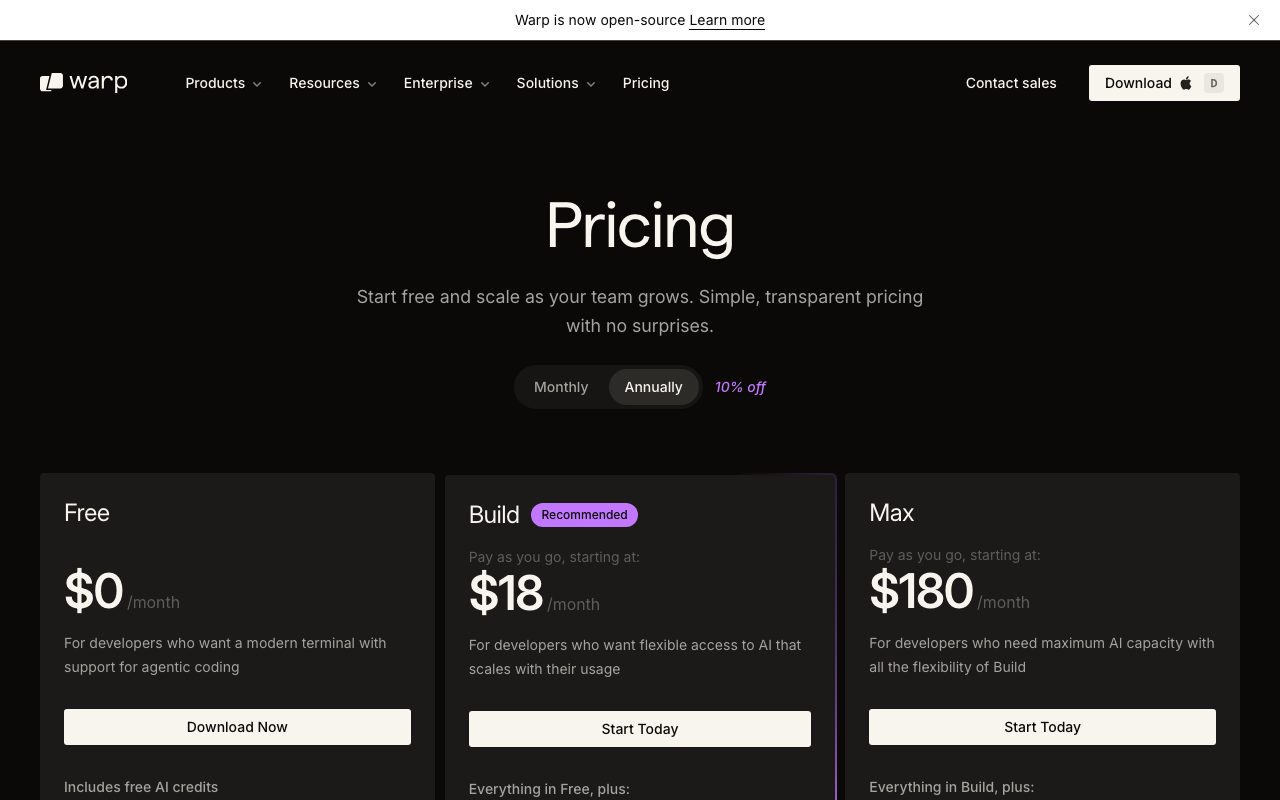
Warp's free plan covers individual use with limited AI requests. Generous enough for most solo developers.
Pro runs around $15 per user per month with higher AI quotas and more advanced features. Team adds collaboration controls. Enterprise is custom-quoted.
The free tier is genuinely usable. AI features have some quotas but core terminal use is unlimited.
Standout Warp features
Speed is real. Warp is genuinely faster at rendering huge log streams than traditional terminals. Tail a verbose log and feel the difference.
AI command search and generation are uniquely useful. Type "how do I find files modified in the last hour" and get the right find command. Useful even for experienced engineers when memory fails.
Block-based output makes long sessions navigable. Scroll back through earlier commands and copy any block in one click. The mental model maps to how you actually work.
IDE-like input editing means cursor keys, multi-line input, and selection all work the way you expect from a text editor. Editing a long curl command is suddenly pleasant.
Markdown-rendered output for supported commands. Things like `gh pr view` or `aws --output table` render with proper formatting instead of raw text walls.
Honest tradeoffs
macOS and Linux only, Windows via WSL. If you're on native Windows without WSL, Warp isn't an option.
Account creation is required. Warp won't run without signing up. Privacy-conscious developers find that off-putting; many won't switch because of it.
Some purists prefer traditional terminal emulators. Vim-style mental models clash with Warp's block-based UI. Tmux users especially feel the friction.
AI features need internet. The terminal works offline; the AI doesn't. Travel-mode usage hits this wall regularly.
Warp is the right terminal if you've ever wished your terminal were as friendly as your code editor. Otherwise, stay where you are.
Warp vs the alternatives
The biggest peer on Mac is iTerm2. iTerm2 is free, open source, and the dominant Mac terminal for years. Warp is opinionated and modern; iTerm2 is configurable and traditional.
WezTerm is the cross-platform GPU-accelerated peer. It's lighter, faster, and more configurable than Warp but lacks the AI features.
Alacritty and Kitty are the minimalist options. Lightning fast, no AI, no collaboration, just terminal.
The native Terminal.app on macOS still works. It's just the basic baseline.
See best terminal emulators, Warp alternatives, and Warp vs iTerm2.
Bottom line on Warp
Warp is the right tool for developers who treat the terminal as an interface rather than a sacred ritual. The AI helps. The blocks help more. The speed seals it.
If you've felt your terminal hasn't gotten an upgrade in twenty years, Warp is your upgrade. Try it for a week. Most converts don't go back.
Warp AI in practice
Type "find files modified in the last hour" and Warp suggests the right find command. Type "kill the process listening on port 3000" and Warp generates the lsof and kill combination. Useful even for senior engineers when memory fails.
Warp AI handles natural-language Q&A about your terminal output. Run a command, get an unexpected error, ask Warp AI what it means. The model has context on the recent block.
The agent mode goes further. Describe a multi-step goal and Warp's agent runs the commands needed. Not always perfect, but increasingly capable for routine ops tasks.
Warp Drive for teams
Warp Drive saves and shares workflows across your team. Common runbooks, debugging procedures, and deployment commands become reusable assets instead of tribal knowledge.
New engineer onboarding accelerates. Instead of "ask Bob about how we deploy," there's a Warp Drive workflow that runs the deploy with the right env vars, region, and config flags.
Notebook-style documents combine commands, output, and prose. Closer to a runnable runbook than static docs.
Warp common questions
"Will Warp work with my zsh config?" Yes. Warp supports zsh, bash, and fish. Your existing dotfiles, aliases, and plugins keep working.
"What about tmux?" Warp has its own pane and tab system. Tmux still runs inside Warp, but heavy tmux users sometimes prefer to stick with iTerm2 or alacritty.
"Is Warp fast?" Yes. GPU-accelerated rendering means huge log streams scroll smoothly. Faster than most traditional terminals.
"Can I use Warp without an account?" No. Account creation is required. That's a deal-breaker for some users.
Final word on Warp
Warp is the right terminal for developers who treat the terminal as an interface rather than a sacred ritual. The AI helps. The blocks help more. The speed seals it.
If you've felt your terminal hasn't gotten an upgrade in twenty years, Warp is your upgrade. Try it for a week. Most converts don't go back.
For teams especially, Warp Drive's workflow sharing is genuinely useful. Onboarding gets faster. Tribal knowledge gets documented as a side effect of using the tool.
Warp for daily development
Most users settle into a workflow within a week. Open Warp, type commands, navigate blocks. The block-based output becomes natural quickly.
Power users invoke AI for unfamiliar commands. Forget the exact tar flags? Ask Warp AI. Need to remember the curl syntax for a POST with JSON? Ask Warp AI. The model fills the gap when memory fails.
Block bookmarking saves important command outputs. The deploy log from yesterday, the diagnostic dump from a debugging session. Recall them later instead of digging through scrollback.
Tab and pane management works like modern editors. Cmd-T for new tab, Cmd-D for split. Familiar shortcuts for anyone who uses VSCode or modern IDEs.
Warp for DevOps work
SSH sessions inside Warp keep the same UX as local terminal. Block-based output, AI assistance, and IDE-style editing all work over SSH.
Multi-server workflows benefit from Warp Drive's saved commands. Common production debugging steps become reusable workflows instead of ad-hoc command construction.
Command palette (Cmd-P) provides quick access to recent commands, saved workflows, and Warp features. Reduces cognitive load during stressful incidents.
Output filtering lets you grep through huge log streams without running a separate grep command. Faster diagnostic loops.
Warp customization
Themes cover light, dark, and many community-contributed options. Customizable enough to match your editor's color scheme.
Prompt customization (PS1) works through your shell config. Warp doesn't override your existing zsh or bash prompt.
Keybindings configurable through the settings UI. Customize to match your existing terminal habits or invent new shortcuts.
Settings sync across devices when you're signed in. Open Warp on a new Mac, your themes and keybindings come along.
Warp roadmap and direction
The team ships frequently. Major features land monthly. Smaller improvements arrive weekly.
AI features keep expanding. Agent mode, multi-step task automation, and deeper IDE-style features all advance.
Collaboration features (Warp Drive) target team-wide workflows. The vision is "version-controlled, shareable terminal workflows" rather than "fancier terminal."
Windows native support is rumored but not shipping yet. Until then, WSL is the workaround for Windows users who want Warp.
Warp long-term outlook
The terminal emulator category was sleepy for years. Warp's launch in 2022 and steady iteration since then changed the conversation.
iTerm2 remains the entrenched leader on macOS. Warp competes by being modern and AI-assisted rather than feature-rich and traditional.
WezTerm, alacritty, and kitty cover the cross-platform and minimalist niches. None directly compete with Warp's collaboration and AI focus.
Account requirements remain controversial. Warp's bet is that the value justifies the lock-in. For some users it does. For others it doesn't. The product won't suit everyone.
For developers who treat the terminal as a real interface (not a sacred ritual), Warp is the most innovative pick. The AI features keep improving. The collaboration story compounds for teams that adopt it.
Tutorial / Demo
Key Features
- AI command search and generation
- Block-based terminal output navigation
- IDE-like text editing in the input area
- Shared workflows and collaborative features
- Custom themes and prompt customization
- Command palette for quick actions
- Markdown-rendered output for supported commands
Pros & Cons
What we like
- Significantly faster than traditional terminals
- AI assistant helps with unfamiliar commands
- Modern UI feels intuitive for newcomers
- Block-based output is great for long sessions
- Active development with frequent updates
Room for improvement
- macOS and Linux only, Windows via WSL
- Requires account creation to use
- Some purists prefer traditional terminal emulators
- AI features need internet connection
Frequently Asked Questions
What is Warp used for?
Is Warp free to use?
What are the pros and cons of Warp?
Who should use Warp?
Best For
Featured in
Tags
Alternatives to Warp



Our take
Tool Index Editorial · May 2026· 4.4/5
Warp sits in a crowded category, differentiating itself as the modern terminal reimagined with ai and collaboration.
Worth highlighting: Significantly faster than traditional terminals, AI assistant helps with unfamiliar commands, and Modern UI feels intuitive for newcomers. The friction points: macOS and Linux only, Windows via WSL and Requires account creation to use.
In short: Warp is a solid pick when you need daily terminal usage for software development, and a harder sell if macOS and Linux only, Windows via WSL would be a dealbreaker.
Editorial opinion from the Tool Index team, written from the public product pages. Not a user review.
Reviews (6)
Solid daily driver
Warp is one of those tools you stop noticing because it just works. Honestly impressed by how active development with frequent updates. Got real value out of IDE-like text editing in the input area. Sticking with Warp.
Quietly excellent
Tried Warp on a side project first. Where it really wins is block-based output is great for long sessions. The block-based terminal output navigation is more useful than I expected. Main use case: learning new CLI tools with AI assistance. Would buy again without thinking twice.
Pros
- Significantly faster than traditional terminals
- Block-based output is great for long sessions
- AI assistant helps with unfamiliar commands
Hit the Warp sweet spot
Tried Warp on a side project first. The thing I keep coming back to: modern UI feels intuitive for newcomers. Worth calling out the block-based terminal output navigation too. It fits well for sharing terminal workflows with team members.
Underrated honestly
Picked Warp for the lower price, stayed for the actual quality. Genuine strength: block-based output is great for long sessions. Ai command search and generation works the way you'd hope. Found it works best for onboarding new developers to command line workflows. Would buy again without thinking twice.
The kind of tool you forget you're paying for
Found Warp on a Reddit thread, glad I clicked. What stands out is how modern UI feels intuitive for newcomers. Ai command search and generation works the way you'd hope. Main use case: devOps and system administration tasks. Easy yes for anyone weighing the same trade-offs.
Pros
- Modern UI feels intuitive for newcomers
Easy 5 from me
Tried Warp on a side project first. What stands out is how modern UI feels intuitive for newcomers. Got real value out of IDE-like text editing in the input area. Found it works best for learning new CLI tools with AI assistance. Hard to imagine going back to my previous setup.
Pros
- Modern UI feels intuitive for newcomers
- Active development with frequent updates
Badge builder
Add Warp to your website
Choose a badge style and size, preview it here, then copy the generated HTML. Badge images are self-contained SVGs and do not require an external script.

<a href="https://toolindex.net/tools/warp?ref=badge" target="_blank" rel="noopener">
  <img src="https://toolindex.net/badge/warp/medium.svg" alt="Warp - Listed on Tool Index" width="180" height="50" />
</a>How to use the badge
- 1. Pick the style, size, and theme that fit your layout.
- 2. Copy the generated HTML from the code block.
- 3. Paste it into your footer, homepage, or press page.
Standard badge available
The standard listing badge is available now. Score and circle badges are limited to tools currently ranked in the top 10 of a category.
Badge clicks return visitors to this profile with a referral tag so the source remains identifiable.
Related Tools

Kevin Gabeci
Solo developer building web apps, cozy browser games, and AI creator toolkits.

Coolify
Self-hostable, open source alternative to Heroku and Netlify

Apatero AI
The creator studio for AI image, video, audio, 3D, and avatars, now at apatero.ai.
Kevin Gabeci Toolkits
Seven AI toolkits for writing books, making music, cutting video, and building agents.
Work on Warp? Request listing access or correction