
Demorta
Record, edit, share, and measure interactive product demos from a Chrome extension
Gallery
About Demorta
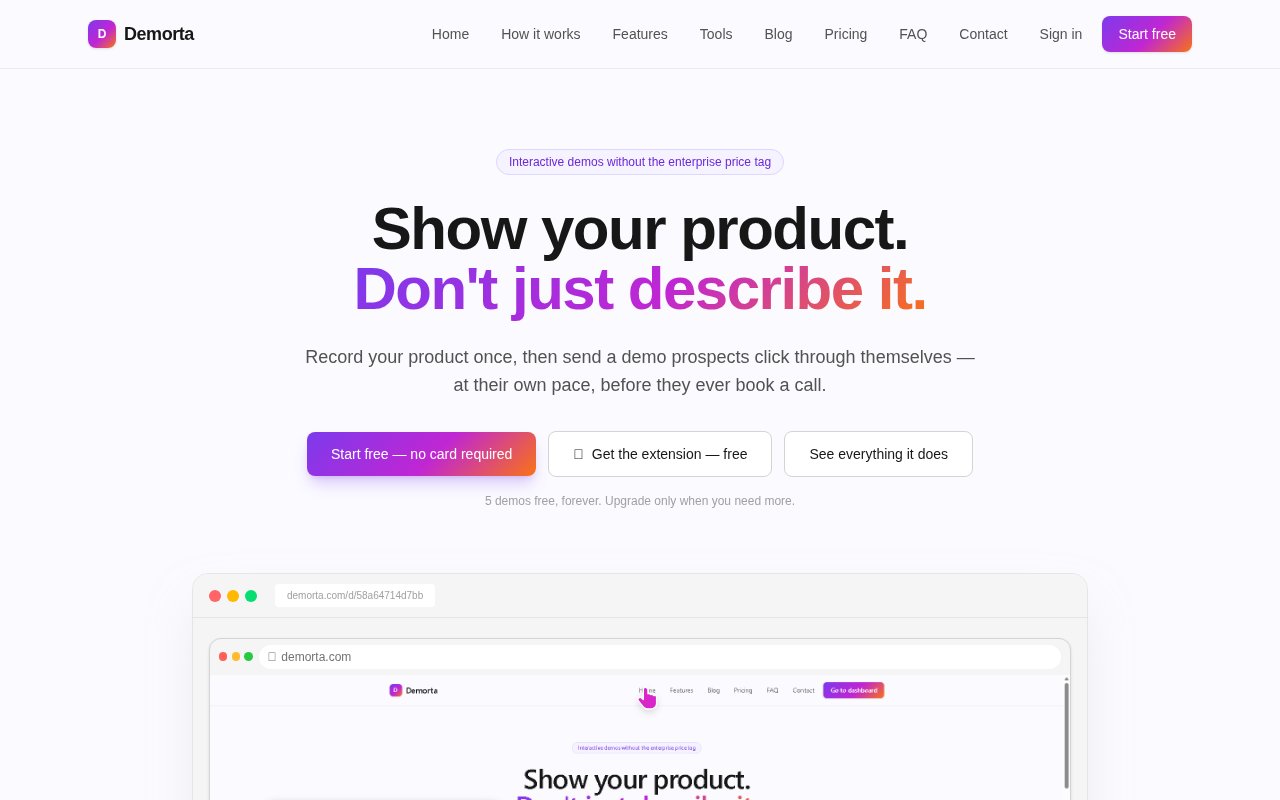
Demorta is an interactive product demo builder for turning a real software workflow into a guided, clickable presentation. It is designed for prospects who want to understand a product before committing to a sales call, as well as customers or employees who need a walkthrough they can complete at their own pace. Instead of asking a team to maintain a sandbox or add tour code to its application, Demorta records the interface through a Chrome extension. The creator clicks through the product normally, each click becomes a step, and the result can be polished and published as a link or iframe. That gives sales and marketing teams a reusable version of a demonstration without requiring an engineer to build a separate environment for every campaign.
The recording process supports screenshot steps and HTML snapshots. With the extension running, a creator moves through the desired flow and captures the screens that matter. Afterwards, the editor can change visible text, replace images, search and replace a correction across steps, add captions or speech bubbles, and zoom attention toward an important control. Sensitive information can be blurred, and Demorta says that operation destroys the stored pixels on the server instead of merely covering them with an overlay. That distinction matters when a recording starts from an account containing customer or internal data. The extension only needs access to capture the current tab when the user actively starts recording, according to the pricing FAQ, and it doesn't need an SDK or a snippet inside the product.
A finished demo can be linear or interactive. Branching choices let viewers jump toward the feature they care about, while Previous and Next navigation remains available. Guided mode asks the viewer to click the highlighted control, click-to-reveal steps hide content until the correct area is selected, and quiz steps can require the right answer before advancing. Those tools allow the same basic capture workflow to support a sales presentation, an onboarding sequence, or lightweight training. Creators can apply a company logo, name, website, and brand color across published demos. Paid tiers can remove Demorta branding, and higher plans add narration, richer branching, quiz steps, lead capture, and advanced analytics.
Sharing is handled through a public link or an iframe that can be placed on a homepage, landing page, help article, or page builder that accepts embeds. Both routes point to the current version, so an edit made after publication updates the shared demo without a fresh export. Demorta can also export a walkthrough as video or PDF when the recipient needs a file that is easier to forward or view away from the interactive player. Lead gates can request an email before a demo or at its end, and the dashboard ties each response to the demo that produced it. Analytics show views, completion rate, and per-step drop-off, which helps a team find the part of a story where viewers lose interest without adding separate event tags.
Demorta is best suited to small software teams, product marketers, sales teams, and customer education staff that need polished click-through demos quickly. It offers a practical middle ground between a screen recording, which a viewer can only watch, and a maintained product sandbox, which takes more work to operate. A creator can demonstrate a repeatable path while hiding live account details and steering different audiences toward different branches. The focus is intentionally on captured demos rather than a live tour running inside the customer's own application. Teams looking for contextual tooltips that respond to real user data inside production software will need a different kind of onboarding system, while teams that want a shareable simulation can benefit from Demorta's simpler setup.
Access is freemium. The Free plan allows five demos with unlimited steps and viewers, screenshot and HTML capture, editing, blurring, embedding, and basic analytics. Existing published demos stay live if the limit is reached, but the workspace can't create a sixth until one is archived or the account upgrades. Starter begins at $15.99 per month and adds unlimited demos and removal of Demorta branding for a single creator. Growth is aimed at teams and adds two seats, narration, branching, quizzes, lead capture, and advanced drop-off analytics, while Business adds unlimited seats and priority support. Monthly plans can be changed or canceled through billing, and published work can fall back to the free plan rather than being deleted. That makes the free tier useful for testing a real workflow, though teams needing interactive sales qualification will likely need Growth rather than the entry paid plan.
Key Features
- Chrome-based step capture
- Screenshot and HTML editing
- Branching guided demo paths
- Sensitive data blurring
- Live links and iframe embeds
- Completion and drop-off analytics
Pros & Cons
What we like
- Creates demos without product-side code
- Edits update every published embed
- Supports interactive training and sales paths
- Free tier includes five usable demos
Room for improvement
- Recording depends on a Chrome extension
- Free plan stops at five demos
- Lead capture requires a higher plan
- Focused on captured rather than live tours
Frequently Asked Questions
What is Demorta?
Does Demorta require code in the product?
Is Demorta free?
Can a Demorta demo be updated after sharing?
Best For
Featured in
Alternatives to Demorta
View all
Apatero AI
The creator studio for AI image, video, audio, 3D, and avatars, now at apatero.ai.

Prompted Income
Make money with AI, documented with the receipts instead of the screenshots.

Sellsmithy
The workshop side of selling digital products. Built first, fees counted, duds included.

Postdex
An exclusive marketplace for finished, human-made articles. Every piece sells once.
Our take
Tool Index Editorial · Sep 2026· 4.0/5
Demorta records a browser workflow through a Chrome extension and turns it into an editable, clickable product demo with links, embeds, branching, lead capture, and analytics. It is aimed at sales, marketing, onboarding, and support teams that want prospects to try a guided flow without touching the live product. Five demos are free, and unlimited plans start at $15.99 per month.
We found the workflow clear and the site includes a real demo to inspect. Editing text or images after capture and updating every published embed is practical, while destructive pixel blurring is a thoughtful privacy detail. The main limit is the medium. These are captured walkthroughs, not live product tours, and recording depends on Chrome. Branching, narration, lead capture, and deeper analytics also sit on higher plans.
Editorial opinion from the Tool Index team, written from the public product pages. Not a user review.
Reviews (0)
Badge builder
Add Demorta to your website
Choose a badge style and size, preview it here, then copy the generated HTML. Badge images are self-contained SVGs and do not require an external script.

<a href="https://toolindex.net/tools/demorta?ref=badge" target="_blank" rel="noopener">
  <img src="https://toolindex.net/badge/demorta/medium.svg" alt="Demorta - Listed on Tool Index" width="180" height="50" />
</a>How to use the badge
- 1. Pick the style, size, and theme that fit your layout.
- 2. Copy the generated HTML from the code block.
- 3. Paste it into your footer, homepage, or press page.
Standard badge available
The standard listing badge is available now. Score and circle badges are limited to tools currently ranked in the top 10 of a category.
Badge clicks return visitors to this profile with a referral tag so the source remains identifiable.
Related Tools
Apatero AI
The creator studio for AI image, video, audio, 3D, and avatars, now at apatero.ai.

SEObot
Autonomous AI SEO agent that runs your blog and link building on autopilot

Substack
Hosted newsletter and publication platform with built-in payments, recommendations, and an audience network for writers.

MailerLite
Friendly, affordable email marketing tool with newsletters, automations, landing pages, and a growing creator toolkit.
Work on Demorta? Request listing access or correction