FreshBooks
Cloud accounting designed for service-based small businesses and freelancers
Gallery

About FreshBooks
FreshBooks is the cloud accounting and invoicing platform that built its name serving freelancers and small service businesses. It handles invoicing, time tracking, expenses, and double-entry accounting in one app. FreshBooks has been around long enough to feel like infrastructure for a particular shape of business.
The newer version (FreshBooks Classic was retired) is a serious general ledger system, not just an invoice generator. That is the headline most reviewers miss. If you outgrew the original FreshBooks and assume it is still a glorified invoicer, take another look.
It is not the cheapest tool in the space. It is also not the buggy mess some QuickBooks refugees expect.
What FreshBooks does
FreshBooks covers the core service-business accounting loop. Invoices with recurring schedules and online payments. Estimates and proposals that convert to invoices. Time tracking that flows into invoices. Expense capture from receipts and bank feeds. Plus reports your accountant will actually accept.
Bank reconciliation is a real feature, not a marketing one. Connect your accounts, FreshBooks pulls transactions, you categorize them, and the books reconcile. It is not as fast as Xero in some flows and is faster than QuickBooks Online in others.
Project tracking is included with budgets, profitability views, and team time logs. It is light by accounting-tool standards but heavier than most competitors in this segment.
Who FreshBooks is for
FreshBooks fits independent service businesses: consultants, agencies, designers, lawyers, accountants, contractors. The data model is built around projects, clients, and time, which matches how those businesses actually operate.
It is less of a fit for inventory-heavy product businesses. FreshBooks added basic inventory but is not the right tool for a fast-moving e-commerce operation. Use Shopify plus a real accounting integration there.
Pricing
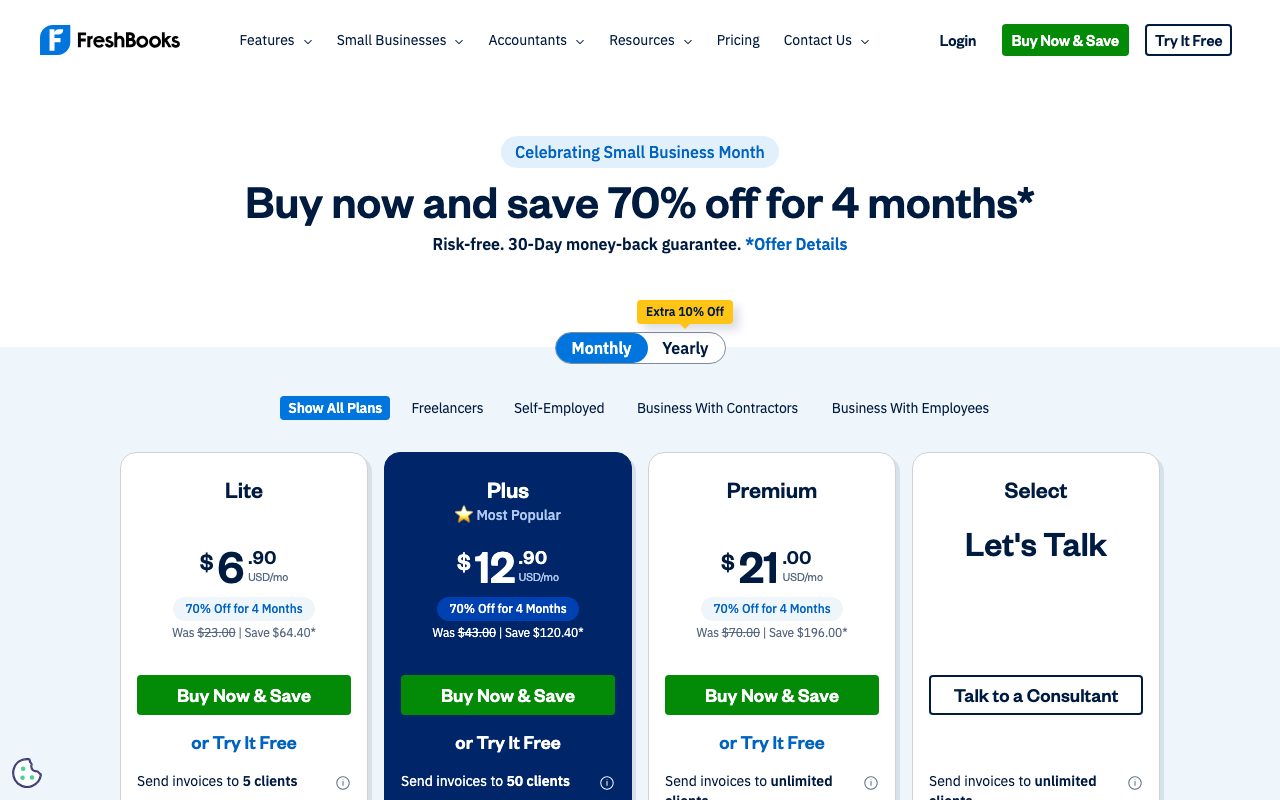
Pricing scales by client count and seats. The Lite tier is for solo operators with a small client list; Plus and Premium add team members, more clients, and accounting features. Discounts at sign-up are routine, so look for them.
Add-on costs include team members, payroll integration, and advanced payments. Stripe and a built-in payments processor are both options.
Features that pull weight
The invoicing flow is the cleanest in the segment. Invoice templates, recurring billing, late payment reminders, online payment links, multi-currency, and a client portal. Sending an invoice is genuinely a few seconds of work after the first one.
Time tracking is integrated with the timer running on web, desktop app, or mobile. Time entries attach to projects and roll into invoices. The invoicing-from-time-tracking loop is FreshBooks's competitive advantage on most service businesses.
Reports cover P&L, balance sheet, sales tax, A/R aging, profitability by project. Export to your accountant or hand them a portal login. Most CPAs in North America have seen FreshBooks before, which removes a meaningful friction.
The mobile app is genuinely good. You can capture a receipt, send an invoice, and start a timer without opening a laptop. That is rarer than it sounds.
Tradeoffs
FreshBooks is North America-centric. Tax handling for the US and Canada is mature; some other regions are functional but less polished. EU VAT and global multi-jurisdiction tax setups are doable but check before committing.
The general ledger depth is solid for service businesses, less impressive for complex multi-entity setups. Multi-currency works; consolidating books across multiple legal entities is not its strength.
Pricing per client tier annoys some users. If you run a high-volume one-off-client business, the math gets bumpy.
FreshBooks is the obvious pick for a service-business operator who wants accounting that does not feel like accounting. The category does not have many tools that hit that brief.
FreshBooks vs alternatives
Versus QuickBooks Online, FreshBooks is friendlier for service businesses, less powerful for complex inventory and multi-entity. QBO is what your accountant probably knows; FreshBooks is what you will actually use day to day.
Versus Wave, FreshBooks is more capable and more expensive. Wave's free tier is hard to beat for the smallest operators; FreshBooks earns the upgrade once you have steady client work.
Versus Xero, FreshBooks is more focused on services and time. Xero has a stronger international footprint and a deeper accountant ecosystem outside North America.
See best accounting software, QuickBooks alternatives, and the FreshBooks vs QuickBooks comparison.
Common questions
Is FreshBooks just an invoicing tool? No, it is a full small-business accounting system now. Does it handle sales tax? Yes, with state and provincial support in North America. Can my accountant use it? Yes, with a dedicated accountant view. Does it integrate with payroll? Yes, with Gusto and a built-in option in some regions.
Bottom line
FreshBooks is the right pick for North American service businesses that want one tool for invoicing, time, expenses, and the books. It is not the cheapest, and it pays for itself fast if invoicing was eating your week. Wave, QuickBooks, and Xero each win different niches around it.
For freelancers and small agencies, FreshBooks remains a top three default. Browse tools for freelancers and the FreshBooks profile for current pricing.
Setup, week one
Day one: connect your bank accounts and credit cards. FreshBooks pulls transactions automatically. The categorization is mostly automated with a learning curve.
Day two: import clients from your previous tool. CSV import works for most competitors. Set up your default invoice template with logo, brand colors, and payment terms.
Day three: connect Stripe or the built-in payments processor. Without payments connected, you are using FreshBooks as a glorified spreadsheet. With payments, the late-payment problem mostly solves itself.
Day four: set up your projects and time tracking categories. The data model assumes you bill by project; lean into it.
Day five: invite your accountant. They get a portal with the views they need; you do not have to email PDFs at quarter-end.
Common patterns
Recurring invoices: set the schedule once, FreshBooks generates and sends on cadence. Most professional service businesses have recurring revenue; automate it.
Expense capture: photograph a receipt with the mobile app, FreshBooks extracts the data and categorizes. Manually categorize once, the system learns. After three months, this is mostly hands-off.
Project profitability: log time, log expenses, generate the P&L by project. Discover which clients are actually profitable. This insight tends to surprise operators who never measured it.
Tradeoffs that matter at scale
Pricing per client tier is the main scaling pain. Beyond a couple hundred clients, the math gets uncomfortable. Some agencies have moved to QuickBooks or Xero at that point.
Inventory is light. If you sell physical products, FreshBooks is not the right answer. Use Shopify and integrate accounting.
Multi-entity is not its strength. One business, one FreshBooks account is the happy path.
FreshBooks reporting deep dive
Profit and Loss: standard P&L by month, quarter, year. Categorize transactions correctly and the report writes itself.
Balance Sheet: assets, liabilities, equity. FreshBooks computes correctly when categorizations are clean.
Sales tax summary: by jurisdiction, with the data your accountant or tax software needs.
Accounts Receivable Aging: who owes you, how long they have owed it. The collection workflow flows from this report.
Profitability by project: time and expenses against billed revenue. The hidden insight: which clients are actually losing you money.
FreshBooks plus accountant workflow
Invite your accountant as a Collaborator. They get a portal view; you do not have to email PDFs.
Quarterly: tax filing prep is faster because the categorizations and reports are ready. The accountant pulls what they need without bothering you.
Year-end: the books should be close to closed by January because daily reconciliation kept them current. The dread of "I have to organize everything in March" goes away.
Audit trail: FreshBooks logs every change. If a question comes up, you can show what changed when and by whom.
FreshBooks at three years in
Year one: invoice and time tracking become muscle memory. The friction of getting paid drops.
Year two: project profitability and reporting reveal which clients are actually worth the work. Some clients get fired; some get raises.
Year three: tax filing is a non-event because the books are clean. Year-end close is two days, not two weeks.
The compound benefit is real. Most accounting tools pay back over time, not on day one. FreshBooks is in that category.
FreshBooks customer support
Phone support exists, which is rare in modern SaaS. North American hours.
Email support is responsive within a day for most issues.
The help center is comprehensive; most questions are answered there before you need to contact support.
FreshBooks integrations worth knowing
Stripe and the built-in payments processor for collections.
Gusto for payroll integration in the US.
Bench for outsourced bookkeeping; the integration is deep enough to be useful.
Zapier for the long tail of "send this to that."
API access for custom integrations, with documentation that is decent.
FreshBooks for specific service businesses
Designers and agencies: project profitability views show which retainer clients are losing money. Renegotiate or fire.
Lawyers and consultants: time tracking down to the six-minute increment. Bill accurately; capture every billable moment.
Contractors and tradespeople: estimate to invoice flow handles the bid-then-bill pattern. Mobile receipt capture covers job-site expenses.
Coaches and therapists: recurring monthly billing for retainer clients. Per-session billing for hourly. Both flow into the same books.
Photographers: project-based work with delivery milestones. Track time on shoots, edits, and admin separately for true profitability.
Tutorial / Demo
Key Features
- Invoicing with online payments
- Time tracking tied to projects and clients
- Expense capture and receipt scanning
- Project profitability reports
- Recurring billing and late-fee automation
- Client portal for approvals
Pros & Cons
What we like
- Tailored workflows for freelancers and agencies
- Friendly UI for non-accountants
- Time tracking is genuinely good
Room for improvement
- Lower-tier plans cap billable clients
- Reporting depth trails Xero and QuickBooks
- Inventory features are limited
Frequently Asked Questions
Is FreshBooks better than QuickBooks for freelancers?
How much does FreshBooks cost?
Does FreshBooks handle sales tax and VAT?
Can I accept credit cards through FreshBooks?
Does FreshBooks do payroll?
Best For
Featured in
Alternatives to FreshBooks
View all


Our take
Tool Index Editorial · May 2026· 4.6/5
FreshBooks is the kind of tool you adopt when you want cloud accounting designed for service-based small businesses and freelancers.
Worth highlighting: Tailored workflows for freelancers and agencies, Friendly UI for non-accountants, and Time tracking is genuinely good. The friction points: Lower-tier plans cap billable clients and Reporting depth trails Xero and QuickBooks.
In short: FreshBooks is a strong pick when you need freelancers invoicing a handful of clients, and a harder sell if lower-tier plans cap billable clients would be a dealbreaker.
Editorial opinion from the Tool Index team, written from the public product pages. Not a user review.
Reviews (4)
Worth the price of admission
The pitch for FreshBooks sounded too good to be true. Mostly true. The thing I keep coming back to: tailored workflows for freelancers and agencies. Expense capture and receipt scanning works the way you'd hope. Main use case: freelancers invoicing a handful of clients. Still recommending it to people in similar setups.
Pros
- Friendly UI for non-accountants
- Time tracking is genuinely good
Maybe in a year when they fix the basics
Six months of using FreshBooks, here's what holds up. Where it really wins is tailored workflows for freelancers and agencies. Wish they'd address how reporting depth trails Xero and QuickBooks. Probably better for someone with different needs.
Best decision this quarter
FreshBooks solves a real problem for me, but it's not magic. The biggest win has been time tracking is genuinely good. Their take on recurring billing and late-fee automation is solid. Main use case: service businesses replacing spreadsheet invoicing. Not perfect: inventory features are limited.
Pros
- Tailored workflows for freelancers and agencies
- Time tracking is genuinely good
- Friendly UI for non-accountants
Cons
- Inventory features are limited
- Lower-tier plans cap billable clients
Honest take after a few weeks
Skeptical at first because FreshBooks looked too simple. It's not. Genuine strength: time tracking is genuinely good. Project profitability reports works the way you'd hope. Found it works best for service businesses replacing spreadsheet invoicing. Honest gripe: reporting depth trails Xero and QuickBooks. Would buy again without thinking twice.
Pros
- Friendly UI for non-accountants
Badge builder
Add FreshBooks to your website
Choose a badge style and size, preview it here, then copy the generated HTML. Badge images are self-contained SVGs and do not require an external script.

<a href="https://toolindex.net/tools/freshbooks?ref=badge" target="_blank" rel="noopener">
  <img src="https://toolindex.net/badge/freshbooks/medium.svg" alt="FreshBooks - Listed on Tool Index" width="180" height="50" />
</a>How to use the badge
- 1. Pick the style, size, and theme that fit your layout.
- 2. Copy the generated HTML from the code block.
- 3. Paste it into your footer, homepage, or press page.
Standard badge available
The standard listing badge is available now. Score and circle badges are limited to tools currently ranked in the top 10 of a category.
Badge clicks return visitors to this profile with a referral tag so the source remains identifiable.
Related Tools

Simple RMD
Calculate, aggregate, and manage your annual IRA required minimum distributions.
Deel
Global payroll, contractor, and EOR platform
Chargebee
Subscription billing and revenue management for B2B SaaS

Rippling
Workforce platform unifying HR, IT, and finance
Work on FreshBooks? Request listing access or correction