
Green Screen Remover
Replace solid-color video backdrops locally with no upload or watermark
Gallery
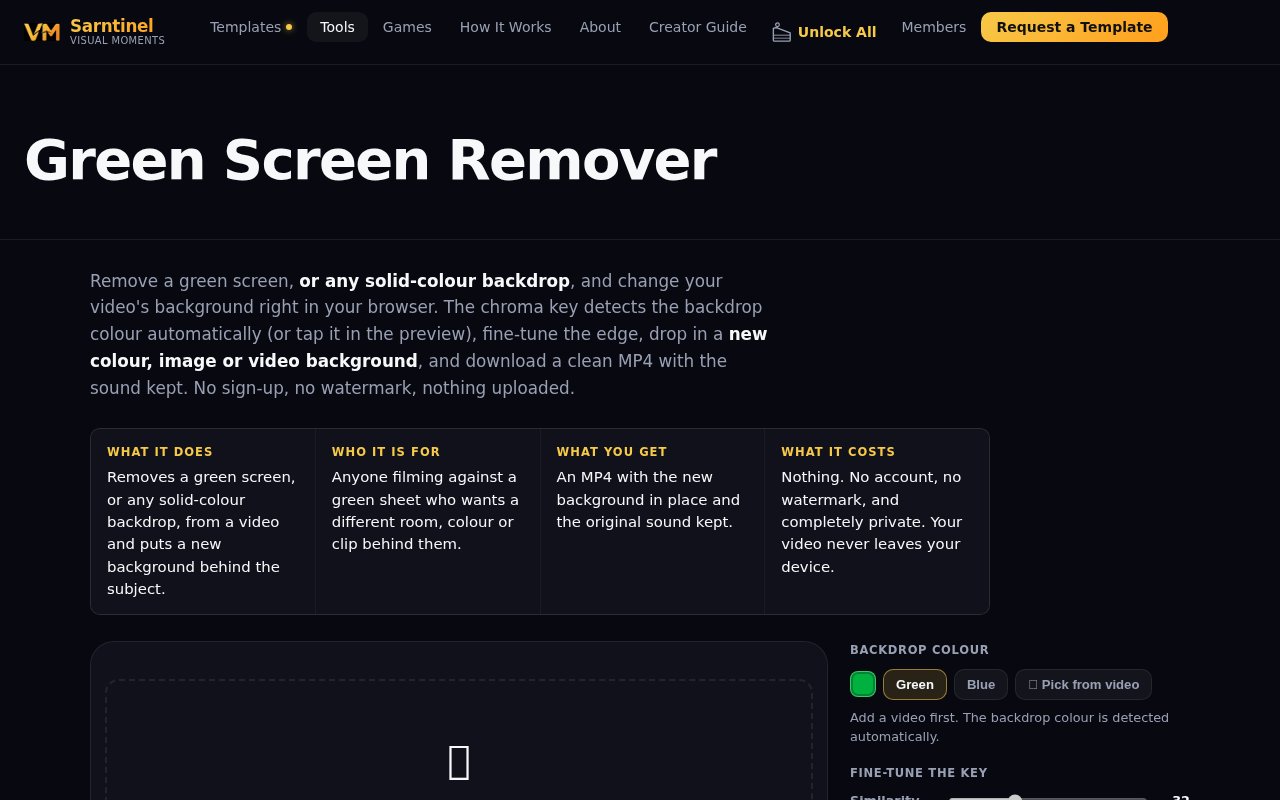
About Green Screen Remover
Green Screen Remover is a free, in-browser video tool from Visual Moments that removes a green screen or another evenly colored backdrop and replaces it with a solid color, image, or video. It is designed for people who already filmed against a sheet, wall, studio screen, or other consistent background and want a finished MP4 without installing an editor. The source clip stays on the device throughout the job, and the page requires neither an account nor an upload. The tool preserves the clip's original audio by default and produces a normal video with the chosen background baked into the picture.
The workflow begins with an MP4, WebM, or MOV file selected from the device or dropped onto the page. Green Screen Remover tries to detect the backdrop automatically. Green and blue have dedicated controls, while a picker lets the user sample any other background color directly from a video frame. A live preview shows the key before export, and the timeline can be dragged to inspect a particular moment. This matters because a setting that looks clean in one still frame may break around moving hair, hands, or clothing once the clip plays.
Several controls address the common weaknesses of a simple chroma key. Similarity widens or narrows the range of colors removed, smoothness softens rough changes around the mask, and edge softness blends the outline into the replacement scene. Spill removal reduces the green or blue cast reflected onto hair and shoulders. A matte view turns retained areas white and removed areas black, making missed patches and accidental cutouts easier to see. These adjustments don't make uneven lighting disappear automatically, but they give users a practical way to correct shadows, creases, color variation, and glow before spending time on the final render.
The replacement can be a flat color, a still image, or another video. Images and videos scale to fill the frame, and a background video loops when it is shorter than the foreground clip. Only the original clip's soundtrack is used, so audio from a replacement video isn't mixed into the export. Users can keep that sound in sync or deliberately save a silent result. Once the settings look right, the browser tests and rebuilds every frame locally, displays progress, and offers the finished MP4 for download. There is no watermark added to the result.
Local processing is central to both the appeal and the limitations. Private or unpublished footage never has to leave the device, and there is no server upload queue. Processing speed depends on the user's hardware, however, because the browser is doing the work. The site says a computer may need roughly two to three times the clip's duration to finish, while phones can take longer. Desktop clips are capped at two minutes and phone clips at one minute. Exporting requires Chrome, Edge, or Safari 17 or newer, although other browsers can still preview the key. The screen and tab need to remain active until saving finishes.
Good source footage still makes the largest difference. The product recommends lighting the backdrop evenly, smoothing creases, and leaving some distance between the subject and the screen to reduce shadows and reflected color. Clothing or objects close to the backdrop color may disappear with it. The matte preview can reveal gray or ragged regions before export, and playing the clip helps expose failures that aren't visible on a paused frame. Users can then adjust similarity, smoothness, edge softness, and spill removal in small steps. For a long recording, trimming to the needed moment first reduces the amount of frame-by-frame processing. These practical checks make the tool useful for creators who understand the basic chroma-key setup but don't want a full editing suite. The result can cover straightforward creator work such as placing a presenter over a branded still, swapping a room wall for a cleaner scene, or putting foreground footage over a moving background. Because the replacement is rendered into the exported picture, the downloaded MP4 can be uploaded like an ordinary video without asking the destination platform to understand chroma key settings.
The tool is a focused chroma-key utility rather than an automatic AI cutout for arbitrary scenes. It works best when the backdrop is even, well lit, and clearly separated from the subject's colors. Anything close to the selected key color can turn transparent, and MP4 output cannot contain a genuinely transparent video background. Within that scope, it offers unusually clear controls for a free one-page tool. Access is free, with no sign-up, upload, or watermark. Visual Moments also links to related editing tools and paid template content, but using Green Screen Remover itself does not require a purchase.
Key Features
- Local in-browser video processing
- Automatic backdrop color detection
- Adjustable chroma key controls
- Color, image, or video backgrounds
- Original audio preservation
- Watermark-free MP4 export
Pros & Cons
What we like
- Keeps source footage on the device
- Handles any evenly colored backdrop
- Offers detailed edge and spill controls
- Requires no account or software install
Room for improvement
- Desktop clips are limited to two minutes
- Phone clips are limited to one minute
- Rendering can take several clip lengths
- Transparent video export isn't supported
Frequently Asked Questions
What is Green Screen Remover?
Does it upload my video?
Does it only work with green screens?
Is Green Screen Remover free?
Best For
Featured in
Alternatives to Green Screen Remover
View all
Apatero AI
The creator studio for AI image, video, audio, 3D, and avatars, now at apatero.ai.
Apatero Studio
Creator studio for AI image, video, audio, 3D, and avatars. Every model worth using, in one workspace.

Melodex
Turn your idea into an AI-generated music video

Speel
AI UGC video generator that makes realistic AI avatars hold and talk about your product for ads
Our take
Tool Index Editorial · Sep 2026· 4.0/5
Green Screen Remover is a free browser tool that replaces an even-colored video backdrop with a color, image, or looping video. It is for creators who already shot against green, blue, or another solid background and need a finished MP4 without installing an editor. We found automatic color detection, a manual picker, matte preview, edge and spill controls, audio preservation, and local processing with no account, upload, or watermark.
For a one-page utility, the controls are unusually practical and the privacy boundary is clear. The browser does all the work, though, so exports can take several times the clip length and the tab must stay active. Desktop clips are capped at two minutes, phone clips at one minute, and output isn't transparent video. Uneven lighting, shadows, hair, or clothing close to the key color will still expose the limits of basic chroma keying.
Editorial opinion from the Tool Index team, written from the public product pages. Not a user review.
Reviews (0)
No reviews yet
Be the first to share your experience with Green Screen Remover
Sign in to write a reviewBadge builder
Add Green Screen Remover to your website
Choose a badge style and size, preview it here, then copy the generated HTML. Badge images are self-contained SVGs and do not require an external script.

<a href="https://toolindex.net/tools/green-screen-remover?ref=badge" target="_blank" rel="noopener">
  <img src="https://toolindex.net/badge/green-screen-remover/medium.svg" alt="Green Screen Remover - Listed on Tool Index" width="180" height="50" />
</a>How to use the badge
- 1. Pick the style, size, and theme that fit your layout.
- 2. Copy the generated HTML from the code block.
- 3. Paste it into your footer, homepage, or press page.
Standard badge available
The standard listing badge is available now. Score and circle badges are limited to tools currently ranked in the top 10 of a category.
Badge clicks return visitors to this profile with a referral tag so the source remains identifiable.
Related Tools
Apatero AI
The creator studio for AI image, video, audio, 3D, and avatars, now at apatero.ai.

LocalClip
Local-first AI video clipper for Mac that turns long videos into vertical clips
Melodex
Turn your idea into an AI-generated music video
Apatero Studio
Creator studio for AI image, video, audio, 3D, and avatars. Every model worth using, in one workspace.
Work on Green Screen Remover? Request listing access or correction