
hcode One-Person Engineering
Run a structured software delivery lifecycle with several coding agents and one human owner
Gallery
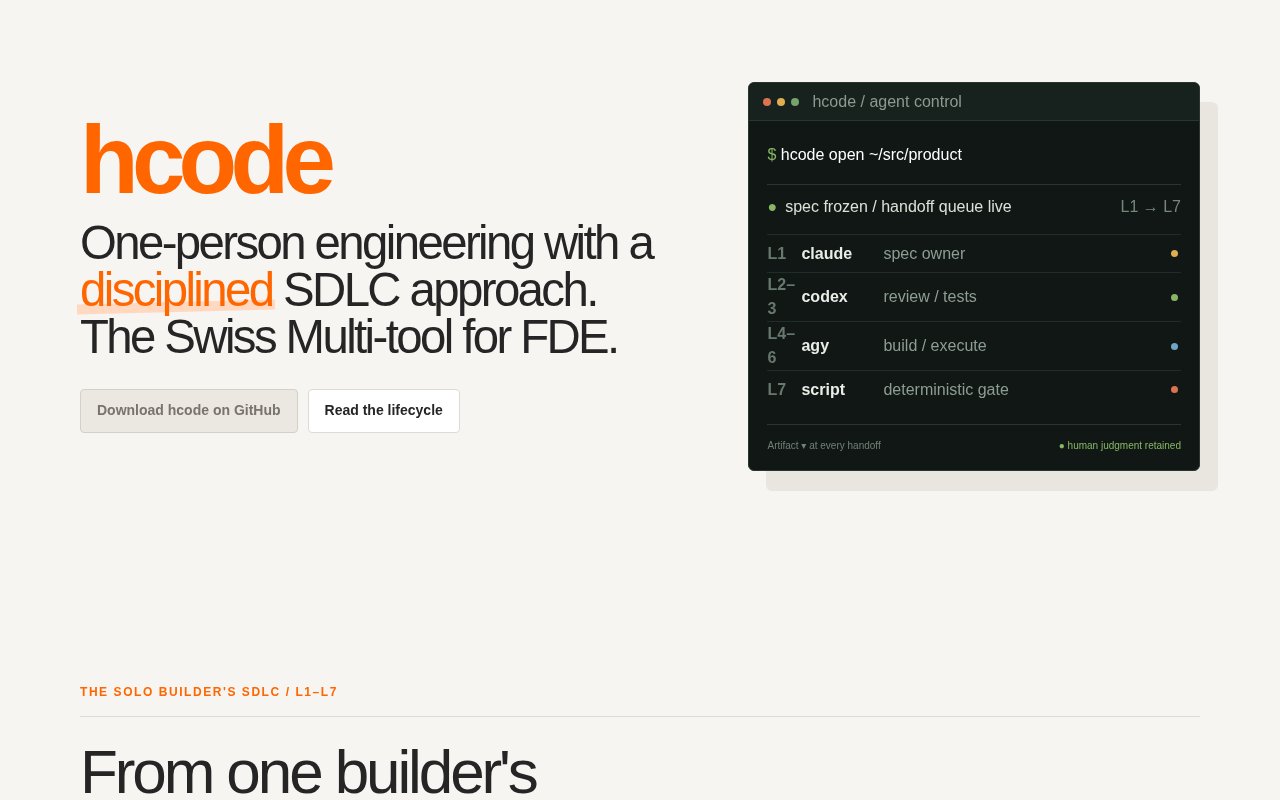
About hcode One-Person Engineering
hcode One-Person Engineering is a local desktop IDE for solo developers who want several coding agents to contribute to one project through a defined software delivery process. Instead of giving one agent a broad instruction to plan, code, test, and approve its own work, hcode splits the job into bounded roles and handoffs. One human remains responsible for product judgment and the final merge decision. The application brings agent terminals, lifecycle stages, source control, review evidence, and permission requests into one place so the owner can run a disciplined workflow without recreating the overhead of a conventional engineering organization.
The core workflow is organized as seven lifecycle stages. It moves from a specification through adversarial review, tests, implementation, code review, controlled execution, and a deterministic merge verdict. Each stage has one job and an accountable role, and its output becomes an artifact for the next stage. The specification is reviewed and then frozen before implementation begins. Later agents can expose a problem with that contract, but they don't quietly rewrite the target while building against it. This makes changes in scope visible and gives the human owner a concrete record of what each agent was asked to prove.
hcode assigns different command line agents to roles that are intended to check one another. Its published workflow uses Claude for specification ownership and diff review, Codex for pressure testing the specification and writing tests before implementation, and Antigravity for implementation and execution. Other agents such as Grok can also run through the interface. The exact model names matter less than the separation of duties. An author isn't treated as its own independent reviewer, tests can be created without seeing the implementation, and the final gate is deterministic rather than another model offering an uncheckable opinion.
The application also tackles the practical source control work created by parallel agents. Isolated workspaces keep their changes contained, while a Source Control and Conflicts view shows changed files, branch state, side by side diffs, and warnings when worktrees touch the same areas. From there, the owner can review, commit, merge, squash, cherry-pick, or resync work from the base branch. A merge preview lets the user inspect the likely integration result before changing the base. That focus is useful when agent output is plentiful but the hard part is understanding what overlaps, what passed, and what is actually ready to combine.
Terminals remain visible as first-class parts of the workflow rather than being hidden behind an opaque task queue. hcode collects approval requests from different terminals into a permission bar, letting the owner answer a request without searching for the pane that raised it. Monaco provides the code comparison surface, while local ownership of credentials keeps agent tools tied to the user's environment. The product is built as a local desktop application with Tauri, Rust, and React. That approach will appeal to developers who already use command line coding agents and want a graphical control surface without moving their repositories and credentials into a hosted service.
hcode is best suited to a technically confident solo engineer, founder, or forward deployed engineer who already understands Git and wants more structure around agent-assisted delivery. It isn't a general no-code builder and it doesn't remove the need to make architecture or product decisions. Its value comes from making responsibilities, artifacts, conflicts, and gates explicit. A small team could use the ideas, but the interface and One-Person Engineering framing place one accountable owner at the center. The workflow may feel heavier than a single chat for tiny edits, yet it becomes more relevant as a change spans planning, tests, implementation, and release evidence.
The application is currently offered free, with local desktop builds and no paid plan presented on the product surface reviewed for this listing. It is also very new, so platform availability and lifecycle controls are still evolving. The launch made a macOS build available, with Omarchy and Ubuntu builds discussed as the next releases. Buyers should confirm that a current build supports their operating system and preferred agents before adopting it for daily work. For users who fit that setup, hcode offers an unusually concrete answer to a growing problem, coordinating multiple coding agents while keeping the human decision maker visibly in charge.
Key Features
- Seven-stage agent delivery lifecycle
- Role-separated coding agent workflow
- Isolated agent workspaces
- Source control conflict dashboard
- Deterministic merge evidence
- Central terminal permission bar
Pros & Cons
What we like
- Separates implementation from independent checks
- Keeps one human accountable for merges
- Surfaces conflicts across parallel agent work
- Runs locally with user-owned credentials
Room for improvement
- Very new product with a small user base
- Structured stages can be heavy for small edits
- Platform builds are still rolling out
- Requires comfort with Git and CLI agents
Frequently Asked Questions
What is hcode One-Person Engineering?
Which coding agents does hcode work with?
Is hcode free?
Who is hcode for?
Best For
Featured in
Alternatives to hcode One-Person Engineering
View allCursor
VS Code fork built around an AI pair-programmer

Replit
Browser IDE plus Replit Agent that builds and deploys apps from a prompt
Windsurf
Codeium's AI editor with Cascade agent and deep IDE integration

Vibe Built
Building real apps with agentic AI. What worked, what broke, what shipped.
Our take
Tool Index Editorial · Sep 2026· 3.5/5
hcode One-Person Engineering wraps several coding agents in a seven stage delivery process with frozen specifications, independent tests, code review, execution evidence, and a deterministic merge gate. We like the insistence that the implementer is not its own checker and that one human keeps the final decision. Visible terminals, isolated workspaces, and conflict previews address real problems in parallel agent work.
The process is heavier than most solo edits need, assumes confidence with Git and command line agents, and currently appears very young. The page showed version 0.1.5 and centered a specific Claude, Codex, and Antigravity role split, which may not suit every toolchain. It is free today and conceptually strong, but platform support and daily reliability deserve hands on validation.
Editorial opinion from the Tool Index team, written from the public product pages. Not a user review.
Reviews (0)
No reviews yet
Be the first to share your experience with hcode One-Person Engineering
Sign in to write a reviewBadge builder
Add hcode One-Person Engineering to your website
Choose a badge style and size, preview it here, then copy the generated HTML. Badge images are self-contained SVGs and do not require an external script.

<a href="https://toolindex.net/tools/hcode-one-person-engineering?ref=badge" target="_blank" rel="noopener">
  <img src="https://toolindex.net/badge/hcode-one-person-engineering/medium.svg" alt="hcode One-Person Engineering - Listed on Tool Index" width="180" height="50" />
</a>How to use the badge
- 1. Pick the style, size, and theme that fit your layout.
- 2. Copy the generated HTML from the code block.
- 3. Paste it into your footer, homepage, or press page.
Standard badge available
The standard listing badge is available now. Score and circle badges are limited to tools currently ranked in the top 10 of a category.
Badge clicks return visitors to this profile with a referral tag so the source remains identifiable.
Related Tools

Bolt.new
Prompt-to-deployed full-stack app inside the browser

Tabnine
Privacy-first enterprise AI code assistant you control, with SaaS, VPC, on-prem, or fully air-gapped deployment
Cursor
VS Code fork built around an AI pair-programmer

Skeezo
Agent-native macOS IDE for coordinating Claude Code and AI agents
Work on hcode One-Person Engineering? Request listing access or correction