
Hyperlane
AI-native IDE that runs multiple coding agents in parallel across isolated Git worktrees
Gallery
About Hyperlane
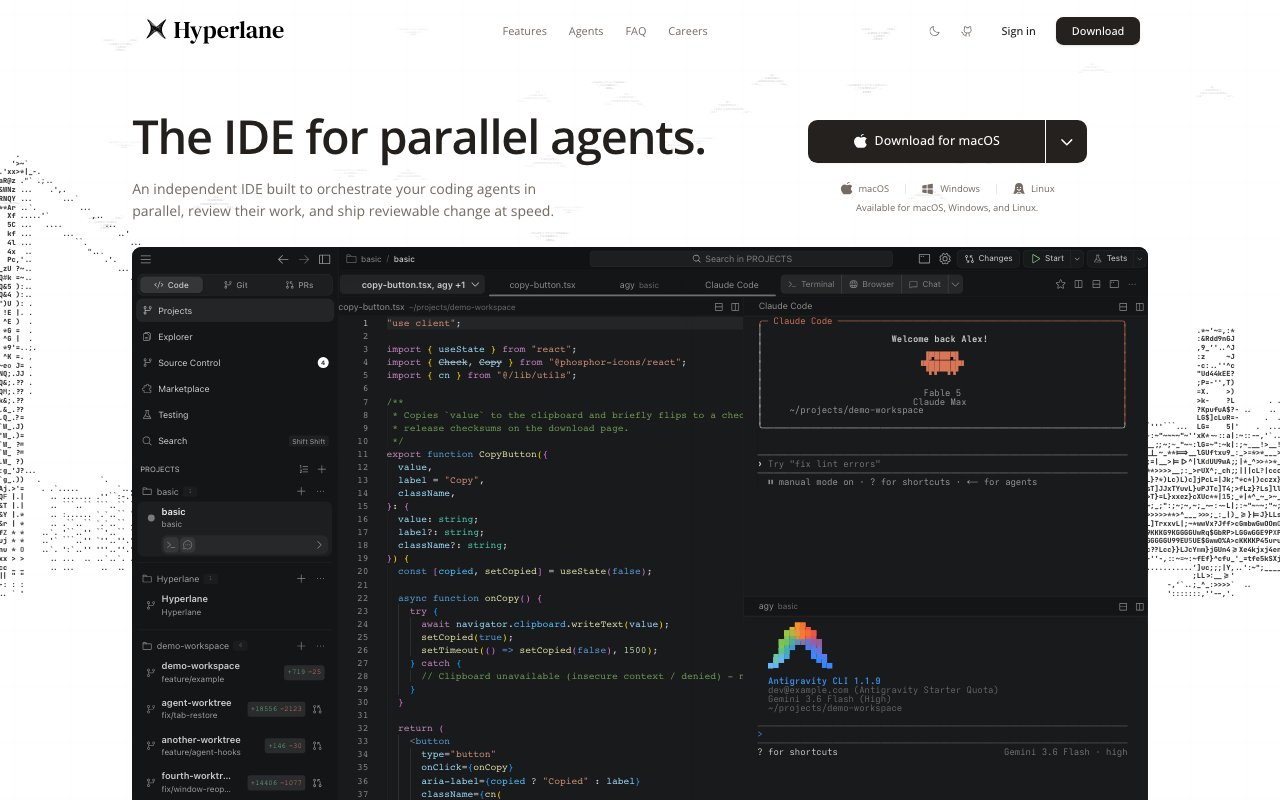
Hyperlane is an IDE designed to run multiple coding agents in parallel while keeping their work organized through Git. Each agent operates in its own isolated worktree, meaning the changes one agent makes do not interfere with the changes another is making. You can watch all of them stream output into the same editor, review what they produced, and merge the good parts back into your main branch. The pitch is that agents are fast but not always correct. By isolating their work and giving you visual tools to review it, Hyperlane lets you move at agent speed without the risk of untested code landing in production.
The editor runs on the VS Code engine. That foundation means your existing keybindings, extensions, and habits carry over. The ecosystem of extensions, language servers, debuggers, and themes that VS Code users rely on works in Hyperlane because it shares the same core. What Hyperlane adds is an orchestration layer on top. You can run Claude Code, Codex, OpenCode, or Gemini CLI at the same time, each working on a different feature or problem. Beyond those initial integrations, the platform supports any CLI based coding agent and any tool following the Agent Client Protocol standard. The worktree isolation is the key architectural choice. Instead of having one agent stomp on another's changes or requiring you to manually manage branches, the IDE handles the separation automatically and surfaces a visual representation of how everything relates.
Version control is not an afterthought. A live Git graph shows every branch, commit, and merge as it happens. You can see at a glance which agent produced which commit and how the branches connect. That visibility matters when multiple agents are generating code at once and you need to understand the structure before merging anything. Three way merge conflict resolution uses synchronized windows so you can compare the base version, your changes, and the agent's changes side by side. Cherry pick, revert, and rebase operations are accessible without leaving the editor. Pull request management is built in for GitHub Cloud and Enterprise, GitLab Cloud and self hosted, Codeberg, and Forgejo. You can list, review, comment on, and merge pull requests from one panel without opening a browser.
The rest of the feature set covers daily development tasks that do not involve agents but benefit from the same interface. Tab tiling displays multiple editors, terminals, and browser previews side by side instead of stacked tabs. Codebase search indexes your entire project for fast navigation with custom filtering options. Prettier integration formats JavaScript, TypeScript, CSS, JSON, and other supported languages automatically on save or command. Node.js profiling helps you identify performance bottlenecks in your backend code. React component profiling does the same for frontend applications. A design mode includes a live browser inspector so you can make visual adjustments with agent assistance without switching to a separate browser window. The inspector works in place, letting you iterate on UI without context switching.
Platform support covers macOS, Windows, and Linux. Downloads are free. The decision to build on VS Code's source code rather than starting from scratch means Hyperlane inherits a mature ecosystem without reimplementing basic functionality. You are not betting on a new editor that cannot yet handle your language or framework. You are getting VS Code with an agent orchestration layer that treats branches, conflicts, and merges as first class concepts rather than something you handle outside the editor in a terminal or separate GUI.
The target audience is developers already using AI coding assistants who find the coordination friction painful. If you have Claude Code running in one terminal and Codex in another, switching between them and manually managing their output takes time. Copying agent suggestions from one window into your editor, creating branches by hand, and resolving conflicts in a separate diff tool adds up. Hyperlane centralizes that workflow. You see everything in one place, review the diffs visually, and merge what works. The tradeoff is that you are adopting a new editor rather than staying in your existing setup. For teams generating a lot of agent output and struggling to keep it organized, that tradeoff may be worth it. For solo developers on simpler projects where one agent at a time is sufficient, the added complexity of agent orchestration may not justify the switch.
There is no paid tier mentioned on the site. Hyperlane launches as free software at zero dollars. Future pricing is not disclosed, but the current offering includes all features without restrictions. That means you can use all the agent orchestration, Git visualization, pull request management, and developer tooling features without hitting a paywall. If you want to experiment with parallel agent execution and visual branch management without financial commitment, Hyperlane is a reasonable place to start.
Key Features
- Parallel execution of up to four coding agents
- Isolated Git worktrees per agent
- Live Git graph with branch visualization
- Three-way merge conflict resolution
- Built-in PR management for GitHub and GitLab
- Design mode with live UI inspector
Pros & Cons
What we like
- Run multiple AI agents in parallel without context switching
- VS Code foundation preserves existing workflows
- Agent isolation prevents untested code from merging accidentally
- Deep Git integration keeps version control visible
Room for improvement
- Newer editor with a smaller extension ecosystem
- Agent orchestration adds complexity for simpler projects
- Requires familiarity with Git worktree concepts
- Currently limited to four concurrent agents
Frequently Asked Questions
What is Hyperlane?
Is Hyperlane free?
Which AI agents does Hyperlane support?
How does Hyperlane integrate with Git?
Best For
Featured in
Alternatives to Hyperlane
View allCursor
VS Code fork built around an AI pair-programmer

Replit
Browser IDE plus Replit Agent that builds and deploys apps from a prompt
Windsurf
Codeium's AI editor with Cascade agent and deep IDE integration

Vibe Built
Building real apps with agentic AI. What worked, what broke, what shipped.
Reviews (0)
Badge builder
Add Hyperlane to your website
Choose a badge style and size, preview it here, then copy the generated HTML. Badge images are self-contained SVGs and do not require an external script.

<a href="https://toolindex.net/tools/hyperlane?ref=badge" target="_blank" rel="noopener">
  <img src="https://toolindex.net/badge/hyperlane/medium.svg" alt="Hyperlane - Listed on Tool Index" width="180" height="50" />
</a>How to use the badge
- 1. Pick the style, size, and theme that fit your layout.
- 2. Copy the generated HTML from the code block.
- 3. Paste it into your footer, homepage, or press page.
Standard badge available
The standard listing badge is available now. Score and circle badges are limited to tools currently ranked in the top 10 of a category.
Badge clicks return visitors to this profile with a referral tag so the source remains identifiable.
Related Tools

Bolt.new
Prompt-to-deployed full-stack app inside the browser

Tabnine
Privacy-first enterprise AI code assistant you control, with SaaS, VPC, on-prem, or fully air-gapped deployment
Cursor
VS Code fork built around an AI pair-programmer

Skeezo
Agent-native macOS IDE for coordinating Claude Code and AI agents
Work on Hyperlane? Request listing access or correction