
Jinx
Host a searchable short-link directory for free on GitHub Pages
Gallery
About Jinx
Jinx is a minimalist, open-source URL shortener and link directory that runs as a static site on GitHub Pages. It gives a person or small team short paths on a domain they control without adding a server, database, or recurring link-management subscription. A visitor who opens a known path is redirected to its destination, while the root page presents a searchable directory of every configured link. The project is intentionally just files in a GitHub repository, so ownership, editing, deployment, and access control all live in tools many technical teams already use.
Links are stored in one JavaScript object. Each entry pairs a shortcut with a destination URL and can also include a human-readable description. Simple paths work for everyday shortcuts, and slashes create nested paths for structures such as team documents, contact methods, or grouped resources. An editor changes the links file, commits the revision, and lets GitHub Pages publish it. This is not a hosted dashboard where anyone can create links through a form. It is a small static system whose configuration remains visible and versioned in the repository.
The directory provides more than a list. Its search uses a self-hosted copy of MiniSearch and supports fuzzy matching as well as queries that ignore separators. A phrase with spaces, a hyphenated version, and a joined version can all find a nested shortcut with the same underlying characters. A query parameter can pre-filter the directory, making it possible to share a search view. Unknown or mistyped paths can route people back toward that searchable index rather than ending as an unhelpful dead end, which makes the link collection easier to explore even when someone only remembers part of a name.
Every link also gets a QR code button. The code is generated locally in the browser with an included QR library, so creating it doesn't call an outside QR service. Users can copy the result as a PNG or download it for a sign, presentation, event, or printed handout. Optional GoatCounter support adds privacy-oriented click counts without cookies. Teams that don't want analytics can leave it disabled. Branding lives in a separate configuration file, where the owner can change the title, subtitle, decorative mark, accent color, editing link, custom domain, repository name, and analytics setting.
Deployment involves forking the repository, replacing the sample redirects, adjusting the configuration, and enabling GitHub Pages from the main branch. A custom domain can be connected through GitHub Pages and a CNAME DNS record, or the owner can use the default GitHub Pages address. Editing permission is simply repository commit permission. That makes the model understandable for a small technical team, and Git history provides a record of changes, but it also defines the audience. Someone who wants a nontechnical admin panel, automatic link creation, user roles beyond repository access, or rich campaign reporting will find Jinx deliberately sparse.
The design keeps the moving parts easy to audit. Search code, QR generation, redirect logic, branding, and the actual link map all ship with the site rather than depending on a proprietary control plane. A fork can be moved, renamed, or modified under the MIT license, and the owner isn't locked to an account with a link-shortening vendor. The same simplicity creates operational responsibilities. A malformed links file can break redirects, every entry needs correct JavaScript syntax, and someone must review and publish repository changes. GitHub permissions are adequate for a small trusted group, but they aren't a substitute for a purpose-built approval workflow or separate editor roles. The owner can keep analytics turned off or supply a GoatCounter site name when basic click counts are useful. QR codes remain available either way because their generator ships with the site. Descriptions are optional, but adding them makes a shared directory easier for colleagues to search and understand. Nested paths can group related destinations without introducing database records, while pre-filtered search links can point someone toward a useful subset of the directory.
Jinx is free under the MIT license, and the project itself has no paid tier. GitHub is still required for the intended hosting and editing workflow, and a custom domain may carry its own registration cost. Redirects happen through a static client-side site rather than a dedicated redirect service, so owners should test the behavior and performance that matter for their use case. For personal collections, internal team shortcuts, project documentation, and lightweight branded links, the appeal is clear. The system stays small, inspectable, portable, and free of a backend that somebody must patch, host, and pay for.
Key Features
- Static GitHub Pages hosting
- Custom-domain short links
- Fuzzy searchable link directory
- Nested shortcut paths
- Local QR code generation
- Optional GoatCounter analytics
Pros & Cons
What we like
- Needs no server or database
- Keeps link changes in Git history
- Supports custom branding and domains
- Uses a permissive MIT license
Room for improvement
- Links are edited in a code file
- Requires familiarity with GitHub Pages
- Access control depends on repository permissions
- Analytics are limited to an optional integration
Frequently Asked Questions
What is Jinx?
Is Jinx free?
Does Jinx need a server or database?
How do teams control who can edit links?
Best For
Featured in
Alternatives to Jinx
View all
Apatero AI
The creator studio for AI image, video, audio, 3D, and avatars, now at apatero.ai.

Prompted Income
Make money with AI, documented with the receipts instead of the screenshots.

Sellsmithy
The workshop side of selling digital products. Built first, fees counted, duds included.

Postdex
An exclusive marketplace for finished, human-made articles. Every piece sells once.
Our take
Tool Index Editorial · Sep 2026· 3.0/5
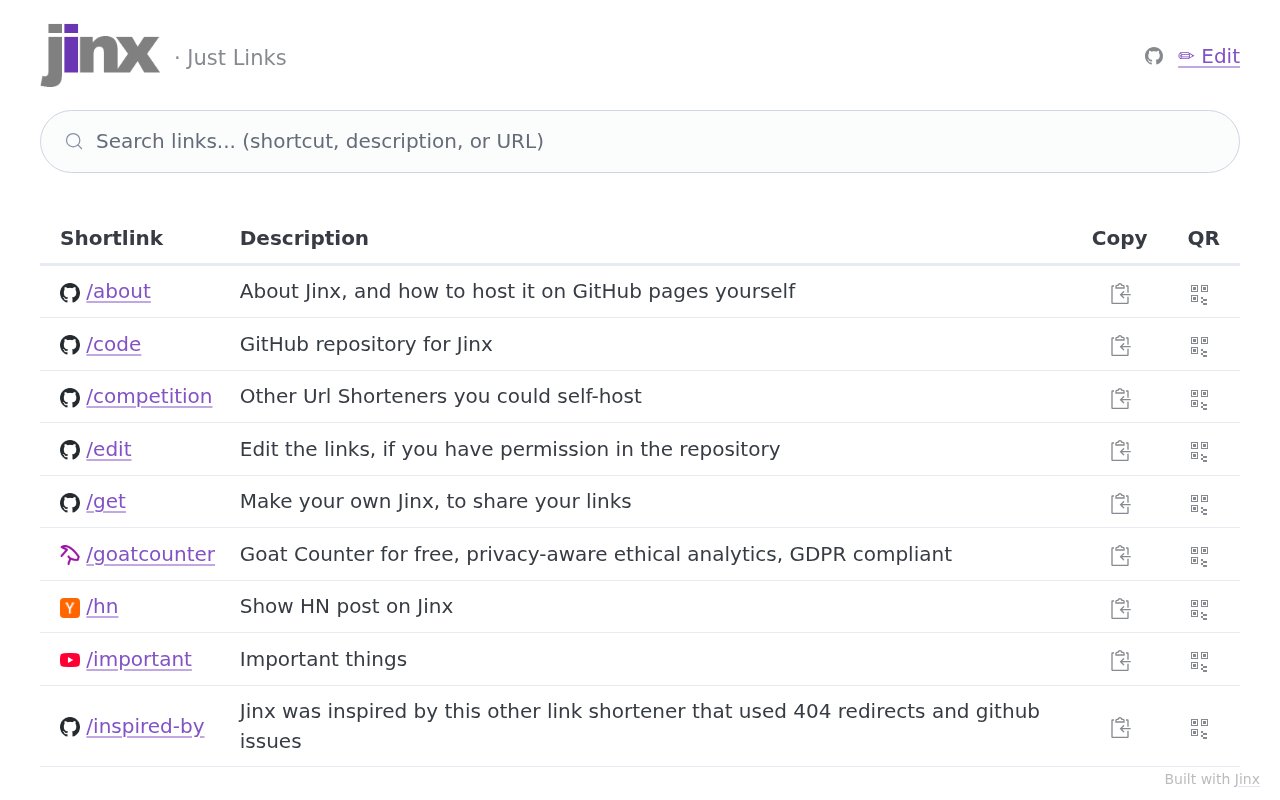
Jinx is a compact short-link directory with search, copy controls, QR codes, and an edit route. It is aimed at technical individuals or small teams that want a branded index of useful links rather than a large campaign platform. We opened the public site and found the directory working, including fuzzy similar matches and per-link QR actions. The page also points visitors to a route for making their own Jinx, but today's capture doesn't show pricing or deployment instructions.
The live site demonstrates the core idea with very little clutter, and a searchable directory is more forgiving than a set of shortcuts people must memorize. The limitation is that the public page gives too little context about administration, analytics, hosting, or access control. It looks best suited to a lightweight personal or team index, not a replacement for a managed link service with roles, reporting, and nontechnical editing.
Editorial opinion from the Tool Index team, written from the public product pages. Not a user review.
Reviews (0)
Badge builder
Add Jinx to your website
Choose a badge style and size, preview it here, then copy the generated HTML. Badge images are self-contained SVGs and do not require an external script.

<a href="https://toolindex.net/tools/jinx?ref=badge" target="_blank" rel="noopener">
  <img src="https://toolindex.net/badge/jinx/medium.svg" alt="Jinx - Listed on Tool Index" width="180" height="50" />
</a>How to use the badge
- 1. Pick the style, size, and theme that fit your layout.
- 2. Copy the generated HTML from the code block.
- 3. Paste it into your footer, homepage, or press page.
Standard badge available
The standard listing badge is available now. Score and circle badges are limited to tools currently ranked in the top 10 of a category.
Badge clicks return visitors to this profile with a referral tag so the source remains identifiable.
Related Tools
Apatero AI
The creator studio for AI image, video, audio, 3D, and avatars, now at apatero.ai.

SEObot
Autonomous AI SEO agent that runs your blog and link building on autopilot

Substack
Hosted newsletter and publication platform with built-in payments, recommendations, and an audience network for writers.

MailerLite
Friendly, affordable email marketing tool with newsletters, automations, landing pages, and a growing creator toolkit.
Work on Jinx? Request listing access or correction