
JointJS
JavaScript diagramming library for building visual workflow and no-code applications
Gallery
About JointJS
JointJS is a JavaScript and TypeScript diagramming library that provides the rendering engine, interaction handling, and layout infrastructure for building visual applications in the browser. If you're creating a workflow editor, an organizational chart tool, a BPMN modeler, or any interface where users need to drag elements around and connect them with lines, JointJS gives you the foundation to build that without implementing low level graphics primitives yourself. The library handles scalable vector graphics rendering, link routing between elements, collision detection, zoom and pan behavior, automatic layout algorithms, and the dozens of small interactions that make a diagram feel polished and responsive. You focus on your application logic and the specific behavior you need while the library handles the visual layer and the mechanics of manipulation.
The problem JointJS solves is the engineering cost of building diagramming interfaces from scratch. Anyone who has tried to create a visual editor knows that it looks simple until you actually start building it. You need hit detection for elements and links, proper anchor points for connections that update when nodes move, automatic layout algorithms for organizing large diagrams, undo and redo stacks that track every change, copy and paste behavior that preserves relationships, export to various formats, and responsive performance even when the diagram grows to hundreds or thousands of nodes. Building all of that well takes months of dedicated work. JointJS compresses that timeline by providing tested, production grade implementations that you can customize and extend to fit your specific requirements.
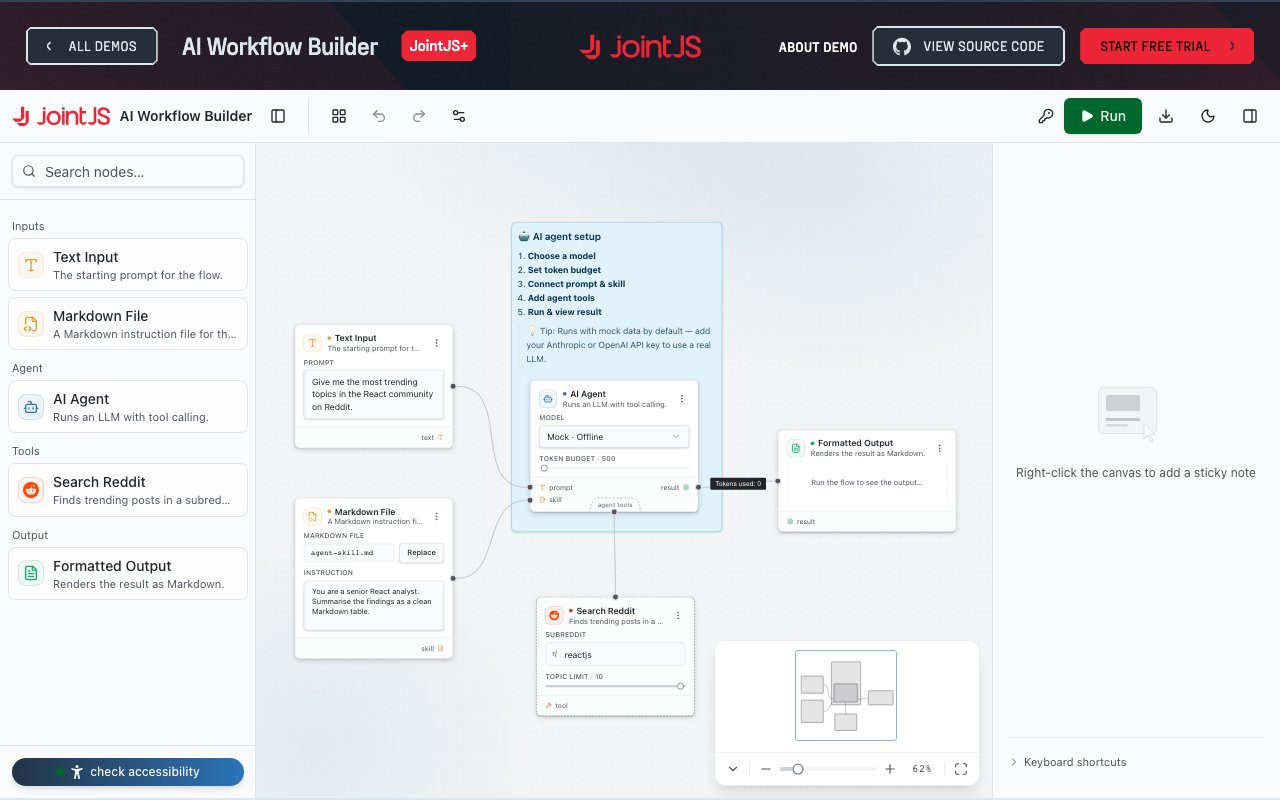
The library integrates smoothly with the major frontend frameworks that teams actually use. It works with React, Angular, Vue, Svelte, plain TypeScript, and HTML5. There's also support for Salesforce Lightning, which matters for teams building on that platform and needing diagram capabilities inside their Salesforce apps. You're not locked into a specific stack, and the documentation includes framework specific examples and integration guides that show how to wire everything together. The 180 plus demo applications in the library cover common diagram types like flowcharts, BPMN workflows, Kanban boards, mind maps, org charts, and chatbot conversation designers. One demo specifically shows an AI Workflow Builder where users connect prompts, skills, and tools visually to define agent behavior without writing code, which is relevant for anyone building AI tooling or automation products.
JointJS is split into two tiers with different licensing models. The Community edition is open source and covers essential diagramming features with basic community support. JointJS+ is the commercial tier that adds over 40 advanced UI features, dedicated developer support from the team that builds the library, and full source code access so you can dig into the implementation and extend it as needed. Commercial licensing is per developer, meaning you pay based on how many engineers work directly with the library rather than how many end users interact with diagrams in your shipped product. A 30 day free trial is available with no obligations, so you can evaluate the full commercial feature set before making a purchasing decision.
Use cases for JointJS span a broad range of industries and application types. Workflow automation platforms use it to let users design flows and pipelines visually rather than writing configuration files. Low code and no code tools build their canvas layer on top of it to provide drag and drop application building. SCADA and HMI interfaces in industrial settings use it for real time monitoring dashboards that display system state graphically. Internal tools teams use it to build quick prototypes of visual editors that would otherwise take quarters to build from scratch using lower level libraries. The library scales from solo developers experimenting with an idea on a weekend to enterprise engineering teams at companies like Oracle, Apple, Boeing, Airbnb, Samsung, and Intel who have deployed JointJS powered interfaces to their users.
Where JointJS sits relative to alternatives is somewhere between low level drawing libraries that give you raw SVG manipulation and opinionated no code platforms that lock you into a specific diagram type and visual style. It provides structure and development speed without dictating what kind of diagram you can build or how it should look. If you need a custom visual editor embedded in a larger product and you want full control over the user experience and behavior, this is the kind of tool that can save significant development time while leaving room to build exactly what your users need rather than conforming to someone else's idea of how diagrams should work.
Key Features
- Drag and drop diagram building
- React Angular Vue Svelte support
- 180 plus demo applications
- AI workflow builder templates
- Export to JSON PNG JPEG
- Per developer commercial licensing
Pros & Cons
What we like
- Open source core with optional commercial tier
- Works with all major frontend frameworks
- Extensive demo library for common diagram types
- Source code included with commercial license
Room for improvement
- Advanced features require paid license
- Learning curve for complex customizations
- Per developer pricing adds up for larger teams
- Some demos marked as coming soon
Frequently Asked Questions
What is JointJS?
Is JointJS free?
Which frameworks does JointJS support?
Can I use JointJS for AI agent builders?
Best For
Featured in
Alternatives to JointJS
View all
1Lookup
Real-time data verification API for phone, email, IP, and domain validation to fight fraud

Kevin Gabeci
Solo developer building web apps, cozy browser games, and AI creator toolkits.

Codedex
A gamified, story-driven platform that teaches Python, web dev, and more like an RPG quest
Hack2hire
Practice real SDE interview questions from top tech companies with expert worked solutions
Reviews (11)
Finally something that fits
Three months of JointJS later, here is what holds up. The output quality holds up better than I expected. Performance has been steady even when I lean on it hard. Worth it for what I get out of it.
Finally something that fits
Have been running JointJS for a while, here is where I land. Where it really wins is react angular vue svelte support. Easy yes for anyone weighing the same trade offs.
Recommended without reservation
JointJS solves a real problem for me without making a fuss about it. The react angular vue svelte support is more useful than I expected. The core workflow is smooth once you are set up. Mostly using it for prototyping a no code automation interface.
Worth a look
Started using JointJS casually, now it is pinned in my dock. What stands out is how it handles ai workflow builder templates. Found it works best for adding a bpmn diagram builder to a product. Recommending it to people in a similar spot.
Solid daily driver
Three months of JointJS later, here is what holds up. The thing I keep coming back to is how reliable it is. It earns its place in my stack.
Worth a look
Started using JointJS casually, now it is pinned in my dock. Got real value out of drag and drop diagram building. No regrets so far.
Pulled its weight from week one
JointJS has quietly become part of my daily flow. Support actually answered when I had a question, which surprised me. The defaults are sensible, so I was not fighting settings on day one. It earns its place in my stack.
Exactly what I needed
JointJS has quietly become part of my daily flow. The interface stays out of my way, which I appreciate. It just works, day after day, without surprises. Would sign up again without thinking twice.
It just works
Started using JointJS casually, now it is pinned in my dock. The extensive demo library for common diagram types is more useful than I expected. It handles the boring parts so I can focus on the work that matters. It fits well for creating an org chart or mind mapping tool. Worth it for what I get out of it.
Quietly excellent
Picked JointJS for the price, stayed for the quality. What stands out is how it handles 180 plus demo applications. The core workflow is smooth once you are set up. Found it works best for creating an org chart or mind mapping tool. Recommending it to people in a similar spot.
Pulled its weight from week one
Came to JointJS after getting frustrated with what I had before. What stands out is how little babysitting it needs. Worth it for what I get out of it.
Badge builder
Add JointJS to your website
Choose a badge style and size, preview it here, then copy the generated HTML. Badge images are self-contained SVGs and do not require an external script.

<a href="https://toolindex.net/tools/jointjs?ref=badge" target="_blank" rel="noopener">
  <img src="https://toolindex.net/badge/jointjs/medium.svg" alt="JointJS - Listed on Tool Index" width="180" height="50" />
</a>How to use the badge
- 1. Pick the style, size, and theme that fit your layout.
- 2. Copy the generated HTML from the code block.
- 3. Paste it into your footer, homepage, or press page.
Standard badge available
The standard listing badge is available now. Score and circle badges are limited to tools currently ranked in the top 10 of a category.
Badge clicks return visitors to this profile with a referral tag so the source remains identifiable.
Related Tools
Kevin Gabeci
Solo developer building web apps, cozy browser games, and AI creator toolkits.

Coolify
Self-hostable, open source alternative to Heroku and Netlify

Warp
The modern terminal reimagined with AI and collaboration

Bolt.new
Prompt-to-deployed full-stack app inside the browser
Work on JointJS? Request listing access or correction