
logPhase
Understand a pull request through changed user journeys, call paths, and source code
Gallery
About logPhase
logPhase is a macOS application for understanding what a pull request changes before deciding whether the code is right. Instead of beginning with a flat file diff, it turns the change into a small set of user journeys and lets the reviewer move from the affected behavior down to the methods and lines behind each step. The idea is to help developers build a working theory of unfamiliar code at the pace AI can now produce it. It's aimed at review and comprehension, not at replacing the person who decides what should be accepted, corrected, or questioned. That distinction matters when a syntactically small edit changes a customer-facing path that spans several services or shared methods.
A review starts when the user pastes a pull request link. The app clones the repository, analyzes both sides of the change, and starts the user's own Claude Code on the review. It first presents the blast radius as behavior flows written from the code. A reviewer can select a step to see the method that implements it, the condition that controls it, and the changed lines at that point. This creates a route from the product behavior back to source details, which is useful when the important effect crosses files and can't be understood from the edited lines alone. The product site's worked example shows one pull request touching three journeys even though only two files changed, which illustrates why line count alone can be a poor guide to review scope.
The structural analysis continues beyond the first flow diagram. A call graph draws every method along a journey and shows which other journeys use a selected method. Reviewers can ask Claude about any step using the method behind it as context. They can also split a broad step into smaller code-backed steps or ask for a plainer label. Any file can be opened read-only, with go to definition and caller information available for navigation. These controls make it possible to challenge the generated explanation while staying anchored to the analyzed program rather than accepting a generic AI summary.
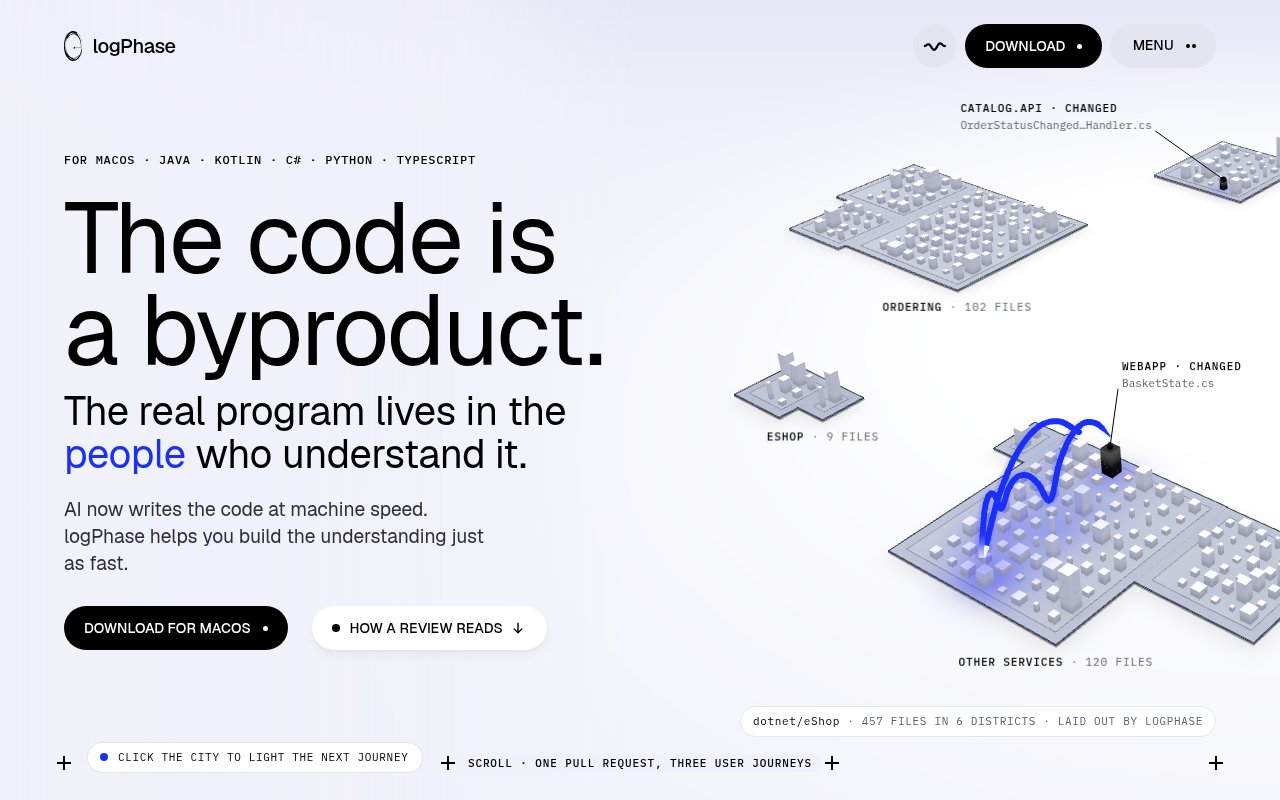
logPhase also provides a persistent visual map called the Canvas. It draws a repository as a city, where services become districts, packages become pads, files become towers, and imports appear as arcs. The journeys touched by a change light up as trails through that model. The layout stays in the same place between runs, so the visual geography can become familiar over time instead of being regenerated into a new diagram for every review. A file tower grows with its line count, while import relationships help show how districts connect. That makes the view particularly relevant for inherited services, larger systems, and teams trying to retain shared understanding as people and generated code change.
The desktop app supports Java, Kotlin, C#, Python, and TypeScript, each through a language-specific parser. Java uses Spoon, Kotlin uses compiler PSI, C# uses Roslyn, Python uses Pyright, and TypeScript uses ts-morph. Analysis for Java, Kotlin, Python, and TypeScript runs offline on the Mac. C# requires Microsoft's .NET SDK, which is fetched once. Reviews use the customer's own Claude Code, and whatever Claude reads is sent to Anthropic under that setup. GitHub tokens remain in the macOS keychain, while git remotes and the update check are the other stated network activity.
The fit is fairly specific. A developer needs a Mac, Claude Code, and a repository in one of the five supported languages. Private repositories also require GitHub access during setup. In exchange, the tool combines deterministic program analysis with Claude's ability to name and explain behavior, while leaving the source browser read-only and the reviewer in control. Apple Silicon and Intel builds are both offered, but there are no Windows or Linux versions listed. Teams that primarily want automated comments in a hosted pull request interface will find a different workflow here, since logPhase is a local visual review environment.
Access begins with a free month from first launch and doesn't require signup or a card. After that, logPhase costs $15 per month through Polar, with one subscription covering all of a customer's Macs. Polar emails the licence key, and the subscription can be cancelled through its customer portal. The reviewer still needs their own Claude Code access, so that dependency should be included when evaluating the full cost and data path. For Mac-based developers reviewing AI-written or unfamiliar code, the focused combination of journeys, call graphs, source navigation, and a stable system map offers a concrete way to understand more than the diff.
Key Features
- Journey-based pull request reviews
- Code-backed behavior flow diagrams
- Cross-journey call graph
- Read-only source navigation
- Persistent repository city map
- Five language-specific parsers
Pros & Cons
What we like
- Starts review from changed behavior instead of files
- Connects generated explanations to real methods and lines
- Keeps most language analysis local on the Mac
- Maps shared methods across multiple user journeys
Room for improvement
- Available only as a macOS desktop app
- Reviews require a separate Claude Code setup
- Limited to five supported programming languages
- C# analysis needs a one-time .NET SDK download
Frequently Asked Questions
What is logPhase?
Which languages does logPhase support?
Does logPhase send repository code over the network?
How much does logPhase cost?
Best For
Featured in
Alternatives to logPhase
Cursor
VS Code fork built around an AI pair-programmer

Replit
Browser IDE plus Replit Agent that builds and deploys apps from a prompt
Windsurf
Codeium's AI editor with Cascade agent and deep IDE integration

Vibe Built
Building real apps with agentic AI. What worked, what broke, what shipped.
Our take
Tool Index Editorial · Oct 2026· 3.5/5
logPhase reframes pull request review around changed user journeys, then connects each step to methods, lines, callers, and a persistent code map. We found that more useful than a generic AI summary because the reviewer can move from behavior back to source and challenge the explanation. It is best for developers trying to understand unfamiliar or AI written changes that cross several files.
The app runs on macOS and requires the user's own Claude Code access. It supports Java, Kotlin, C#, Python, and TypeScript, which leaves many stacks out, and it is a local review environment rather than a hosted commenting bot. That dependency and platform restriction narrow the audience, but the combination of parser backed structure and readable journeys is a thoughtful answer to review overload.
Editorial opinion from the Tool Index team, written from the public product pages. Not a user review.
Reviews (0)
Badge builder
Add logPhase to your website
Choose a badge style and size, preview it here, then copy the generated HTML. Badge images are self-contained SVGs and do not require an external script.

<a href="https://toolindex.net/tools/logphase?ref=badge" target="_blank" rel="noopener">
  <img src="https://toolindex.net/badge/logphase/medium.svg" alt="logPhase - Listed on Tool Index" width="180" height="50" />
</a>How to use the badge
- 1. Pick the style, size, and theme that fit your layout.
- 2. Copy the generated HTML from the code block.
- 3. Paste it into your footer, homepage, or press page.
Standard badge available
The standard listing badge is available now. Score and circle badges are limited to tools currently ranked in the top 10 of a category.
Badge clicks return visitors to this profile with a referral tag so the source remains identifiable.
Related Tools

Bolt.new
Prompt-to-deployed full-stack app inside the browser

Tabnine
Privacy-first enterprise AI code assistant you control, with SaaS, VPC, on-prem, or fully air-gapped deployment
Cursor
VS Code fork built around an AI pair-programmer

Skeezo
Agent-native macOS IDE for coordinating Claude Code and AI agents
Work on logPhase? Request listing access or correction