
Lumae
Record and polish Mac product demos with local editing and agent controls
Gallery
About Lumae
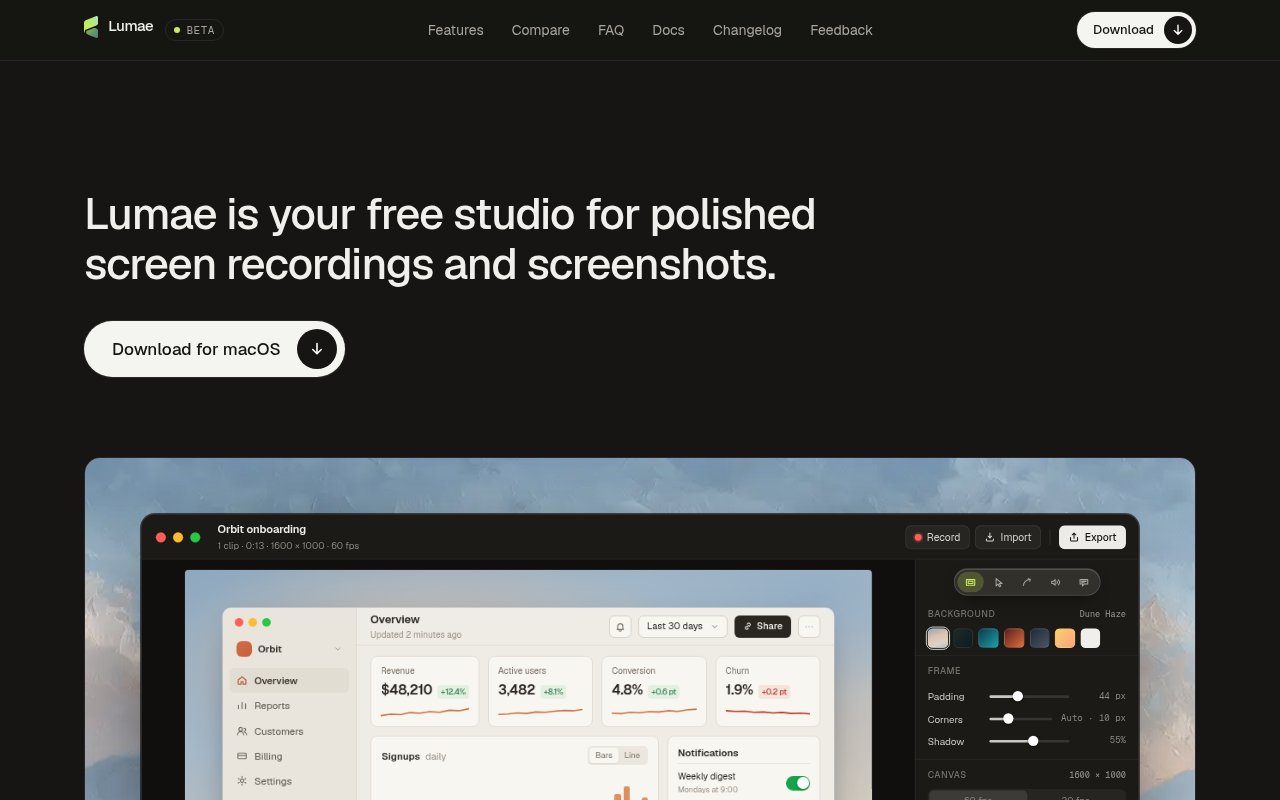
Lumae is a free native Mac app for recording, editing, and exporting polished screen demos and annotated screenshots. It is designed around the small production tasks that make a raw capture easier to follow, including zoom timing, cursor motion, framing, captions, and voiceover. Rather than sending a recording to a browser editor, Lumae keeps capture, transcription, editing, and rendering on the Mac. There is no account, upload requirement, watermark, or project limit in the current beta. It fits developers, product teams, educators, and support writers who need a clean visual explanation without turning every short walkthrough into a full video editing project.
Recording starts with a display, window, or selected area. Lumae can group clicks that happen close together into an automatic zoom, leading into the first click and lingering after the last, while manual zooms can be placed and aimed on the timeline. The app hides the captured pointer and redraws a smoother path with movement tilt and a visible click response. Camera motion uses sampled shutter-style blur rather than a simple blur filter. Solid and gradient backgrounds, padding, corner treatment, and shadows provide the framed look commonly used for product demos, while the canvas can be previewed at 60 or 30 frames per second.
The editor supports trimming, splitting, reordering, importing, and stitching clips. A single take can be recorded again without disturbing the rest of the timeline, which is useful when one step changes after the main demonstration is already assembled. Voiceover is recorded while the timeline plays, and the original clip audio can duck under the narration with gradual ramps. Captions are transcribed on the device through Apple's speech models, broken into readable lines around pauses and sentence endings, and edited inline. Lumae keeps the original media inside its project package and represents edits separately, so editing does not repeatedly rewrite the source recording.
Screenshot work is handled with similar care. A global shortcut or the menu bar can capture a display, window, or area and open the result in an annotation editor. Arrows, boxes, ellipses, highlights, mosaic blur, text, and numbered steps remain editable instead of being painted permanently onto the pixels. Screenshots can use the same background and frame treatment as recordings, then be copied or exported as PNG at their own pixel density. This makes Lumae useful for release notes, bug reports, tutorials, and support documents as well as video, especially when a short sequence needs both still images and a recorded walkthrough in a consistent style.
A built-in Model Context Protocol server gives Lumae an unusual automation path. From the app's settings, a user can connect Claude Code, Codex CLI, Claude Desktop, Cursor, or another MCP client. The agent can list and read projects, cut clips, add zooms, write captions, import media, and undo changes in the project that is open. Each request arrives in the live editor as one undo step, so automated edits remain visible and reversible. Natural-language planning inside Lumae is marked as upcoming, and recording, screenshot capture, and export are not yet exposed to agents. The current MCP value is therefore focused on editing existing material rather than operating the entire production loop unattended.
Privacy is a central part of the product's current design. Recordings, screenshots, rendering, and caption transcription remain local and work offline. Lumae says its network activity is limited to a daily update check and anonymous usage counts, with the usage reporting switch available in privacy settings. Projects are stored in the Movies folder as Lumae packages containing original media and a small JSON edit description. Video exports support MP4 or MOV with H.264 or HEVC, and screenshots export as PNG. There is intentionally no cloud upload or built-in share link, so finished files need to be distributed through another service.
Lumae is currently free with no card or account, but it is also labeled as a beta and requires macOS 26.0 or later. That unusually high system requirement excludes older Macs and operating systems. Webcam overlays are not available yet, while competing recorders may be further along in capture and sharing features. Users must also grant the normal macOS screen recording permission, with microphone access requested separately when it is enabled. Within those limits, Lumae is a substantial native editor rather than a thin recorder. Its combination of automatic presentation polish, editable screenshot markup, local processing, non-destructive projects, and reversible agent-driven edits gives Mac users a focused way to produce demos without a subscription or cloud workflow.
Key Features
- Automatic click-based zooms
- Smoothed animated cursor paths
- On-device editable captions
- Retake and stitch timeline
- Editable screenshot annotations
- Built-in MCP editing server
Pros & Cons
What we like
- Keeps capture, transcription, and rendering on the Mac
- Includes strong polish tools without a subscription
- Makes agent edits visible and individually undoable
- Handles polished screenshots and video together
Room for improvement
- Requires macOS 26.0 or later
- Beta release has no webcam overlay yet
- Provides no cloud upload or share links
- Agents cannot record or export projects yet
Frequently Asked Questions
What is Lumae?
Is Lumae free?
Does Lumae upload recordings to the cloud?
What can an AI agent edit in Lumae?
Best For
Featured in
Alternatives to Lumae
View all
Apatero AI
The creator studio for AI image, video, audio, 3D, and avatars, now at apatero.ai.
Apatero Studio
Creator studio for AI image, video, audio, 3D, and avatars. Every model worth using, in one workspace.

Melodex
Turn your idea into an AI-generated music video

Speel
AI UGC video generator that makes realistic AI avatars hold and talk about your product for ads
Our take
Tool Index Editorial · Sep 2026· 4.0/5
Lumae is a free native Mac recorder and screenshot editor for polished product demos. It adds automatic zooms, redrawn cursor motion, captions, backgrounds, retakes, annotations, and several export formats. Its built-in MCP server also lets coding agents inspect and edit projects through the same undoable command system as the app.
We found a detailed, current changelog and unusually concrete agent documentation, which makes the beta feel more substantial than its version number suggests. Local capture and editing are good defaults for sensitive demos. It is still a Mac-only beta, and the site does not offer a cloud hosting or sharing workflow. Teams needing webcam-heavy presentations, browser collaboration, or a managed video library will need another tool around it.
Editorial opinion from the Tool Index team, written from the public product pages. Not a user review.
Reviews (0)
Badge builder
Add Lumae to your website
Choose a badge style and size, preview it here, then copy the generated HTML. Badge images are self-contained SVGs and do not require an external script.

<a href="https://toolindex.net/tools/lumae?ref=badge" target="_blank" rel="noopener">
  <img src="https://toolindex.net/badge/lumae/medium.svg" alt="Lumae - Listed on Tool Index" width="180" height="50" />
</a>How to use the badge
- 1. Pick the style, size, and theme that fit your layout.
- 2. Copy the generated HTML from the code block.
- 3. Paste it into your footer, homepage, or press page.
Standard badge available
The standard listing badge is available now. Score and circle badges are limited to tools currently ranked in the top 10 of a category.
Badge clicks return visitors to this profile with a referral tag so the source remains identifiable.
Related Tools
Apatero AI
The creator studio for AI image, video, audio, 3D, and avatars, now at apatero.ai.

LocalClip
Local-first AI video clipper for Mac that turns long videos into vertical clips
Melodex
Turn your idea into an AI-generated music video
Apatero Studio
Creator studio for AI image, video, audio, 3D, and avatars. Every model worth using, in one workspace.
Work on Lumae? Request listing access or correction