
Music Visualizer
Create audio-reactive videos from music, artwork, text, and browser-based presets
Gallery
About Music Visualizer
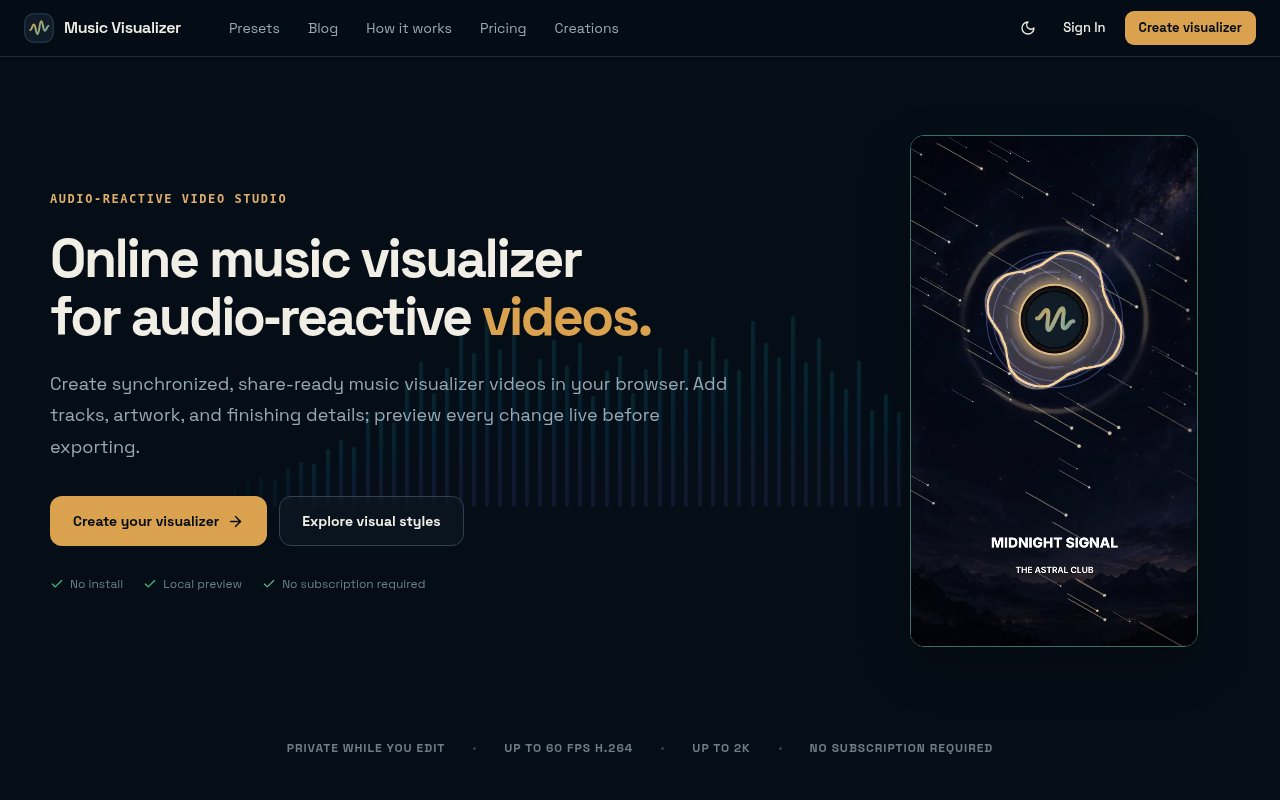
Music Visualizer is a browser-based studio that turns an audio track into a synchronized visualizer video. It is made for musicians, producers, DJs, bands, podcasters, labels, and other independent creators who want a publishable video without learning a full motion graphics editor. A project can combine a track with cover art, a logo, titles, colors, and audio-reactive motion. The editor previews changes locally in the browser, while the final H.264 video is rendered in the cloud after the user signs in and spends export credits.
The starting point is a library of 25 designed presets. Each preset provides a distinct visual direction whose bars, waves, pulses, or other movement responds to the track's frequency and waveform data. The creator chooses a style, adds audio and artwork, and then adjusts visual intensity, colors, layout, text, and composition. Background artwork can be cropped with pan and zoom, which helps the same image work in different frames. The live preview changes as those choices are made, so a creator can evaluate the rhythm and look before committing credits to the cloud render.
Projects can target square, vertical, or widescreen output using 1:1, 9:16, and 16:9 aspect ratios. That covers common placements on YouTube, TikTok, Instagram, and other video channels without requiring a separate editor just to reshape the canvas. Finished files can be exported at 720p, 1080p, or 2K and at up to 60 frames per second. A 720p or 1080p render costs one credit, while a 2K render costs two. Tracks can be up to 10 minutes long. Lyrics and 4K exporting are shown on the roadmap rather than as current capabilities, so buyers shouldn't count on either for a present project.
The local-first editing model limits when source media leaves the device. Audio and images remain in the current browser while the user edits and previews, and uploads begin only when an export is requested. Cloud rendering then handles the computational work asynchronously, which means the user's device doesn't have to stay occupied encoding the final video. Source media, rendered videos, and creation records are automatically deleted after 14 days. During that retention window the finished video can be downloaded more than once. A rendering system failure returns reserved credits automatically, though invalid, corrupt, or mismatched source media isn't eligible for credit restoration.
The studio supports modern desktop and mobile browsers, so a creator can shape a project without installing specialist software. The same editing flow is used for all three aspect ratios. A square canvas can suit a feed post, a vertical version can fill a phone screen, and a wide version can be prepared for a standard video player. Ratio-aware artwork cropping helps reposition the image as the frame changes. Because frequency analysis drives the motion, the creator doesn't have to keyframe every beat by hand. The preset supplies the responsive movement while the user concentrates on visual identity through the artwork, logo, artist or episode name, colors, and overall intensity.
This workflow suits a creator who already has finished audio and artwork but needs motion for release promotion or a screen-based listening experience. An independent artist can turn cover art into a visual identity for a single. A DJ can pair a longer mix with continuous movement, while a podcast producer can combine episode art, a logo, and responsive visuals for video platforms. It is more focused than a general video editor, which keeps the path from audio to export short. The limits are equally clear. It doesn't currently add timed lyrics, its highest resolution is 2K, and every cloud export consumes credits even though editing and previewing are free.
Completed exports are paid, although anyone can use the editor and live preview without charge and there is no subscription requirement. Exporting uses one-time credit packs that never expire. The listed packs are two credits for $3.90, ten credits for $14.90, and thirty credits for $34.90, with larger packs lowering the cost per credit. A ten-credit pack can produce up to ten 720p or 1080p videos, or five 2K videos. Checkout for each credit purchase is handled securely through Stripe. A user buys credits only when ready to export. This model is straightforward for creators who release occasionally because there is no recurring bill. High-volume publishers may prefer predictable subscription pricing, but subscription plans are only listed as a future option today.
Key Features
- Twenty-five reactive presets
- Local browser live preview
- Three social aspect ratios
- Cloud-rendered H.264 exports
- Artwork and text customization
- Exports up to 2K
Pros & Cons
What we like
- Editing and previewing are free
- Source media stays local until export
- Credits never expire
- Supports desktop and mobile browsers
Room for improvement
- Every cloud export uses credits
- Tracks are limited to 10 minutes
- Finished files are retained for 14 days
- Lyrics and 4K remain roadmap items
Frequently Asked Questions
What is Music Visualizer?
Can I try Music Visualizer for free?
Does it upload my audio while I edit?
Which video formats can it create?
Best For
Featured in
Alternatives to Music Visualizer

Apatero AI
The creator studio for AI image, video, audio, 3D, and avatars, now at apatero.ai.
Apatero Studio
Creator studio for AI image, video, audio, 3D, and avatars. Every model worth using, in one workspace.

Melodex
Turn your idea into an AI-generated music video

Pixel Painters
Unlimited graphic design subscriptions built only for churches and ministries
Reviews (0)
No reviews yet
Be the first to share your experience with Music Visualizer
Sign in to write a reviewBadge builder
Add Music Visualizer to your website
Choose a badge style and size, preview it here, then copy the generated HTML. Badge images are self-contained SVGs and do not require an external script.

<a href="https://toolindex.net/tools/music-visualizer?ref=badge" target="_blank" rel="noopener">
  <img src="https://toolindex.net/badge/music-visualizer/medium.svg" alt="Music Visualizer - Listed on Tool Index" width="180" height="50" />
</a>How to use the badge
- 1. Pick the style, size, and theme that fit your layout.
- 2. Copy the generated HTML from the code block.
- 3. Paste it into your footer, homepage, or press page.
Standard badge available
The standard listing badge is available now. Score and circle badges are limited to tools currently ranked in the top 10 of a category.
Badge clicks return visitors to this profile with a referral tag so the source remains identifiable.
Related Tools
Apatero AI
The creator studio for AI image, video, audio, 3D, and avatars, now at apatero.ai.

LocalClip
Local-first AI video clipper for Mac that turns long videos into vertical clips
Melodex
Turn your idea into an AI-generated music video
Apatero Studio
Creator studio for AI image, video, audio, 3D, and avatars. Every model worth using, in one workspace.
Work on Music Visualizer? Request a listing correction