
PasteSheet
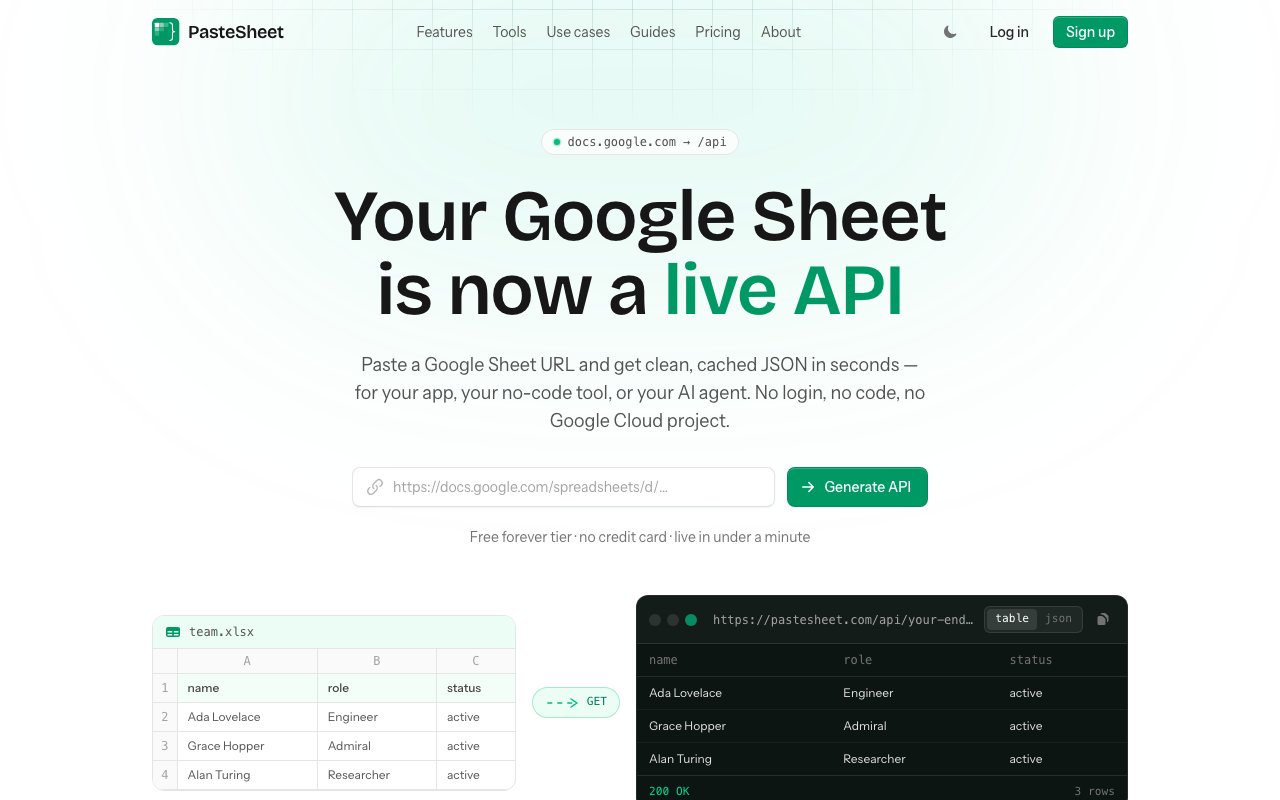
Turn a public Google Sheet into a cached REST API and an MCP server
Gallery
About PasteSheet
PasteSheet turns a public Google Sheet into a cached JSON REST API and an MCP server, with no backend, no Google Cloud project, and no API keys. You paste the sheet's share URL, and it reads the tabs, headers, and rows, works out what type each column holds, and hands back a permanent endpoint your app or your AI agent can call.
The problem it goes after turns up on nearly every small project. A spreadsheet is the fastest place to put structured data, and it's usually where the non-technical people on a team are already working happily. Getting that data into software is the part that stops being fast. The official route runs through a Google Cloud project, a service account, OAuth scopes, and a token refresh you'll be maintaining forever, which is a lot of ceremony for a landing page that needs to read forty rows of pricing. It's rarely a deliberate choice to end up there, either. The sheet exists because somebody needed the data yesterday, and by the time anyone asks for a proper API it's already the source of truth for three people who aren't going to migrate. PasteSheet compresses all of that down to one paste.
What comes back is a REST endpoint at /api/{id} that returns JSON, and it isn't just a dump of the sheet. You can filter, search, sort, and paginate straight from URL parameters, so a good chunk of the querying you'd otherwise write server-side happens in the request itself. Responses are cached with a TTL you control. The free tier caches for five minutes, and paid plans let you tune it anywhere from thirty seconds to an hour, depending on whether you care more about freshness or about staying under a rate limit. Rate limits scale with the plan as well, from sixty requests a minute on the free tier up to five thousand on Agency, which tells you the caching isn't decorative. A cached endpoint absorbs traffic that would otherwise hammer Google's own limits, and that's the quiet reason the whole approach holds up under load at all.
The second half of the product explains its timing. Every endpoint is also an MCP server, at /mcp/sheets/{id}, exposing three read-only tools named list_tabs, get_schema, and query_rows. Point Claude, ChatGPT, or Cursor at that URL and the assistant can discover the tabs, learn the schema, and query rows on its own, instead of you pasting CSV chunks into a chat window and hoping the model doesn't lose track of a column halfway through. For anyone building agents, it's a cheap way to hand a model a live, structured data source it can actually navigate. It's a small surface, and that's the point. Three tools are enough for a model to orient itself in a dataset it has never seen before, and few enough that they don't crowd out everything else in its tool manifest.
Schema drift gets specific attention, which is the detail that suggests the product has been used in anger rather than just demoed. Spreadsheets are edited by humans, and humans rename columns and insert rows in the middle without telling anyone. PasteSheet watches for that. You can have it alert you when the shape of the sheet changes, or lock the schema so a breaking edit fails loudly instead of quietly feeding your app the wrong field. Anyone who has had a dashboard break because a colleague retitled a header will understand why that feature exists. The two modes suit different temperaments, since alerts fit a project where you'd rather know and then decide for yourself, while the lock fits anything where silently wrong data is worse than a loud, obvious failure.
It's deliberately read-only and never writes back to the source spreadsheet. That narrows what it can do, and it also removes the entire category of accidents where an integration corrupts the one file everybody depends on. The shape that emerges suits pricing tables, changelogs, content collections, directories, config that a non-developer needs to edit, and internal dashboards. It's a poor fit if what you wanted was a real database with writes and relations. This is an easy tool to outgrow on purpose, and it seems comfortable with that. One constraint is worth thinking through before you start, which is that it reads public sheets, so anything served through an endpoint is already readable by anyone holding the link. Paid plans add private endpoints so the API surface itself can be locked down, but the sharing model on the underlying spreadsheet still applies.
Pricing is freemium and clearly aimed at individuals rather than procurement departments. The free tier is genuinely usable, with three endpoints, two thousand requests a month, five hundred rows per endpoint, one tab, a sixty request per minute limit, and MCP access included, and it doesn't ask for a card. Starter runs $9 a month for ten endpoints, fifty thousand requests, five thousand rows, five tabs, and adds private endpoints, column configuration, custom cache settings, workspace MCP, and the schema alerts and lock. Pro is $19 a month for unlimited endpoints, tabs, and rows, three hundred thousand requests, and it layers on full-text search, aggregation, and webhooks. Agency at $49 a month carries the same feature set out to a million requests a month for client work. MCP sits on every tier including the free one, which is a notably un-greedy choice given that it's the part most likely to pull people in.
Key Features
- Google Sheet to JSON REST endpoint
- MCP server with three read-only tools
- Filter, search, sort and paginate via URL
- Configurable cache TTL per endpoint
- Schema drift alerts and schema lock
- Automatic column type inference
Pros & Cons
What we like
- No Google Cloud project, service account, or API keys to manage
- MCP access is included even on the free tier
- Read-only by design, so it can't corrupt the source sheet
- Schema lock catches breaking spreadsheet edits before your app does
Room for improvement
- Read-only, so there's no writing data back to the sheet
- Works with public Google Sheets rather than any spreadsheet source
- Row and request caps on lower tiers mean you can outgrow it
- Younger product with a smaller community around it
Frequently Asked Questions
What is PasteSheet?
Is PasteSheet free?
Can PasteSheet write back to my spreadsheet?
How does the MCP server work?
Best For
Featured in
Alternatives to PasteSheet
View all
1Lookup
Real-time data verification API for phone, email, IP, and domain validation to fight fraud

Kevin Gabeci
Solo developer building web apps, cozy browser games, and AI creator toolkits.

Codedex
A gamified, story-driven platform that teaches Python, web dev, and more like an RPG quest
Hack2hire
Practice real SDE interview questions from top tech companies with expert worked solutions
Reviews (9)
Genuinely impressed
Three months of PasteSheet later, here is what holds up. Where it really wins is configurable cache ttl per endpoint. The output quality holds up better than I expected. Would sign up again without thinking twice.
Pulled its weight from week one
Found PasteSheet on a Show HN thread and I am glad I clicked. What stands out is how it handles filter, search, sort and paginate via url. Found it works best for prototyping an api in an afternoon without a backend. Easy yes for anyone weighing the same trade offs.
Finally something that fits
Started using PasteSheet casually, now it is pinned in my dock. What stands out is how it handles filter, search, sort and paginate via url. It handles the boring parts so I can focus on the work that matters. No regrets so far.
Recommended without reservation
Three months of PasteSheet later, here is what holds up. Where it really wins is schema lock catches breaking spreadsheet edits before your app does. Easy yes for anyone weighing the same trade offs.
Recommended without reservation
PasteSheet solves a real problem for me without making a fuss about it. Got real value out of no google cloud project, service account, or api keys to manage. It does what it says, which is rarer than it should be. Mostly using it for letting non-developers edit site content in a spreadsheet. Worth it for what I get out of it.
Decent with some rough edges
Tried PasteSheet on a side project first, then rolled it out everywhere. The mcp server with three read-only tools is more useful than I expected. One thing that bugs me is read-only, so there's no writing data back to the sheet.
Good, with a few caveats
Have been running PasteSheet for a while, here is where I land. The mcp access is included even on the free tier is more useful than I expected. It slotted into my routine without much fuss. Mostly using it for prototyping an api in an afternoon without a backend. It would be a five if not for row and request caps on lower tiers mean you can outgrow it. It earns its place in my stack.
It just works
Came to PasteSheet after getting frustrated with what I had before. Got real value out of mcp access is included even on the free tier. The core workflow is smooth once you are set up. Glad I made the switch.
Solid daily driver
Three months of PasteSheet later, here is what holds up. Their take on no google cloud project, service account, or api keys to manage is genuinely good. Mostly using it for letting non-developers edit site content in a spreadsheet. Recommending it to people in a similar spot.
Badge builder
Add PasteSheet to your website
Choose a badge style and size, preview it here, then copy the generated HTML. Badge images are self-contained SVGs and do not require an external script.

<a href="https://toolindex.net/tools/pastesheet?ref=badge" target="_blank" rel="noopener">
  <img src="https://toolindex.net/badge/pastesheet/medium.svg" alt="PasteSheet - Listed on Tool Index" width="180" height="50" />
</a>How to use the badge
- 1. Pick the style, size, and theme that fit your layout.
- 2. Copy the generated HTML from the code block.
- 3. Paste it into your footer, homepage, or press page.
Standard badge available
The standard listing badge is available now. Score and circle badges are limited to tools currently ranked in the top 10 of a category.
Badge clicks return visitors to this profile with a referral tag so the source remains identifiable.
Related Tools
Kevin Gabeci
Solo developer building web apps, cozy browser games, and AI creator toolkits.

Coolify
Self-hostable, open source alternative to Heroku and Netlify

Warp
The modern terminal reimagined with AI and collaboration

Bolt.new
Prompt-to-deployed full-stack app inside the browser
Work on PasteSheet? Request listing access or correction