Pia
Post once to Instagram, TikTok, YouTube Shorts, Facebook, X and Pinterest for two cents a post
Gallery
About Pia
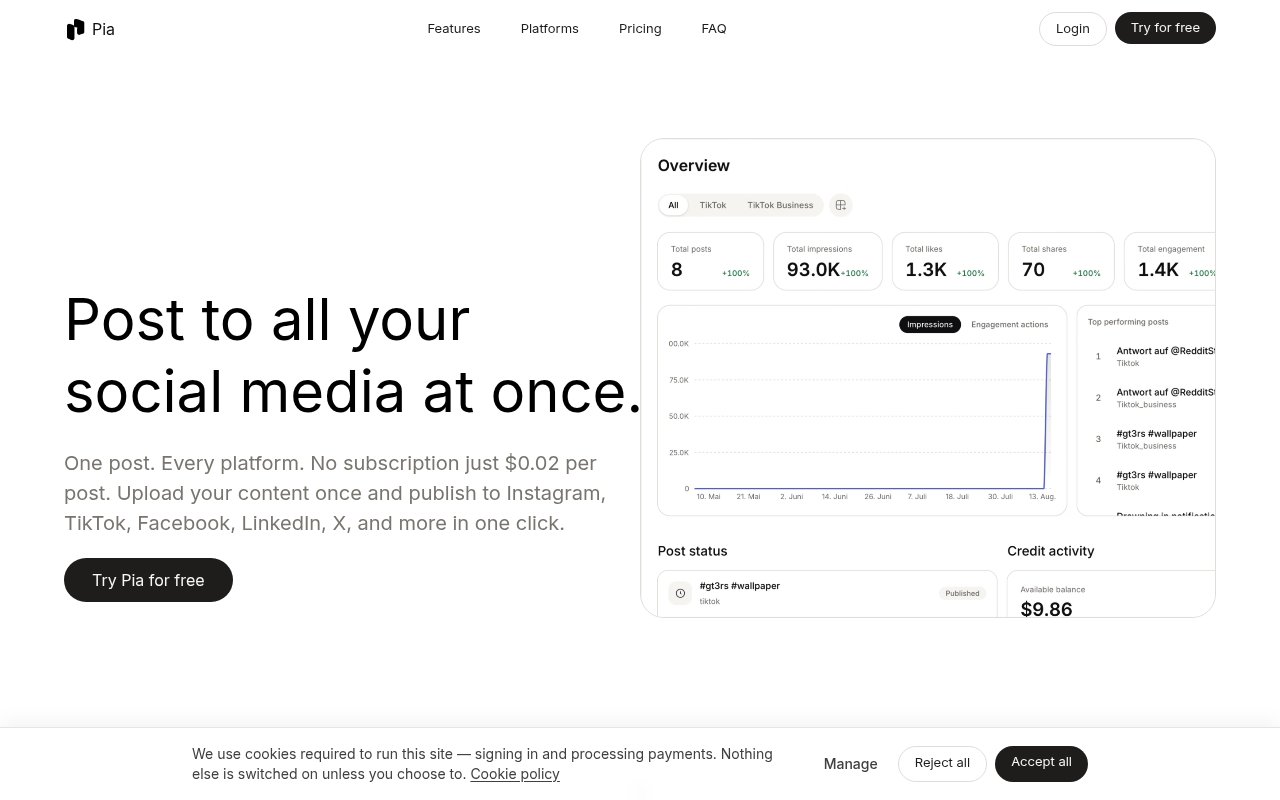
Pia is a social media publishing tool that takes a single upload and posts it to Instagram, TikTok, YouTube Shorts, Facebook, X and Pinterest in one go. The site frames the problem plainly, most creators lose hours every week re-uploading the same content, and the fix is just as plain. Upload once, tick the destinations, publish. The other half of the pitch is the pricing. There's no subscription at all. Each post it publishes costs two cents, and you can try it with 30 free posts before paying anything.
Setup starts by connecting your accounts. Pia uses each platform's official authorization flow, so you log in with the network itself and it never stores your passwords. After that the workflow is short. You upload the video or image, choose which platforms and which accounts should receive it, and adjust the caption per platform if a hashtag or a mention only makes sense on one network. Then you either publish immediately or schedule it. Scheduling works per platform or for everything at once, so a clip can go out on TikTok in the morning and on Instagram in the evening from the same upload, or the whole set can land together at a fixed time. All the connected accounts sit in one dashboard where you add and manage them, and a unified analytics view shows how the posts did across networks without opening six separate apps to find out.
A first week looks like this. You sign up, which gives you the 30 free posts, connect the accounts you actually post to, and upload something you'd normally publish by hand. Choose the destinations, glance at the captions, and send it. Once the free posts run out, the next post costs two cents and the one after that costs the same, so there's never a moment where you have to decide whether the tool is worth a monthly fee. If you stop posting for a month, you pay nothing that month, and the accounts stay connected for when you come back.
Against a conventional scheduler the trade is straightforward. A subscription buys you a calendar, a team inbox and whatever else the vendor bundles, and it costs the same whether you post daily or not at all. Pia charges by the post and folds scheduling and analytics into that price. For an account posting a few times a week that's a few dollars a month, and for a shop that only posts around launches it's cents. The people who'll miss a subscription tool are the ones who need collaboration features, because the site doesn't describe any.
It's built for creators who make one piece of content and want it everywhere, and for the social media managers who run a handful of accounts for a small brand or a few clients. It suits people whose volume never justified a monthly plan, someone posting a few times a week, or a shop that pushes a product photo to Pinterest and Instagram and not much else. If you've been copying the same caption into four apps by hand, that's the job it replaces. The difference is the business model. The site puts it as no subscriptions, no tiers, no per-platform pricing tricks. Scheduling and analytics are included rather than gated behind a higher plan, and you only pay for what actually gets published. On ownership, the FAQ is direct. You own the content, fully, and Pia says it never uses what you upload for anything other than publishing it where you told it to. That combination, cheap and disposable rather than a commitment, is unusual in a category that usually asks for a card and a monthly fee before you've posted once.
The limits are the flip side of that focus. The platform list is six networks, and LinkedIn, Threads and Bluesky aren't on it. The site describes a publishing and analytics tool, and there's no sign of team seats, approval workflows or a shared content calendar. Per-post billing is easy to reason about at low volume but less predictable for an account pushing hundreds of posts a month, and it's a younger product with a shorter track record than the established schedulers it's undercutting. None of that is hidden, and the FAQ on the homepage answers the subscription, platform, scheduling, ownership and security questions in a few lines each.
Access is pay as you go. Signing up comes with 30 free posts to try the service, after which every published post is billed at two cents. The site's own example works out to about $3.12 a month for six posts a week sent to all of its platforms. There's no plan to pick and nothing to cancel, and 30 free posts are enough to run a real week or two of publishing before the first two cents change hands. Support runs through email at support@trypia.app and a Discord community, and the terms and privacy policy are published on the site under its legal pages.
Key Features
- One upload published to six networks
- Per-platform caption customization
- Scheduling per platform or all at once
- Unified analytics dashboard
- Official OAuth connections, no stored passwords
- Pay-per-post pricing with no subscription
Pros & Cons
What we like
- Two cents a post instead of a monthly plan
- 30 free posts to try it
- Captions and timing can differ per platform
- Analytics and scheduling cost nothing extra
Room for improvement
- Six networks, with no LinkedIn, Threads or Bluesky
- No sign of team seats or approval workflows on the site
- Per-post billing is less predictable for high-volume accounts
- Younger product with a shorter track record
Frequently Asked Questions
What is Pia?
How much does Pia cost?
Which platforms does Pia support?
Is my account access safe?
Best For
Featured in
Alternatives to Pia
View all
Apatero AI
The creator studio for AI image, video, audio, 3D, and avatars, now at apatero.ai.

Prompted Income
Make money with AI, documented with the receipts instead of the screenshots.

Sellsmithy
The workshop side of selling digital products. Built first, fees counted, duds included.

Postdex
An exclusive marketplace for finished, human-made articles. Every piece sells once.
Our take
Tool Index Editorial · Sep 2026· 3.5/5
Pia is a lightweight cross-posting service for creators and small brands that want one upload sent to Instagram, TikTok, YouTube, Facebook, X, and Pinterest. It includes per-destination captions, scheduling, and combined analytics, then charges 2 cents per published post after 30 free posts instead of imposing a monthly plan. That model is especially sensible for irregular publishing.
We found the core workflow easy to understand, but the public copy needs tightening. The hero mentions LinkedIn while the platform list and FAQ do not, and there is no visible evidence of approvals, team seats, or a shared editorial workflow. Pia looks useful for a solo operator with modest volume, while agencies should verify destination support and collaboration needs before moving a calendar into it.
Editorial opinion from the Tool Index team, written from the public product pages. Not a user review.
Reviews (0)
Badge builder
Add Pia to your website
Choose a badge style and size, preview it here, then copy the generated HTML. Badge images are self-contained SVGs and do not require an external script.

<a href="https://toolindex.net/tools/pia?ref=badge" target="_blank" rel="noopener">
  <img src="https://toolindex.net/badge/pia/medium.svg" alt="Pia - Listed on Tool Index" width="180" height="50" />
</a>How to use the badge
- 1. Pick the style, size, and theme that fit your layout.
- 2. Copy the generated HTML from the code block.
- 3. Paste it into your footer, homepage, or press page.
Standard badge available
The standard listing badge is available now. Score and circle badges are limited to tools currently ranked in the top 10 of a category.
Badge clicks return visitors to this profile with a referral tag so the source remains identifiable.
Related Tools
Apatero AI
The creator studio for AI image, video, audio, 3D, and avatars, now at apatero.ai.

SEObot
Autonomous AI SEO agent that runs your blog and link building on autopilot

Substack
Hosted newsletter and publication platform with built-in payments, recommendations, and an audience network for writers.

MailerLite
Friendly, affordable email marketing tool with newsletters, automations, landing pages, and a growing creator toolkit.
Work on Pia? Request listing access or correction