Gallery
About Pipedrive
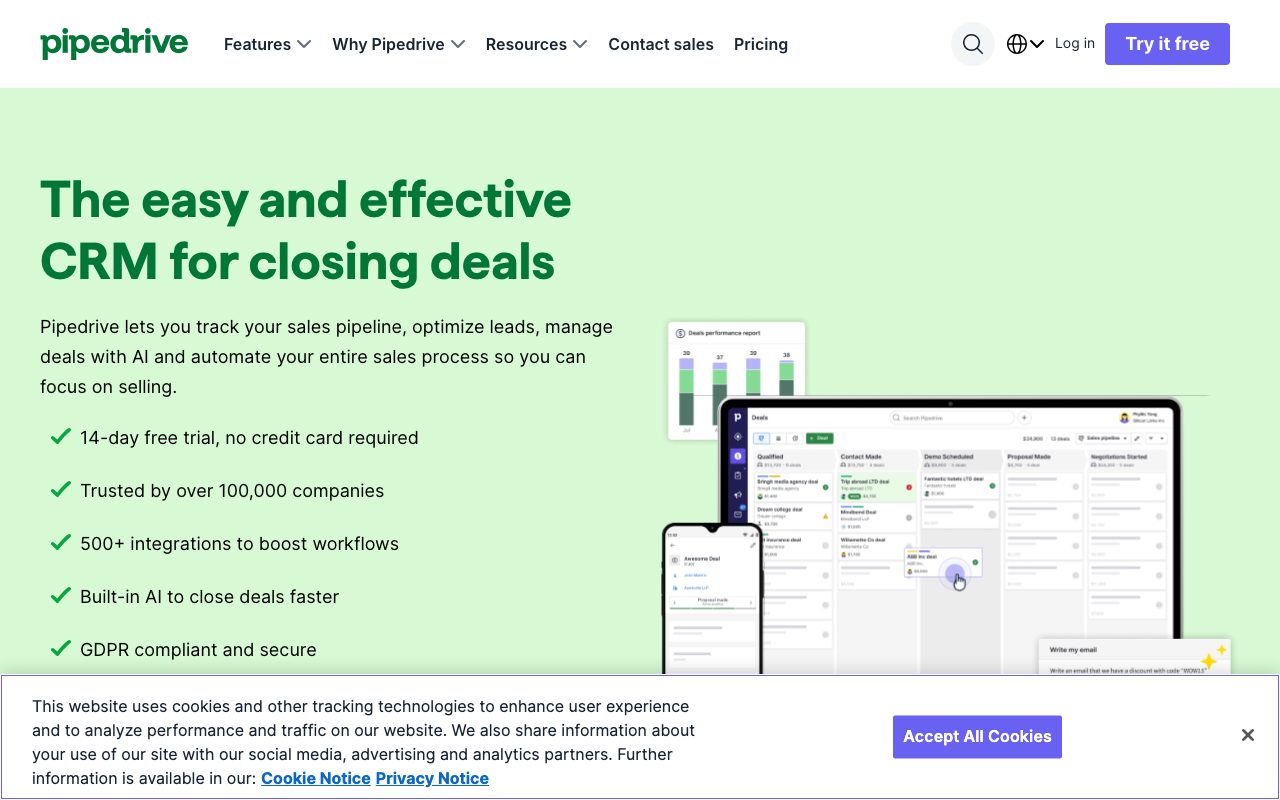
Pipedrive is the CRM that respects how salespeople actually work. The whole interface is built around the deal kanban, where reps drag cards from prospect to closed. Everything else is a layer on top of that one core view.
For small and mid-size sales teams, Pipedrive is often the right answer over Salesforce or HubSpot. It's cheaper, faster to set up, and doesn't require an admin to babysit configurations. The visual pipeline is its calling card.
What Pipedrive does
Pipedrive is a sales-focused CRM with a pipeline-first interface. You define your stages, add deals, and move them through. Each deal has contacts, activities, notes, products, and a value. The kanban board is the home screen and stays the home screen.
Around the pipeline, Pipedrive has email integration, sequences, web forms, calling, automation workflows, reporting, and a marketplace for integrations. Each piece is solid, none are best in class. The point is that they all converge on moving deals forward visually.
The visual pipeline
The kanban view in Pipedrive is the cleanest implementation in the CRM category. Deal cards show the value, contact, last activity, and next step. Color coding flags overdue actions. Drag-and-drop is fast. New reps onboard to the visual model in minutes.
Who Pipedrive is for
Pipedrive fits sales teams of two to fifty in B2B services, real estate, manufacturing, agencies, and SaaS. The common thread is a deal-driven sales motion with multiple stages and visible pipeline accountability. Marketing-led inbound funnels work less naturally.
Pipedrive isn't ideal for transactional ecommerce or service desk-style customer success. It's also not the right fit if you need complex enterprise features like territory management, complex forecasting, or revenue intelligence. That's Salesforce territory.
Pipedrive pricing
Pipedrive starts at $14 per user per month for Essential, which gives you the pipeline, contacts, deals, and basic reporting. Advanced at $29 adds email sync, automation, and meeting scheduling. Professional at $59 adds revenue forecasting and team management. Power and Enterprise scale further with priority support and custom roles.
The pricing undercuts HubSpot Sales Hub Professional and Salesforce significantly. Pipedrive bills annually for the best rates and offers a 14-day trial without a credit card.
Pipedrive features in practice
The Smart Contact Data feature pulls public information about contacts from web sources. The LeadBooster add-on includes chat, prospector, and forms. Web visitors can be tracked and added to the pipeline automatically. Insights, the reporting module, builds dashboards in a few clicks.
Workflow Automation triggers actions based on deal stage changes, time delays, or activity events. Examples include auto-sending an email when a deal moves to "negotiation" or creating a task when a deal is idle for seven days. The automation is good for SMB but light versus Salesforce Flow.
The mobile experience
Pipedrive's mobile app is rare in the CRM space because it's actually good. Reps in the field log calls, update deals, and take notes without fighting the interface. The voice-to-text note feature is unexpectedly useful for after-meeting capture.
Tradeoffs
Pipedrive's reporting is solid but not deep. If you want multi-touch attribution, complex revenue ops dashboards, or finance-grade forecast accuracy, you'll outgrow Pipedrive. The integration with marketing tools is good but not as native as HubSpot's all-in-one stack.
The custom field and object model is flexible but not infinite. Teams with very specific workflows sometimes hit walls Salesforce wouldn't have. Pipedrive's add-on tiers can also stack up, with LeadBooster, Web Visitors, and Campaigns each priced separately.
Pipedrive wins on time-to-value. Most teams are productive on day one, which is rare in CRM-land.
Pipedrive vs alternatives
Compared to HubSpot, Pipedrive is cheaper and simpler but narrower on marketing and service. HubSpot wins for inbound-led motions and broader workflows. Compared to Close, Pipedrive is better for visual pipeline management and weaker on calling.
Compared to Salesforce, Pipedrive is dramatically simpler at the cost of customization ceiling. See our best CRM for small business guide and Pipedrive vs HubSpot breakdown.
Bottom line on Pipedrive
Pipedrive is the right CRM for SMB B2B sales teams that want results without an admin, a consultant, and three months of setup. The kanban-first model is intuitive. The pricing is fair. The breadth of integrations covers most needs.
If your sales motion is visual, deal-driven, and run by a small team, Pipedrive is hard to beat. If you need marketing automation in the same tool, HubSpot is the broader pick. If you need calling-first workflows, Close wins. For everyone else, Pipedrive is the safe and capable default.
Pipedrive setup that works
The Pipedrive setup pattern that works for most B2B SMB sales teams starts with a clear pipeline definition. Five to seven stages from lead to closed-won. Each stage has clear entry and exit criteria the whole team agrees on. Custom fields for the data that actually drives decisions, not the data that might be useful someday.
The activity model is equally important. Each deal should have a next activity scheduled. The Activities view becomes the rep's daily home: today's calls, emails, and meetings, sorted by priority. Reps work the activities, not the deals. The deals advance as a side effect of doing the activities.
Workflow automation patterns
The first automations every Pipedrive team should set up: auto-create follow-up activity when an email is sent, auto-update deal stage when a key activity completes, alert the rep when a deal hasn't moved in 14 days. These three cover the most common pipeline hygiene gaps.
More advanced automations involve lead routing based on territory or product fit, auto-assignment to the right rep, and pipeline-stage-specific email templates. Each automation removes friction. Reps spend more time on selling and less on data entry.
Pipedrive integration ecosystem
Pipedrive has direct integrations with most common tools: Slack, Zapier, Make, Mailchimp, Calendly, DocuSign, QuickBooks, Outlook, Gmail. The marketplace covers hundreds more. The API is well-documented for custom integrations. Most teams find what they need without engineering work.
The integration with email is particularly important. Pipedrive's email sync brings inbound and outbound messages into the deal context automatically. Reps can write emails from Pipedrive and they sync to their inbox. The two-way sync makes Pipedrive feel like a CRM that lives inside email rather than alongside it.
Common Pipedrive questions
Does Pipedrive support quoting and proposals? Limited natively. The Smart Docs add-on creates simple proposals from templates. For complex CPQ workflows, Pipedrive integrates with PandaDoc, DocuSign, or Proposify. Most SMB teams use a separate proposal tool integrated to Pipedrive rather than expecting it to handle the full quote-to-cash flow.
How is Pipedrive for inbound marketing teams? Solid for capturing inbound leads and routing them to reps. The web forms feature creates simple capture forms that push directly into the pipeline. For deeper marketing automation, integration with Mailchimp, ActiveCampaign, or HubSpot Marketing Hub fills the gap.
Can Pipedrive scale past 50 reps? Technically yes, practically maybe. Above 50 reps, the lack of advanced revenue ops features and weaker forecasting becomes painful. Most teams that scale that large eventually migrate to Salesforce or HubSpot Enterprise. Pipedrive is sweet-spot software for the 5 to 50 rep range.
Pipedrive reporting depth
The Insights module covers the main reports a sales team needs. Pipeline stage conversion rates, activity volume per rep, deal velocity, win rates by source. Custom dashboards combine these into views for the sales manager and the CEO. The reports refresh automatically and export cleanly.
For more sophisticated analytics, teams pipe Pipedrive data into a warehouse via the API or via a tool like Stitch or Fivetran. Looker, Mode, or Hex then build executive dashboards from the warehouse. This pattern works well and lets Pipedrive handle the operational layer while the warehouse handles the analytical layer.
Final take on Pipedrive
Pipedrive has occupied the visual pipeline CRM niche for years and continues to serve it well. The product hasn't tried to become Salesforce or HubSpot. It's stayed focused on what made it valuable: a kanban-first interface that helps reps see and move deals. That focus is the entire reason it remains compelling.
The competitive landscape has stabilized. HubSpot has gotten more expensive for full-platform use. Salesforce remains overkill for SMB. Close has taken some of the dialing-focused market. Pipedrive's visual pipeline territory is fairly defensible, and the team has invested in adjacent capabilities like lead capture, automation, and reporting without losing the core simplicity.
For SMB B2B sales teams in 2026, Pipedrive is among the top options. The pricing is fair, the time-to-value is short, and the feature breadth is right for teams under 50 reps. The decision usually comes down to whether you prioritize visual pipeline (Pipedrive), calling-first workflows (Close), or full marketing-plus-sales platform (HubSpot). For teams whose primary need is moving deals through stages with visibility, Pipedrive is hard to beat.
Pipedrive add-ons and ecosystem
Pipedrive's add-on tiers extend the core CRM into adjacent capabilities. LeadBooster covers chat, prospecting, web forms, and calendar booking. Web Visitors tracks anonymous traffic and identifies returning prospects. Smart Docs handles proposals, contracts, and e-signature. Campaigns provides email marketing within the platform. Each add-on prices separately, which lets teams pick what they need.
The marketplace ecosystem covers integrations with Slack, Zapier, Make, accounting tools, e-signature platforms, and dozens of calling and SMS providers. The integrations are well-maintained and most popular ones are first-party or vetted partners. For teams that want to extend Pipedrive beyond the core kanban, the ecosystem is broad enough to cover most adjacent needs.
The community of Pipedrive users includes consultants, agencies, and certified partners who help with implementation, customization, and training. For teams that want help getting set up properly or optimizing existing workflows, finding qualified support is easier than for newer or smaller CRM platforms. The professional services ecosystem is mature and accessible.
Tutorial / Demo
Key Features
- Drag-and-drop visual pipeline
- Activity reminders and email sync
- Sales forecasting and revenue reports
- Workflow automation and smart contact data
- Lead inbox and web forms
- Mobile apps for iOS and Android
Pros & Cons
What we like
- Built specifically around how reps actually sell
- Faster to set up than enterprise CRMs
- Predictable per-user pricing
Room for improvement
- Marketing automation is thinner than HubSpot or Salesforce
- Reporting depth depends on the tier you pick
- Add-ons (LeadBooster, Campaigns) cost extra
Frequently Asked Questions
How much does Pipedrive cost?
Pipedrive vs HubSpot, which?
Is Pipedrive good for solo founders?
Does Pipedrive have email sync?
Can Pipedrive automate workflows?
Best For
Featured in
Alternatives to Pipedrive
View all
Our take
Tool Index Editorial · May 2026· 4.6/5
If you're evaluating Pipedrive, the headline is simple: visual sales crm built around the deal pipeline, and most teams will get value out of the box.
What it actually does well: Built specifically around how reps actually sell, Faster to set up than enterprise CRMs, and Predictable per-user pricing. Where it stumbles: Marketing automation is thinner than HubSpot or Salesforce and Reporting depth depends on the tier you pick.
In short: Pipedrive is a strong pick when you need b2B sales teams managing a few hundred open deals, and a harder sell if marketing automation is thinner than HubSpot or Salesforce would be a dealbreaker.
Editorial opinion from the Tool Index team, written from the public product pages. Not a user review.
Reviews (6)
Almost perfect, almost
Been using Pipedrive for a couple of cycles now. The biggest win has been predictable per-user pricing. The drag-and-drop visual pipeline is more useful than I expected. Found it works best for b2B sales teams managing a few hundred open deals. Honest gripe: marketing automation is thinner than HubSpot or Salesforce. Solid pick for my use case, your mileage may vary.
Pros
- Predictable per-user pricing
- Faster to set up than enterprise CRMs
Cons
- Add-ons (LeadBooster, Campaigns) cost extra
- Marketing automation is thinner than HubSpot or Salesforce
Onboarded the team in a day
Adopted Pipedrive for one project, ended up using it for more. The biggest win has been predictable per-user pricing. The mobile apps for iOS and Android is more useful than I expected. Found it works best for b2B sales teams managing a few hundred open deals. Wish they'd address how reporting depth depends on the tier you pick. Glad I made the switch.
Pros
- Built specifically around how reps actually sell
Caveats: good ones and frustrating ones
Took a few weeks for Pipedrive to click, then it stuck. The biggest win has been predictable per-user pricing. The activity reminders and email sync is more useful than I expected. Main use case: founders running outbound on their own. Not perfect but better than the alternatives I tried.
Cons
- Add-ons (LeadBooster, Campaigns) cost extra
Honest take after six months
Adopted Pipedrive for one project, ended up using it for more. Honestly impressed by how predictable per-user pricing. Their take on lead inbox and web forms is solid. Sticking with Pipedrive.
Pipedrive has been a quiet upgrade
Got Pipedrive on the recommendation of someone I trust. Honestly impressed by how built specifically around how reps actually sell. Hard to imagine going back to my previous setup.
Genuinely impressed
Tried Pipedrive on a side project first. The biggest win has been built specifically around how reps actually sell.
Badge builder
Add Pipedrive to your website
Choose a badge style and size, preview it here, then copy the generated HTML. Badge images are self-contained SVGs and do not require an external script.

<a href="https://toolindex.net/tools/pipedrive?ref=badge" target="_blank" rel="noopener">
  <img src="https://toolindex.net/badge/pipedrive/medium.svg" alt="Pipedrive - Listed on Tool Index" width="180" height="50" />
</a>How to use the badge
- 1. Pick the style, size, and theme that fit your layout.
- 2. Copy the generated HTML from the code block.
- 3. Paste it into your footer, homepage, or press page.
Score badge available
Pipedrive qualifies for the score and circle badges based on its current top-10 positionin Sales.
Badge clicks return visitors to this profile with a referral tag so the source remains identifiable.
Related Tools

Boilerroom
An all-in-one outbound sales platform for dialing, sequencing, and follow-up

Close
Inside-sales CRM with calling and email built in
Apollo.io
B2B prospecting database fused with a sales engagement platform
lemlist
Cold email and multichannel outreach with personalized images and video
Work on Pipedrive? Request listing access or correction