
Scribe
CLI tool that builds a searchable knowledge base from your coding sessions and repos
Gallery
About Scribe
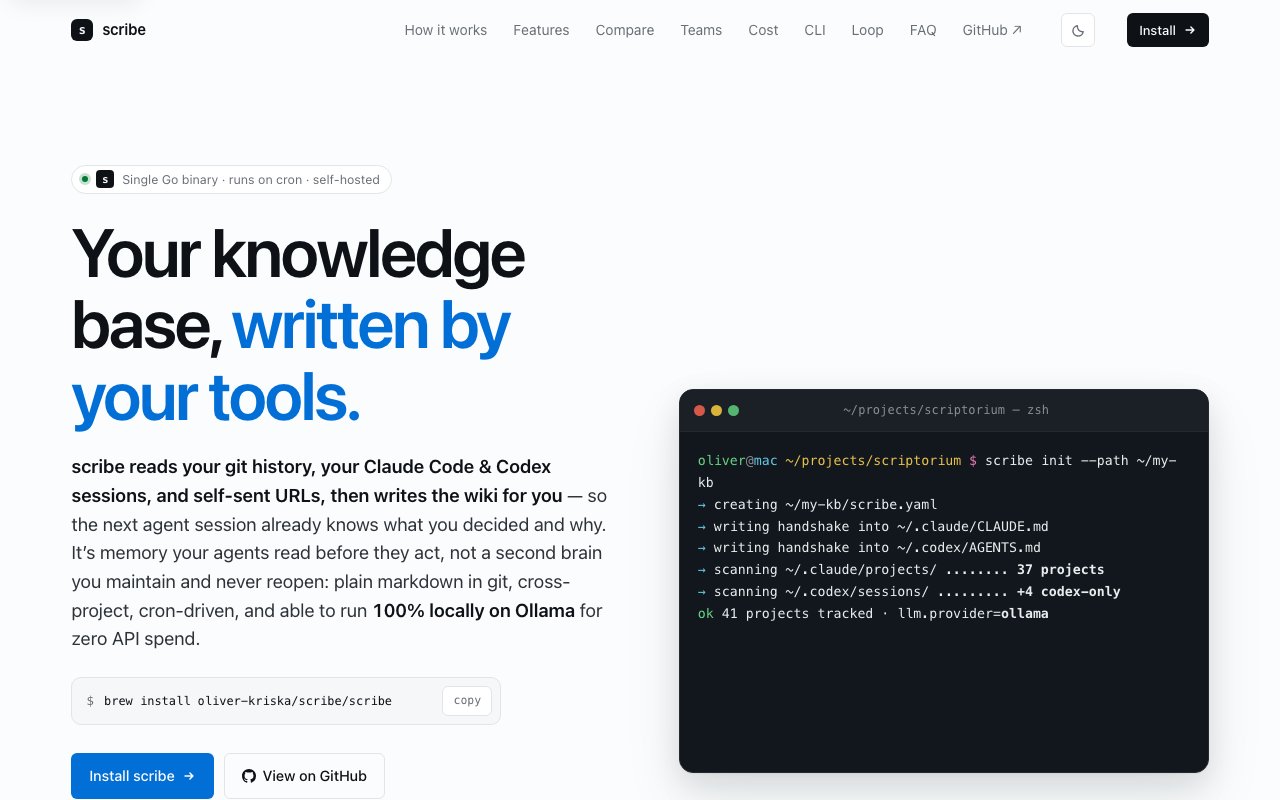
Scribe is a command-line tool that automatically builds a searchable knowledge base from development work without requiring manual note-taking or documentation effort. It solves a persistent problem for developers who use AI coding assistants like Claude Code or Codex: the insights, decisions, debugging solutions, and architectural explanations generated during coding sessions disappear once the conversation ends. Scribe captures this information from git history, AI coding sessions, and self-sent URLs, then transforms it into organized wiki pages that persist across projects and remain queryable long after the original work is done. The accumulated knowledge compounds over time, making past solutions accessible when similar problems arise in future projects.
The tool runs as a single binary built in Go, available for macOS and Linux under the MIT license. Installation happens through Homebrew or a shell script, and once configured, Scribe operates autonomously on a cron schedule with no ongoing intervention required. Users set it up once, configure their input sources, and let it run in the background continuously absorbing new information from their development workflow. The capture pipeline pulls from four input streams: git repositories where commit messages and code changes tell a story of decisions made, AI coding assistant sessions where problem-solving conversations contain valuable context, user-submitted URLs pointing to documentation or resources worth remembering, and iMessage self-chat links where developers often save useful articles or tools they want to revisit later.
Processing happens in stages designed to filter noise before anything reaches the language model, which keeps costs down and quality up. First, FTS5 keyword-density scoring removes boilerplate content, template code, and repetitive patterns that would waste inference time without adding knowledge value. Then a two-pass absorption process creates entity-first wiki pages, meaning the system organizes knowledge around specific concepts, tools, patterns, or decisions rather than dumping everything chronologically. The output is a typed knowledge graph stored as plain markdown files with wikilinks connecting related concepts and backlinks showing which pages reference any given topic. This structure makes navigation intuitive and helps users discover connections between pieces of information they might not have linked mentally.
The graph structure uses ten defined edge types to represent how different pieces of knowledge relate to each other. These include relationships like supersedes (when a newer approach replaces an older one), contradicts (when information conflicts between contexts), specializes (when one concept is a more specific version of another), and several others that capture the nuances of how knowledge evolves. When a debugging approach that worked in one project gets refined or replaced in another, those relationships are explicit in the graph structure rather than buried in chronological notes. This makes it possible to understand not just what was learned but how that understanding developed over time and which information should take precedence.
One of the more practical features involves agent integration with AI coding assistants. Scribe writes handshakes into Claude and Codex configurations so that these AI assistants automatically query the knowledge base before making suggestions or decisions. This means solutions discovered in one project can inform work in another without the developer needing to remember relevant context and re-explain it. The accumulated knowledge becomes part of the information available to AI assistants, reducing repetitive explanations and improving the quality of suggestions. For developers who work across multiple codebases, this cross-project memory eliminates the frustration of solving the same problem twice because the first solution was in a different repository's chat history.
The system can run entirely locally using Ollama for inference, eliminating API costs for users who prefer to keep everything on their own hardware and maintain complete privacy over their development knowledge. Those who want faster processing or higher-quality inference can connect to hosted providers at roughly fifty-five cents to six dollars per month, or use their existing Anthropic Claude CLI subscription. This flexibility means developers can choose their preferred tradeoff between cost, speed, privacy, and inference quality based on their specific needs and constraints without being locked into a particular approach.
Target users are developers working across multiple projects who rely on AI coding assistants and find themselves repeatedly re-explaining context or rediscovering solutions they already found. The tool particularly benefits anyone frustrated by the ephemeral nature of AI conversations, where valuable debugging sessions, architectural discussions, and implementation explanations vanish after the chat window closes. Storage in a plain git repository ensures no vendor lock-in, and the markdown format means the knowledge base remains readable, portable, and accessible regardless of whether Scribe continues to exist. The entire project is free and open source under the MIT license.
Key Features
- Automatic knowledge extraction from git, Claude Code, and Codex
- Local first with zero API cost via Ollama
- BM25 full text search from terminal
- Agent handshake for context injection
- Typed knowledge graph with relationship tracking
- Scheduled automation via cron or LaunchAgents
Pros & Cons
What we like
- Runs entirely local with no API spend if you use Ollama
- Extracts context from AI sessions you would otherwise lose
- Plain markdown output you own and can edit directly
- Injects knowledge into agents so they stop suggesting things you already rejected
Room for improvement
- Requires local LLM setup or API keys for processing
- Younger project with a smaller community
- Best value comes from heavy AI coding assistant usage
- Initial extraction can be slow on large git histories
Frequently Asked Questions
What is Scribe?
Does Scribe require API keys?
Is Scribe free?
Who is Scribe for?
Best For
Featured in
Alternatives to Scribe

1Lookup
Real-time data verification API for phone, email, IP, and domain validation to fight fraud

Kevin Gabeci
Solo developer building web apps, cozy browser games, and AI creator toolkits.

Codedex
A gamified, story-driven platform that teaches Python, web dev, and more like an RPG quest
Hack2hire
Practice real SDE interview questions from top tech companies with expert worked solutions
Reviews (9)
Quietly excellent
Picked Scribe for the price, stayed for the quality. What stands out is how it handles extracts context from ai sessions you would otherwise lose. It handles the boring parts so I can focus on the work that matters. Found it works best for tracking architectural decisions across multiple repositories. Recommending it to people in a similar spot.
Does the job, a few gripes
Scribe solves a real problem for me without making a fuss about it. Where it really wins is extracts context from ai sessions you would otherwise lose. The thing I keep coming back to is how reliable it is. My only gripe is younger project with a smaller community. Glad I made the switch.
Two months in, no regrets
Came to Scribe after getting frustrated with what I had before. What stands out is how it handles scheduled automation via cron or launchagents. The defaults are sensible, so I was not fighting settings on day one. Recommending it to people in a similar spot.
Pulled its weight from week one
Scribe has quietly become part of my daily flow. Their take on automatic knowledge extraction from git, claude code, and codex is genuinely good. The output quality holds up better than I expected. Mostly using it for consolidating learnings from claude code and codex transcripts. Easy yes for anyone weighing the same trade offs.
Decent with some rough edges
Three months of Scribe later, here is what holds up. It slotted into my routine without much fuss. It fits well for tracking architectural decisions across multiple repositories. One thing that bugs me is initial extraction can be slow on large git histories. Would sign up again without thinking twice.
Worth a look
Hadn't planned on switching, but Scribe was hard to ignore. The typed knowledge graph with relationship tracking is more useful than I expected. The thing I keep coming back to is how reliable it is. Found it works best for consolidating learnings from claude code and codex transcripts. Worth it for what I get out of it.
Two months in, no regrets
Three months of Scribe later, here is what holds up. Where it really wins is local first with zero api cost via ollama. It has shaved real time off my week. Mostly using it for building a personal wiki from your coding sessions automatically. Worth it for what I get out of it.
Genuinely impressed
Hadn't planned on switching, but Scribe was hard to ignore. Their take on automatic knowledge extraction from git, claude code, and codex is genuinely good. Found it works best for building a personal wiki from your coding sessions automatically. It earns its place in my stack.
Exactly what I needed
Came to Scribe after getting frustrated with what I had before. What stands out is how it handles typed knowledge graph with relationship tracking. Glad I made the switch.
Badge builder
Add Scribe to your website
Choose a badge style and size, preview it here, then copy the generated HTML. Badge images are self-contained SVGs and do not require an external script.

<a href="https://toolindex.net/tools/scribe?ref=badge" target="_blank" rel="noopener">
  <img src="https://toolindex.net/badge/scribe/medium.svg" alt="Scribe - Listed on Tool Index" width="180" height="50" />
</a>How to use the badge
- 1. Pick the style, size, and theme that fit your layout.
- 2. Copy the generated HTML from the code block.
- 3. Paste it into your footer, homepage, or press page.
Standard badge available
The standard listing badge is available now. Score and circle badges are limited to tools currently ranked in the top 10 of a category.
Badge clicks return visitors to this profile with a referral tag so the source remains identifiable.
Related Tools
Kevin Gabeci
Solo developer building web apps, cozy browser games, and AI creator toolkits.

Coolify
Self-hostable, open source alternative to Heroku and Netlify

Warp
The modern terminal reimagined with AI and collaboration

Bolt.new
Prompt-to-deployed full-stack app inside the browser
Work on Scribe? Request listing access or correction