
Shootsolo
Film yourself hands-free with voice controls, a teleprompter, and dual-format recording
Gallery
About Shootsolo
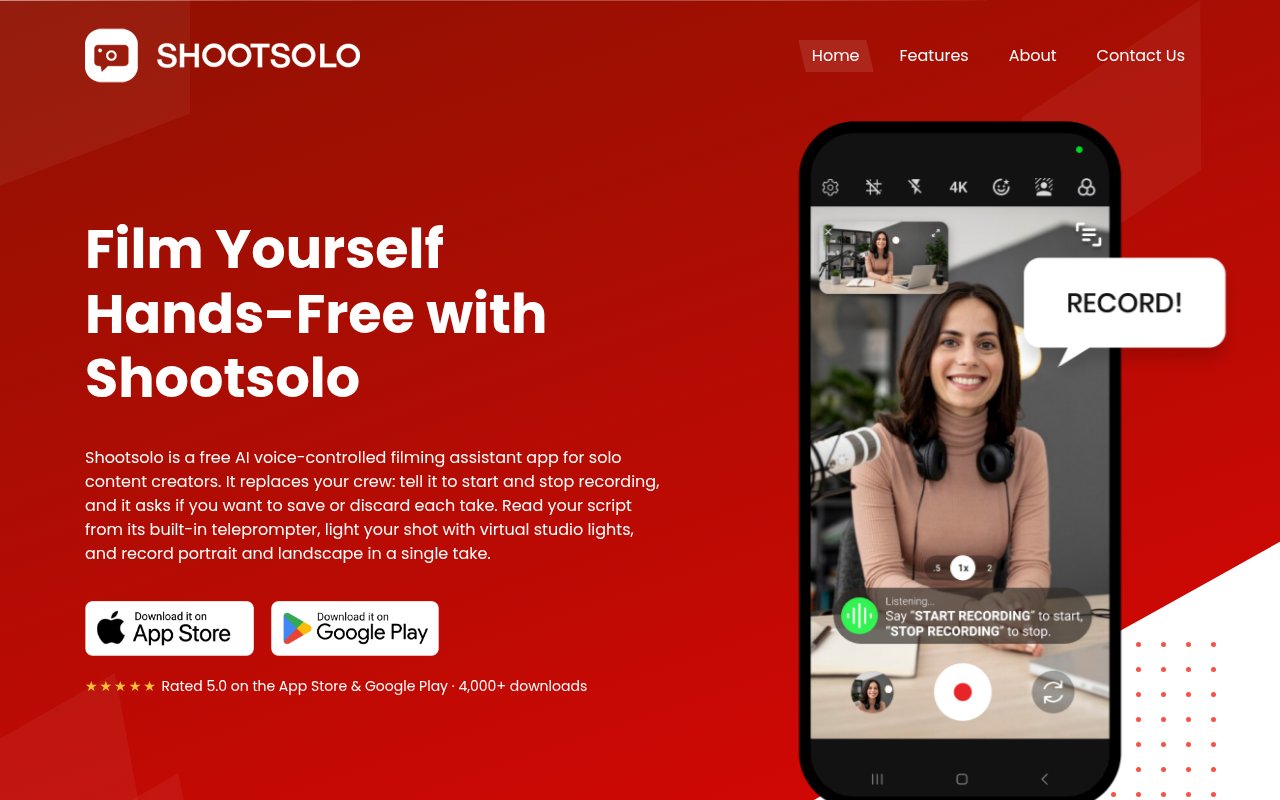
Shootsolo is a free camera app for people who record themselves without a camera operator. It lets a creator start, pause, resume, and stop video with spoken commands, then asks whether the finished take should be saved or discarded. That removes the repeated walk between the camera position and the phone, and it prevents failed attempts from filling the photo gallery. The app combines that hands-free control with a teleprompter, framing tools, background effects, lighting effects, and support for both iPhone and Android. It is meant to run the recording session itself rather than act as an editor after filming.
A typical shoot starts with the phone placed where the creator wants it. The creator can say a supported start command, deliver the take, and stop it without touching the device. Shootsolo then asks whether to keep the result. Saying yes saves it, while saying no discards it and lets the creator try again. The command set also covers pausing, resuming, playing the video, and closing playback. Start and stop phrases can be switched to presets such as And Action and And Cut in settings. Bluetooth shutter remotes and external microphones are supported too, so voice control isn't the only way to operate a setup from in front of the lens. The front and rear cameras are both available, and a composition grid helps line up the shot before recording begins.
The built-in teleprompter keeps a script on screen while the camera records. Its text size, margins, and scrolling speed are adjustable, which helps a presenter keep pace and look toward the lens without using another device for notes. The script can be previewed, rewound, or cleared before a take. Shootsolo can save portrait and landscape versions from one take, giving creators material for vertical social feeds and wider YouTube video without filming the same performance twice. A live preview shows how the second orientation will be framed, while a grid and safe-zone overlay help keep the subject positioned for both files. In HD, both versions are saved at full HD resolution. In 4K, the phone's physical orientation is captured at 4K and the second format is cropped from it. The built-in player provides an immediate review step, and files can be renamed so matching vertical and horizontal versions stay organized.
Visual tools cover common home and solo setups. The app can blur a background, replace it with green or grey, smooth skin, and adjust brightness, contrast, and exposure. Virtual studio lights add spotlights and colored light effects directly in the camera view. Each virtual light can be repositioned, recolored, and adjusted in intensity while the creator watches the live preview. The site says what the user sees is what gets recorded. These effects shape the captured image rather than adding physical light to the room, so a reasonably lit space still helps. They won't replace careful real lighting or a purpose-built set for every production, but they give a single person more control when recording in a bedroom, office, kitchen, gym, or temporary location. Because the effects, prompt, capture controls, and review step sit together, there is less need to coordinate several apps before each take.
Shootsolo is aimed at solo creators, vloggers, podcasters, YouTubers, and anyone making instructional or social video alone. Cooking and fitness demonstrations are especially natural uses because the presenter may have occupied or messy hands while standing away from the phone. It also suits scripted talking-head clips, video podcast segments, tutorials, TikTok posts, Reels, Shorts, and ordinary YouTube videos. Its clearest advantage is that it treats solo filming as a live operating problem. Many camera apps improve the image, but they still expect someone to touch the screen before and after every take. Here, spoken control and the keep-or-discard prompt reduce that repeated physical setup work.
The app is genuinely free rather than a limited trial. Shootsolo says current versions include unlimited recording, every feature, no advertising, no subscription, and no watermark. An older credit system has been removed. It also works fully offline, so recording, review, and saving don't depend on a network connection. That makes it practical in locations with poor service and keeps the core session on the device. The product is available for iPhone and Android through their respective app stores. The official site reports more than 4,000 downloads and more than 1,100 monthly creators, though it remains a focused camera utility rather than a full production suite, and creators will still need another tool for timeline editing, captions, or publishing.
Key Features
- Voice-controlled camera recording
- Adjustable built-in teleprompter
- Simultaneous portrait and landscape capture
- Background blur and green screen
- Virtual studio lighting
- External microphone and shutter support
Pros & Cons
What we like
- Runs complete takes without touching the phone
- Includes every feature with no watermark
- Works fully offline on mobile devices
- Saves two aspect ratios from one take
Room for improvement
- Focused on filming rather than timeline editing
- Voice commands use a defined phrase set
- Visual effects depend on phone capability
- Desktop recording isn't supported
Frequently Asked Questions
What is Shootsolo?
Is Shootsolo really free?
Does Shootsolo work offline?
Which voice commands does Shootsolo support?
Best For
Featured in
Alternatives to Shootsolo

Apatero AI
The creator studio for AI image, video, audio, 3D, and avatars, now at apatero.ai.
Apatero Studio
Creator studio for AI image, video, audio, 3D, and avatars. Every model worth using, in one workspace.

Melodex
Turn your idea into an AI-generated music video

Speel
AI UGC video generator that makes realistic AI avatars hold and talk about your product for ads
Our take
Tool Index Editorial · Oct 2026· 4.0/5
Shootsolo is a free iPhone and Android camera app for people filming themselves without an operator. We found a practical bundle of voice-controlled recording, a teleprompter, keep-or-discard review, background effects, virtual lights, and simultaneous portrait and landscape output. It works offline, carries no ads or watermark, and the site says recording is unlimited with no subscription.
The product solves the awkward live-control part of solo shooting better than a general editor does. It is especially sensible for cooking, fitness, tutorials, and scripted talking-head clips where the presenter stands away from the phone. It doesn't provide timeline editing, captions, or publishing, and voice commands use defined phrases. Dual-format quality and visual effects will also depend on the phone and orientation, so creators may still need another app to finish the video.
Editorial opinion from the Tool Index team, written from the public product pages. Not a user review.
Reviews (0)
Badge builder
Add Shootsolo to your website
Choose a badge style and size, preview it here, then copy the generated HTML. Badge images are self-contained SVGs and do not require an external script.

<a href="https://toolindex.net/tools/shootsolo?ref=badge" target="_blank" rel="noopener">
  <img src="https://toolindex.net/badge/shootsolo/medium.svg" alt="Shootsolo - Listed on Tool Index" width="180" height="50" />
</a>How to use the badge
- 1. Pick the style, size, and theme that fit your layout.
- 2. Copy the generated HTML from the code block.
- 3. Paste it into your footer, homepage, or press page.
Standard badge available
The standard listing badge is available now. Score and circle badges are limited to tools currently ranked in the top 10 of a category.
Badge clicks return visitors to this profile with a referral tag so the source remains identifiable.
Related Tools
Apatero AI
The creator studio for AI image, video, audio, 3D, and avatars, now at apatero.ai.

LocalClip
Local-first AI video clipper for Mac that turns long videos into vertical clips
Melodex
Turn your idea into an AI-generated music video
Apatero Studio
Creator studio for AI image, video, audio, 3D, and avatars. Every model worth using, in one workspace.
Work on Shootsolo? Request listing access or correction