
Summarizer.Free
AI summarization for text, articles, and YouTube videos with no signup required
Gallery
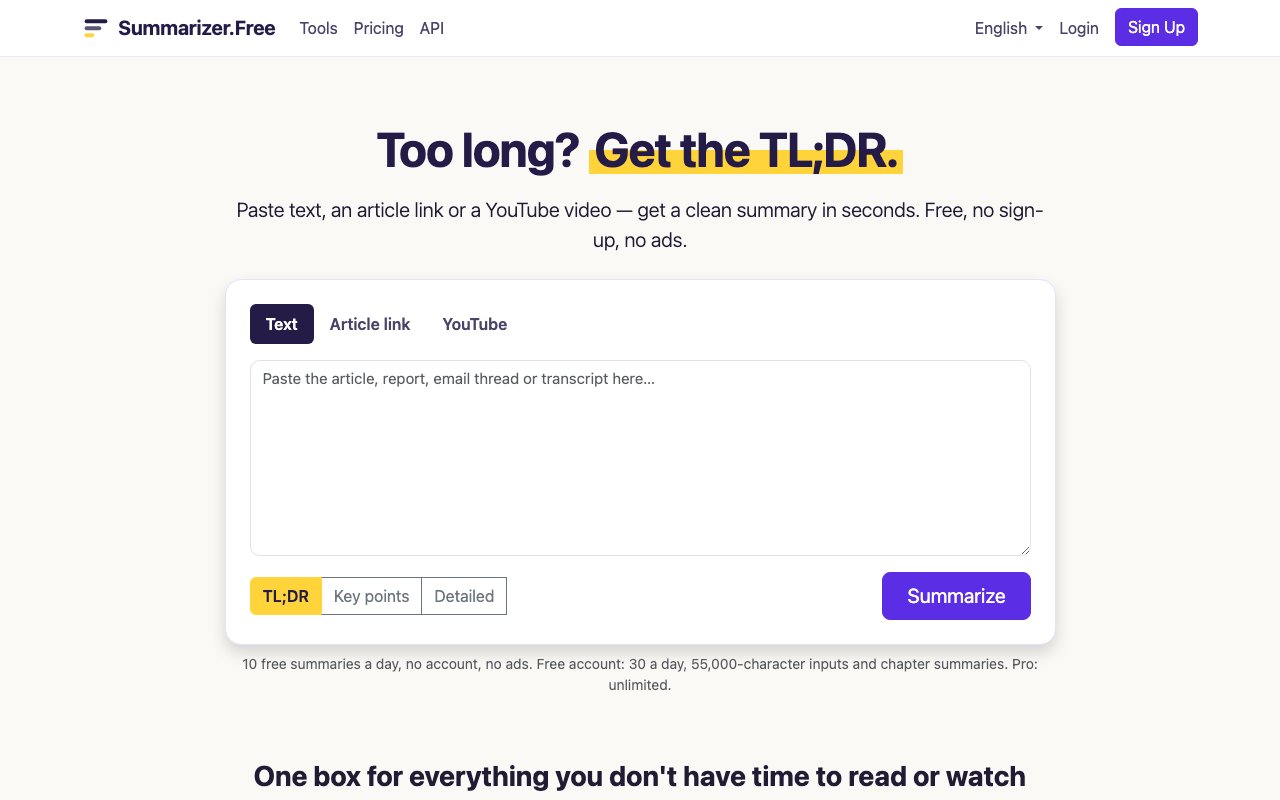
About Summarizer.Free
Summarizer.Free is an AI summarization tool that condenses long text, web articles, and YouTube videos into shorter digests without requiring any account or signup. You paste content or drop a URL, pick a summary style, and get results in seconds. The service handles inputs in any language and can return summaries in over 100 languages, which makes it useful for people consuming content outside their native tongue. There is nothing to install and no login wall standing between you and a quick summary. The interface loads fast, works on mobile browsers, and does exactly what it says without pushing you toward a signup flow every few clicks.
The core problem it solves is information overload. Articles run long, videos eat up time, and not everything deserves a full read or watch. Before committing 20 minutes to a YouTube explainer or half an hour to a deep-dive blog post, you want to know whether the substance justifies the investment. Summarizer.Free lets you skim the core ideas first and decide whether the original is worth your attention. Researchers checking sources, students reviewing lecture recordings, and professionals staying current on industry news all fit the target profile. Anyone who reads or watches more than they can comfortably process in a day will find a use case here. The time you save on content that turns out to be shallow pays for the occasional summary you read before diving into something worthwhile.
The interface offers three output modes. TL;DR gives you a brief overview in a few sentences, enough to know what the piece is about without any detail. Key points breaks the content into a bulleted list of the main ideas, useful when you need to reference specific arguments or facts later. Detailed chapter breakdowns work well for longer videos, splitting the content into timestamped sections so you can jump to the parts that matter and skip the padding. You can copy the result directly, share it across social platforms, or just read it on the page and move on. The output is clean text, not a proprietary format, so you can paste it into notes, emails, or documents without additional formatting cleanup. That flexibility matters when you are pulling summaries into a research workflow or sharing key points with a team.
Usage limits depend on whether you create an account. Without signing up, you get 10 summaries per day and can process inputs up to about 25,000 characters. That covers most standard articles and shorter videos, enough for casual daily use. A free account bumps that to 30 summaries daily and roughly 55,000 characters per input, which handles longer reads and medium-length video transcripts. Premium subscribers unlock unlimited summaries and can handle inputs up to around 500,000 characters, translating to roughly four hours of video content or book-length text. For YouTube specifically, the tool pulls captions, so videos without captions will not work. If the creator has not provided subtitles and auto-generated captions are not available, there is nothing for the model to summarize. That limitation is worth knowing before you paste a link and wonder why it fails.
There is also an API for developers who want to build summarization into their own products. It accepts JSON requests and returns structured summaries, available to any account holder. That opens up automation use cases like summarizing support tickets, condensing meeting transcripts, generating summary cards for a content feed, or triage-reading research papers before deciding which to read in full. The API means you can integrate the same summarization engine powering the web tool into your own workflow without building the model infrastructure yourself. For teams that process a lot of inbound content, this alone can save hours of human reading time per week and turn a manual bottleneck into a scalable process.
Data handling is straightforward. The service processes inputs on its own servers, retains content briefly for abuse prevention, and explicitly states it does not sell user data or use it for model training. That matters for anyone feeding in proprietary or sensitive material, though the safest approach for truly confidential content is always to keep it local. The whole experience is browser-based, so there is nothing to install, and the free tier is generous enough to handle casual use without ever entering a credit card. For heavier users, the premium tier removes limits and adds longer input capacity, but the free version covers most everyday summarization needs. If you read a lot and wish you could skim faster, this is a low-friction tool worth bookmarking. It does not try to be a research assistant or a writing coach. It summarizes content, quickly and well, and that focus is its strength.
Key Features
- Summarizes text, article URLs, and YouTube videos
- Three output styles including key points and chapters
- No signup required for basic use
- Handles inputs up to 500k characters on Pro
- YouTube transcript extraction built in
- No ads on the free tier
Pros & Cons
What we like
- Works immediately without creating an account
- Supports multiple input types from a single interface
- Free tier is generous enough for casual daily use
- Clear about what summaries can and cannot do
Room for improvement
- YouTube summarization requires captions to exist
- Free tier caps at ten summaries per day
- No offline or local processing option
- Summary depth depends on source quality
Frequently Asked Questions
What is Summarizer.Free?
Is Summarizer.Free actually free?
What types of content can it summarize?
Does it add information to summaries?
Best For
Featured in
Alternatives to Summarizer.Free
View all
Wordtune
AI rewriting and editing assistant by AI21 Labs that rephrases, adjusts tone, and shortens or expands your text

Jasper
AI marketing platform that puts brand voice, agents, and on-brand content production in one workspace
Rytr
Budget-friendly AI writing assistant with 40+ use cases, 20+ tones, and a free tier built for fast, affordable copy

Prompt Larder
A small shelf of prompts that were actually run, labelled with the model and the reason they work.
Reviews (0)
Badge builder
Add Summarizer.Free to your website
Choose a badge style and size, preview it here, then copy the generated HTML. Badge images are self-contained SVGs and do not require an external script.

<a href="https://toolindex.net/tools/summarizer-free?ref=badge" target="_blank" rel="noopener">
  <img src="https://toolindex.net/badge/summarizer-free/medium.svg" alt="Summarizer.Free - Listed on Tool Index" width="180" height="50" />
</a>How to use the badge
- 1. Pick the style, size, and theme that fit your layout.
- 2. Copy the generated HTML from the code block.
- 3. Paste it into your footer, homepage, or press page.
Standard badge available
The standard listing badge is available now. Score and circle badges are limited to tools currently ranked in the top 10 of a category.
Badge clicks return visitors to this profile with a referral tag so the source remains identifiable.
Related Tools
Rytr
Budget-friendly AI writing assistant with 40+ use cases, 20+ tones, and a free tier built for fast, affordable copy
Prompt Larder
A small shelf of prompts that were actually run, labelled with the model and the reason they work.

QuillBot
AI paraphraser, grammar checker, summarizer, and citation suite in one writing workspace
Wordtune
AI rewriting and editing assistant by AI21 Labs that rephrases, adjusts tone, and shortens or expands your text
Work on Summarizer.Free? Request listing access or correction