
Ditch Community Edition
Local-first macOS workspace for running and supervising Codex sessions across many projects
Gallery
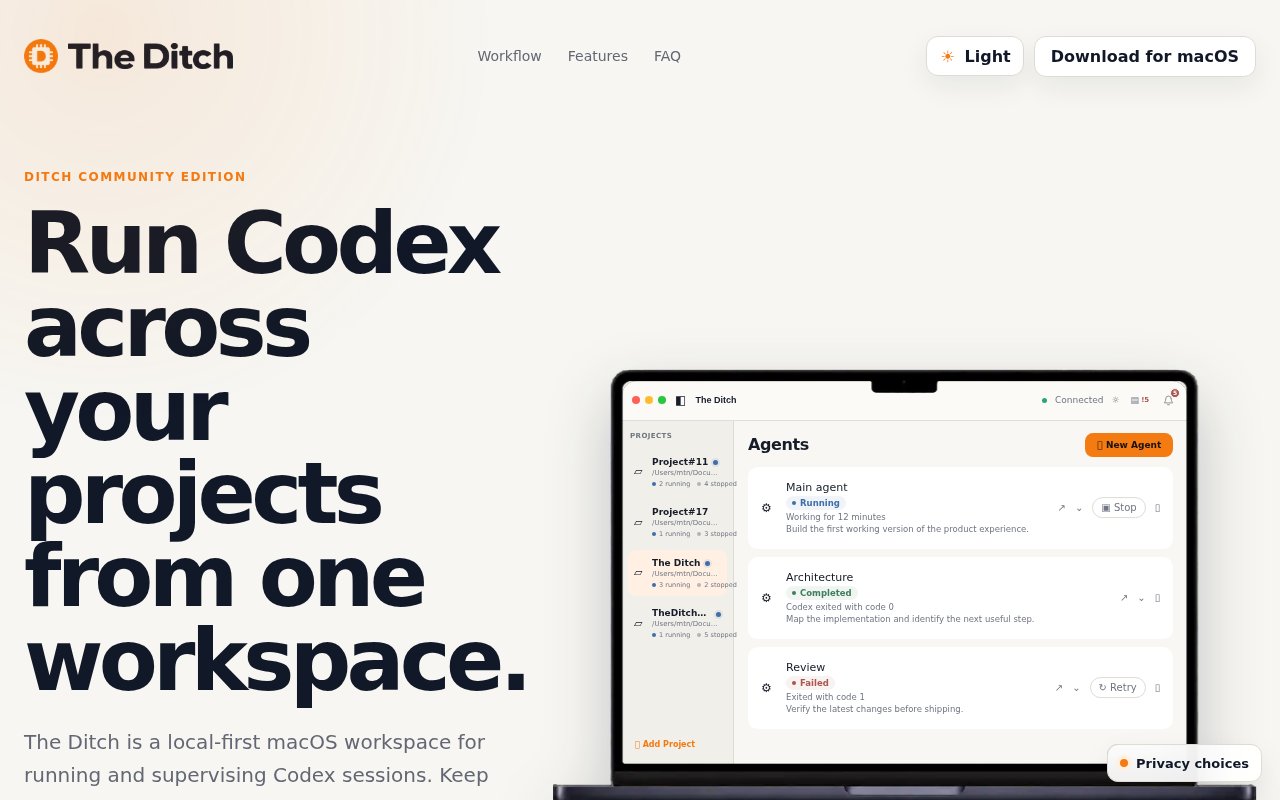
About Ditch Community Edition
Ditch Community Edition, which the site calls The Ditch, is a local-first macOS workspace for running and supervising Codex sessions across several projects at once. You add the repositories you're working on, launch Codex from inside the app, and it keeps every session attached to its project with a status, a history and a notification when it needs you. It's open source under the AGPL, and there's no account, no cloud and no email gate on the download.
The problem is what happens once a developer has more than one project and an AI coding agent working on each. Codex runs in a terminal, so three projects means three terminals, three sets of scrollback, and no single place that says which session is running, which is waiting for input, and which finished an hour ago. The Ditch turns that into a workspace. Each project has its sessions, each session has a state of running, waiting, completed or failed, and the app notifies you locally when something changes so you can keep working elsewhere.
How it works is a two-part design. A Rust runtime called ditchd coordinates the workspace and persists projects and session state in SQLite on your machine, and a Flutter macOS app talks to it over versioned JSON on a Unix socket. For a local project, ditchd launches the Codex CLI with codex exec in its own process group per turn, routes your prompt through standard input, and resumes follow-ups with the native thread ID so the conversation continues rather than starting over. For a project on another machine, a remote ditchd runs over SSH and drives codex app-server, with thread resumption persisted the same way. You need a compatible Codex CLI installed and signed in, and for SSH projects a reachable OpenSSH host running Linux or macOS.
Around the sessions there's a project file browser, editing for supported file types, and an integrated terminal for running project commands, so a quick fix or a test run doesn't force a context switch. The FAQ is explicit that it isn't trying to replace your editor or your terminal, and it doesn't replace Codex either. It's a workspace layer around Codex that launches and oversees sessions while keeping them tied to their projects.
Getting started is the beta .dmg from the site, a Codex CLI that's installed and signed in with codex login, and a first project added from a folder or a Git repository. From there you start a session, give it a prompt, and watch the status change from running to waiting or completed while you move on to the next project. Follow-ups pick up the same thread, so a session you left yesterday continues with its history intact, and the session list stays attached to the project it belongs to rather than living in a global log.
It's built for solo founders, indie hackers, AI-native builders and consultants who operate several codebases with Codex and want one view of all of them. It's macOS only in the current release, and Codex is the only supported agent, so teams standardised on other coding agents or on Linux desktops will need to wait or fork. Consultants juggling client codebases get the same benefit, one place to see which engagement's agent is waiting on them.
The local-first stance is the differentiator. Projects and session state never leave your machine, there's no Ditch account, and the download from the site doesn't ask for an email, an account, cookie consent or an anti-bot check. The repository on GitHub carries the full source under AGPL-3.0-only, with build instructions for Flutter 3.10 or later, Rust 1.85 or later, Xcode and Git if you'd rather compile it yourself. The maker, DitchNow, notes that commercial distributions are produced separately under a proprietary license, and the community repo includes a narrow public client for discovering and installing those builds, so a paid edition exists alongside the free one. There's no committed public roadmap; feedback goes through GitHub issues and discussions.
Where it sits relative to other ways of running an agent is as the supervisor rather than the agent. A terminal gives you Codex with no memory of what's running elsewhere. An IDE integration ties the agent to the one project that's open. The Ditch is the layer above both, tracking many sessions across many projects with each turn isolated in its own process group, which is how ditchd can tell you cleanly when one has finished or failed.
Access is open source and free. The current build is distributed as a beta .dmg from theditch.dev, requires macOS 11 or later, and expects the Codex CLI to be present and logged in. There's no pricing page for the Community Edition and no published contact email, so the GitHub repository is the place for questions, and the site's FAQ covers the basics of scope and platform support.
Key Features
- Multi-project Codex session launcher
- Session status with local notifications
- Persistent session history per project
- Remote projects over SSH
- File browser, editor and integrated terminal
- Local ditchd runtime with SQLite state
Pros & Cons
What we like
- One view of every Codex session across projects
- Everything stays on your machine, no account
- Download with no email, account or cookie gate
- Full source under AGPL-3.0 with build instructions
Room for improvement
- macOS only in the current release
- Codex is the only supported coding agent
- Beta distribution from a young repository
- Needs the Codex CLI installed and signed in
Frequently Asked Questions
What is Ditch Community Edition?
Is it free?
Does it replace Codex or my editor?
What do I need to run it?
Best For
Featured in
Alternatives to Ditch Community Edition
View allCursor
VS Code fork built around an AI pair-programmer

Replit
Browser IDE plus Replit Agent that builds and deploys apps from a prompt
Windsurf
Codeium's AI editor with Cascade agent and deep IDE integration

Vibe Built
Building real apps with agentic AI. What worked, what broke, what shipped.
Our take
Tool Index Editorial · Sep 2026· 3.5/5
Ditch Community Edition is a local macOS control room for people running several Codex sessions across multiple repositories. It keeps project files, terminals, session status, history, and local notifications together, and it can supervise projects on remote Linux or macOS hosts over SSH. Community is free and AGPL licensed. Commercial remote control costs EUR 15 monthly, EUR 150 yearly, or EUR 350 for a lifetime license, with Codex usage separate.
We found the product boundary sensible. Ditch supervises Codex rather than pretending to replace an editor or terminal, and saved native thread IDs make returning to work credible. It is still a beta tied to macOS and one coding agent, and it requires a compatible authenticated Codex CLI on every relevant host. For a Mac user already juggling Codex terminals, it solves a real coordination problem; everyone else is outside its current lane.
Editorial opinion from the Tool Index team, written from the public product pages. Not a user review.
Reviews (0)
No reviews yet
Be the first to share your experience with Ditch Community Edition
Sign in to write a reviewBadge builder
Add Ditch Community Edition to your website
Choose a badge style and size, preview it here, then copy the generated HTML. Badge images are self-contained SVGs and do not require an external script.

<a href="https://toolindex.net/tools/theditch?ref=badge" target="_blank" rel="noopener">
  <img src="https://toolindex.net/badge/theditch/medium.svg" alt="Ditch Community Edition - Listed on Tool Index" width="180" height="50" />
</a>How to use the badge
- 1. Pick the style, size, and theme that fit your layout.
- 2. Copy the generated HTML from the code block.
- 3. Paste it into your footer, homepage, or press page.
Standard badge available
The standard listing badge is available now. Score and circle badges are limited to tools currently ranked in the top 10 of a category.
Badge clicks return visitors to this profile with a referral tag so the source remains identifiable.
Related Tools

Bolt.new
Prompt-to-deployed full-stack app inside the browser

Tabnine
Privacy-first enterprise AI code assistant you control, with SaaS, VPC, on-prem, or fully air-gapped deployment
Cursor
VS Code fork built around an AI pair-programmer

Skeezo
Agent-native macOS IDE for coordinating Claude Code and AI agents
Work on Ditch Community Edition? Request listing access or correction