
Tweet Download
Turn tweets and X posts into shareable images and videos without watermarks or signups
Gallery
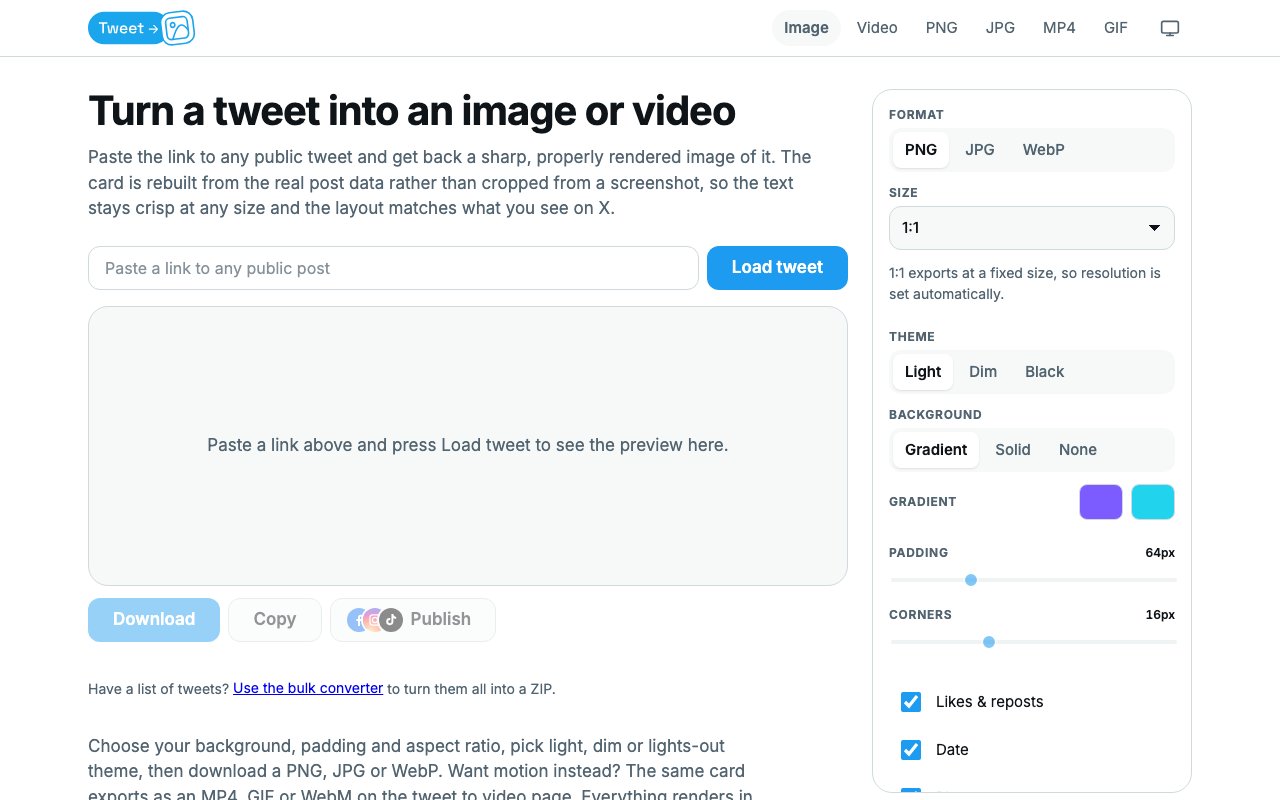
About Tweet Download
Tweet Download is a free web tool that converts tweets and X posts into clean images or videos you can share anywhere. You paste a link, adjust a few settings, and download the result. There is no account to create, no watermark stamped on your export, and no server storing your data. Everything renders in your browser, which means the tweet never leaves your device and you are not waiting for a backend to process anything. For anyone who regularly repurposes social content across platforms, this solves the problem of getting a tweet to look good on Instagram, TikTok, LinkedIn, or anywhere else that does not handle X embeds gracefully. The tool does one thing, does it well, and gets out of the way.
The problem is familiar to anyone who has tried to share a tweet on a platform that does not support native embedding. Instagram does not embed tweets at all, so you either post a screenshot or skip it. TikTok shows a link that nobody clicks, which defeats the purpose of sharing in the first place. LinkedIn displays a bare URL that looks unprofessional and generates no engagement. Taking a screenshot on your phone works in a pinch, but you end up with low resolution text that looks fuzzy when scaled, a visible notification bar at the top, a battery percentage in the corner, and whatever else was on screen at the time. Tweet Download rebuilds the card from the actual post data rather than cropping a screenshot. The text stays crisp at any size because it is rendered fresh rather than captured as pixels. This makes a real difference on high density displays and in feeds that compress uploads aggressively.
The workflow is minimal. Paste the tweet URL, pick your format, and customize the background, padding, aspect ratio, and theme to match where you plan to post. Background options include solid colors, gradients, and transparent if you want to layer the card over something else. Aspect ratio presets cover square, portrait, and landscape, plus custom ratios if you need something specific for an unusual platform or design. Themes match the X interface in light, dim, and lights out modes, so you can match the original tweet appearance or pick whichever looks best against your background. You can add your own watermark or attribution if you want credit on the image, but the tool itself does not force one. Scale is adjustable, with three times standard as the default, which lands around 1794 pixels wide and holds up on any modern screen without pixelation or blur.
Image exports are available in PNG, JPG, and WebP. Video exports come as MP4, GIF, or WebM for animated content like video tweets or polls with motion. Beyond basic formats, the tool includes presets for specific platforms. You can export directly sized for Instagram posts, Instagram Reels, TikTok, YouTube Shorts, LinkedIn, or Facebook. There is even a 4K image option if you need maximum resolution for print or large displays. This saves the step of resizing after export and ensures the output fits the platform you are targeting without black bars, awkward cropping, or letterboxing. The platform presets are updated to match current specifications, so you do not have to look up recommended dimensions yourself.
Bulk conversion is supported for users who have multiple tweets to process. You paste a list of URLs, apply your settings once, and download a ZIP file with all the exports. This makes the tool practical for social media managers repurposing a thread, compiling highlights from a conference, building a content archive, or preparing a newsletter roundup. You do not have to repeat the same configuration for every single post, which saves significant time when you are working with a dozen or more tweets at once.
Because everything happens client side, there is no queue to wait in and no rate limit to hit. You are not sharing your X session or API access with the service because the rendering happens locally in your own browser. The trade off is that you need a browser capable of running the rendering engine, but any modern browser on desktop or mobile qualifies, including Safari, Chrome, Firefox, and Edge. The site loads quickly and the interface stays out of the way. There is no signup flow, no email capture, no cookie banner to dismiss before you can use it, and no popups asking you to upgrade. You just paste, configure, and download.
There is no paid tier. The tool is genuinely free with no upsell for higher resolution, no premium features hidden behind a paywall, and no limit on how many tweets you convert. The only constraint is that it works with public tweets. Protected accounts and private posts are not accessible because the tool pulls from publicly available data, not from any authenticated session. For creators, marketers, newsletter writers, and anyone who regularly shares tweets outside of X and wants them to look polished rather than like a low effort screenshot, Tweet Download does the job without friction and without cost. It is refreshingly simple in a space crowded with tools that want your email first and your attention forever.
Key Features
- Image export in PNG, JPG, and WebP
- Video export in MP4, GIF, and WebM
- Three times default resolution output
- Customizable backgrounds and themes
- Bulk conversion for multiple tweets
- Client side rendering with no data upload
Pros & Cons
What we like
- Completely free with no watermarks or signups
- Renders from post data so text stays crisp
- Supports both image and video exports
- Runs entirely in the browser for privacy
Room for improvement
- Requires a modern browser to render exports
- Only works with public tweets and posts
- No mobile app for offline use
- Limited customization compared to design tools
Frequently Asked Questions
What is Tweet Download?
Does Tweet Download add a watermark?
Is my data uploaded to a server?
What formats can I export?
Best For
Featured in
Alternatives to Tweet Download

Apatero AI
The creator studio for AI image, video, audio, 3D, and avatars, now at apatero.ai.

Prompted Income
Make money with AI, documented with the receipts instead of the screenshots.

Sellsmithy
The workshop side of selling digital products. Built first, fees counted, duds included.

Postdex
An exclusive marketplace for finished, human-made articles. Every piece sells once.
Reviews (0)
Badge builder
Add Tweet Download to your website
Choose a badge style and size, preview it here, then copy the generated HTML. Badge images are self-contained SVGs and do not require an external script.

<a href="https://toolindex.net/tools/tweet-download?ref=badge" target="_blank" rel="noopener">
  <img src="https://toolindex.net/badge/tweet-download/medium.svg" alt="Tweet Download - Listed on Tool Index" width="180" height="50" />
</a>How to use the badge
- 1. Pick the style, size, and theme that fit your layout.
- 2. Copy the generated HTML from the code block.
- 3. Paste it into your footer, homepage, or press page.
Standard badge available
The standard listing badge is available now. Score and circle badges are limited to tools currently ranked in the top 10 of a category.
Badge clicks return visitors to this profile with a referral tag so the source remains identifiable.
Related Tools
Apatero AI
The creator studio for AI image, video, audio, 3D, and avatars, now at apatero.ai.

SEObot
Autonomous AI SEO agent that runs your blog and link building on autopilot

Substack
Hosted newsletter and publication platform with built-in payments, recommendations, and an audience network for writers.

MailerLite
Friendly, affordable email marketing tool with newsletters, automations, landing pages, and a growing creator toolkit.
Work on Tweet Download? Request listing access or correction