Video Size Reducer
Compress one video to a platform limit or custom target inside the browser
Gallery
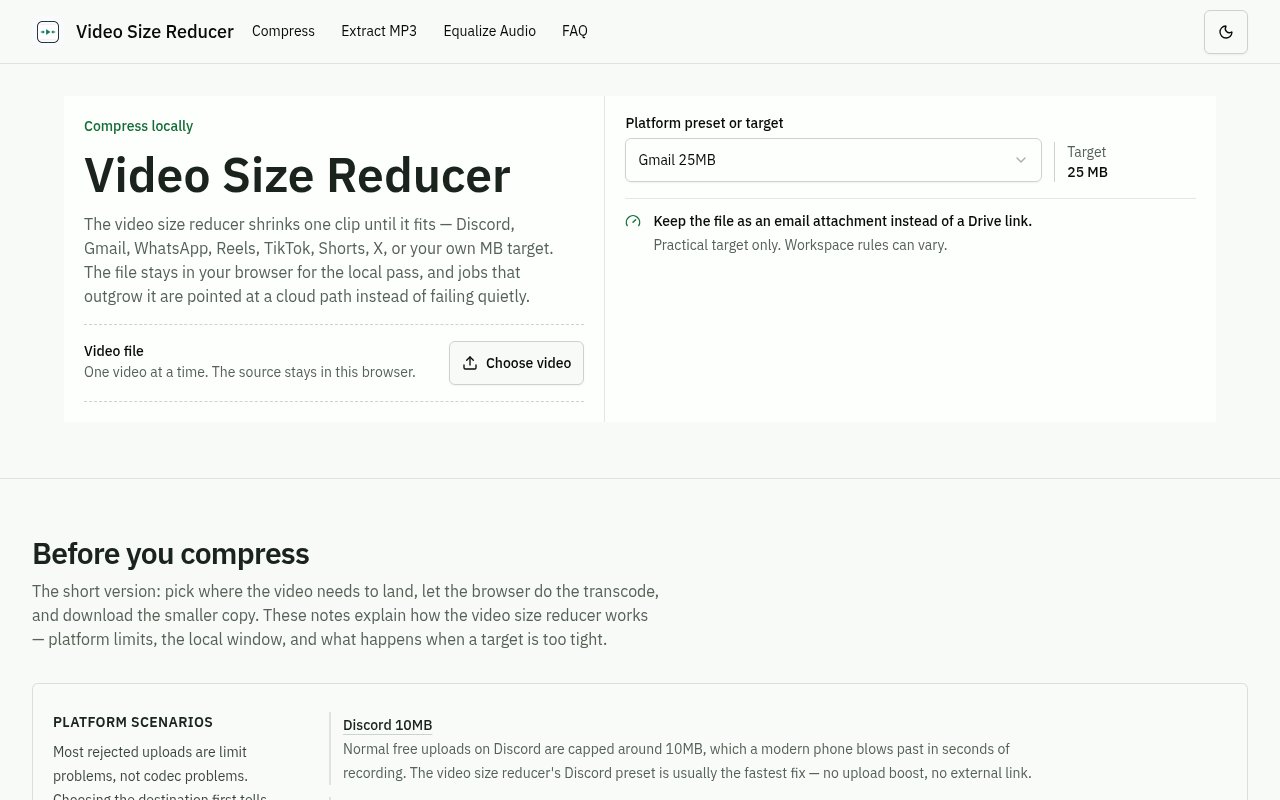
About Video Size Reducer
Video Size Reducer is a free browser tool for shrinking one video until it fits a sharing limit. Instead of asking for a vague quality setting, it lets the user choose a destination preset or enter a custom target in megabytes. The presets cover familiar destinations such as Discord, Gmail, WhatsApp, Instagram Reels, TikTok, YouTube Shorts, and X. That target-first approach is useful when the practical question isn't how much compression to apply, but whether the finished clip will pass an attachment or upload limit without being replaced by an external link.
The normal compression path stays inside the browser. After a file is selected, the page reads its size, duration, resolution, and container so the user can compare the source with the requested target. It then loads a WebAssembly build of ffmpeg on demand and transcodes the clip in the active tab. There is no source upload and no server-side copy during this local pass. When encoding finishes, the smaller file is written directly to the browser's download. The page, its assets, and an optional cloud-interest form use the network, but the source video does not.
The tool deliberately handles one file and one output at a time. A user picks the destination or custom size, confirms that the detected metadata looks right, starts the job, and watches progress in the page. A slow job can be cancelled. The finished result is shown with its actual size so it can be checked against the destination limit before being attached or uploaded. Common formats such as MP4 and WebM are the safest inputs, while less common containers can still be tried and inspected through the initial metadata read.
Destination presets make the result easier to reason about than a generic slider. Gmail's attachment limit calls for a different budget from a short social upload, and a custom forum may impose its own cap. The user can aim close to the space actually available instead of compressing more aggressively than necessary. That matters because every unnecessary reduction spends visual quality. The site recommends choosing the loosest target the destination will accept so the output retains as much detail as the constraint permits.
Video Size Reducer also explains the size tradeoff before committing to an unrealistic target. It relates the requested output to the source size and duration, since the available bitrate has to cover the entire clip. Mild reductions generally preserve more of the original appearance, while an extreme request such as forcing a long, high-bitrate recording into a few megabytes must lose substantial detail. If a target cannot be reached, the tool reports the mismatch and leaves a clear choice between relaxing the limit, accepting lower quality, or considering the separate cloud path.
The local workflow is best suited to short clips being prepared for messages, social posts, support tickets, online forms, and forums. It also has a privacy advantage for family footage, internal drafts, unreleased media, and other videos a user would rather not upload to an unknown transcoding service. The site's reference environment is desktop Chrome, with a comfortable local range of roughly 300 MB or ten minutes of source footage. Other desktop browsers may work similarly, but browser memory and performance still determine what a tab can finish.
The main limitation comes from doing serious media processing in WebAssembly. It runs under a browser tab's memory ceiling and lacks the performance profile of a native desktop encoder, so long or large footage can be slow. Mobile use is described as best effort because a phone may evict a backgrounded tab during transcoding. Files beyond the local window are not started as likely failures. Instead, the site points those users toward interest in a cloud-processing path intended for larger, longer, batch, or higher-quality jobs. That cloud option is presented as a future or separate route rather than part of the free local compressor.
Access to the local compressor is free and does not require an account or payment step. That makes it a focused utility rather than a full video editing suite. It does not promise batch processing, timeline editing, professional codec controls, or guaranteed visual quality at impossible sizes. Its strength is the direct workflow from a real platform limit to a downloadable file, combined with local processing and candid guidance about where browser compression stops being practical. For a single ordinary clip that needs to fit under a known cap, it removes much of the bitrate guesswork without asking the user to install software.
Key Features
- Platform size presets
- Custom megabyte targets
- Local WebAssembly compression
- Source metadata preview
- Actual output size check
- Oversize job routing
Pros & Cons
What we like
- Keeps source video inside the browser
- Works backward from real upload limits
- Requires no account or software install
- Explains missed targets instead of hiding them
Room for improvement
- Processes only one video at a time
- Best suited to clips under local limits
- Browser encoding is slower than native software
- Mobile tabs may stop during long jobs
Frequently Asked Questions
What is Video Size Reducer?
Does Video Size Reducer upload the source file?
Is Video Size Reducer free?
What videos are a good fit for the browser compressor?
Best For
Featured in
Alternatives to Video Size Reducer
View all
Apatero AI
The creator studio for AI image, video, audio, 3D, and avatars, now at apatero.ai.
Apatero Studio
Creator studio for AI image, video, audio, 3D, and avatars. Every model worth using, in one workspace.

Melodex
Turn your idea into an AI-generated music video

Speel
AI UGC video generator that makes realistic AI avatars hold and talk about your product for ads
Our take
Tool Index Editorial · Sep 2026· 4.0/5
Video Size Reducer compresses one clip toward a platform preset or custom megabyte target inside the browser. We found the target first workflow more useful than a vague quality slider because it works backward from the actual upload constraint. The source stays local during compression, and the tool is free with no account required.
Local WebAssembly encoding is also the main limitation. Long or large files can be slow, mobile browsers may evict the tab, and only one video is handled at a time. Any aggressive target will still sacrifice visible quality, regardless of how clear the interface is. For an ordinary clip that must fit an email, chat, or form limit, this is a direct and privacy conscious utility.
Editorial opinion from the Tool Index team, written from the public product pages. Not a user review.
Reviews (0)
No reviews yet
Be the first to share your experience with Video Size Reducer
Sign in to write a reviewBadge builder
Add Video Size Reducer to your website
Choose a badge style and size, preview it here, then copy the generated HTML. Badge images are self-contained SVGs and do not require an external script.

<a href="https://toolindex.net/tools/video-size-reducer?ref=badge" target="_blank" rel="noopener">
  <img src="https://toolindex.net/badge/video-size-reducer/medium.svg" alt="Video Size Reducer - Listed on Tool Index" width="180" height="50" />
</a>How to use the badge
- 1. Pick the style, size, and theme that fit your layout.
- 2. Copy the generated HTML from the code block.
- 3. Paste it into your footer, homepage, or press page.
Standard badge available
The standard listing badge is available now. Score and circle badges are limited to tools currently ranked in the top 10 of a category.
Badge clicks return visitors to this profile with a referral tag so the source remains identifiable.
Related Tools
Apatero AI
The creator studio for AI image, video, audio, 3D, and avatars, now at apatero.ai.

LocalClip
Local-first AI video clipper for Mac that turns long videos into vertical clips
Melodex
Turn your idea into an AI-generated music video
Apatero Studio
Creator studio for AI image, video, audio, 3D, and avatars. Every model worth using, in one workspace.
Work on Video Size Reducer? Request listing access or correction