VODForge
Free, open-source desktop app for downloading YouTube videos and playlists as MP4 or MP3
Gallery
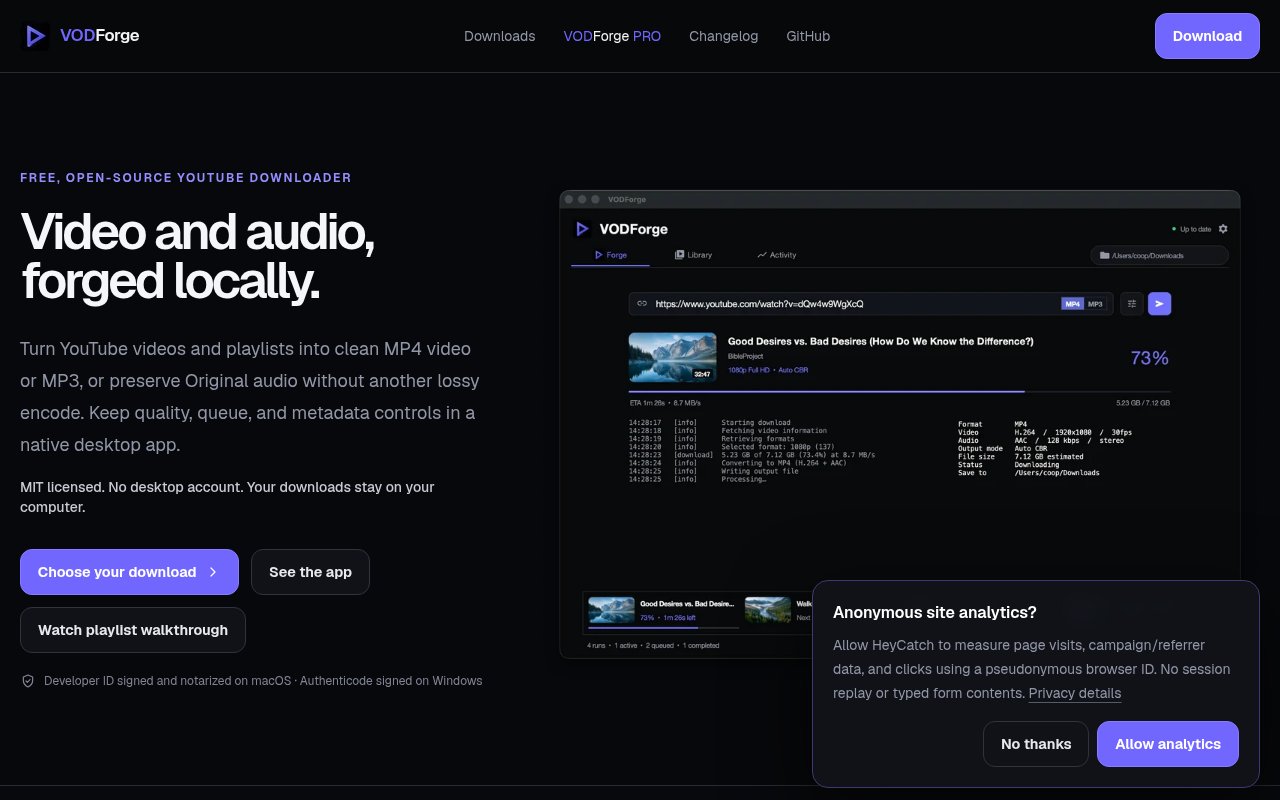
About VODForge
VODForge is a free, MIT-licensed desktop app for downloading YouTube videos and playlists to your own machine as MP4 video, MP3 audio or the original audio stream, with a local library to organise what you've saved. It exists as an alternative to web-based converters, which route your request through someone else's server, cap quality, and wrap the result in ads. VODForge runs locally, needs no account, and shows its work. The pitch is a downloader you can trust to give you the quality you asked for and to tell you what it did.
Under the hood it's a Python and Tk application, deliberately not Electron, that drives yt-dlp for extraction, FFmpeg for encoding, Deno for the JavaScript runtime that yt-dlp needs, and LibVLC for playback. You paste a video, a playlist or a batch of URLs, pick a quality cap anywhere from 360p up to 4K, and choose between MP4, MP3 at up to 320 kbps, or the original audio kept as Opus or AAC. Bitrate selection can be source-aware, so it doesn't inflate a low-quality source into a large file, or run in a strict compliance mode when you need a fixed target. The original-audio option matters for archival, since it keeps the Opus or AAC stream exactly as YouTube served it instead of transcoding it a second time. Playlists move through a sequential queue, and batch mode takes a list of individual URLs as well, with each item landing in the same library with its own metadata. Metadata is embedded, thumbnails and cover art are handled, and the app keeps a source-versus-output comparison so you can see what the conversion actually did.
The library side turns the downloads folder into something you can search, with tagging and categorisation, a built-in player for MP4, MP3 and audio files with chapter support, and a small converter that combines an MP3 and an image into an MP4. The player means you can check a download without leaving the app, and the tags and categories are what make a few hundred saved files findable later. Download history stays private on the machine, analytics are optional, and there's no upload step anywhere in the flow.
A typical session is short. Paste a playlist URL, set the cap to 1080p and the format to MP4, and let the queue work through it while the library fills in titles, thumbnails and metadata. Switch to MP3 for a lecture series you'll listen to on the move, and the source-aware mode picks a bitrate that matches what the upload actually contained instead of padding every file to 320 kbps. When it's done, the comparison view shows the source and the output side by side, which is the transparency the project is built around.
It's for content creators archiving their own uploads, video archivists, researchers keeping local copies of references, and anyone who wants a downloader with quality controls and transparency rather than a browser tab and a hope. Builds are packaged for macOS 12 and later on Apple Silicon and Intel and for 64-bit Windows 10 and 11. There's no Python to install, releases carry SHA-256 checksums and release notes so you can see what changed before updating, and the installers are signed. Neither build asks for an account, and the analytics that exist are optional.
What sets it apart from raw yt-dlp is the interface and the library, and what sets it apart from web converters is that nothing leaves your machine. The limits are the ones any downloader shares. Available resolutions and formats depend on the source video and on YouTube, re-encoding to MP3 can't restore detail the source never had, and content that needs a login is handled by passing browser cookies or a cookies.txt file through yt-dlp. Downloading is also subject to the platform's terms and to copyright, which is on the user to respect. It's early software too, and the version number says so. A single maintainer publishes releases, features arrive through the changelog, and VODForge depends on yt-dlp keeping pace with YouTube, so it's a fine fit for a personal archive and worth weighing for anything that has to keep working unattended. The upside of the MIT licence is that nothing stops you building it yourself if the releases ever stall.
The desktop app is free and open source under MIT, with the bundled runtimes under their own licences, and the source and releases live on GitHub at SnowfallHD/vodforge, currently at version 0.1.9 with an active changelog. A paid cloud service called VODForge Pro is planned and has an interest list, but nothing on the desktop side is gated behind it. There's no published email. Bug reports and pull requests go through GitHub.
Key Features
- MP4, MP3, and original audio output
- Quality caps from 360p to 4K
- Playlist and batch URL queue
- Metadata and cover art embedding
- Searchable local library with player
- Signed builds for macOS and Windows
Pros & Cons
What we like
- Free and MIT licensed with signed installers
- Runs locally with no account or upload
- Source-aware bitrate avoids fake quality
- Built-in player and tagging for saved files
Room for improvement
- Early 0.1.x release with a single maintainer
- Formats depend on what YouTube serves
- No Linux build yet
- Downloads must respect the platform's terms
Frequently Asked Questions
What is VODForge?
Is VODForge free?
What platforms does VODForge run on?
Does VODForge need an account?
Best For
Featured in
Alternatives to VODForge
View all
Apatero AI
The creator studio for AI image, video, audio, 3D, and avatars, now at apatero.ai.
Apatero Studio
Creator studio for AI image, video, audio, 3D, and avatars. Every model worth using, in one workspace.

Melodex
Turn your idea into an AI-generated music video

Speel
AI UGC video generator that makes realistic AI avatars hold and talk about your product for ads
Our take
Tool Index Editorial · Sep 2026· 3.5/5
VODForge is a free, open source desktop app for saving YouTube videos and playlists as MP4, MP3, or original audio. It is for people archiving material they own or are permitted to download who want local processing and explicit quality controls. Version 0.2.2 offers signed builds for Apple Silicon and Intel Macs plus 64 bit Windows 10 and 11, with no desktop account.
We like the source and output comparison, quality ceilings up to 4K, source aware audio choices, sequential playlist queue, and checksums for published files. Keeping downloads on the computer is preferable to an opaque converter site. It is still young software that depends on YouTube and its extraction stack continuing to work. There is no Linux build, available formats depend on the source, and users remain responsible for copyright and platform terms.
Editorial opinion from the Tool Index team, written from the public product pages. Not a user review.
Reviews (0)
Badge builder
Add VODForge to your website
Choose a badge style and size, preview it here, then copy the generated HTML. Badge images are self-contained SVGs and do not require an external script.

<a href="https://toolindex.net/tools/vodforge?ref=badge" target="_blank" rel="noopener">
  <img src="https://toolindex.net/badge/vodforge/medium.svg" alt="VODForge - Listed on Tool Index" width="180" height="50" />
</a>How to use the badge
- 1. Pick the style, size, and theme that fit your layout.
- 2. Copy the generated HTML from the code block.
- 3. Paste it into your footer, homepage, or press page.
Standard badge available
The standard listing badge is available now. Score and circle badges are limited to tools currently ranked in the top 10 of a category.
Badge clicks return visitors to this profile with a referral tag so the source remains identifiable.
Related Tools
Apatero AI
The creator studio for AI image, video, audio, 3D, and avatars, now at apatero.ai.

LocalClip
Local-first AI video clipper for Mac that turns long videos into vertical clips
Melodex
Turn your idea into an AI-generated music video
Apatero Studio
Creator studio for AI image, video, audio, 3D, and avatars. Every model worth using, in one workspace.
Work on VODForge? Request listing access or correction