
30 Seconds of Knowledge
New-tab browser extension that shows one real code snippet at a time
Gallery
About 30 Seconds of Knowledge
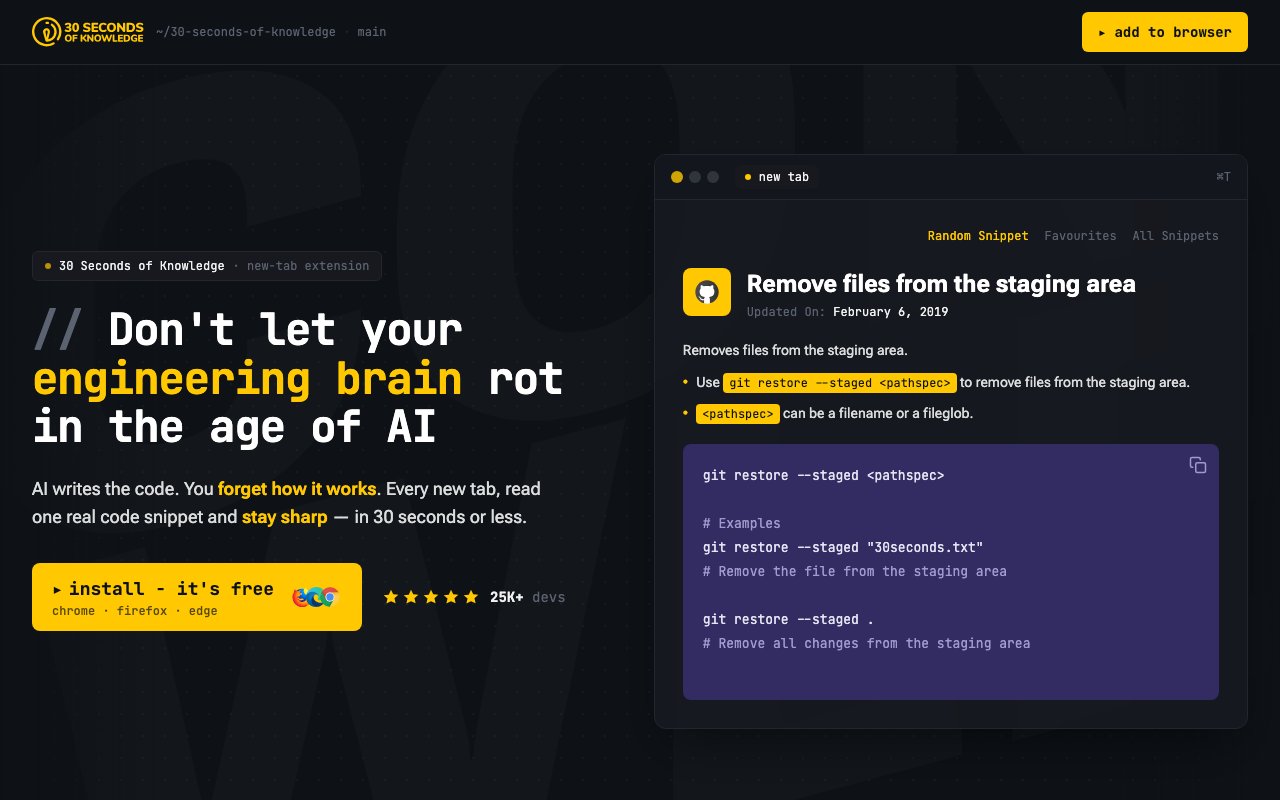
30 Seconds of Knowledge is a browser extension that replaces your new tab page with a single, real code snippet to read. The premise is blunt and a little uncomfortable, AI writes the code and you slowly forget how it works. Every time you open a tab, you get thirty seconds or less of actual programming to keep the muscles from going soft. The problem it names is skill atrophy. When a model does the typing all day, the mechanics stop passing through your own hands, and the knowledge that used to feel automatic starts to fade. This extension doesn't fight that with a course you have to schedule or a streak you have to protect. It just puts one small, concrete thing in front of you at a moment you were going to have anyway, the blank pause between tasks when a new tab opens.
The content is the substance here. There are more than fifteen hundred snippets spread across fourteen programming libraries, covering languages and tools like C++, C sharp, CSS, Dart, Git, Go, HTML, JavaScript, Python, PHP, and Ramda, along with a set of interview questions. Each new tab pulls one at random, so over a week of ordinary browsing you drift across a wide spread of topics without ever sitting down to study. The thirty second frame is the key constraint. It's short enough that reading a snippet never feels like a task you have to opt into, which is what lets it survive as a habit at all. A longer lesson competes with whatever you opened the tab to do and usually loses, while a single snippet fits inside the pause itself. Over weeks that trickle adds up, and the point isn't to master anything in one sitting, it's to keep a broad base of fundamentals from quietly eroding while a model does the typing.
Because the pick is random and the library spans fourteen areas, you keep brushing against corners of the stack you don't touch day to day. A back-end developer might land on a CSS trick, a front-end developer on a Git command, and both hold a little more range than their current project strictly demands. That breadth is part of the pitch, since the knowledge most at risk of fading is usually the stuff you don't use this week but will need next month. A few touches make it more than a flash-card wall. CSS snippets come with a live preview, so you see the rule actually render rather than just reading it, which is the difference between recognizing a property and understanding what it does. You can favorite the ones worth keeping, so a snippet you want to revisit doesn't vanish back into the shuffle. And because the whole thing rides on the new tab, there's no separate app to open and no habit to build beyond the browsing you already do.
It's aimed squarely at developers, especially the ones who lean on AI assistants for daily work and can feel their recall getting rusty. That includes people prepping for interviews, since the interview-question set turns dead moments into low-stakes practice, and it includes anyone who wants passive, steady exposure to fundamentals instead of a heavy structured curriculum. If you already open dozens of tabs a day, the cost of using it is close to zero.
What separates it from a newsletter or a tutorial site is that it meets you where you already are rather than asking for dedicated time. A newsletter waits in an inbox you might ignore, and a course sits behind an intention you might not follow through on. This turns an involuntary habit, opening tabs, into the delivery mechanism, which is a quietly clever way to make review effortless. It works across Chrome, Firefox, Edge, Brave, and Arc, so it isn't tied to one browser.
Nothing about it asks for a commitment beyond installing the extension. There's no account to make, no lesson plan to follow, and no notification chasing you to come back, which is close to the opposite of most learning apps. It works best as a supplement rather than a replacement for real study, a way to keep fundamentals within reach so that when you do need to write something by hand, the shape of it is still familiar instead of half-forgotten.
It's free to download and use, with optional donations and some merchandise for people who want to support it, but nothing about the core experience sits behind a paywall. The project has picked up a real following, with tens of thousands of users, a strong presence on the Chrome Web Store, and a healthy count of stars on GitHub, which suggests the simple idea has landed with the developers it's for. For anyone worried about staying sharp while an AI handles the typing, it's a low-effort way to keep the fundamentals warm.
Key Features
- One code snippet on every new tab
- Over 1500 snippets across 14 libraries
- Live preview for CSS snippets
- Favorites for snippets worth keeping
- Interview-question set for practice
- Works across five major browsers
Pros & Cons
What we like
- Turns idle new tabs into steady review
- Free to use with no paywalled core
- Wide topic spread across languages and tools
- No course or streak to keep up with
Room for improvement
- Aimed only at developers
- Replaces your new tab page, which not everyone wants
- Random exposure, not a structured curriculum
- Depth is limited to short snippets
Frequently Asked Questions
What is 30 Seconds of Knowledge?
How much content is there?
Is 30 Seconds of Knowledge free?
Who is it for?
Best For
Featured in
Alternatives to 30 Seconds of Knowledge

1Lookup
Real-time data verification API for phone, email, IP, and domain validation to fight fraud

Codedex
A gamified, story-driven platform that teaches Python, web dev, and more like an RPG quest
Hack2hire
Practice real SDE interview questions from top tech companies with expert worked solutions
Cloudflare Pages
Free Jamstack hosting on Cloudflares edge with unlimited bandwidth and tight integration with Workers.
Reviews (11)
Finally something that fits
Came to 30 Seconds of Knowledge after getting frustrated with what I had before. Got real value out of one code snippet on every new tab. It fits well for passive daily exposure to a new language. Worth it for what I get out of it.
Genuinely impressed
Have been running 30 Seconds of Knowledge for a while, here is where I land. The no course or streak to keep up with is more useful than I expected. The defaults are sensible, so I was not fighting settings on day one. Found it works best for keeping coding fundamentals sharp while using ai. It earns its place in my stack.
Powerful once it clicks
Came to 30 Seconds of Knowledge after getting frustrated with what I had before. The wide topic spread across languages and tools is more useful than I expected. Found it works best for practicing interview questions in spare moments. It would be a five if not for depth is limited to short snippets.
Quietly excellent
Picked 30 Seconds of Knowledge for the price, stayed for the quality. Their take on works across five major browsers is genuinely good. It does what it says, which is rarer than it should be. It fits well for reviewing css behavior with live previews.
Decent with some rough edges
Hadn't planned on switching, but 30 Seconds of Knowledge was hard to ignore. Their take on interview-question set for practice is genuinely good. It fits well for practicing interview questions in spare moments. It would be a five if not for aimed only at developers. Worth it for what I get out of it.
Solid daily driver
Three months of 30 Seconds of Knowledge later, here is what holds up. It does what it says, which is rarer than it should be. Mostly using it for practicing interview questions in spare moments. Recommending it to people in a similar spot.
Exactly what I needed
Three months of 30 Seconds of Knowledge later, here is what holds up. The one code snippet on every new tab is more useful than I expected. Support actually answered when I had a question, which surprised me. Mostly using it for passive daily exposure to a new language. Would sign up again without thinking twice.
It just works
Tried 30 Seconds of Knowledge on a side project first, then rolled it out everywhere. Got real value out of turns idle new tabs into steady review. Mostly using it for reviewing css behavior with live previews.
Solid daily driver
Found 30 Seconds of Knowledge on a Show HN thread and I am glad I clicked. Where it really wins is over 1500 snippets across 14 libraries. Recommending it to people in a similar spot.
Solid daily driver
30 Seconds of Knowledge solves a real problem for me without making a fuss about it. Performance has been steady even when I lean on it hard. Found it works best for reviewing css behavior with live previews.
Pulled its weight from week one
Three months of 30 Seconds of Knowledge later, here is what holds up. Where it really wins is no course or streak to keep up with. The defaults are sensible, so I was not fighting settings on day one.
Badge builder
Add 30 Seconds of Knowledge to your website
Choose a badge style and size, preview it here, then copy the generated HTML. Badge images are self-contained SVGs and do not require an external script.

<a href="https://toolindex.net/tools/30secondsofknowledge?ref=badge" target="_blank" rel="noopener">
  <img src="https://toolindex.net/badge/30secondsofknowledge/medium.svg" alt="30 Seconds of Knowledge - Listed on Tool Index" width="180" height="50" />
</a>How to use the badge
- 1. Pick the style, size, and theme that fit your layout.
- 2. Copy the generated HTML from the code block.
- 3. Paste it into your footer, homepage, or press page.
Standard badge available
The standard listing badge is available now. Score and circle badges are limited to tools currently ranked in the top 10 of a category.
Badge clicks return visitors to this profile with a referral tag so the source remains identifiable.
Related Tools

Kevin Gabeci
Solo developer building web apps, cozy browser games, and AI creator toolkits.

Coolify
Self-hostable, open source alternative to Heroku and Netlify

Warp
The modern terminal reimagined with AI and collaboration

Bolt.new
Prompt-to-deployed full-stack app inside the browser
Work on 30 Seconds of Knowledge? Request listing access or correction