
Academa Studio
AI native Manim editor for creating and refining mathematical animations in the browser
Gallery
About Academa Studio
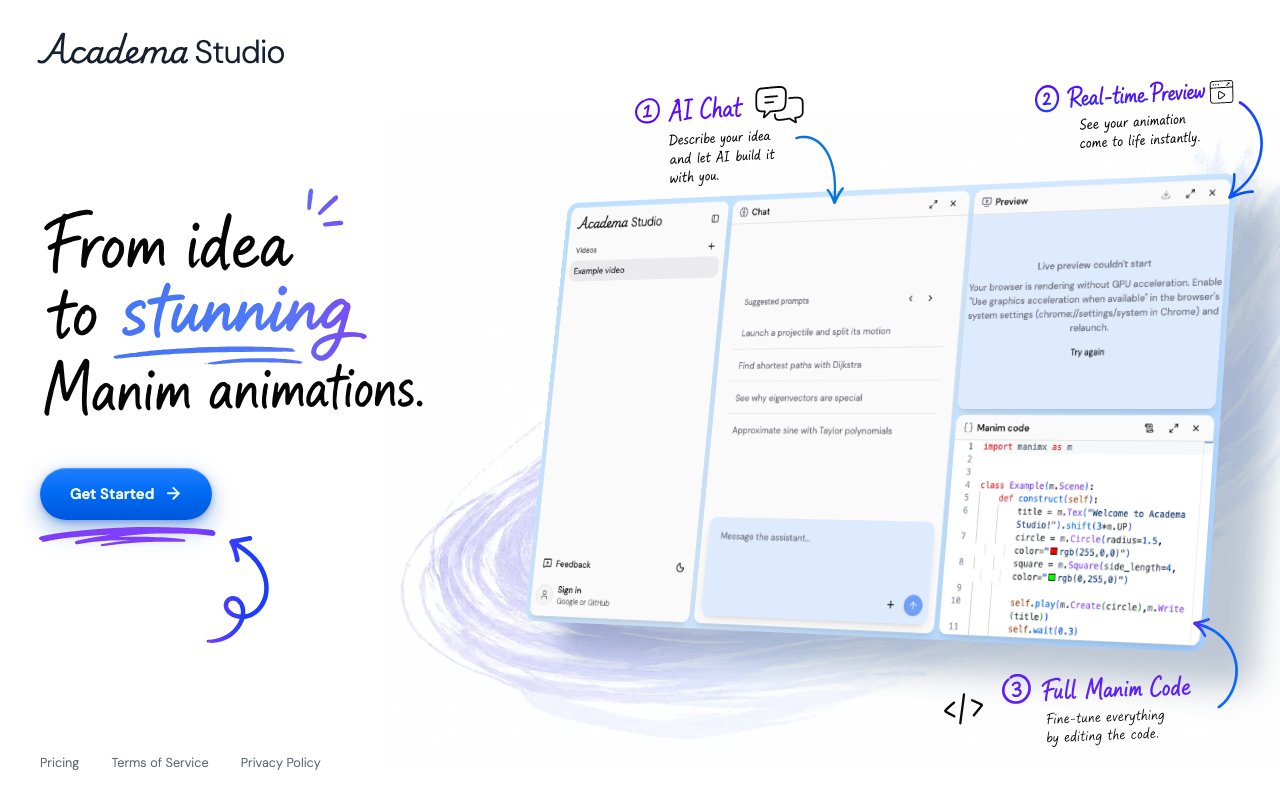
Academa Studio is a web based editor for creating mathematical animations using Manim, the animation engine that powers those elegant math explainer videos popularized by channels like 3Blue1Brown. The platform combines AI assistance with a full code editor and live preview, letting users describe animations conversationally while maintaining complete access to the underlying code for precise control. This bridges the significant gap between wanting professional mathematical animations and needing deep programming expertise to create them from scratch, opening up quality math visualization to educators and communicators who aren't primarily developers.
The interface splits into three connected components that work together throughout the creation process. A chat panel accepts natural language descriptions of what you want to animate, with suggested prompts to help users get started when facing a blank canvas. An AI assistant interprets these descriptions and generates Manim code, which appears immediately in the integrated code editor where you can review, modify, and refine every detail. A live preview panel renders the animation in real time as you work, so you see results continuously without manually running build processes or switching between applications to check output.
The system handles complex mathematical visualizations that would otherwise require significant Manim expertise to code manually. Users have created projectile motion demonstrations showing trajectories under gravity, graph algorithm visualizations illustrating traversal and search processes, eigenvector transformations revealing matrix behavior geometrically, Taylor series approximations converging to target functions, and other concepts that genuinely benefit from animated explanation rather than static diagrams. The AI understands mathematical intent and translates it into proper Manim scene construction.
The workflow accommodates both those who want AI to handle most of the implementation and those who prefer hands on control over every parameter. You might start with a conversational prompt describing the concept you want to visualize, let the AI generate initial code, then iterate through additional prompts or direct code editing to refine timing, colors, labels, and motion. More experienced users can write Manim code directly while using AI assistance for specific components or troubleshooting. The live preview makes iteration fast regardless of which approach you take, eliminating the render and check cycle that slows traditional Manim development.
All projects save to the cloud with version management built in, so you can track changes and return to earlier states without manual backup processes. Export options cover various resolutions and frame rates depending on where the final animations will be used, whether that's social media, presentations, course platforms, or video embedding in web content. The platform runs entirely in browser with no local software installation required, which removes the friction of setting up Manim's dependencies, Python environments, LaTeX installations, and rendering pipelines on your own machine. Getting started means signing in rather than configuring development tools.
Pricing offers two tiers after a seven day free trial of the Plus plan that requires no payment information upfront. Plus costs twenty dollars monthly and provides expanded weekly AI usage along with real time preview, the full Manim editor, unlimited video projects and cloud storage, and flexible export options covering different quality levels. Pro at one hundred dollars monthly offers the highest AI usage allocation for creators with heavy production schedules or complex animation needs. Chat functionality remains free across all tiers with weekly limits on AI assisted generation, so you can experiment before committing to a paid plan.
Educators creating course content represent the most obvious audience, since math education benefits enormously from visualization but few teachers have time to learn animation tools deeply. Mathematicians preparing visualizations for papers, presentations, or talks can produce professional animations without diverting significant time from research. Content creators building explainer videos for YouTube, educational platforms, or internal training can accelerate production substantially. The AI native approach means someone with a clear understanding of what mathematical concept they want to show can produce broadcast quality animations without mastering Manim's syntax and scene architecture from scratch, while those with Manim experience gain significant productivity through faster iteration and real time feedback on changes.
Key Features
- Browser based Manim animation editor
- AI assistant for code generation and editing
- Real time preview rendering
- No local Python setup required
- Example projects for common math topics
- Google and GitHub authentication
Pros & Cons
What we like
- Removes the friction of local Manim installation
- AI helps generate and debug animation code
- Live preview speeds up the iteration cycle
- Accessible to non-programmers with AI guidance
Room for improvement
- Requires an account for full access
- Pricing structure is not clearly documented
- Output quality depends on Manim knowledge
- Newer product with a smaller user base
Frequently Asked Questions
What is Academa Studio?
Do I need to install Manim to use Academa Studio?
Is Academa Studio free?
Who is Academa Studio for?
Best For
Featured in
Alternatives to Academa Studio
View allKling AI
Kuaishou's video model that punches above its weight on motion
Luma Dream Machine
Fast, photoreal video generation from the team behind Genie 3D
HeyGen
Generate talking-head avatar videos in dozens of languages

Runway
Video generation, editing, and effects in one creative suite
Reviews (0)
Badge builder
Add Academa Studio to your website
Choose a badge style and size, preview it here, then copy the generated HTML. Badge images are self-contained SVGs and do not require an external script.

<a href="https://toolindex.net/tools/academa?ref=badge" target="_blank" rel="noopener">
  <img src="https://toolindex.net/badge/academa/medium.svg" alt="Academa Studio - Listed on Tool Index" width="180" height="50" />
</a>How to use the badge
- 1. Pick the style, size, and theme that fit your layout.
- 2. Copy the generated HTML from the code block.
- 3. Paste it into your footer, homepage, or press page.
Standard badge available
The standard listing badge is available now. Score and circle badges are limited to tools currently ranked in the top 10 of a category.
Badge clicks return visitors to this profile with a referral tag so the source remains identifiable.
Related Tools
Pika
Playful AI video generator known for fun effects and short clips

Vidu
AI video generator built around reference-to-video, keep characters, props and styles consistent across every clip
Luma Dream Machine
Fast, photoreal video generation from the team behind Genie 3D
Seedance
ByteDance's benchmark-leading AI video model that delivers cinematic, audio-synced clips at a fraction of rival pricing
Work on Academa Studio? Request listing access or correction