
Runway
Video generation, editing, and effects in one creative suite
Gallery
About Runway
Runway is the AI-powered video generation and editing suite that's redefining what creative teams can ship. Founded in 2018, the company was generating buzz long before the current generative AI wave arrived.
The team behind Runway includes Cristóbal Valenzuela, Anastasis Germanidis, and Alejandro Matamala. They've raised over $230M from investors including Google, Nvidia, and Salesforce. The company contributed to Stable Diffusion's research.
If you're looking at AI video tools today, you're probably comparing Runway, Pika, OpenAI's Sora, and Synthesia. Here's where Runway fits.
What Runway actually does
Runway combines AI video generation with traditional editing tools. You can generate clips from text prompts (Gen-3 Alpha and Gen-4 models), edit existing footage with AI (background removal, motion brush, inpainting), and assemble final videos in their timeline editor.
Beyond core video, Runway offers AI image generation, audio tools, lip sync for talking-head videos, 3D capture, and a Creative Partners Program for high-volume professional work.
The interface is designed for creative professionals, not engineers. It feels closer to Adobe than to a developer API, though the API exists for programmatic use.
Who Runway is for
Filmmakers, video editors, motion designers, and creative agencies are the core audience. Runway's tools fit existing post-production workflows rather than replacing them.
Marketing teams use Runway for ad creative iteration. Generate 10 variations of a product video in minutes, pick the best, finalize in their suite. The ROI is real for high-volume creative shops.
Where Runway doesn't fit: simple talking-head videos (Synthesia or HeyGen are better), polished 2D animation (Adobe After Effects still wins), or anyone who needs frame-perfect VFX (still needs Houdini or Nuke).
Pricing breakdown
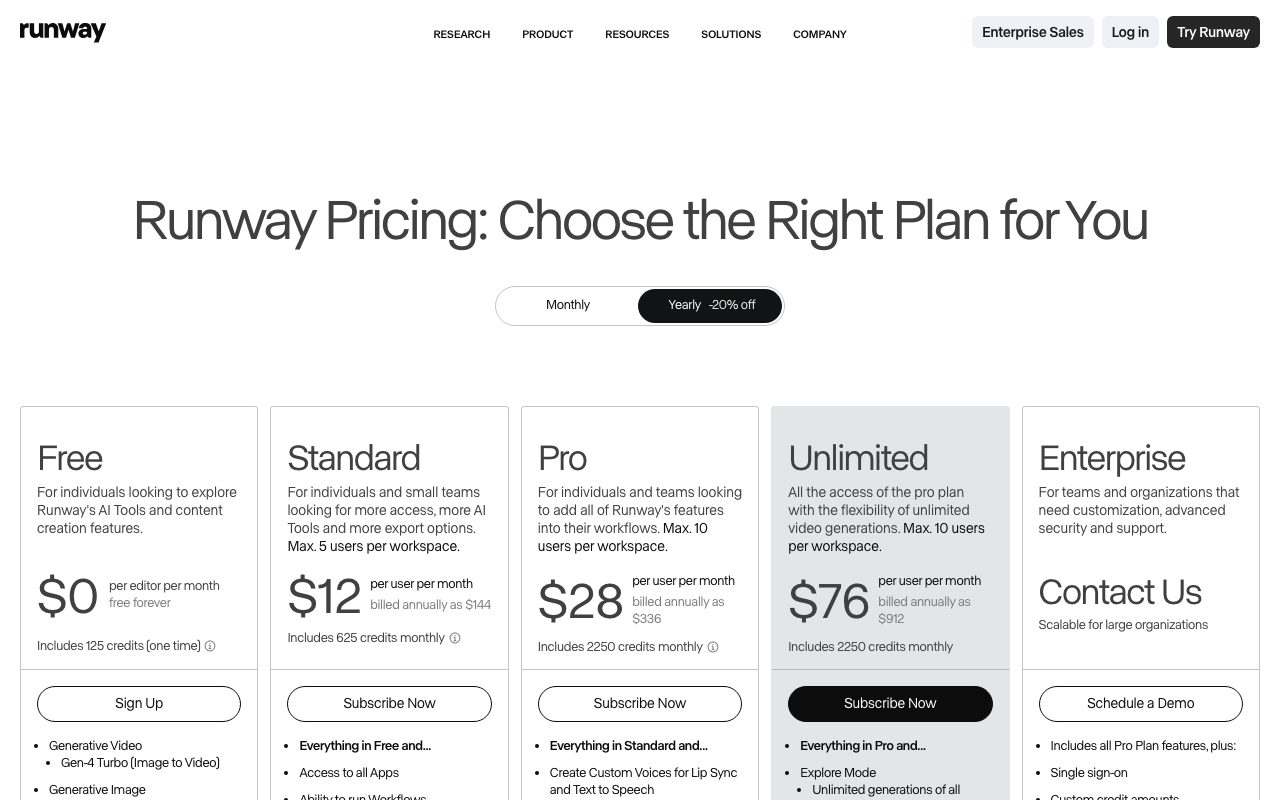
Free tier offers 125 one-time credits to try the platform. Enough for a few generations to evaluate quality.
Standard is $15/month with 625 credits/month, watermarked exports. Pro is $35/month with 2,250 credits and watermark removal. Unlimited is $95/month with truly unlimited generations on lower-quality models, plus monthly credits for top-tier models.
Enterprise is custom-priced. Includes the Creative Partners Program for high-volume customers and dedicated support.
Standout features
Gen-3 and Gen-4 video models
The latest text-to-video and image-to-video models produce coherent 10-second clips with realistic motion. Quality is competitive with Sora and ahead of most other accessible tools.
The image-to-video workflow is particularly strong. Start with a still image, prompt the motion, and Runway animates it convincingly. This is gold for marketing assets.
Motion brush and AI editing
Motion brush lets you paint regions of an image to specify what should move and how. Subject-tracking AI extends background removal to video, which used to require frame-by-frame manual work.
The full timeline editor
Most AI video tools generate clips and stop. Runway includes a timeline editor where you assemble generated clips with traditional footage, add audio, and export. The integration is the moat.
Runway's bet is that AI video tools belong inside a creative suite, not as standalone generators. That bet is paying off as the technology matures.
Honest tradeoffs
Output quality varies. Some generations are stunning. Others have weird artifacts (extra fingers, melting faces, physics violations). Iteration is part of the workflow. Budget credits accordingly.
Credits run out fast on Standard. A serious creative project on Standard tier won't last the month. Pro is the practical floor for working professionals.
The model is closed-source. You can't fine-tune on custom data the way you can with some open-source video models. For unique brand-specific outputs, this matters.
Runway vs alternatives
Versus Pika: Pika is the friendly indie alternative. Less powerful, simpler interface, often cheaper. Runway has better quality and a real timeline editor. Pika is fine for casual use.
Versus OpenAI Sora: Sora is the headline-grabber for video quality. Access has been limited. Runway is shipping today, with comparable (sometimes better) quality on certain types of content.
Versus Synthesia: Synthesia is talking-head specialist with avatars. Different shape. Synthesia for corporate training videos. Runway for creative work.
Versus Adobe Firefly Video: Firefly is the Adobe answer integrated with Premiere. Quality is improving, ecosystem advantage is real. Runway has the lead on generative model quality, Adobe has the install base.
For more options, see best AI video tools or tools for video editors.
Bottom line
Runway is the most credible AI video tool for professional creative work. The combination of strong models and a real editing suite is rare. It's not magic, but it's a force multiplier for teams that ship video.
For one-off experiments, the free tier or Pika get you started cheaper. For ongoing creative work where AI video is part of the workflow, Pro tier and up are where Runway pays back.
Try the free tier with realistic prompts. Quality has come a long way. The plateau hasn't been reached.
Runway for marketing and ad creative
The most common production use case is marketing teams iterating on ad creative. Generate 20 variations of a product video in an afternoon, test them, scale the winners. Runway compresses the creative iteration loop dramatically.
Image-to-video is the workhorse. Marketing teams take their static product photos, prompt the motion they want (subtle product rotation, dramatic camera move, animated text), and ship video creative without filming.
For DTC brands, this is genuinely transformative. Video ad creative used to require shoots, agencies, and weeks of turnaround. Runway compresses it to days, sometimes hours.
Limitations marketers hit
10-second clip limits mean you can't generate full ads in one shot. Stitch clips together in the Runway timeline editor or your existing post-production tool.
Brand consistency requires careful prompt engineering and reference images. Runway's "stylize" features help but aren't perfect. Expect some clips to be unusable per generation.
Audio isn't generated. Use Runway's audio library, license tracks, or generate with separate AI audio tools (Suno, ElevenLabs, Udio).
Runway for film and entertainment
Independent filmmakers use Runway for VFX shots that used to require expensive software. Object removal, scene extension, sky replacement, simulated camera moves on still photos.
The Creative Partners Program gives high-volume professional users dedicated infrastructure and earlier access to new models. The customer list includes major studios that don't publicly announce.
For a documentary or indie film with VFX needs that are too expensive for traditional tools, Runway is increasingly the answer. The quality is approaching what cost six-figure budgets a few years ago.
Working with Runway in production
Most pros use Runway as one tool in a larger workflow. Generate base footage in Runway, refine in DaVinci Resolve or Premiere, composite in After Effects, color grade in DaVinci. The output integrates with standard NLE workflows.
Frame rate and resolution: Runway exports at 24/30/60 fps and various resolutions up to 4K on Pro tier. Match your project's specs at generation time to avoid quality loss in conversion.
Common Runway questions
How long does video generation take?
10-second clips: 2-5 minutes per generation depending on model and queue length. Iteration is faster on Unlimited tier with priority queue.
The processing time has dropped significantly over the past year. Continued improvement is likely as Runway scales infrastructure.
Can I train Runway on my brand?
Limited. Runway doesn't offer fine-tuning the way some image models do. You can use reference images and detailed prompts to nudge style but can't train custom models on Standard or Pro tiers.
Enterprise tier offers more customization including limited brand-specific training. Pricing reflects the custom work.
What about copyright and licensing?
Runway's terms grant you commercial use rights for content you generate. The training data and copyright situation is the broader AI industry question; Runway is generally on the responsible end of the spectrum.
For brand-safe production, document your prompts and reference images. Avoid generating content that closely mimics existing copyrighted work.
For more AI creative tools, see best AI creative tools or Runway vs Pika.
Runway's place in creative AI
Runway pioneered AI video tools and remains a leader. The competition from Sora, Pika, and others keeps the pressure on, which benefits users.
The platform's bet on creative-suite integration (timeline editor, audio tools, image gen) differentiates from pure-generator competitors. As AI video matures, the suite advantage compounds.
For creative professionals, Runway is increasingly a workflow tool, not just an experimental toy. The output quality clears the threshold for real production use.
For more creative AI tools, see best AI creative tools.
Runway for non-creative teams
Marketing teams, product teams, and corporate communications also use Runway. Internal videos, training content, and announcement videos benefit from AI generation.
The use case quality bar is lower for internal content. A "good enough" AI-generated explainer beats no video. The economics shift dramatically.
For external customer-facing video, the quality bar is higher. Runway can produce that quality, but expect more iteration and post-production effort.
For more video tools, see best AI video tools.
Tutorial / Demo
Key Features
- Gen-3 / Gen-4 text-to-video and image-to-video
- Motion Brush for directing animation
- Green-screen rotoscoping and inpainting
- Lip-sync and Act-One performance capture
- Frame interpolation and slow-motion
- API for studios and partners
Pros & Cons
What we like
- Most complete pro-grade AI video toolkit
- Active iteration with frequent model updates
- Editing tools elevate raw model output
- Used in actual film and ad production
Room for improvement
- Credits burn faster than expected, so serious work needs the higher plan
- Clip length is still capped (around 10 seconds without extension)
- Output quality varies clip to clip
- Steeper learning curve than the consumer-only competitors
Frequently Asked Questions
Runway vs Pika vs Sora?
How much does Runway cost?
Does Runway support image to video?
Can I use Runway videos commercially?
What's the realistic clip length?
Best For
Featured in
Tags
Alternatives to Runway
View allKling AI
Kuaishou's video model that punches above its weight on motion
Luma Dream Machine
Fast, photoreal video generation from the team behind Genie 3D
HeyGen
Generate talking-head avatar videos in dozens of languages
Google Veo
Google DeepMind text-to-video model that generates 1080p and 4K clips with native synchronized audio
Our take
Tool Index Editorial · May 2026· 4.6/5
What Runway is really selling — beyond the marketing copy — is video generation, editing, and effects in one creative suite.
Where it wins: Most complete pro-grade AI video toolkit, Active iteration with frequent model updates, and Editing tools elevate raw model output. Honest gripes: Credits burn faster than expected, so serious work needs the higher plan and Clip length is still capped (around 10 seconds without extension).
In short: Runway is a strong pick when you need generating B-roll and concept shots, and a harder sell if credits burn faster than expected, so serious work needs the higher plan would be a dealbreaker.
Editorial opinion from the Tool Index team, written from the public product pages. Not a user review.
Reviews (6)
Honest take after the past year
Came to Runway after frustration with what I had before. What stands out is how most complete pro-grade AI video toolkit. Mostly using it for lip-syncing characters to recorded dialogue. Still recommending it to people in similar setups.
Pros
- Most complete pro-grade AI video toolkit
- Editing tools elevate raw model output
Best decision this quarter
Started using Runway casually, now it's pinned in my dock. What stands out is how used in actual film and ad production. Got real value out of API for studios and partners. Main use case: VFX work like rotoscoping and inpainting on existing footage. Not perfect: credits burn faster than expected — serious work needs the higher plan.
Wanted to love it, couldn't
Adopted Runway for one project, ended up using it for more. Where it really wins is editing tools elevate raw model output. Mostly using it for lip-syncing characters to recorded dialogue. That said, clip length is still capped (around 10 seconds without extension) is a real gripe. Looking at alternatives but not in a rush.
Underrated honestly
Runway solves a real problem for me, but it's not magic. The biggest win has been most complete pro-grade AI video toolkit. Got real value out of gen-3 / Gen-4 text-to-video and image-to-video.
Pros
- Most complete pro-grade AI video toolkit
- Used in actual film and ad production
It just works
Runway is one of those tools you stop noticing because it just works. What stands out is how active iteration with frequent model updates. Worth calling out the API for studios and partners too. Mostly using it for generating B-roll and concept shots. Worth the price for what I get out of it.
Pros
- Editing tools elevate raw model output
- Most complete pro-grade AI video toolkit
- Used in actual film and ad production
Three months in, here's the verdict
Runway has quietly become part of my daily flow. What stands out is how editing tools elevate raw model output. Worth calling out the gen-3 / Gen-4 text-to-video and image-to-video too. Main use case: VFX work like rotoscoping and inpainting on existing footage.
Badge builder
Add Runway to your website
Choose a badge style and size, preview it here, then copy the generated HTML. Badge images are self-contained SVGs and do not require an external script.

<a href="https://toolindex.net/tools/runway?ref=badge" target="_blank" rel="noopener">
  <img src="https://toolindex.net/badge/runway/medium.svg" alt="Runway - Listed on Tool Index" width="180" height="50" />
</a>How to use the badge
- 1. Pick the style, size, and theme that fit your layout.
- 2. Copy the generated HTML from the code block.
- 3. Paste it into your footer, homepage, or press page.
Score badge available
Runway qualifies for the score and circle badges based on its current top-10 positionin AI Video Generators.
Badge clicks return visitors to this profile with a referral tag so the source remains identifiable.
Related Tools

Apatero AI
The creator studio for AI image, video, audio, 3D, and avatars, now at apatero.ai.
Kevin Gabeci Toolkits
Seven AI toolkits for writing books, making music, cutting video, and building agents.

Warp
The modern terminal reimagined with AI and collaboration

Bolt.new
Prompt-to-deployed full-stack app inside the browser
Work on Runway? Request listing access or correction