AI Meter
macOS app that tracks local AI coding agent usage and estimates environmental impact
Gallery
About AI Meter
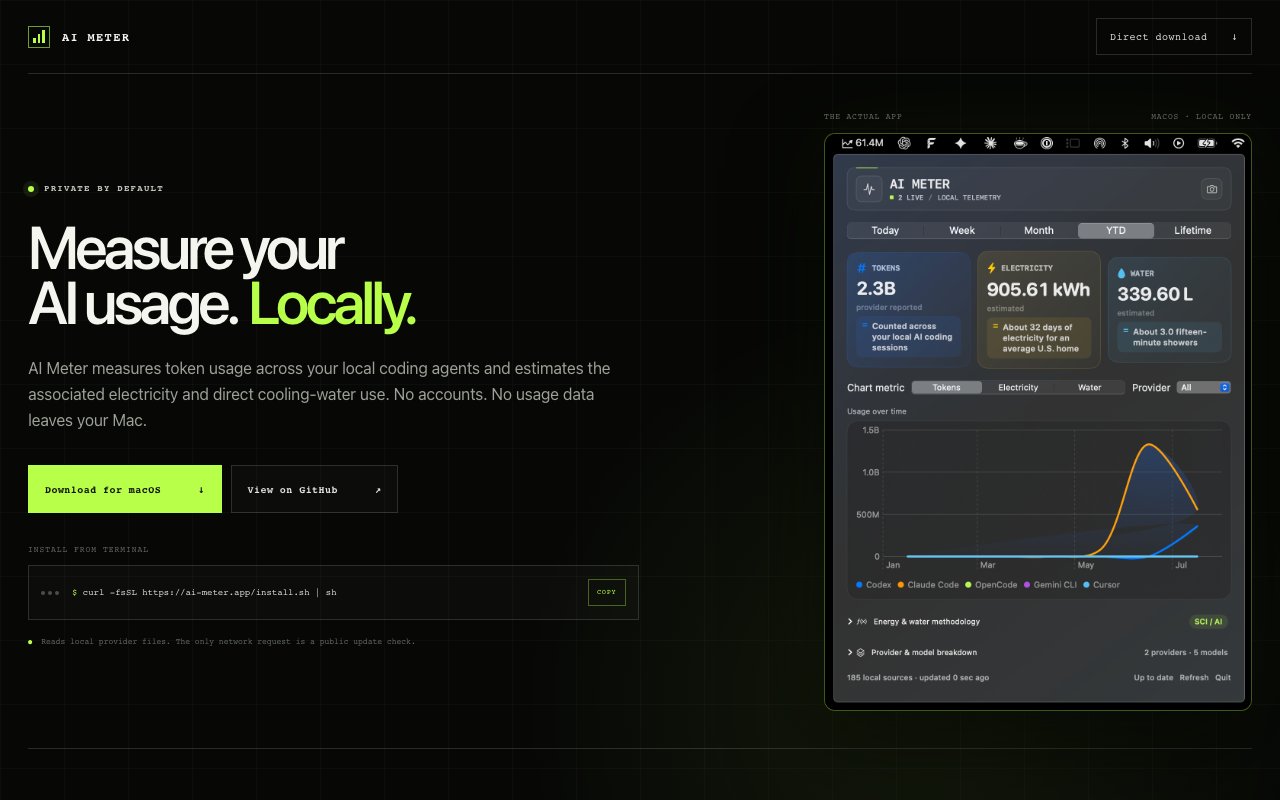
AI Meter is a macOS utility that monitors how many tokens your local AI coding agents consume and translates that usage into estimated electricity and water costs. It reads token counts from Codex, Claude Code, Cursor, OpenCode, and Gemini CLI by scanning their local records on your machine, then displays an interactive dashboard showing usage over time alongside environmental impact metrics. The goal is simple: make the invisible cost of AI assisted development visible so you can understand what your workflow actually consumes at the infrastructure level.
The problem it addresses is invisible consumption. Developers using AI coding assistants generate thousands or tens of thousands of tokens daily without any sense of the resources behind those requests. Cloud providers handle the compute in massive data centers, but the electricity and cooling happen somewhere real, and most users have no visibility into what their workflow actually costs in environmental terms. Carbon pledges and sustainability reports are everywhere in corporate communications, yet the tools we use daily provide no feedback on what they consume. AI Meter makes that cost concrete by attaching numbers to your usage patterns, turning abstract compute into tangible resource estimates.
Under the hood the app uses a baseline of 0.39 kilowatt hours per million tokens to estimate facility energy consumption. That figure comes from published estimates of large language model inference costs at scale. You can adjust it anywhere from 0.20 to 0.75 kilowatt hours depending on the efficiency assumptions you want to apply. More efficient data centers using renewable power and advanced cooling might warrant a lower number. Older facilities with less optimized infrastructure might justify a higher estimate. The configurability means you can model different scenarios rather than accepting a single fixed assumption, which matters if you are preparing a report that needs defensible methodology.
Water usage estimation relies on configurable parameters for power usage effectiveness and liters per kilowatt hour of IT load to model direct cooling needs. The defaults reflect industry averages from data center sustainability disclosures, but power users can tune them to match specific data center profiles if they have better information. The point is not to produce an exact audit quality measurement but to provide a reasonable order of magnitude estimate that grounds abstract token counts in physical resources. Better to have an informed approximation than no data at all.
Privacy is absolute. There are no accounts, no usage data leaves your Mac, and the only network activity is a public update check to pull new versions. Everything stays local, which fits the ethos of developers who care about controlling where their data goes. You install the app, it reads local logs, and it shows you a dashboard. That is the entire data flow. No telemetry, no analytics, no cloud sync, no registration form, no email required. The app just does its job and stays out of your way.
The interface is a simple dashboard with an interactive chart. You see token counts over time, cumulative energy estimates, and water usage projections in one view. It runs in the background and updates as your coding agents log activity, so the numbers stay current without manual intervention. You can glance at it periodically to track trends or dig into the data when you need specifics for a sustainability report or internal audit. The learning curve is essentially zero because there is nothing to configure beyond the optional efficiency parameters.
Who needs this? Developers and companies that want to quantify the environmental footprint of their AI assisted workflows. Sustainability teams producing carbon accounting reports need data from every tool the company uses, and coding assistants are a growing slice of that pie. Individual developers curious about their personal impact can see cumulative usage and decide whether to change their habits. Engineering managers evaluating different AI tools might use the data to compare which assistant is more resource efficient for similar tasks. Researchers studying the environmental cost of AI in practice finally have a way to gather real usage data. The audience is niche, but for those who care about this question, there has been no easy way to get an answer until now.
AI Meter is completely free for both individuals and companies. You download the app directly from the website or install via a terminal command, and it works out of the box with no signup, licensing, or payment. The source code is available on GitHub for anyone who wants to inspect the logic, verify privacy claims, or contribute improvements. Open source means you do not have to trust marketing copy; you can read the code yourself and confirm that it does exactly what it says.
Key Features
- Tracks tokens from Codex, Claude Code, Cursor, OpenCode, Gemini CLI
- Estimates electricity consumption per million tokens
- Models water usage for data center cooling
- Interactive dashboard with usage charts
- Fully local with no data leaving your Mac
- Open source on GitHub
Pros & Cons
What we like
- Completely free for individuals and companies
- No accounts or data transmission, fully private
- Configurable parameters for custom efficiency assumptions
- Open source and inspectable
Room for improvement
- macOS only, no Windows or Linux support
- Limited to specific coding agents it can parse
- Environmental estimates are models, not exact measurements
- Niche utility with a narrow use case
Frequently Asked Questions
What is AI Meter?
Is AI Meter free?
Does AI Meter send my data anywhere?
How accurate are the environmental estimates?
Best For
Featured in
Alternatives to AI Meter
View all
1Lookup
Real-time data verification API for phone, email, IP, and domain validation to fight fraud

Kevin Gabeci
Solo developer building web apps, cozy browser games, and AI creator toolkits.

Codedex
A gamified, story-driven platform that teaches Python, web dev, and more like an RPG quest
Hack2hire
Practice real SDE interview questions from top tech companies with expert worked solutions
Reviews (0)
Badge builder
Add AI Meter to your website
Choose a badge style and size, preview it here, then copy the generated HTML. Badge images are self-contained SVGs and do not require an external script.

<a href="https://toolindex.net/tools/ai-meter?ref=badge" target="_blank" rel="noopener">
  <img src="https://toolindex.net/badge/ai-meter/medium.svg" alt="AI Meter - Listed on Tool Index" width="180" height="50" />
</a>How to use the badge
- 1. Pick the style, size, and theme that fit your layout.
- 2. Copy the generated HTML from the code block.
- 3. Paste it into your footer, homepage, or press page.
Standard badge available
The standard listing badge is available now. Score and circle badges are limited to tools currently ranked in the top 10 of a category.
Badge clicks return visitors to this profile with a referral tag so the source remains identifiable.
Related Tools
Kevin Gabeci
Solo developer building web apps, cozy browser games, and AI creator toolkits.

Coolify
Self-hostable, open source alternative to Heroku and Netlify

Warp
The modern terminal reimagined with AI and collaboration

Bolt.new
Prompt-to-deployed full-stack app inside the browser
Work on AI Meter? Request listing access or correction