
Best JSON Formatter
Format, validate, compare, and convert JSON entirely in your browser
Gallery
About Best JSON Formatter
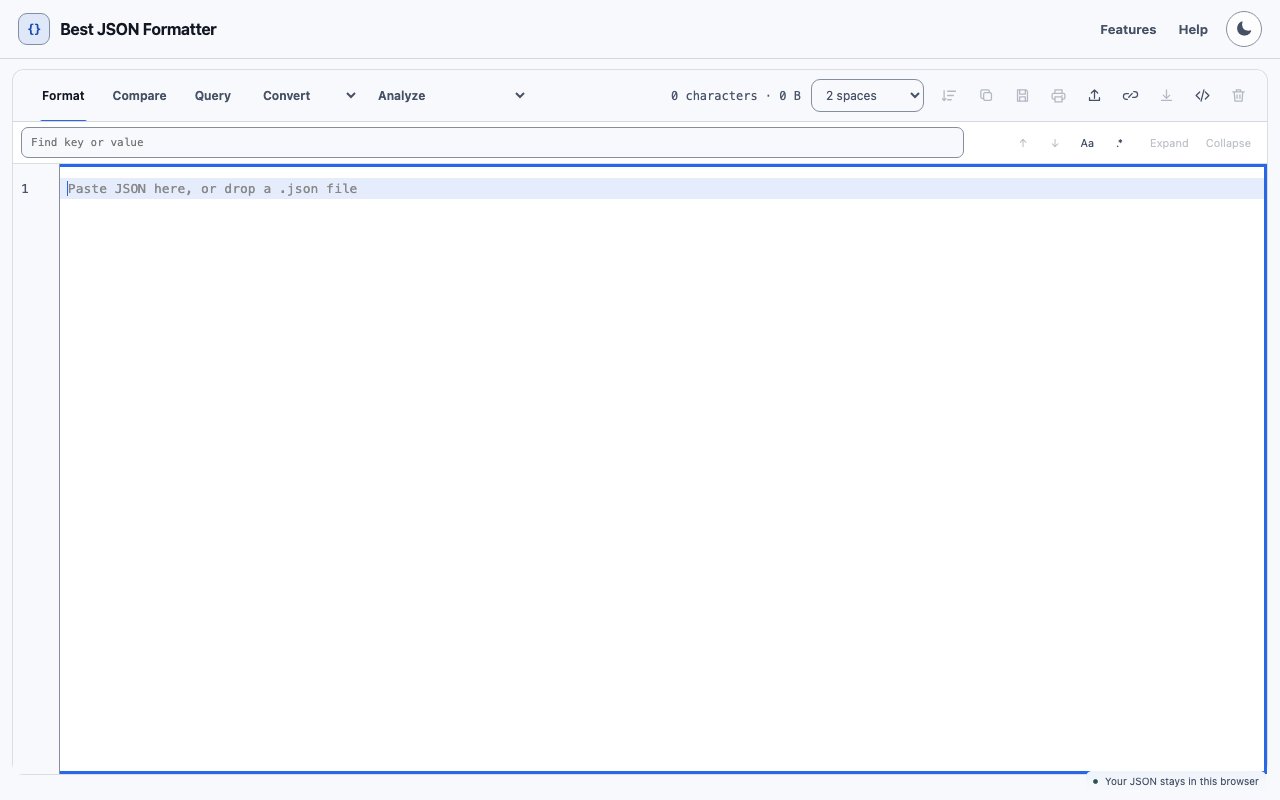
Best JSON Formatter is a browser based JSON utility that handles formatting, validation, comparison, repair, and conversion without sending your data anywhere. You paste in messy or minified JSON, and it cleans it up with proper indentation. You get validation errors highlighted in place, repair suggestions for malformed structures, and conversion to XML, YAML, or CSV when you need your data in a different shape. Everything runs client side, so your JSON stays in the browser and never touches a server. This makes it safe to use with production data, internal configurations, or anything else you would not want leaving your machine.
The core use case is the one developers hit constantly throughout their workday. You are debugging an API response, looking at a config file, or trying to understand a payload that came back as a single unreadable line with no whitespace or structure. You need it formatted so you can actually see what is going on, trace the nesting, and find the field you care about. This tool does that instantly, with customizable indentation using two, three, or four spaces or tabs depending on your preference and your team's coding standards. The editor is built on CodeMirror, which means you get syntax highlighting, bracket matching, automatic bracket closing, and a responsive editing experience that feels like working in a real code editor rather than a plain textarea on a web page.
Beyond basic formatting, it includes a tree viewer that lets you expand and collapse sections of large JSON documents. This is useful when you are working with deeply nested structures and need to focus on a specific branch without scrolling through hundreds of lines trying to match opening and closing brackets. You can click through the tree to navigate directly to any node, which is faster than hunting for a closing bracket in a wall of text. The tree view gives you a structural overview of your data at a glance, showing you the hierarchy without forcing you to parse it mentally. There is also a comparison mode for side by side diffs when you are trying to spot what changed between two JSON files. The diff highlights additions, deletions, and modifications clearly so you do not have to eyeball the differences manually or paste both versions into separate text editors and scroll through them looking for mismatches.
The query feature lets you filter and search within JSON data, which is helpful when you are looking for a specific key or value buried somewhere in a large object with dozens or hundreds of fields. You can run queries against the loaded JSON and see matching results highlighted directly in the editor, so you know exactly where in the structure your target data lives. For validation, it goes beyond simple syntax checking. The tool can detect duplicate keys that would cause confusion or unexpected behavior in some parsers, verify number precision to catch floating point issues, and validate against JSON Schema if you provide one. When it finds problems, it shows exactly where they are with line numbers and column positions, and often suggests how to fix them so you do not have to guess what went wrong.
Conversion covers the common cases where you need data in a format another tool or team expects. You can take JSON and output it as XML for systems that still expect that format, YAML for configuration files that use that syntax, or CSV for importing into spreadsheets and databases. This saves you from writing throwaway scripts or hunting for separate converters every time you need to move data between formats. The tool also supports minification when you need to compact JSON for transport or storage, stripping out all the whitespace to reduce payload size. It provides document statistics like character count and file size so you can verify your payload is within API limits or storage constraints before you send it.
The interface is clean and responsive, with light and dark themes that follow your system preference or can be set manually if you prefer to override your OS settings. Keyboard shortcuts are available for common actions like formatting, minifying, and copying, and the layout is accessible enough that you can tab through controls without reaching for the mouse. There is a browser extension if you want quick access without navigating to the site each time. The extension provides the same formatting and validation features directly from your browser toolbar, which is convenient when you are frequently switching between your editor, terminal, and browser while debugging or testing.
For developers who need a reliable JSON formatter they can reach for without thinking about it, this one checks the boxes. It is fast, private, and covers the adjacent utilities like validation, repair, comparison, and conversion that you would otherwise need separate tools for. There is no account to create, no payment required, and no advertising interruptions cluttering up the interface. It just works, which is exactly what a developer utility should do. Whether you are a frontend developer debugging API responses, a backend engineer reviewing config files, or a data analyst converting between formats, the tool handles what you need without unnecessary friction.
Key Features
- Customizable JSON formatting and beautification
- Real time syntax validation
- JSON repair for malformed structures
- Side by side comparison mode
- Conversion to XML, YAML, and CSV
- Interactive tree viewer with folding
Pros & Cons
What we like
- Processes everything locally with no server uploads
- Covers formatting, validation, comparison, and conversion in one tool
- Completely free with no signup required
- Includes a browser extension for quick access
Room for improvement
- No API for programmatic access
- Very large JSON files may hit browser memory limits
- Limited to JSON as the input format
- No collaboration or sharing features
Frequently Asked Questions
What is Best JSON Formatter?
Is my data private when using this tool?
Can I convert JSON to other formats?
Is there a browser extension available?
Best For
Featured in
Alternatives to Best JSON Formatter
View all
1Lookup
Real-time data verification API for phone, email, IP, and domain validation to fight fraud

Kevin Gabeci
Solo developer building web apps, cozy browser games, and AI creator toolkits.

Codedex
A gamified, story-driven platform that teaches Python, web dev, and more like an RPG quest
Hack2hire
Practice real SDE interview questions from top tech companies with expert worked solutions
Reviews (0)
No reviews yet
Be the first to share your experience with Best JSON Formatter
Sign in to write a reviewBadge builder
Add Best JSON Formatter to your website
Choose a badge style and size, preview it here, then copy the generated HTML. Badge images are self-contained SVGs and do not require an external script.

<a href="https://toolindex.net/tools/bestjsonformatter?ref=badge" target="_blank" rel="noopener">
  <img src="https://toolindex.net/badge/bestjsonformatter/medium.svg" alt="Best JSON Formatter - Listed on Tool Index" width="180" height="50" />
</a>How to use the badge
- 1. Pick the style, size, and theme that fit your layout.
- 2. Copy the generated HTML from the code block.
- 3. Paste it into your footer, homepage, or press page.
Standard badge available
The standard listing badge is available now. Score and circle badges are limited to tools currently ranked in the top 10 of a category.
Badge clicks return visitors to this profile with a referral tag so the source remains identifiable.
Related Tools
Kevin Gabeci
Solo developer building web apps, cozy browser games, and AI creator toolkits.

Coolify
Self-hostable, open source alternative to Heroku and Netlify

Warp
The modern terminal reimagined with AI and collaboration

Bolt.new
Prompt-to-deployed full-stack app inside the browser
Work on Best JSON Formatter? Request listing access or correction