
BlockSlides
Embeddable ProseMirror-powered WYSIWYG slide editor for React and Vue apps
Gallery
About BlockSlides
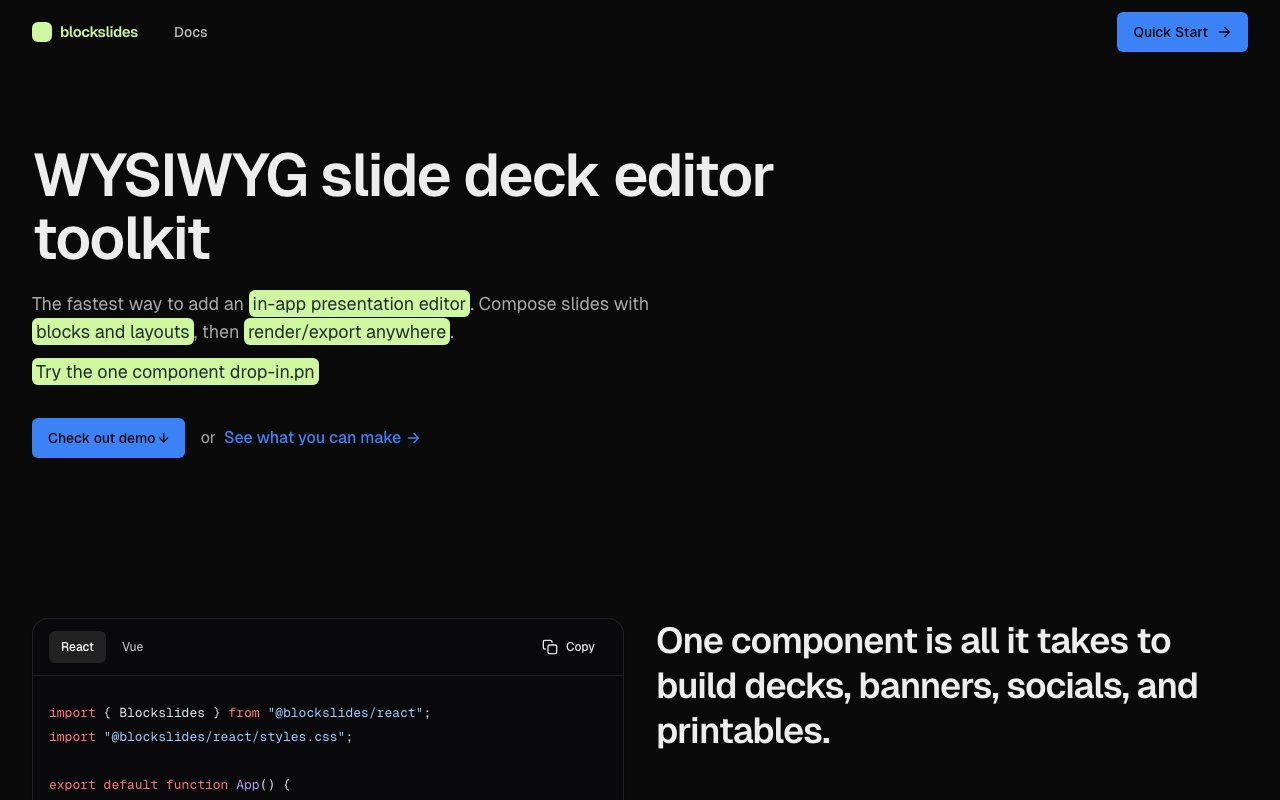
BlockSlides is a toolkit for adding a WYSIWYG slide editor straight into your own app. Instead of sending users off to a separate design tool or building an editor from scratch, you drop in a single component and get a full editing surface. Users can build decks, social banners, thumbnails, and printable one-pagers, all from the same underlying slide model. The framing on the site is that one component is all it takes to ship an in-app presentation editor, and everything else layers on top of that. It's squarely a developer product, meant for teams who want authoring inside their own product rather than a standalone app. The site pitches it as the fastest way to add an in-app presentation editor, and it backs that up with a one-line drop-in component you can copy for either framework.
The problem it goes after is a familiar one for product teams. Rich text editors for documents are a solved space, with mature libraries covering paragraphs, marks, and inline formatting. Slides and bounded canvases are a different shape of problem. You need fixed page sizes, layouts, drag positioning, media, and tables, all living inside a frame rather than a flowing document that grows as you type. Rolling that yourself means rebuilding selection, keyboard shortcuts, undo, and export before you write a single feature your users care about. BlockSlides treats that canvas as a first-class model, so you can mix a 16x9 slide, an A4 page, and a LinkedIn banner in one document without fighting the tool.
Under the hood it's ProseMirror-powered. The headless core, published as @blockslides/core, gives you the editor runtime and document model, and framework bindings for React and Vue 3 give you drop-in UI with sensible defaults. Anyone who has worked with Tiptap will recognize the architecture, since content lives as structured JSON and behavior is composed from extensions and node views rather than baked into the editor. There are more than 50 extensions covering text, media, layouts, tables, math, and markdown. On top of that sit prebuilt pieces like a bubble menu that appears when you select text, a template picker, preset templates, drag-and-drop reordering, and image controls, so you can ship a working editor quickly and go deeper only where you need to. The demo on the homepage is a real editor rather than a recording, so you can add a slide from templates, open the bubble menu by selecting text, drag blocks to reorder content, and click an image to explore its controls, which is the same surface you would be embedding.
Because content is JSON-first, you own it. You store the structured document for persistence and versioning, then export to HTML, Markdown, or plain text whenever you need it for publishing, previews, docs, and search indexing. That matters when the editor is one part of a larger product and the output has to feed other systems, drive a static renderer, or get diffed in version control. Nothing is trapped in an opaque binary file, and the same document can render live in the app or statically somewhere else without a separate conversion step.
It's also built with AI workflows in mind. The @blockslides/ai-context package ships prompt bundles, schemas, and templates so that documents generated by a language model stay valid against the editor's structure. If you're building an assistant that drafts a deck from a brief or generates a batch of social graphics, that keeps the output inside the rails of what your editor can actually render, instead of producing JSON the editor then rejects. The starting point for customization is an ExtensionKit that bundles the common extensions, and you extend from there with your own nodes and views when the defaults run out.
Where it stands apart is the focus. Plenty of editor toolkits handle long-form text extremely well. Far fewer take slides and bounded visual canvases seriously as a document type with their own layout rules, and that's the gap BlockSlides is built to fill. It fits teams building presentation or pitch-deck features, social-graphic creators, report and one-pager builders, and any product where users lay out visual assets rather than write essays. The multi-asset angle, one slide model producing many sizes and formats, is the part that would be tedious to assemble from separate tools. The same JSON document can carry mixed sizes, so a deck, a thumbnail, and a banner can sit side by side and be edited with one consistent set of controls.
Access is open source. The packages are published on npm under the MIT license, with the source on GitHub and documentation at blockslides.dev, so you can install it, read the code, and self-host the editor inside your own stack with no vendor lock-in. There's no paid tier or account to sign up for, which makes it easy to evaluate by wiring the demo component into a test app and clicking around. As a young project the community and ecosystem around it are still small, so expect to read source and file issues rather than lean on a large body of tutorials.
Key Features
- ProseMirror-powered headless editor core
- React and Vue 3 drop-in components
- One model for decks, banners, and printables
- JSON-first content with HTML and Markdown export
- 50+ extensions and custom node views
- AI-ready schemas and prompt bundles
Pros & Cons
What we like
- Open source under the MIT license
- Ships a full editor UX out of the box
- Content stays as portable structured JSON you own
- One model outputs many asset sizes and types
Room for improvement
- Aimed at developers, not end users
- Young project with a small community
- Requires wiring into your own app
- Documentation is still maturing
Frequently Asked Questions
What is BlockSlides?
Is BlockSlides free?
Is BlockSlides built on ProseMirror?
Who is BlockSlides for?
Best For
Featured in
Alternatives to BlockSlides

1Lookup
Real-time data verification API for phone, email, IP, and domain validation to fight fraud

Codedex
A gamified, story-driven platform that teaches Python, web dev, and more like an RPG quest
Hack2hire
Practice real SDE interview questions from top tech companies with expert worked solutions
Cloudflare Pages
Free Jamstack hosting on Cloudflares edge with unlimited bandwidth and tight integration with Workers.
Reviews (11)
Genuinely impressed
Started using BlockSlides casually, now it is pinned in my dock. It slotted into my routine without much fuss. The output quality holds up better than I expected. No regrets so far.
Exactly what I needed
Tried BlockSlides on a side project first, then rolled it out everywhere. Got real value out of react and vue 3 drop-in components.
Finally something that fits
Came to BlockSlides after getting frustrated with what I had before. What stands out is how it handles prosemirror-powered headless editor core. The defaults are sensible, so I was not fighting settings on day one. Easy yes for anyone weighing the same trade offs.
Two months in, no regrets
BlockSlides has quietly become part of my daily flow. Got real value out of open source under the mit license. Setup was painless and I was productive the same day. Found it works best for building an ai-assisted deck builder. No regrets so far.
Powerful once it clicks
Tried BlockSlides on a side project first, then rolled it out everywhere. Support actually answered when I had a question, which surprised me. It fits well for letting users design social graphics in-app. My only gripe is young project with a small community. No regrets so far.
Recommended without reservation
Tried BlockSlides on a side project first, then rolled it out everywhere. What stands out is how it handles react and vue 3 drop-in components. Recommending it to people in a similar spot.
Exactly what I needed
Tried BlockSlides on a side project first, then rolled it out everywhere. Got real value out of 50+ extensions and custom node views. Would sign up again without thinking twice.
Pulled its weight from week one
Came to BlockSlides after getting frustrated with what I had before. The interface stays out of my way, which I appreciate. Performance has been steady even when I lean on it hard. It fits well for generating printable one-pagers from structured data.
Solid daily driver
BlockSlides solves a real problem for me without making a fuss about it. Their take on prosemirror-powered headless editor core is genuinely good.
Solid daily driver
Picked BlockSlides for the price, stayed for the quality. The core workflow is smooth once you are set up. Mostly using it for embedding a slide editor in a saas product. Recommending it to people in a similar spot.
Genuinely impressed
BlockSlides has quietly become part of my daily flow. The interface stays out of my way, which I appreciate. The core workflow is smooth once you are set up.
Badge builder
Add BlockSlides to your website
Choose a badge style and size, preview it here, then copy the generated HTML. Badge images are self-contained SVGs and do not require an external script.

<a href="https://toolindex.net/tools/blockslides?ref=badge" target="_blank" rel="noopener">
  <img src="https://toolindex.net/badge/blockslides/medium.svg" alt="BlockSlides - Listed on Tool Index" width="180" height="50" />
</a>How to use the badge
- 1. Pick the style, size, and theme that fit your layout.
- 2. Copy the generated HTML from the code block.
- 3. Paste it into your footer, homepage, or press page.
Standard badge available
The standard listing badge is available now. Score and circle badges are limited to tools currently ranked in the top 10 of a category.
Badge clicks return visitors to this profile with a referral tag so the source remains identifiable.
Related Tools

Kevin Gabeci
Solo developer building web apps, cozy browser games, and AI creator toolkits.

Coolify
Self-hostable, open source alternative to Heroku and Netlify

Warp
The modern terminal reimagined with AI and collaboration

Bolt.new
Prompt-to-deployed full-stack app inside the browser
Work on BlockSlides? Request listing access or correction