
Bohay
Terminal-based mission control for managing multiple AI coding agents
Gallery
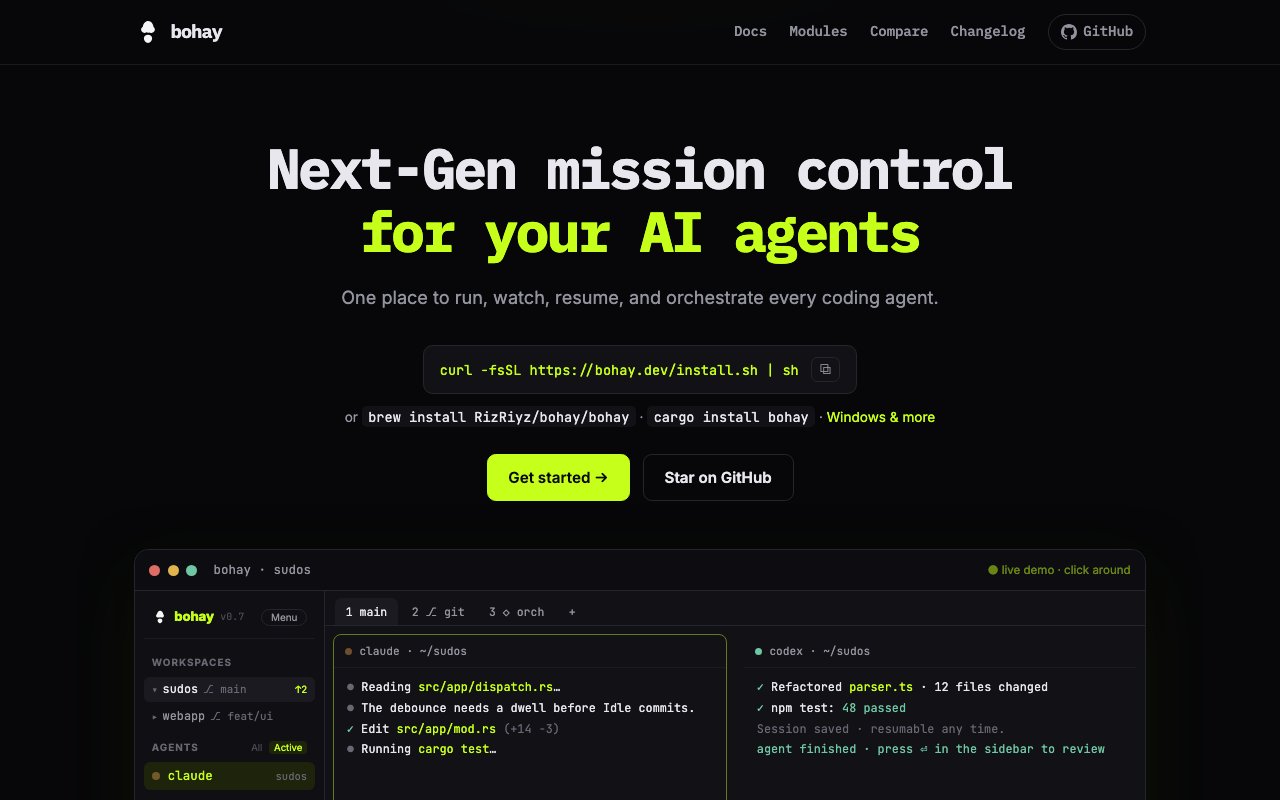
About Bohay
Bohay is a terminal application that brings all your AI coding agents into one interface. If you're running Claude Code, Copilot, Codex, Aider, or any of the other AI assistants that have taken over developer workflows, Bohay gives you a single place to monitor status, manage tasks, browse files, and handle git operations without bouncing between windows. The platform supports a wide range of agents including Claude Code, GitHub Copilot, Codex, opencode, Cursor, Pi, Kimi, Amp, Grok, Qwen, Gemini, Aider, and Droid, with session resumption and precise event reporting available for select agents in that list. The goal is to make managing multiple AI coding assistants feel like running one coherent system rather than juggling a dozen disconnected terminals.
The core problem it addresses is context fragmentation. Modern AI-assisted development often means multiple agents working on different parts of a codebase, each in its own terminal or window. Keeping track of which agent is waiting for input, which one finished its task, and what files changed becomes overhead that slows you down. You lose time switching between windows, remembering what each agent was doing, and trying to coordinate their work manually. Bohay consolidates that into one view with real-time status indicators that distinguish between waiting, working, finished, and resting states. Optional audio notifications let you know when agents complete tasks or need input, so you can focus elsewhere without constantly checking back. The status monitoring alone can save significant context-switching time in a typical development session.
Session persistence is one of the features that sets it apart from just running multiple terminals. Close your terminal and your sessions survive. Panes, tabs, and layouts reload exactly where you left off, and agents pick up their chat history automatically. That matters when you're mid-task on a long-running refactor and need to shut down for the day, or when your machine restarts unexpectedly. When you come back, everything is waiting for you in the same state, not starting fresh with lost context. You don't have to re-explain what you were working on to each agent or recreate the setup you had before. This persistence extends to the full interface layout, so your carefully arranged panes and tabs survive across sessions.
For teams using multiple agents in parallel, the orchestration system is where Bohay shines. A task board called orch lets you define dependencies between tasks, so you can set up a sequence where agent A does the refactor, then agent B writes the tests, then agent C updates the documentation. The platform spins up isolated git worktrees for each agent so they don't step on each other's work when editing files. Path leases block overlapping file edits, preventing conflicts before they happen. Quality gates require test commands to pass before a task counts as complete, adding a verification layer to agent output so you catch problems early. A dedicated merge worktree protects your primary checkout from agent commits until you're ready to integrate, giving you control over what lands in your main branch. This orchestration layer turns parallel AI assistance from a coordination headache into a structured workflow.
File management is built in with a sidebar tree that shows git status for every file and a fast viewer that updates live as agents edit. You can browse commits, branches, pull requests, and issues without leaving the interface, and create or merge PRs directly. The integrated editor support connects to vim, nano, or whatever you've set in your EDITOR environment variable, so you can jump from viewing a file to editing it in your preferred tool. For remote work, Bohay can drive sessions on machines over SSH without needing port forwarding, making it practical for teams with remote dev environments or cloud-based development setups.
On macOS, an optional notch panel called Bohay-Notch mirrors agent status to the MacBook's notch display and gives you quick approval access from the menu bar. It requires macOS 15 or later on Apple silicon and installs via Homebrew with a separate cask command. It's a small touch, but useful if you want to keep tabs on agent progress while working in another app like a browser or documentation without switching back to the terminal constantly. When an agent needs approval or finishes a task, you can see it immediately in the notch without interrupting your current work.
Bohay is open source under AGPL-3.0, so there's no paid tier or freemium model. You install via curl from the website, Homebrew tap, or Cargo if you prefer building from source. The code lives on GitHub and the community is growing as more developers adopt multi-agent workflows. The tradeoff is that this is a terminal-native tool. If you prefer GUIs or aren't comfortable in the command line, the learning curve may feel steep. But for developers already living in the terminal who want to wrangle multiple AI agents without losing track of state, Bohay pulls all the threads together in one coherent interface that makes parallel agent work manageable rather than chaotic.
Key Features
- Real-time multi-agent status monitoring
- Session persistence across restarts
- Isolated git worktrees per agent
- Task orchestration with dependencies
- Integrated file browser with git status
- macOS notch panel for quick access
Pros & Cons
What we like
- Consolidates multiple AI agents into one terminal interface
- Sessions and layouts survive terminal closures
- Git worktree isolation prevents agents from conflicting
- Free and open source under AGPL-3.0
Room for improvement
- Terminal-native, so it assumes command line comfort
- Session resumption only works with select agents
- Newer project with a smaller community
- macOS notch feature requires separate install
Frequently Asked Questions
What is Bohay?
Is Bohay free?
Which AI agents does Bohay support?
How does Bohay prevent agents from conflicting?
Best For
Featured in
Alternatives to Bohay
View allCursor
VS Code fork built around an AI pair-programmer

Replit
Browser IDE plus Replit Agent that builds and deploys apps from a prompt
Windsurf
Codeium's AI editor with Cascade agent and deep IDE integration

Treena
Mobile-first IDE with AI coding agents, terminal, and GitHub sync built for your phone
Our take
Tool Index Editorial · Oct 2026· 2.5/5
Bohay appears to have been renamed or replaced. The listing points to bohay.dev, but the captured public page identifies the product as Luvus and installs a luvus command. That current product is a terminal mission control for running, monitoring, resuming, and coordinating coding agents, with file views, status, cost tracking, agent messaging, and repository-aware workflows.
The underlying idea is strong for developers managing several agents, and the interactive page gives a concrete feel for the interface. Still, the name and domain mismatch is a serious listing problem, and the page excerpt did not clearly state pricing or licensing. Until the identity, migration path, and current package are made explicit, we would evaluate Luvus directly rather than rely on claims attached to Bohay.
Editorial opinion from the Tool Index team, written from the public product pages. Not a user review.
Reviews (0)
Badge builder
Add Bohay to your website
Choose a badge style and size, preview it here, then copy the generated HTML. Badge images are self-contained SVGs and do not require an external script.

<a href="https://toolindex.net/tools/bohay?ref=badge" target="_blank" rel="noopener">
  <img src="https://toolindex.net/badge/bohay/medium.svg" alt="Bohay - Listed on Tool Index" width="180" height="50" />
</a>How to use the badge
- 1. Pick the style, size, and theme that fit your layout.
- 2. Copy the generated HTML from the code block.
- 3. Paste it into your footer, homepage, or press page.
Standard badge available
The standard listing badge is available now. Score and circle badges are limited to tools currently ranked in the top 10 of a category.
Badge clicks return visitors to this profile with a referral tag so the source remains identifiable.
Related Tools

Bolt.new
Prompt-to-deployed full-stack app inside the browser

Tabnine
Privacy-first enterprise AI code assistant you control, with SaaS, VPC, on-prem, or fully air-gapped deployment
Cursor
VS Code fork built around an AI pair-programmer

Skeezo
Agent-native macOS IDE for coordinating Claude Code and AI agents
Work on Bohay? Request listing access or correction