
Treena
Mobile-first IDE with AI coding agents, terminal, and GitHub sync built for your phone
Gallery
About Treena
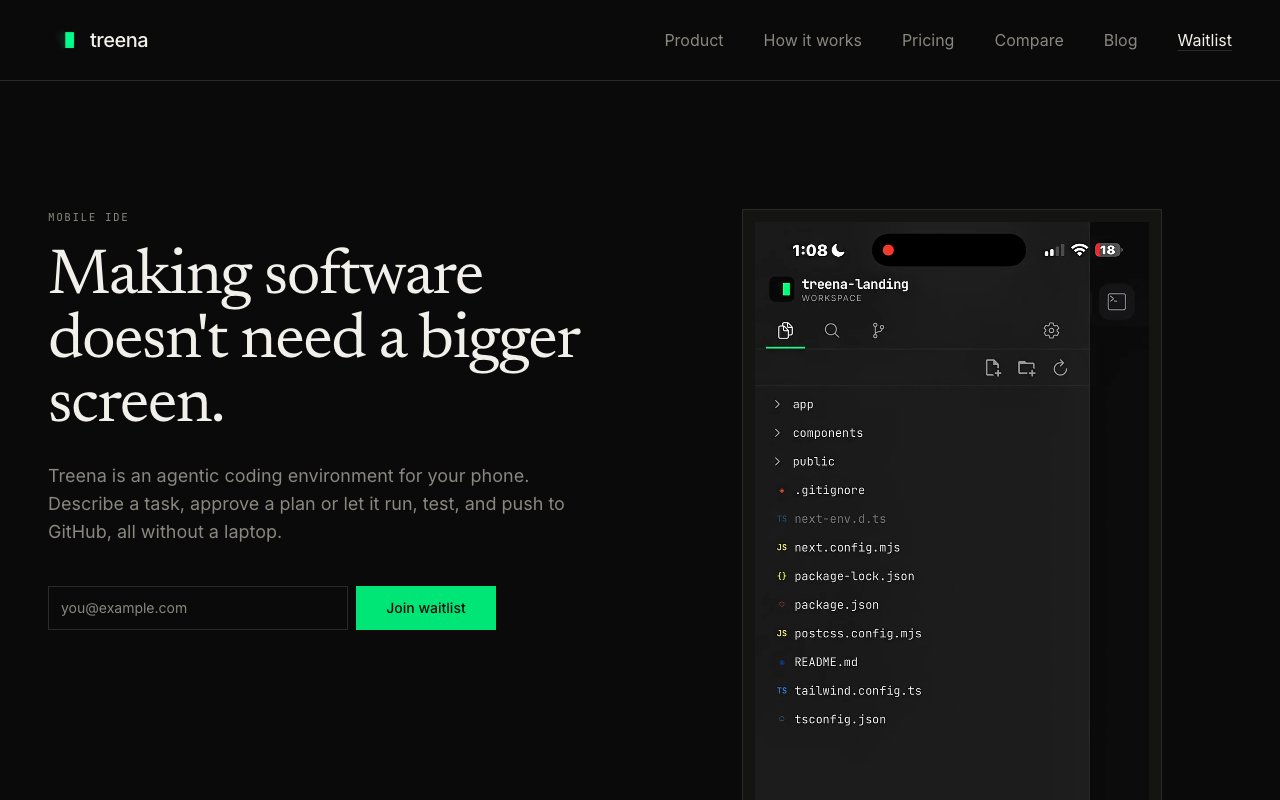
Treena is a mobile first integrated development environment that lets you write, build, test, and deploy code directly from an iPhone or Android device. It combines a real code editor with syntax highlighting, a terminal with live output, a file tree browser, and AI coding agents in a package designed from the ground up for phones rather than ported from desktop. Heavy computation runs in the cloud while the phone acts as a lightweight control surface, which sidesteps the performance limits of mobile hardware and keeps your battery from draining during long coding sessions. The interface was built for touch from the start, not adapted from mouse and keyboard patterns that feel awkward on a small screen.
The problem it solves is location dependence. Most developers assume they need a laptop to ship real software, so a commute, a coffee shop visit, or time spent waiting at an appointment becomes dead time. Treena flips that assumption entirely. You can clone a GitHub repository, describe changes to an AI agent, review the diffs on your phone screen, and let the agent edit files, run tests, and push commits without ever opening a laptop. The workflow is native to mobile rather than a compromise or a stripped down preview mode that can't actually compile or run your code. You're working with real repositories, real build tools, and real deployment pipelines, just from a different form factor.
Under the hood, Treena uses Git as its sync layer. Push a commit from your phone and it appears on your desktop checkout automatically. Pull changes your laptop made and they show up on your mobile workspace without extra configuration or manual refresh. GitHub integration is direct, so you connect a repo once and work against it from any device. The terminal runs in the cloud and streams output back to the phone, which means you get real build logs, test results, and error messages rather than a mocked preview that hides what's actually happening on the server. If a test fails, you see the full stack trace. If a deploy succeeds, you see the confirmation from the actual CI system.
The AI side supports multiple providers including OpenAI, Anthropic, Google, DeepSeek, Mistral, and others through OpenRouter. You bring your own API key, which keeps the app free to download and use without recurring subscription fees from Treena itself. Agents can operate in plan mode, where you review proposed changes before they execute and approve each step, or in full autonomous mode for routine tasks where you trust the agent to handle the details without interruption. There is also Model Context Protocol server support, which lets agents connect to external tools like Figma, AWS, Vercel, Linear, Notion, Stripe, and Supabase to pull context or trigger actions as part of a coding session. That means an agent can read a Figma design, generate the corresponding component code, run the tests, and deploy to Vercel in one sequence without you switching apps or copying information between screens manually.
The audience is developers who find themselves away from a desk more than they would like. That includes anyone who commutes on public transit, travels frequently for work or life, or simply wants to knock out a quick fix without booting up a laptop and waiting for it to wake. It also appeals to teams experimenting with AI coding agents who want a mobile interface for monitoring and steering those agents remotely while doing other things. You can spin up an agent on your phone, go about your day, and check in periodically to see progress and approve the next steps. The phone becomes a command center for your development workflow rather than a consumption device.
What distinguishes Treena from other mobile coding apps is the combination of a full terminal, direct GitHub sync, and multi provider AI agents in one purpose built mobile interface. Many mobile code editors exist, but few offer a genuine end to end workflow that includes running tests and pushing commits to a real repository. The bring your own key model keeps costs predictable and avoids the subscription creep that comes with bundled AI services that charge per seat or per month. And the cloud workspace means your phone stays cool and battery efficient even during long sessions, because the heavy lifting happens on servers rather than in your pocket draining cycles and heat.
Treena is free to download on iOS and Android. Users supply their own API keys for whichever AI providers they prefer, so the only ongoing cost is whatever those providers charge per token. For developers who want to reclaim downtime as productive coding time, or for teams that want to monitor AI agents without being tethered to a desktop, it offers a surprisingly capable mobile workflow that doesn't feel like a compromise or a toy version of what you're used to.
Key Features
- Cloud-based mobile code editor
- Integrated terminal and file manager
- Plan and Agent AI modes
- Multi-model support with mid-task switching
- Native GitHub clone, commit, and push
- Bring-your-own API key model
Pros & Cons
What we like
- Built phone-first rather than scaled down from desktop
- Cloud compute keeps your battery and CPU free
- Full GitHub workflow from clone to push on mobile
- Supports multiple AI providers you can swap mid-task
Room for improvement
- Still in pre-release, so rough edges expected
- Requires your own API keys and understanding of costs
- No offline mode since computation is cloud-based
- Smaller community compared to established mobile editors
Frequently Asked Questions
What is Treena?
Which AI models does Treena support?
Is Treena free?
Does Treena work offline?
Best For
Featured in
Alternatives to Treena


Reviews (9)
Pulled its weight from week one
Treena solves a real problem for me without making a fuss about it. The native github clone, commit, and push is more useful than I expected. Mostly using it for running ai-assisted development workflows on the go. No regrets so far.
Pulled its weight from week one
Have been running Treena for a while, here is where I land. Where it really wins is plan and agent ai modes. It fits well for running ai-assisted development workflows on the go. Would sign up again without thinking twice.
Quietly excellent
Have been running Treena for a while, here is where I land. The plan and agent ai modes is more useful than I expected. Recommending it to people in a similar spot.
Solid daily driver
Found Treena on a Show HN thread and I am glad I clicked. The integrated terminal and file manager is more useful than I expected. The defaults are sensible, so I was not fighting settings on day one. Found it works best for reviewing and pushing code changes from your phone.
Two months in, no regrets
Have been running Treena for a while, here is where I land. Got real value out of multi-model support with mid-task switching. It fits well for reviewing and pushing code changes from your phone. Would sign up again without thinking twice.
Exactly what I needed
Three months of Treena later, here is what holds up. Their take on native github clone, commit, and push is genuinely good. Found it works best for prototyping an idea without pulling out a laptop. Recommending it to people in a similar spot.
Worth a look
Started using Treena casually, now it is pinned in my dock. Where it really wins is cloud compute keeps your battery and cpu free. The interface stays out of my way, which I appreciate.
Finally something that fits
Have been running Treena for a while, here is where I land. Where it really wins is plan and agent ai modes.
Powerful once it clicks
Picked Treena for the price, stayed for the quality. The bring-your-own api key model is more useful than I expected. Found it works best for prototyping an idea without pulling out a laptop. It would be a five if not for smaller community compared to established mobile editors. Worth it for what I get out of it.
Badge builder
Add Treena to your website
Choose a badge style and size, preview it here, then copy the generated HTML. Badge images are self-contained SVGs and do not require an external script.

<a href="https://toolindex.net/tools/treena?ref=badge" target="_blank" rel="noopener">
  <img src="https://toolindex.net/badge/treena/medium.svg" alt="Treena - Listed on Tool Index" width="180" height="50" />
</a>How to use the badge
- 1. Pick the style, size, and theme that fit your layout.
- 2. Copy the generated HTML from the code block.
- 3. Paste it into your footer, homepage, or press page.
Score badge available
Treena qualifies for the score and circle badges based on its current top-10 positionin AI Coding Assistants.
Badge clicks return visitors to this profile with a referral tag so the source remains identifiable.
Related Tools

Bolt.new
Prompt-to-deployed full-stack app inside the browser

Tabnine
Privacy-first enterprise AI code assistant you control, with SaaS, VPC, on-prem, or fully air-gapped deployment
Cursor
VS Code fork built around an AI pair-programmer

Skeezo
Agent-native macOS IDE for coordinating Claude Code and AI agents
Work on Treena? Request listing access or correction