
v0
Vercel's AI app builder that ships React, shadcn, and Tailwind
Gallery

About v0
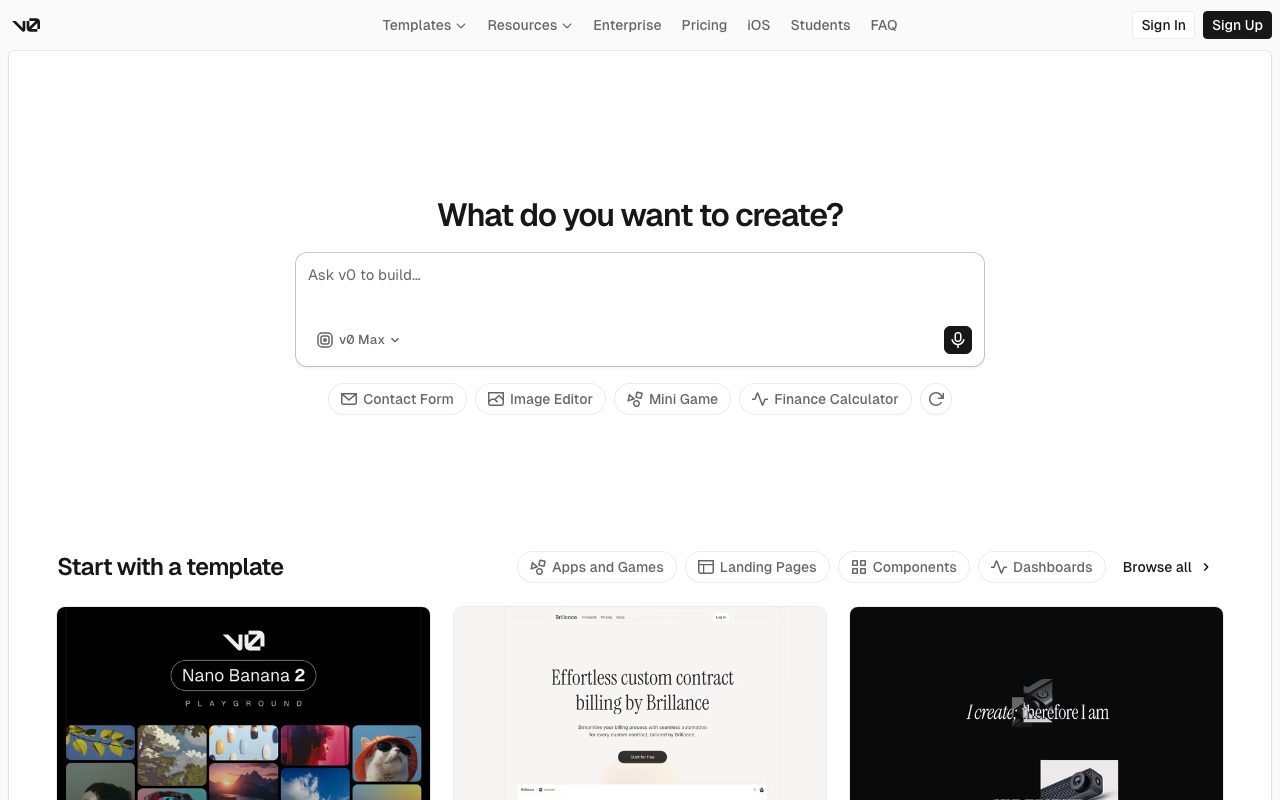
v0 is Vercel's AI UI generator that turns text prompts into React components. You type "a SaaS pricing page with three tiers and a FAQ section." v0 spits out actual code using shadcn/ui, Tailwind, and your design tokens. Then you iterate. Then you copy the code into your repo.
It launched in late 2023 as a generative UI experiment and quickly became one of the most-used AI design tools, partly because the output is real production code, not screenshots or Figma frames. The audience overlaps heavily with the Next.js community, which is a feature, not a coincidence.
If you've been gluing Tailwind classes by hand or copying shadcn examples, v0 is the obvious time-saver. The output isn't always perfect, but it's a great starting point.
What v0 actually does
You describe a UI in plain English. v0 generates a React component using shadcn/ui primitives and Tailwind classes. You can refine it via more prompts, fork variations, attach images for inspiration, or upload a screenshot to clone. The output is copy-pasteable code, not just a preview.
The killer feature is that v0 produces idiomatic shadcn/ui code that fits straight into a Next.js project. If your stack matches v0's defaults, the output drops in with minimal cleanup.
Generation and iteration
Type a prompt, get a component. Ask for changes, get a new version. v0 keeps versions in a sidebar so you can A/B them. The chat-like flow is more flexible than fixed templates and faster than writing UI from scratch.
For complex layouts (dashboards, forms, multi-step flows), v0 handles the scaffolding well. The fine-tuning still requires manual edits, which is fine.
Image-to-UI
Upload a screenshot of a UI you like, v0 attempts to recreate it. Quality varies. For common patterns it's surprisingly good. For unique designs, it produces a starting point that needs work.
Who v0 is for
Frontend devs who use Next.js and shadcn/ui. Full-stack engineers who'd rather generate UI than build it. Designers who can read code. Product folks who want to prototype faster.
It's not great if you don't use shadcn/ui or React. The output is opinionated. If your stack is Vue, Angular, or something else entirely, v0 is the wrong tool. For React shops, it's a productivity multiplier.
v0 pricing
Free tier covers limited generations per day. Premium at $20 a month removes most limits and adds image-to-UI. Team at $30 per user per month adds collaboration. Enterprise is custom.
The pricing is fair for the productivity gain. Most devs we know on Premium say it pays for itself within a week.
Features worth knowing
shadcn/ui native output
The generated code uses shadcn primitives (Button, Card, Dialog, etc.) which means it slots into existing shadcn projects without conversion. If you're not on shadcn, it's still readable but less directly useful.
Multi-file generation
v0 can output multiple files for complex components: a page, its child components, hooks, types. The structure mirrors how you'd organize the code yourself.
API access via Vercel AI SDK
v0 has an API for embedding generation in your own app. Useful if you're building a tool that needs UI generation. Pricing is usage-based.
Block-based composition
Chat with v0 to add a section, refactor a component, or replace a block. The block-based mental model fits how UIs are actually built.
The tradeoffs
v0 generates code, not designs. Designers who want Figma-quality fidelity will be underwhelmed. The output is functional, not pixel-perfect.
The shadcn-and-Tailwind opinion is strong. If you're on Material UI, Chakra, or vanilla CSS, v0 makes you do more cleanup. The tool assumes you're on Vercel's stack.
v0 vs alternatives
The usual comparisons are v0 vs Bolt.new, v0 vs Cursor, and v0 vs Galileo AI. Bolt generates whole apps. Cursor edits existing code. Galileo focuses on Figma-style designs.
For React component generation, v0 is the best in class. See v0 alternatives or browse the best AI UI tools.
Bottom line on v0
v0 is the most useful AI design tool for working React developers. The output is real code, the workflow is fast, and the integration with shadcn/ui is best in class.
If you ship Next.js apps and don't already use v0, you're leaving time on the table. The free tier is enough to test the workflow. After that, $20 a month is small for what you get back.
Common v0 questions
Does v0 work without shadcn/ui? Sort of. The output uses shadcn primitives by default. You can use the code without shadcn but the imports won't resolve cleanly. Stick with shadcn or expect cleanup.
Is the generated code production-ready? Mostly. It's idiomatic and uses sensible defaults. You'll usually want to refactor for your project conventions, add error handling, and integrate with your data layer. It's a strong starting point, not the final code.
Can v0 read my existing codebase? Limited. v0 doesn't know your custom components or design tokens unless you provide them. The newer "Project" features let you upload context, but it's not Cursor-level codebase understanding.
Does v0 work with TypeScript?
Yes, by default. Generated components are TypeScript-first. Type safety is reasonable. Some generations need type tightening but the output compiles.
What about accessibility?
The shadcn primitives v0 uses are accessible by default. Generated UIs are usually decent on accessibility, though always audit. v0 doesn't replace a real accessibility review for production apps.
Workflow tips for v0
Provide your design tokens. Upload your tailwind.config.js or paste your color tokens. v0 uses them in generations. Output matches your brand without manual tweaking.
Iterate in small steps. Don't try to generate a whole page in one prompt. Generate the hero, then the pricing table, then the FAQ. Smaller prompts produce better output.
Use image references. Upload screenshots of UIs you like. v0 picks up patterns. Faster than describing complex layouts in words.
Check the code, not just the preview. The preview can look great while the code has problems. Read the JSX. Fix imports. Refactor for your conventions before committing. Browse tools for frontend developers for related picks.
Real-world v0 scenarios
A frontend developer at a SaaS company uses v0 to scaffold new pages. Marketing wants a pricing page redesign. v0 generates the layout in 10 minutes. The dev refactors for project conventions. Total time: maybe two hours instead of two days.
A solo founder uses v0 to build their entire MVP UI. Each page starts as a v0 generation. They wire up the data layer themselves. The visual quality is dramatically better than what they'd hand-code in the same time. The product looks credible from day one.
A design system maintainer uses v0 to rapidly prototype component variants. "Generate a card with these variants" produces options to evaluate. Faster than coding mockups. The output is real React, not images, so it goes straight into Storybook.
Workflow tips
Provide tailwind config and design tokens. v0 uses them in generations. Output matches your brand without manual tweaking after.
Iterate small. Generate a section. Refine. Generate the next. Don't ask for whole pages in one prompt. Smaller asks produce better results.
Read the generated code. The preview can lie. The JSX shows you the actual structure. Refactor before committing.
For React shops on Next.js and shadcn/ui, v0 is one of the highest-leverage AI tools. The output is real production code, not demoware. Browse the v0 page for community reviews.
Why v0 won the AI UI category
Generating UI from prompts is an obvious AI use case, and many teams tried. Most produced demos that were visually impressive but practically useless. v0 won by producing actual code that fits into actual codebases. The shadcn/ui choice was particularly smart because shadcn became the default React component library for new projects.
The Vercel association doesn't hurt either. Vercel's audience overlaps heavily with the AI UI tool audience: Next.js developers shipping React apps. v0 ships into a built-in audience.
The product strategy has stayed focused. v0 isn't trying to be a full app generator like Bolt or a code editor like Cursor. It generates UI components. That focus produces better output than tools trying to do everything.
For React developers, v0 is the most practical AI UI tool currently available. The output is real code. The integration with shadcn is clean. The price is fair. Most React shops who try v0 incorporate it into their workflow within a week.
v0 in the AI coding landscape
The AI coding tools market keeps splitting. Cursor and Windsurf take the IDE. v0 takes UI generation. Bolt takes full app generation. Each tool serves a different point in the development workflow. They're not really competing for the same usage.
For React developers, v0 fits into a workflow that includes Cursor for editing existing code, GitHub Copilot for autocomplete, and v0 for generating new UI. The combination is more powerful than any single tool. Teams that use all three ship faster than teams using one.
Vercel's investment in v0 keeps growing. The product gets better quarterly. The integration with the Vercel platform tightens. For Next.js shops in particular, v0 is becoming a default tool. The category is young but v0's lead is real.
Tutorial / Demo
Key Features
- React + Tailwind + shadcn/ui code output
- Live preview canvas
- Image and screenshot to UI
- One-click deploy to Vercel
- Multi-page app generation
- GitHub integration
- API for programmatic generation
Pros & Cons
What we like
- Output is real code you can take and own
- Tightly integrated with Next.js / Vercel deploy
- Genuinely fast for landing pages and dashboards
- shadcn/ui aesthetic is consensus-good right now
Room for improvement
- Lock-in to the Next.js + shadcn stack
- Pricing tiers add up if you generate constantly
- Complex backend logic still needs hand work
- Generated code can need cleanup before production
Frequently Asked Questions
Is v0 free?
v0 vs Bolt or Lovable, which is best?
Does v0 lock me into Vercel?
Can v0 actually build production apps?
Does v0 work without an account?
Best For
Featured in
Tags
Alternatives to v0
View allCursor
VS Code fork built around an AI pair-programmer

Lovable
Chat your way to a full-stack web app: Lovable turns plain-English prompts into React plus Supabase projects.

Replit
Browser IDE plus Replit Agent that builds and deploys apps from a prompt
Windsurf
Codeium's AI editor with Cascade agent and deep IDE integration
Our take
Tool Index Editorial · May 2026· 4.4/5
If you're evaluating v0, the headline is simple: vercel's ai app builder that ships react, shadcn, and tailwind, and most teams will get value out of the box.
The standout points: Output is real code you can take and own, Tightly integrated with Next.js / Vercel deploy, and Genuinely fast for landing pages and dashboards. Where it stumbles: Lock-in to the Next.js + shadcn stack and Pricing tiers add up if you generate constantly.
Bottom line: pick v0 when you need spinning up landing pages and dashboards; look elsewhere if lock-in to the Next.js + shadcn stack would be a dealbreaker.
Editorial opinion from the Tool Index team, written from the public product pages. Not a user review.
Reviews (4)
v0 has been a quiet upgrade
Started using v0 casually, now it's pinned in my dock. Genuine strength: tightly integrated with Next.js / Vercel deploy. The live preview canvas is more useful than I expected. Easy yes for anyone weighing the same trade-offs.
Pros
- Tightly integrated with Next.js / Vercel deploy
- Output is real code you can take and own
v0 has been a quiet upgrade
Skeptical at first because v0 looked too simple. It's not. Real selling point: output is real code you can take and own. Worth the price for what I get out of it.
Pros
- Genuinely fast for landing pages and dashboards
- Tightly integrated with Next.js / Vercel deploy
Decent tool, wrong fit
v0 is one of those tools you stop noticing because it just works. Honestly impressed by how tightly integrated with Next.js / Vercel deploy. Found it works best for converting Figma screenshots into working components. Wish they'd address how lock-in to the Next.js + shadcn stack. Probably better for someone with different needs.
Pros
- Genuinely fast for landing pages and dashboards
- Output is real code you can take and own
- shadcn/ui aesthetic is consensus-good right now
Cons
- Generated code can need cleanup before production
Hit the v0 sweet spot
Found v0 on a Reddit thread, glad I clicked. Honestly impressed by how output is real code you can take and own. Easy yes for anyone weighing the same trade-offs.
Pros
- Genuinely fast for landing pages and dashboards
- shadcn/ui aesthetic is consensus-good right now
- Tightly integrated with Next.js / Vercel deploy
Badge builder
Add v0 to your website
Choose a badge style and size, preview it here, then copy the generated HTML. Badge images are self-contained SVGs and do not require an external script.

<a href="https://toolindex.net/tools/v0?ref=badge" target="_blank" rel="noopener">
  <img src="https://toolindex.net/badge/v0/medium.svg" alt="v0 - Listed on Tool Index" width="180" height="50" />
</a>How to use the badge
- 1. Pick the style, size, and theme that fit your layout.
- 2. Copy the generated HTML from the code block.
- 3. Paste it into your footer, homepage, or press page.
Score badge available
v0 qualifies for the score and circle badges based on its current top-10 positionin AI Coding Assistants.
Badge clicks return visitors to this profile with a referral tag so the source remains identifiable.
Related Tools

Kevin Gabeci
Solo developer building web apps, cozy browser games, and AI creator toolkits.

Coolify
Self-hostable, open source alternative to Heroku and Netlify

Apatero AI
The creator studio for AI image, video, audio, 3D, and avatars, now at apatero.ai.
Kevin Gabeci Toolkits
Seven AI toolkits for writing books, making music, cutting video, and building agents.
Work on v0? Request listing access or correction